Description
Yealink MVC900 Microsoft Teams Rooms Extra-Large Room Video Conferencing System Dubai
Yealink MVC900 for Extra-Large Microsoft Teams Rooms in Dubai
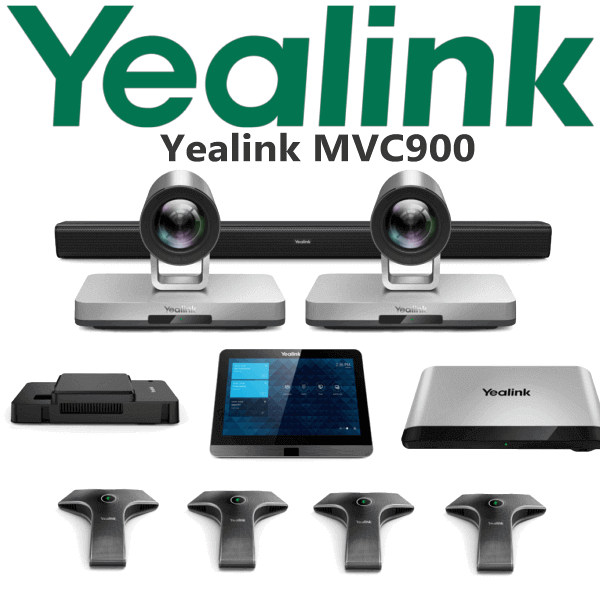
The Yealink MVC900 is a Microsoft Teams Rooms video conferencing system built for extra-large meeting rooms, boardrooms and training spaces. It combines dual UVC80 PTZ cameras, VCM34 microphone coverage, Camera-Hub, MTouch control, MCore compute and content-sharing options into one Teams Rooms deployment. For Dubai offices with long boardroom tables, training rooms, executive meeting spaces or hybrid-work command rooms, MVC900 gives the room a dedicated Teams experience instead of relying on a laptop, webcam and loose speakerphone.
Platform Check — Microsoft Teams Rooms, SIP Conference or Zoom?
The MVC900 is a Microsoft Teams Rooms system. It is not a SIP conference phone and it is not a generic Zoom Room kit. Before quoting, David confirms whether your meeting room runs Microsoft Teams Rooms, SIP audio conferencing, Zoom Rooms or guest BYOD meetings, because the platform decides the correct Yealink hardware.
| Your Platform | Right Yealink Device | What You Need |
|---|---|---|
| Microsoft Teams Rooms | Yealink MVC900 (this page) | Teams Rooms licence, room resource account, display plan and network readiness |
| SIP audio conferencing | Yealink CP-series conference phone — ask David for the correct room size | SIP credentials from 3CX, Yeastar, Grandstream UCM, Asterisk or hosted PBX |
| Zoom Rooms | Zoom-certified Yealink room system — verify certification status before quoting | Zoom Rooms licence and Zoom-compatible room hardware |
| Guest BYOD meetings | MVC900 with wired or wireless sharing options where required | Cable path, user workflow and guest-meeting requirement confirmed before supply |
Microsoft certification checked 04 Aug 2026: Microsoft lists Yealink MVC900 with Intel NUC under certified Teams Rooms for Windows systems. Certification status can change, so Vector Digital Systems verifies the exact bundle before final procurement.
Room-Readiness Truth — MVC900 Needs Planned Power, Network and Cable Paths
MVC900 is a room system, not a plug-in desk device. It needs planned display, power, network, HDMI, USB and table-to-front-wall connectivity. The MTouch console sits at the table, the UVC80 cameras normally sit near the displays, microphones need proper table placement, and the MCore / Mini-PC position must be agreed before installation. Vector Digital Systems checks these points before quoting so the room is ready on installation day.
Built for Extra-Large Rooms and Training Spaces
Yealink positions the MVC900 for extra-large rooms of 18 people and above. The UVC80 camera provides 12× optical PTZ zoom, while the VCM34 microphone gives 20ft / 6m voice pickup. In a long boardroom, this matters: people seated at the far end must be seen clearly and heard without shouting. The MTouch console gives users a familiar Teams interface and one-touch meeting join, reducing the training burden for reception teams, executives and visitors.
MVC900 in the Yealink MVC Range
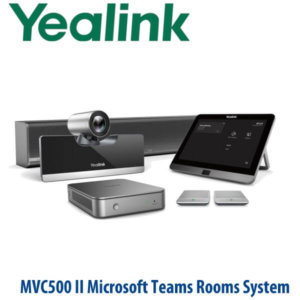
The MVC900 sits above the MVC800 in room coverage and is aimed at extra-large rooms and training rooms where dual-camera coverage is useful. MVC800 is better suited to medium and large rooms, while MVC900 II is the later MVC900-family variant with updated bundle components. For buyers specifically asking for MVC900, this page keeps the model as MVC900 and helps Dubai teams quote the right room package.
| Feature | MVC800 | MVC900 ★ | MVC900 II |
|---|---|---|---|
| Room Size | Medium to large rooms | Extra-large rooms and training rooms | Extra-large rooms |
| Platform | Microsoft Teams Rooms | Microsoft Teams Rooms | Microsoft Teams Rooms |
| Camera | PTZ room camera | Dual UVC80 PTZ cameras | Dual PTZ camera setup |
| Optical Zoom | Room-camera zoom | 12× optical PTZ zoom | 12× optical PTZ zoom class |
| Microphones | Room microphone package | VCM34 microphone array | Updated MVC II audio package |
| Touch Control | MTouch | MTouch 8-inch console | MTouch II console |
| Content Sharing | Teams Rooms sharing options | MShare + WPP20 option | MVC II sharing workflow |
| Best Fit | Standard boardroom | Extra-large boardroom or training room | Later MVC900-family room package |
| Choose if… | Your room is medium or large and does not need dual-camera coverage | You need the MVC900 Teams Rooms package for an extra-large room or training room | Your BOQ specifically calls for the later MVC900 II bundle |
Where the MVC900 Works in Dubai
DIFC and Business Bay boardrooms. Long executive tables need more than a laptop camera. The MVC900 gives senior meeting rooms a dedicated Teams Rooms interface, dual PTZ camera coverage and planned microphone pickup, so remote attendees can see and hear the full room clearly.
DMCC and JLT training rooms. Training rooms often have participants spread across rows rather than sitting around one table. The MVC900’s camera and microphone layout is well suited to instructor-led hybrid sessions, internal training, sales enablement and regional partner meetings.
Government, banking and enterprise HQ rooms. Larger organisations need a Teams room that users can start without IT support every morning. MTouch gives one-touch join, MShare supports wired presentation, and WPP20 adds a wireless sharing option where required.
Hotel and conference-floor meeting rooms. Dubai hotels and serviced offices use Teams Rooms hardware for board meetings, training days and hybrid events. MVC900 is a strong fit when the room must handle both internal staff and external guests with a more professional AV layout than a portable speakerphone.
Full Technical Specifications
| Specification | Yealink MVC900 |
|---|---|
| Product Type | Microsoft Teams Rooms system for extra-large rooms |
| Room Size | Extra-large rooms and training rooms, typically 18+ people |
| Microsoft Certification | Microsoft Teams Rooms certified-device list checked 04 Aug 2026; exact bundle verified before quote |
| Compute | MCore / Mini-PC Teams Rooms compute, depending on bundle configuration |
| Touch Console | MTouch 8-inch touch-control console with Microsoft Teams interface and human motion sensor |
| Camera | Dual Yealink UVC80 PTZ camera setup |
| Camera Zoom | 12× optical zoom with PTZ camera control |
| Camera Control | Camera switching and PTZ control from the room interface |
| Camera-Hub | Included for multi-camera deployment and room camera routing |
| Microphones | VCM34 microphone array with 20ft / 6m voice pickup range |
| Audio Technology | Yealink Noise Proof Technology on VCM34 microphone array |
| Content Sharing | MShare wired sharing with HDMI and Mini-DP input; WPP20 wireless sharing option |
| Display Setup | Single or dual display layout confirmed during room-readiness check |
| Management | Remote management, monitoring, configuration, update and diagnostics through Yealink device management tools |
| Licensing | Requires Microsoft Teams Rooms licence and room resource account; licence quoted separately if required |
| Best For | Extra-large boardrooms, training rooms, executive conference rooms and hybrid meeting spaces |
Compatible Accessories and Room Options
| Accessory / Component | Purpose | Dubai Project Note |
|---|---|---|
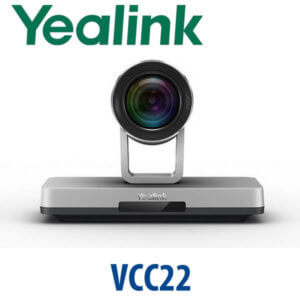
| UVC80 PTZ Camera | 12× optical PTZ camera for long-room video coverage | Camera position should be planned around table length and display wall |
| Camera-Hub | Connects and manages multi-camera room deployment | Useful for extra-large rooms where one camera angle is not enough |
| VCM34 Microphone | Table microphone array with 20ft / 6m pickup | Microphone count and placement depend on table size and seating plan |
| MTouch Console | 8-inch touch panel for Teams meeting join, control and camera operation | Table cable path must be checked before supply |
| MShare | Wired content sharing via HDMI and Mini-DP input | Recommended when presenters regularly connect laptops at the table |
| WPP20 | Wireless presentation pod for one-click content sharing | Useful for training rooms and guest-presenter spaces |
Staging Before Dispatch — What We Configure
Vector Digital Systems stages the Yealink MVC900 project before dispatch: bundle verification, firmware check, Teams Rooms account readiness notes, room resource naming guidance, display layout confirmation, camera placement notes, microphone placement notes, content-sharing workflow and cable-path checklist. For multi-room Dubai projects, each room bundle is labelled separately so the boardroom, training room and executive room do not get mixed during installation.
Export from Dubai
Vector Digital Systems supplies Yealink MVC900 Teams Rooms systems to corporate IT teams, system integrators, hotel groups, education projects, banking networks and government meeting-room projects across the region. Export destinations commonly include Oman, Saudi Arabia, Kuwait, Bahrain, Qatar, Jordan, Egypt, Kenya, Tanzania, Pakistan and Sri Lanka. Shipments are quoted FOB Dubai with commercial invoice, packing list and certificate of origin on request. UAE quotes include VAT breakdown and delivery charges; export quotes include documentation and freight coordination details.
Get a same-day Yealink MVC900 quote in AED
Tell David your room size, seating count, display count, Teams Rooms licence status, camera positions and content-sharing requirement. We quote the correct Yealink MVC900 package with VAT breakdown, delivery and staging notes.
Frequently Asked Questions — Yealink MVC900
Is the Yealink MVC900 a Microsoft Teams Rooms system?
Yes — the Yealink MVC900 is a Microsoft Teams Rooms system for extra-large rooms. Microsoft’s certified-device list was checked on 04 Aug 2026 and lists Yealink MVC900 with Intel NUC under Teams Rooms for Windows systems. Vector Digital Systems verifies the exact bundle before quoting.
What room size is the Yealink MVC900 designed for?
The MVC900 is designed for extra-large rooms and training rooms, typically 18 people and above. It is a good fit for long boardrooms, classroom-style training spaces and enterprise meeting rooms where one camera angle and one small speakerphone are not enough.
Does the MVC900 work with SIP calling or 3CX?
No — MVC900 is a Microsoft Teams Rooms system, not a SIP conference phone. If your room needs SIP audio conferencing for 3CX, Yeastar, Grandstream UCM or a hosted PBX, ask David for the correct Yealink CP-series conference phone instead.
What cameras come with the Yealink MVC900?
The MVC900 room package uses dual Yealink UVC80 PTZ cameras with 12× optical zoom. This helps cover the far end of an extra-large room and lets the room use multiple camera angles instead of relying on one fixed view.
What microphones are used with the Yealink MVC900?
The MVC900 uses Yealink VCM34 microphone arrays with 20ft / 6m voice pickup. Microphone quantity and placement should be planned around table length, seating position and room acoustics, especially in training rooms and long executive boardrooms.
MVC800 vs MVC900 — which one should I buy?
Choose MVC800 for medium to large rooms where one main room camera is enough. Choose MVC900 for extra-large rooms, training rooms and long boardrooms where dual-camera coverage and wider microphone planning are required.
Can guests share content in a Yealink MVC900 room?
Yes — MVC900 supports content-sharing workflows through MShare wired input and WPP20 wireless sharing options, depending on the selected bundle and room design. Tell David whether presenters need HDMI, Mini-DP or wireless sharing before the quote is prepared.
Does Vector Digital Systems configure MVC900 before delivery?
Yes — Vector Digital Systems stages the MVC900 project before dispatch: bundle verification, firmware check, Teams Rooms readiness notes, room labelling, camera placement notes, microphone placement notes and installer documentation. Multi-room projects are packed and labelled room by room.
Who is the authorised Yealink supplier in Dubai?
Vector Digital Systems LLC has supplied and integrated Yealink solutions in Dubai since 2009. David handles Yealink pre-sales, Teams Rooms specification, project pricing, staging and local warranty coordination for Dubai and export customers.
Does Vector Digital Systems export Yealink MVC900 from Dubai?
Yes — Vector Digital Systems exports Yealink MVC900 systems from Dubai to integrators and enterprise buyers in Oman, Saudi Arabia, Kuwait, Bahrain, Qatar, Jordan, Egypt, Kenya, Tanzania, Pakistan and Sri Lanka. Export quotes can include FOB Dubai terms, commercial invoice, packing list and certificate of origin on request.