
Description
Yealink UVC30 Room 4K USB Camera for Small Meeting Rooms Dubai
Yealink UVC30 Room — 4K USB Camera for Small Meeting Rooms in Dubai
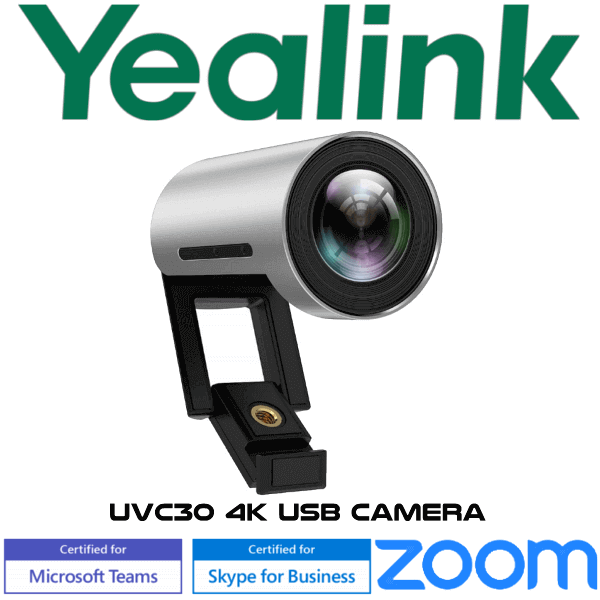
The Yealink UVC30 Room is a compact 4K USB camera built for small meeting rooms, huddle rooms, manager cabins and hybrid-work spaces where the laptop webcam is no longer enough. It gives the room a wide 120° view, sharp 4K video, auto framing and simple USB connection to a meeting-room PC, mini-PC or compatible room system. For Dubai offices upgrading a small Teams Rooms or Zoom Rooms space without moving to a full video bar, the UVC30 Room is the practical camera-only choice.
Platform Fit — Teams Rooms, Zoom Rooms or BYOD?
The UVC30 Room is a USB camera, not a complete video-conferencing codec by itself. It provides the camera feed; your meeting platform still runs on the room PC, mini-PC, laptop or Yealink room system. Match the camera to the right platform before ordering.
| Your Room Setup | How UVC30 Room Fits | What You Need |
|---|---|---|
| Microsoft Teams Rooms | Use UVC30 Room as the USB room camera | Teams Rooms compute, display, controller and licensed Microsoft Teams Rooms account |
| Zoom Rooms | Use UVC30 Room as the USB camera with Zoom Rooms camera control | Zoom Rooms computer or appliance, controller and active Zoom Rooms licence |
| BYOD laptop room | Connect UVC30 Room by USB to the meeting laptop | Laptop, display, separate speakerphone or room audio, and the meeting app of your choice |
Camera Only — Plan Audio Separately
The Yealink UVC30 Room is a camera, not a speakerphone. It does not replace the room microphone or loudspeaker. For a proper meeting room, pair it with a Yealink speakerphone, conference phone or room audio system depending on table size. Vector Digital Systems checks this at quote stage so the room is not delivered with video only and no usable audio pickup.
USB Powered — No PoE Switch Required
Unlike Yealink IP phones that depend on PoE or an optional PSU, the UVC30 Room is a USB camera. It connects using the supplied 3m USB cable to the meeting-room computer or compatible room system. The important installation check is cable route and USB distance, not PoE switch availability.
No Replacement Claim — Same UVC30 Room Model, Different Room Builds
This page does not position the UVC30 Room as a replacement for another Yealink model. It is the same UVC30 Room camera used in different small-room builds: camera-only for an existing room PC, camera plus speakerphone for BYOD huddle rooms, or camera inside a managed Teams Rooms / Zoom Rooms environment. The buying decision is not “old model vs new model”; it is “camera-only vs complete room bundle”.
UVC30 Room Buying Position — Same Camera, Different Room Packages
| Feature | UVC30 Room Camera Only | UVC30 Room + Audio ★ | Full Yealink Room System |
|---|---|---|---|
| Best For | Existing room PC with audio already installed | Small BYOD huddle room needing video + audio | Managed Teams Rooms or Zoom Rooms deployment |
| Camera | UVC30 Room | Same UVC30 Room | Yealink room camera or video bar, depending on system |
| Video Quality | 4K30, 1080p60/30, 720p60/30 | Same 4K camera quality | Depends on selected Yealink room kit |
| Field of View | 120° diagonal | 120° diagonal | Model dependent |
| Audio Included | No | Yes — add Yealink speakerphone or room audio | Usually included in the room kit |
| Platform | BYOD / room PC | BYOD / Teams / Zoom depending on computer | Teams Rooms or Zoom Rooms package |
| Replacement Row | Not applicable | Not applicable | Not applicable |
| Choose if… | You already have working room audio and only need a better camera | You need the safest small-room build with camera and audio quoted together | You want a fully managed meeting room, not a USB BYOD setup |
Where the UVC30 Room Works in Dubai
Small meeting rooms in Business Bay and DIFC. Four to six people around a compact table often need a wider view than a laptop webcam can provide. The UVC30 Room’s 120° field of view captures the table without forcing everyone to sit in the centre of the frame.
DMCC and JLT huddle rooms. Many UAE offices use shared small rooms for supplier calls, HR interviews and hybrid team meetings. A fixed USB camera on the display keeps the room ready, instead of depending on whichever laptop camera arrives first.
Training, clinic and consultation rooms. The UVC30 Room is useful where the room needs a wide, clear view but not a complex PTZ camera system — clinics, education centres, recruitment rooms and small training pods can standardise on one compact camera model.
Full Technical Specifications
| Specification | Yealink UVC30 Room |
|---|---|
| Product Type | 4K USB camera for small and huddle meeting rooms |
| Camera Sensor | 1/2.5″ CMOS, 8.51 megapixel |
| Maximum Resolution | 4K |
| Video Output | 4K30, 1080p60/30, 720p60/30 |
| Maximum FPS | 60FPS |
| Field of View | 120° diagonal |
| Auto Framing | Yes — based on face detection |
| PTZ | EPTZ |
| Zoom | 3× digital zoom |
| USB Protocol | UVC 1.1 |
| USB Cable | 1× 3m USB 2.0 cable |
| Built-in Microphone | No — use a separate speakerphone or room audio system |
| Infrared Camera | No |
| Depth of View | 1m–5m |
| Wide Dynamic Range | Yes |
| White Balance | ATW / Auto / Manual |
| Minimum Illumination | 0.5 lux in daylight, 0.1 lux at night |
| Dimensions | 59mm × φ45mm |
| System Requirement | Windows 7, Windows 10, Mac OS 10.10 or higher |
| Mounting | Flexible clip mount for monitor-top, under-monitor or wall placement |
Compatible Accessories and Room Add-ons
| Add-on | Purpose | When to Add It |
|---|---|---|
| Yealink Speakerphone / Room Audio | Provides microphone pickup and loudspeaker output | Required unless the room already has working audio |
| Room PC / Mini-PC | Runs Teams Rooms, Zoom Rooms or the meeting application | Needed for fixed meeting rooms, unless using a BYOD laptop |
| Display Mount / Wall Mount Planning | Positions the camera correctly at display height | Recommended for glass-wall rooms, wall-mounted displays and boardroom refreshes |
Staging Before Dispatch
Vector Digital Systems stages the UVC30 Room order before dispatch: camera connection checked, USB cable verified, firmware and room-software compatibility reviewed, camera framing tested for the intended room size, and any paired Yealink speakerphone or meeting-room component checked as a complete kit. For Teams Rooms or Zoom Rooms projects, we confirm the platform requirement before delivery so the camera arrives as part of a working room plan, not as an isolated accessory.
Export from Dubai
Vector Digital Systems exports Yealink UVC30 Room cameras from Dubai to system integrators, corporate IT teams, hotel groups and meeting-room installers across the region. Common export destinations include Oman, Saudi Arabia, Kuwait, Bahrain, Qatar, Jordan, Egypt, Kenya, Nigeria and Pakistan. Shipments move FOB Dubai with commercial invoice, packing list and certificate of origin on request. Project pricing is available for multi-room rollouts and repeat integrator orders.
Get a same-day quote in AED for Yealink UVC30 Room
Tell David your room size, platform — Teams Rooms, Zoom Rooms or BYOD — and whether you already have speakerphone audio. We quote with VAT breakdown and Dubai delivery included.
Frequently Asked Questions — Yealink UVC30 Room
Is the Yealink UVC30 Room a complete video conferencing system?
No. The UVC30 Room is a USB camera. It provides video for the room, but it does not include the meeting-room computer, controller, microphone or speaker. For a complete room, Vector Digital Systems can pair it with Yealink audio and the correct Teams Rooms, Zoom Rooms or BYOD setup.
Does the Yealink UVC30 Room work with Microsoft Teams Rooms?
Yes. The UVC30 Room is listed for Microsoft Teams Rooms use as a USB camera. It still needs a Teams Rooms computer or compatible room system, a display, controller and the correct Microsoft Teams Rooms licence. Certification status was checked in August 2026 before writing this page.
Does the Yealink UVC30 Room work with Zoom Rooms?
Yes. Yealink positions the UVC30 Room for Zoom Rooms use as a USB camera, with Zoom Rooms camera control support. For a working Zoom Room you still need the room computer or appliance, controller, display and Zoom Rooms licence.
Does the UVC30 Room have a built-in microphone?
No. The UVC30 Room is the room camera only. You need a separate microphone and speaker solution, such as a Yealink speakerphone or room audio system. We confirm the audio side of the room before quoting so the installation is usable from day one.
What room size is the Yealink UVC30 Room designed for?
The UVC30 Room is designed for small and huddle meeting rooms. Its 120° field of view suits compact rooms where people sit close to the display and the camera needs to capture the full table without manual adjustment.
UVC30 Room vs UVC30 Desktop — which one should I buy?
Choose UVC30 Room for a shared meeting room display or huddle room. Choose UVC30 Desktop for one person at a PC or laptop. The Room version is positioned for small meeting rooms and uses a 3m USB cable; the Desktop version is aimed at personal computer use.
Does the UVC30 Room need PoE or a power adapter?
No. The UVC30 Room is a USB camera and connects through its USB cable. The key installation checks are USB cable route, display position and room-computer placement, not PoE switch availability.
Can Vector Digital Systems configure the UVC30 Room before delivery?
Yes. Vector Digital Systems checks camera connectivity, firmware and room-software compatibility, validates the USB cable and tests camera framing before dispatch. For room bundles, we also check the paired Yealink audio and meeting-room platform requirement.
Who is the Yealink authorised supplier in Dubai?
Vector Digital Systems LLC has supplied and integrated Yealink solutions in Dubai since 2009. David handles Yealink product selection, room-sizing, project pricing, staging and local warranty support for UAE customers and export buyers.
Does Vector Digital Systems export Yealink UVC30 Room cameras from Dubai?
Yes. Vector Digital Systems exports Yealink UVC30 Room cameras and room bundles from Dubai to Oman, Saudi Arabia, Kuwait, Bahrain, Qatar, Jordan, Egypt, Kenya, Nigeria and Pakistan. Export shipments are quoted FOB Dubai with commercial invoice, packing list and certificate of origin on request.
