Description
Yealink MShare Screen Sharing Box HDMI & Mini-DP Presentation Sharing Dubai
Yealink MShare Screen Sharing Box for Dubai Meeting Rooms
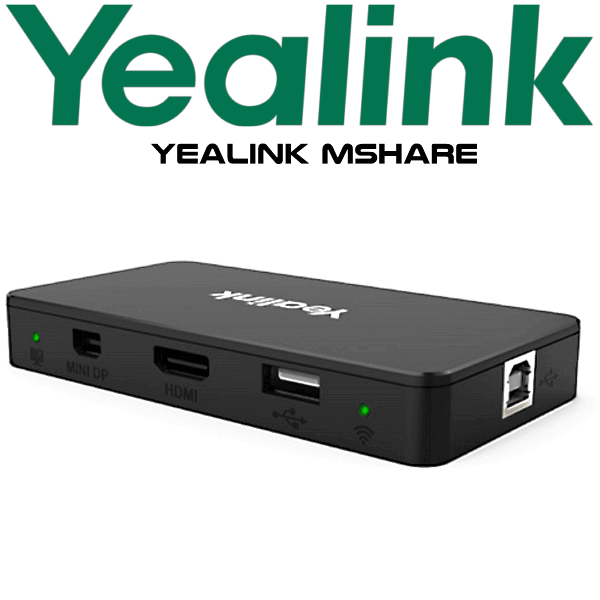
The Yealink MShare is the meeting-room accessory that fixes the most common presentation problem: guests walk in with different laptops, different ports, and a meeting that should already have started. With HDMI and Mini-DP input, 1080P/30FPS Full HD sharing, audio sharing support, and optional Yealink WPP20 wireless presentation pod support, MShare gives Dubai boardrooms a clean, predictable way to share laptop content to the room display.
Vector Digital Systems LLC supplies Yealink MShare for corporate meeting rooms, training rooms, executive offices, education spaces, and video collaboration projects across Dubai and the UAE. We quote in AED with VAT and delivery noted, and we can stage the device as part of a Yealink room system deployment before dispatch.
Platform Fit — What MShare Does and Does Not Do
MShare is a content sharing accessory, not a desk phone and not a standalone video bar. It is used to bring laptop screen content into a Yealink meeting-room setup. For Microsoft Teams Rooms or Zoom Rooms projects, David will verify the full room kit and certification status before quoting — do not assume the sharing accessory alone defines the room platform.
| Your Room Setup | Where Yealink MShare Fits | What to Confirm Before Order |
|---|---|---|
| Yealink video room system | Adds wired and wireless laptop content sharing | Room system model, display input path, table cable route |
| Microsoft Teams Room | May be part of a Yealink Teams Rooms hardware design | Full room kit certification must be verified before quoting |
| Zoom Room | Used in Yealink room deployments where presentation sharing is required | Zoom room hardware design and current certification status |
| Simple display / presentation room | Use for laptop HDMI / Mini-DP sharing to the meeting display | Display input, cable length, table box position, user workflow |
Wired Sharing, Wireless Sharing, Same MShare Model
Per your requested structure, this page keeps the same Yealink MShare model across the comparison block and removes the replacement row. The buyer decision is not “old vs new”; it is how the same MShare device will be used in the room — wired laptop sharing, wireless WPP20 sharing, or a cleaner conference-table installation.
| Feature | MShare — Wired Use | Yealink MShare ★ | MShare + WPP20 Wireless |
|---|---|---|---|
| Best for | Fixed boardroom table with cabled laptop sharing | Flexible Dubai meeting rooms needing both HDMI and Mini-DP | Rooms where guests should share without touching room cables |
| Screen sharing | 1080P/30FPS | 1080P/30FPS Full HD | 1080P/30FPS via paired WPP20 workflow |
| Laptop inputs | HDMI / Mini-DP | HDMI + Mini-DP for mixed Windows and MacBook users | Wireless pod plus room sharing path |
| Audio sharing | Supported | Supported | Supported when deployed correctly with room system |
| Wireless | Not required | Built-in 2.4G/5GHz AP for Yealink wireless presentation device | Use with Yealink WPP20 for one-click sharing |
| Room style | Training room, meeting table, fixed HDMI workflow | Boardroom, huddle room, executive meeting room | Visitor-heavy rooms and senior management spaces |
| Choose if… | Your room needs a reliable cable-first presentation point | You want the safest all-round Yealink sharing accessory for mixed laptop users | You want quick guest sharing with the WPP20 wireless presentation pod |
No Power Surprise — Confirm the Room Design Before Dispatch
MShare is normally quoted as part of a room system or presentation table setup, so the important power question is not PoE like a desk phone; it is whether the room has the right cable path, USB path, display input, and table position. Before dispatch, Vector Digital Systems confirms how the MShare will sit in the room so the installation team does not discover missing cables after the boardroom table is closed.
Where Yealink MShare Works in Dubai
DIFC and Business Bay boardrooms. Senior users and guests arrive with Windows laptops, MacBooks, and USB-C adapters that may or may not work. MShare gives the room a planned sharing path instead of relying on loose HDMI cables and last-minute adapter hunting.
Training rooms and education spaces. In Dubai training centres, universities, and corporate academies, presenters change every session. MShare keeps the sharing experience consistent: connect, share, and move on without reconfiguring the room display.
Hybrid meeting rooms. For Yealink video collaboration projects, MShare is useful when the room needs laptop content sharing as part of a wider Teams Room, Zoom Room, or Yealink room system design. David will confirm the exact system design before quoting.
Executive visitor rooms. Visitor-heavy offices in DMCC, JLT, Dubai Internet City, and Abu Dhabi often need a cleaner sharing flow than “who has the HDMI cable?” With MShare and the optional WPP20, the room can support a more professional guest presentation workflow.
Full Technical Specifications
| Specification | Yealink MShare |
|---|---|
| Product Type | Screen sharing box / content sharing accessory |
| Screen Sharing Resolution | Up to 1080P/30FPS Full HD screen sharing |
| Audio Sharing | Supported |
| Video Input | 1 × HDMI video input |
| Additional Laptop Input | 1 × Mini-DP video input |
| USB Ports | 1 × USB 2.0 Type-B port, 1 × USB 2.0 Type-A port |
| Wireless Presentation | Supports Yealink WPP20 wireless presentation pod workflow |
| Wireless AP | Built-in 2.4G/5GHz Wi-Fi AP for Yealink wireless presentation device |
| Typical Use | Laptop content sharing in Yealink meeting rooms, boardrooms, huddle spaces and training rooms |
| Package Content | MShare unit, USB cables, Mini-DP cable, mounting accessories and quick start guide — confirm current box contents with David before dispatch |
Compatible Accessories and Room Items
| Item | Purpose | Order Note |
|---|---|---|
| Yealink WPP20 | Wireless presentation pod for one-click sharing | Ask David to confirm compatibility and availability for your room kit |
| HDMI cable path | Connects laptop/table box to the room display or system path | Cable length and table route should be confirmed before installation |
| Mini-DP workflow | Supports compatible laptops using Mini-DP output | Useful for mixed laptop environments, especially visitor rooms |
| Yealink room system | MShare is normally deployed as part of the wider room design | Share the room model, platform and display layout before quoting |
Staging Before Dispatch
For Yealink room projects, Vector Digital Systems checks the MShare workflow before dispatch: room platform, laptop input path, display route, USB connection, optional WPP20 requirement, and table placement. Where the MShare is supplied with a Yealink room system, we stage the complete kit so the installer receives a clear cable plan and the buyer receives a working sharing workflow instead of a box of disconnected accessories.
Export from Dubai
Vector Digital Systems exports Yealink MShare and Yealink room accessories from Dubai to system integrators, AV installers, telecom suppliers, corporate procurement teams and hospitality projects. Common export routes include Oman, Saudi Arabia, Kuwait, Bahrain, Qatar, Jordan, Egypt, Kenya, Nigeria and Pakistan. Shipments are quoted FOB Dubai with commercial invoice, packing list and certificate of origin on request. For project quantities, send David the room count, destination country and required accessory list.
Get a same-day quote in AED for Yealink MShare
Tell David your room platform, display model, laptop input requirement, whether you need WPP20 wireless sharing, and delivery location. We quote with VAT breakdown and delivery noted.
Frequently Asked Questions — Yealink MShare
What is the Yealink MShare used for?
Yealink MShare is a screen sharing box used in meeting rooms to present laptop content to the room system or display. It supports 1080P/30FPS Full HD sharing, HDMI input, Mini-DP input, audio sharing and optional Yealink WPP20 wireless presentation pod workflow.
Does Yealink MShare work with Microsoft Teams Rooms?
MShare can be used in Yealink room designs where content sharing is required, but the full Microsoft Teams Rooms kit and certification status must be verified before quoting. Do not treat MShare alone as the Teams-certified room system. David will confirm the correct Yealink Teams Rooms hardware for your project.
Does Yealink MShare work with Zoom Rooms?
MShare can support presentation sharing inside Yealink room deployments, but Zoom Rooms compatibility depends on the full room hardware design. Vector Digital Systems verifies the current Yealink Zoom room kit and accessory fit before quoting.
Can users share wirelessly with Yealink MShare?
Yes — MShare supports the Yealink WPP20 wireless presentation pod workflow. The MShare includes a built-in 2.4G/5GHz wireless AP for Yealink wireless presentation devices, allowing one-click sharing when the room is configured correctly.
What laptop inputs does Yealink MShare support?
Yealink MShare supports HDMI video input and Mini-DP video input, making it suitable for mixed Windows laptop and MacBook environments. It also supports audio sharing, so presentation audio can be included when the room system is designed correctly.
Is Yealink MShare the same as MShare E2?
No. Yealink MShare and MShare E2 are related screen sharing accessories, but they are not the same product. This page is for Yealink MShare. MShare E2 is a separate MVC screen sharing box with USB Type-B, HDMI In and USB-C input. Ask David which version fits your Yealink room kit before ordering.
Do I need Yealink WPP20 with MShare?
You need WPP20 only if the room requires wireless one-click presentation sharing. For fixed meeting rooms where laptop users are comfortable connecting by cable, HDMI or Mini-DP sharing may be enough. David will recommend the right setup based on your room workflow.
Does Vector Digital Systems configure Yealink MShare before delivery?
Yes — for room projects, Vector Digital Systems checks the sharing workflow before dispatch, including platform, cable route, USB path, display input and optional WPP20 requirement. The goal is to deliver a working room-sharing setup, not just an unopened accessory box.
Who is the Yealink supplier for MShare in Dubai?
Vector Digital Systems LLC supplies Yealink MShare in Dubai and has handled Yealink product supply, staging, warranty support and project pricing since 2009. David is the Yealink specialist for room accessory quotes, availability checks and project configuration.
Does Vector Digital Systems export Yealink MShare from Dubai?
Yes — Vector Digital Systems exports Yealink MShare and room accessories from Dubai to integrators and corporate buyers in Oman, Saudi Arabia, Kuwait, Bahrain, Qatar, Jordan, Egypt, Kenya, Nigeria and Pakistan. Export quotes can include FOB Dubai, commercial invoice, packing list and certificate of origin on request.