
Description
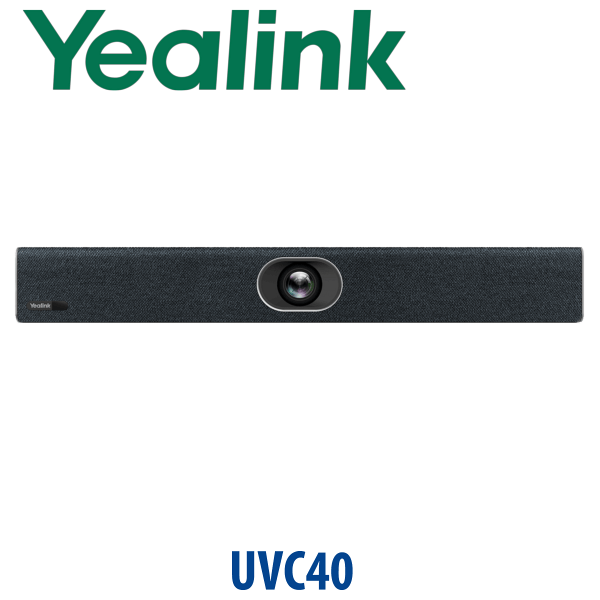
Yealink UVC40 All-in-One 4K USB Video Bar for Small Rooms Dubai
The UVC40 Has a Successor — Choose the UVC40 E2 for New Dubai Rooms
The Yealink UVC40 was one of the easiest ways to turn a small meeting room into a proper BYOD video room: one USB bar, one cable to the laptop, camera, microphones and speaker all handled together. For new projects in Dubai, the model to quote is the Yealink UVC40 E2 — the updated all-in-one USB video bar for small and huddle rooms, with ultra-HD 4K imaging, a 120° super-wide view, 8 MEMS microphones, AI Auto Framing, Speaker Tracking, sound localisation and an electric lens cap for privacy.
Vector Digital Systems supplies and stages Yealink meeting room hardware in Dubai for offices, clinics, training rooms, free-zone companies and export buyers. Tell David whether your room is BYOD, Microsoft Teams Rooms, Zoom Rooms or a mixed platform before ordering — the right Yealink model depends on how the meeting starts.
Platform Trap: USB BYOD Bar, Teams Rooms Appliance or Zoom Rooms Appliance?
The UVC40 E2 is a USB BYOD video bar. It connects to a meeting laptop and appears as a standard USB camera, microphone and speaker. That is different from a dedicated Microsoft Teams Rooms or Zoom Rooms appliance, where the room runs meetings without relying on a user laptop. This is the video-room version of the common Yealink buyer mistake: the camera body may look similar, but the platform workflow is not the same.
| Your Meeting Workflow | Right Yealink Choice | What You Need |
|---|---|---|
| BYOD laptop meetings — Teams, Zoom, Webex, Google Meet | Yealink UVC40 E2 USB video bar — this page | Laptop with meeting app + USB connection to the bar |
| Microsoft Teams Rooms | Yealink MeetingBar or MVC system — verify current Microsoft certification before quoting | Teams Rooms licence, room account and certified room hardware |
| Zoom Rooms | Yealink Zoom Rooms appliance or kit — verify current Zoom certification before quoting | Zoom Rooms licence, room account and certified room hardware |
If staff walk into the room with their own laptop and join meetings from different apps, the UVC40 E2 is the simple route. If the room must have a fixed touch controller and start scheduled Teams or Zoom meetings without a laptop, ask David for the current certified Yealink room system instead.
Power Truth: This Is Not a PoE Desk Phone
Unlike Yealink desk phones, the UVC40 E2 uses its own external power adapter. Do not plan this room like a PoE IP phone installation. The video bar needs mains power near the display, a USB route back to the meeting laptop or BYOD box, and suitable mounting behind or below the screen. Vector Digital Systems checks cable length, mounting position and power access before dispatch so the room is ready on installation day.
Why Dubai Buyers Choose an All-in-One USB Bar
Many small Dubai meeting rooms still run on a laptop webcam, a table speakerphone and a loose USB cable. The result is predictable: people at the far end cannot hear the back row, the camera points at one chair, and every meeting starts with someone changing audio settings. The UVC40 E2 solves that problem in one unit. The 120° camera covers the room, the 8 MEMS microphone array picks up voices around the table, and AI framing keeps the participants centred without manual camera control.
For SMEs in Business Bay, DMCC, DIFC, JLT and Al Quoz, this is often the most practical first meeting-room upgrade: it keeps the meeting platform flexible while giving the room a permanent, professional audio-video endpoint.
UVC40 E2 in the Yealink Room Range — Where It Sits
The UVC40 E2 sits between a simple USB room camera and a full dedicated room appliance. Choose the UVC30 Room if you only need a camera and already have separate audio. Choose the UVC40 E2 when you want one USB bar for camera, microphone and speaker. Choose a MeetingBar A20 when the room needs a native Teams Rooms or Zoom Rooms appliance workflow rather than BYOD laptop meetings.
| Feature | UVC30 Room | UVC40 E2 ★ | MeetingBar A20 |
|---|---|---|---|
| Room Type | Small room camera | Small and huddle room all-in-one USB bar | Dedicated small-room appliance |
| Camera | 4K USB camera | Ultra-HD 4K camera | 20MP meeting-room camera |
| Field of View | Wide room view | 120° super-wide view | Wide room view |
| Built-in Microphones | No — add separate audio | 8 MEMS microphone arrays | 8 MEMS microphone arrays |
| Built-in Speaker | No — add separate speakerphone | Yes — high-fidelity speaker | Yes — room appliance audio |
| Meeting Platform | BYOD USB | BYOD USB | Teams Rooms / Zoom Rooms appliance, verify certification |
| AI Framing | Smart Framing | Auto Framing + Speaker Tracking | Auto Framing + Speaker Tracking |
| Replaces / Upgrade From | Laptop webcam | UVC40 and mixed webcam/speakerphone rooms | BYOD-only rooms needing native room control |
| Price Tier | Entry camera | Mid-range all-in-one | Higher room-system tier |
| Choose if… | You only need a USB camera and already have room audio | You want one USB bar for camera, mics and speaker in a BYOD room | You want a fixed Teams Rooms or Zoom Rooms appliance workflow |
Where the UVC40 E2 Works in Dubai
Small boardrooms and huddle rooms. In Business Bay, JLT and Sheikh Zayed Road offices, small meeting rooms are often shared by sales, finance, HR and management teams. The UVC40 E2 gives that room a fixed professional camera, microphone and speaker without locking the business to one meeting platform.
Free-zone companies with mixed meeting apps. A DMCC trading company may receive Zoom invites from suppliers, Teams invites from enterprise customers and Google Meet links from overseas partners. A BYOD USB bar keeps that room flexible: connect the laptop, choose the meeting app, and the UVC40 E2 becomes the room audio-video system.
Clinics, training rooms and interview rooms. Healthcare clinics in Dubai, HR teams in DIFC and training rooms in Al Barsha often need better video without a full room-system budget. Auto Framing keeps participants visible, Speaker Tracking helps remote attendees follow the conversation, and the electric lens cap gives visible privacy when the room is not in use.
Fast room refreshes after return-to-office. Many UAE offices are reopening or upgrading meeting rooms after hybrid-work changes. The UVC40 E2 is practical when the room already has a display and table but needs reliable camera, microphone and speaker performance in one mounted unit.
Full Technical Specifications
| Specification | Yealink UVC40 E2 |
|---|---|
| Product Type | All-in-one intelligent USB video bar for small and huddle rooms |
| Camera | Ultra-HD 4K camera |
| Field of View | 120° super-wide field of view |
| Video AI | Auto Framing, Speaker Tracking, sound localisation, Smart Area Exposure |
| Privacy | Electric lens cap / electric privacy cover |
| Microphones | Built-in 8 MEMS microphone arrays |
| Audio Processing | Noise reduction, echo cancellation, beamforming and full-duplex meeting audio |
| Speaker | Built-in high-fidelity speaker for small-room audio |
| Expansion Microphones | Supports wired and wireless Yealink expansion microphones |
| Connection Type | USB BYOD connection to laptop or meeting-room BYOD box |
| Compatibility | Applicable to popular video conferencing platforms through standard USB audio/video operation, including Teams, Zoom, Webex, Google Meet and similar meeting apps |
| Management | Yealink USB Connect, Yealink RoomConnect and Yealink device management platform options |
| Mounting | Wall, display or room mounting options depending on selected bracket and room design |
| Power | External power adapter — not a PoE desk-phone installation |
| Successor Context | Recommended new-project successor for legacy UVC40 BYOD small-room deployments |
Compatible Accessories and Room Add-ons
| Accessory | Model / Type | Purpose |
|---|---|---|
| Wireless Expansion Mic | VCM36-W package | Extends voice pickup for longer tables or rooms where participants sit away from the video bar |
| Wired Expansion Mic | VCM35 | Adds table microphone coverage when the room layout needs fixed wired pickup |
| BYOD Box | Yealink BYOD-Box | Improves laptop-to-room connection workflow where the display and video bar are fixed in place |
| Mounting Kit | Wall / display mounting accessories | Positions the UVC40 E2 correctly above or below the room display for eye-level framing |
David will confirm the room size, table length, display position and laptop connection path before adding accessories. The most common UVC40 E2 mistake is buying the bar but forgetting the room workflow: where the USB cable exits, where the laptop sits, and whether extra microphone pickup is needed.
Staging Before Dispatch — What Vector Digital Systems Checks
Before dispatch, Vector Digital Systems checks the UVC40 E2 package, power supply, USB connection requirements, mounting plan, firmware readiness and the buyer’s meeting workflow. For Dubai installations, we confirm whether the room is BYOD-only, mixed-platform, Teams Rooms or Zoom Rooms. Where a dedicated certified Teams or Zoom system is required, we route the buyer to the correct Yealink MeetingBar or MVC range instead of overselling a USB bar into the wrong workflow.
For multi-room projects, we label each unit by room name, match accessories to each room, and prepare a room-by-room delivery schedule so the installer is not sorting boxes on site.
Export from Dubai
Vector Digital Systems exports Yealink UVC40 E2 video bars and meeting-room accessories from Dubai to system integrators, telecom operators, hotel groups, corporate IT teams and AV installers. Common routes include Oman, Saudi Arabia, Qatar, Kuwait and Bahrain across the Gulf; Jordan and Egypt for regional office projects; Kenya and Tanzania for East African deployments; and Pakistan, Sri Lanka and Bangladesh for South Asian integrators.
Export shipments move FOB Dubai with commercial invoice, packing list and certificate of origin on request. For project quantities, David can quote the UVC40 E2 with expansion microphones, mounting accessories and room-by-room packing to reduce installation time at destination.
Get a same-day quote in AED — Dubai supply and export available
Tell David your room size, meeting platform, quantity, display position and whether you need expansion microphones or a BYOD box. We quote with VAT breakdown and delivery charges included.
Frequently Asked Questions — Yealink UVC40 E2
Is the Yealink UVC40 E2 the replacement for the UVC40?
Yes — for new small-room BYOD projects, Vector Digital Systems recommends the Yealink UVC40 E2 as the successor choice to the original UVC40. It keeps the all-in-one USB video bar idea and updates the room with ultra-HD 4K imaging, a 120° field of view, 8 MEMS microphones, AI framing and speaker tracking.
Does the Yealink UVC40 E2 work with Microsoft Teams or Zoom?
Yes, the UVC40 E2 works as a USB BYOD camera, microphone and speaker with meeting apps such as Microsoft Teams, Zoom, Webex and Google Meet on a connected laptop. It is not the same as a native Microsoft Teams Rooms or Zoom Rooms appliance. If you need a certified room appliance with a room account and touch controller, ask David to verify the current Yealink Teams Rooms or Zoom Rooms model before quoting.
What room size is the Yealink UVC40 E2 designed for?
The UVC40 E2 is designed for small and huddle meeting rooms. Its 120° super-wide camera view, 8 MEMS microphone array and built-in speaker suit typical 2 to 6 person Dubai rooms where users bring a laptop and join meetings from different platforms.
UVC40 E2 vs MeetingBar A20 — which one should I buy?
Choose the UVC40 E2 when your meeting room is BYOD and users join Teams, Zoom, Webex or Google Meet from their own laptop. Choose a MeetingBar A20 when the room needs a fixed Teams Rooms or Zoom Rooms appliance workflow with a room account, room licence and dedicated controller. David can verify certification status before quoting any Teams or Zoom room appliance.
Does the Yealink UVC40 E2 need PoE?
No. The UVC40 E2 is not powered like a Yealink PoE desk phone. It uses an external power adapter and connects to the meeting laptop or BYOD setup by USB. Before dispatch, Vector Digital Systems confirms power location, USB routing and mounting position so installation is straightforward.
Can I add microphones to the Yealink UVC40 E2?
Yes. The UVC40 E2 supports wired and wireless Yealink expansion microphones, including options such as VCM35 and VCM36-W depending on the room design. David will confirm the table length, seating position and cable path before recommending extra microphones.
Who is the authorised Yealink supplier in Dubai?
Vector Digital Systems LLC has supplied, staged and supported Yealink solutions in Dubai since 2009. David handles Yealink pre-sales selection, project pricing, meeting-room accessory matching, staging and local warranty support.
What is the best Yealink video bar for a small meeting room in Dubai?
For a BYOD small meeting room, the Yealink UVC40 E2 is the best fit because it combines a 4K camera, wide-angle room view, microphones and speaker in one USB bar. For a room that must run native Teams Rooms or Zoom Rooms without a laptop, step up to the appropriate Yealink MeetingBar or MVC room system after certification verification.
Does Vector Digital Systems configure the UVC40 E2 before delivery?
Yes. Vector Digital Systems checks the package, power supply, USB workflow, mounting requirement, accessory match and firmware readiness before dispatch. For multi-room projects, each unit can be labelled by room name and packed with its matching microphones and brackets.
Does Vector Digital Systems export Yealink UVC40 E2 video bars from Dubai?
Yes. Vector Digital Systems exports Yealink UVC40 E2 video bars and meeting-room accessories from Dubai to integrators, AV installers and corporate IT buyers in Oman, Saudi Arabia, Qatar, Kuwait, Bahrain, Jordan, Egypt, Kenya, Tanzania, Pakistan and Sri Lanka. Shipments move FOB Dubai with commercial invoice, packing list and certificate of origin on request.