Description
Yealink VP59 Smart Video Phone 8-Inch Executive Video IP Phone Dubai
Yealink VP59 Smart Video Phone for Executive Desks in Dubai
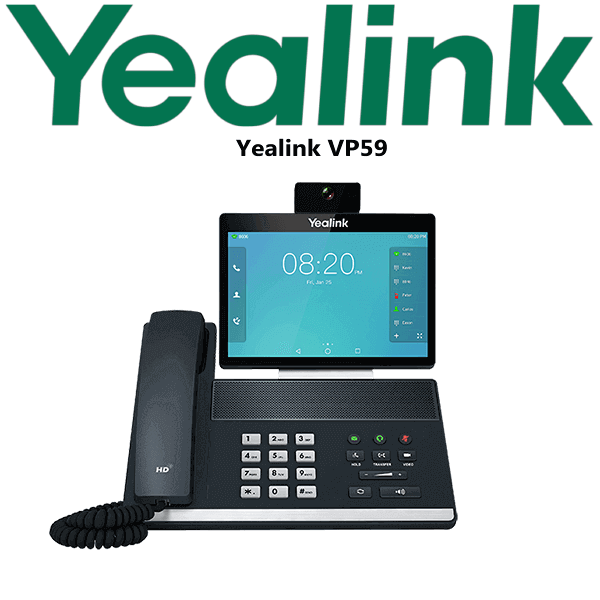
The Yealink VP59 is a flagship smart video phone built for executives, directors, teleworkers and small meeting spaces that need professional voice and video from one desk device. Instead of using a laptop webcam for every call, the VP59 gives the user an 8-inch adjustable touchscreen, a removable 1080p full-HD camera, HD voice, built-in Wi-Fi, Bluetooth, HDMI output and dual Gigabit Ethernet in one executive phone. Vector Digital Systems supplies the Yealink VP59 in Dubai with same-day quote in AED, VAT and delivery noted, and staging before dispatch.
SIP, Microsoft Teams or Zoom? Quote the Correct VP59 Edition
The important buying point with the VP59 is not a replacement story — it is the platform edition. The same VP59 model family exists for different collaboration environments, and the wrong edition can delay deployment. A SIP VP59 is for SIP PBX and hosted VoIP systems. A Teams VP59 must be verified against Microsoft’s current certified device status before quoting. A Zoom VP59 is quoted as the Zoom Phone Appliance edition where Zoom Phone and Zoom Meetings are required.
| Your Platform | Right VP59 Edition | What You Need |
|---|---|---|
| SIP PBX — 3CX, Yeastar, UCM, Asterisk, hosted PBX | Yealink VP59 SIP smart video phone | SIP credentials from your PBX or hosted VoIP provider |
| Microsoft Teams Phone | Yealink VP59 Teams Edition — verify current Microsoft certification status before quote | Microsoft 365 tenant + Teams Phone licence per user |
| Zoom Phone / Zoom Meetings | Yealink VP59 Zoom Phone Appliance | Zoom Phone or Zoom collaboration environment, configured by your IT team |
Tell David which platform you use before ordering: SIP PBX, Microsoft Teams Phone, or Zoom Phone. Vector Digital Systems checks the correct VP59 edition and avoids the most expensive mistake in video phone buying — ordering the right hardware body but the wrong software platform.
PoE Truth — No Power Surprise at Delivery
The Yealink VP59 should be planned as a PoE desk device. It supports Power over Ethernet through its Gigabit LAN port. If your switch does not supply PoE, ask David to add the matching Yealink power supply to the quote. Dubai offices often place executive video phones in cabins, meeting corners and director desks where network ports are available but PoE status is not always checked. Vector Digital Systems confirms this before dispatch so the phone arrives ready to power up.
Why the VP59 Is Different from a Normal Desk Phone
A standard IP phone is built around audio. The VP59 is built around visual collaboration. The 8-inch adjustable touchscreen gives a tablet-like interface for calls and meetings, while the removable 1080p camera supports executive face-to-face calling without adding a separate webcam. HDMI output lets the user connect a larger display, and built-in Wi-Fi and Bluetooth reduce cable clutter on premium desks. For managing directors, regional sales leaders, consulting partners, legal teams and hybrid managers in Dubai, the VP59 is the desk phone that can handle both daily calls and video-first collaboration.
VP59 Platform Comparison — Same Model Family, Different Use Case
| Feature | VP59 SIP | VP59 Smart Video Phone ★ | VP59 Zoom / Teams Editions |
|---|---|---|---|
| Best For | SIP PBX voice and video | Executive smart video desk | Cloud collaboration platform offices |
| Display | 8″ 1280×800 touchscreen | 8″ 1280×800 touchscreen | 8″ touchscreen platform UI |
| Accounts / Platform | Up to 16 VoIP accounts | Platform-specific quotation | Teams or Zoom account/licence |
| Camera | 1080p full-HD removable camera | 1080p full-HD removable camera | Platform edition camera setup |
| Network | Dual Gigabit Ethernet | Dual Gigabit Ethernet | Dual Gigabit Ethernet |
| Wi-Fi / Bluetooth | Built-in Wi-Fi + Bluetooth | Built-in Wi-Fi + Bluetooth | Built-in Wi-Fi + Bluetooth |
| Meeting Use | SIP video and mixed conferencing | Executive video calls and huddle use | Zoom or Teams meetings, edition dependent |
| Expansion | USB headset, HDMI, storage/media use | USB, HDMI, headset and display options | Edition-specific camera/mic options |
| Price Tier | Premium SIP video phone | Executive premium | Platform licence + device tier |
| Choose if… | You run a SIP PBX and need executive video calling | You want the VP59 as a flagship video desk phone and need David to confirm the right edition | Your office is standardised on Zoom Phone or Microsoft Teams Phone |
Where the Yealink VP59 Works in Dubai
Executive cabins and board-level desks. The VP59 suits managing directors, partners and senior managers who take video calls from their desk but do not want to open a laptop for every conversation. The 8-inch screen, HD camera and speakerphone make the desk look clean while keeping video calls professional.
DIFC, DMCC and Business Bay hybrid offices. Many Dubai leadership teams now split calls between SIP voice, Zoom meetings and Teams Phone environments. The VP59 model family is useful here, but the platform edition matters. Vector Digital Systems checks whether you need SIP, Zoom or Teams before quoting.
Small huddle rooms and private meeting corners. The VP59 can be used as a compact video endpoint where a full room system is too large. HDMI output, USB headset support, built-in Wi-Fi and optional platform-specific accessories make it practical for small rooms, owner offices and private consultation areas.
Clinics, consulting firms and regional sales desks. A doctor doing follow-up consultations, a consultant speaking to overseas clients, or a regional sales director calling partners in Oman, Saudi Arabia and Kenya can use the VP59 as a dedicated professional video phone instead of relying on a shared laptop camera.
Full Technical Specifications
| Specification | Yealink VP59 |
|---|---|
| Device Type | Flagship smart video IP phone |
| Display | 8-inch 1280×800 capacitive adjustable touchscreen |
| Camera | Dynamic removable full-HD camera, up to 1080p@30 video |
| Operating System | Android-based platform; edition varies by SIP, Teams or Zoom version |
| SIP Accounts | Up to 16 VoIP accounts on the SIP edition |
| Video Conferencing | Up to 3-party video conferencing on SIP edition; platform editions vary |
| Mixed Conference | Up to 10-party video/audio mixed conferencing on SIP edition, with video-call limits |
| Audio | HD handset, HD speaker, full-duplex speakerphone, Acoustic Shield and Noise Proof technology |
| Network Ports | Dual Gigabit Ethernet ports |
| Wireless | Built-in dual-band Wi-Fi and Bluetooth 4.2 |
| USB | USB support for headset, media and storage applications; port count depends on edition |
| HDMI | HDMI output for external monitor or TV connection |
| Power | PoE support; optional external power supply required if the switch does not provide PoE |
| Security | SIP security features include TLS/SSL support on SIP edition; platform security varies by edition |
| Best Use | Executive desk, teleworker desk, director cabin, small huddle space, video-first professional workstation |
Compatible Accessories and Add-ons
| Accessory | Model / Type | Purpose |
|---|---|---|
| Power Supply | Yealink PSU — confirm at order | Required when the desk switch does not provide PoE |
| USB Headset | Yealink USB headset range | For private executive calls and hybrid work desks |
| Bluetooth Headset | Bluetooth headset — confirm compatibility | Wireless desk calling through built-in Bluetooth |
| External Display | HDMI monitor or TV | Larger view for video calls and small meeting-space use |
| Platform Accessories | Edition-specific camera/mic accessories | Used for huddle-room versions where supported by the Teams or Zoom edition |
Staging Before Dispatch
Vector Digital Systems stages the Yealink VP59 before dispatch from Dubai. For SIP deployments, we load SIP registration, provisioning template, codec settings, dial plan, BLF or speed-dial keys where required, and complete a test call. For Zoom or Teams environments, we confirm the correct edition and the platform prerequisites before delivery so your IT team is not trying to register the wrong device type. For executive desks, the phone can be labelled, packed by user, and delivered with VAT breakdown and delivery charges included in the quote.
Export from Dubai
Vector Digital Systems supplies and exports Yealink VP59 smart video phones from Dubai to system integrators, telecom operators, corporate procurement teams, banks, clinics and hotel groups. Common export destinations include Oman, Saudi Arabia, Qatar, Bahrain and Kuwait in the GCC; Jordan and Egypt in the wider Arab market; Kenya and Tanzania in East Africa; and Pakistan and Sri Lanka for South Asian projects. Shipments move FOB Dubai with commercial invoice, packing list and certificate of origin on request. Project pricing is available for multi-unit executive or regional-office deployments.
Get a same-day quote in AED for Yealink VP59
Tell David your platform — SIP, Microsoft Teams Phone or Zoom Phone — plus quantity, PoE availability and delivery location. Vector Digital Systems quotes with VAT breakdown, delivery charges and staging included.
Frequently Asked Questions — Yealink VP59
Is the Yealink VP59 a SIP phone, Teams phone or Zoom phone?
The VP59 model family exists in platform-specific editions. The SIP edition is for SIP PBX and hosted VoIP systems. The Teams Edition must be verified against Microsoft’s current certified-device status before quoting. The Zoom Phone Appliance edition is for Zoom Phone and Zoom Meetings environments. Tell David your platform before ordering.
Does the Yealink VP59 work with Microsoft Teams?
There is a Yealink VP59 Teams Edition, but Vector Digital Systems verifies current Microsoft certification status before making a Teams quote. Do not order the SIP VP59 for a Teams-only office unless your IT design specifically uses SIP integration outside native Teams Phone.
Does the Yealink VP59 work with Zoom Phone?
Yes, the Yealink VP59 is available as a Zoom Phone Appliance edition for Zoom Phone and Zoom Meetings workflows. Ask David to quote the Zoom edition specifically, not the SIP edition, when your office runs Zoom Phone.
Does the Yealink VP59 come with a power adapter, or do I need PoE?
Plan the VP59 as a PoE device. It supports Power over Ethernet from a compatible switch. If your switch does not provide PoE, ask David to include the matching Yealink power supply in the quote so the phone can be powered at the executive desk on delivery day.
Will the Yealink VP59 work with 3CX, Yeastar, Grandstream UCM or an existing SIP PABX?
The SIP edition of the VP59 is designed for SIP PBX and hosted VoIP platforms and supports up to 16 VoIP accounts. Vector Digital Systems can stage SIP registration, provisioning template, codec settings, dial plan and test calls before dispatch from Dubai.
What is the best Yealink video phone for an executive desk in Dubai?
The Yealink VP59 is the premium Yealink choice when the user needs a dedicated desk video phone with an 8-inch touchscreen, 1080p camera, HD audio, HDMI output, Wi-Fi and Bluetooth. For larger meeting rooms, ask David for a Yealink A-series or MVC room system instead.
Can the Yealink VP59 connect to Wi-Fi and Bluetooth?
Yes. The VP59 includes built-in dual-band Wi-Fi and Bluetooth 4.2, making it useful for clean executive desks, Bluetooth headset pairing and offices where cable routing is difficult. For reliability, Vector Digital Systems still checks whether wired Gigabit Ethernet and PoE are available.
Can I connect the Yealink VP59 to a larger screen?
Yes. The VP59 includes HDMI output for connecting to an external monitor or TV, which is useful for executive cabins, huddle rooms and small meeting spaces where users want a larger view than the built-in 8-inch touchscreen.
Who is the authorised Yealink supplier in Dubai?
Vector Digital Systems LLC has supplied Yealink solutions in Dubai since 2009. David handles Yealink product selection, platform checks, staging, project pricing and local warranty coordination for VP59 deployments.
Does Vector Digital Systems export Yealink VP59 phones from Dubai?
Yes. Vector Digital Systems exports Yealink VP59 phones from Dubai to integrators and enterprise buyers in Oman, Saudi Arabia, Qatar, Bahrain, Kuwait, Jordan, Egypt, Kenya, Tanzania, Pakistan and Sri Lanka. Shipments are quoted FOB Dubai with commercial invoice, packing list and certificate of origin on request.
Does Vector Digital Systems configure the Yealink VP59 before delivery?
Yes. For SIP deployments, Vector Digital Systems stages SIP registration, provisioning template, codec settings, dial plan and test calls before dispatch. For Zoom or Teams environments, the team confirms the correct VP59 edition and platform requirements before delivery.