Description
Yealink UVC30-CP900-BYOD Meeting Kit 4K BYOD Huddle Room Kit Dubai
Yealink UVC30-CP900-BYOD Meeting Kit for Dubai Huddle Rooms
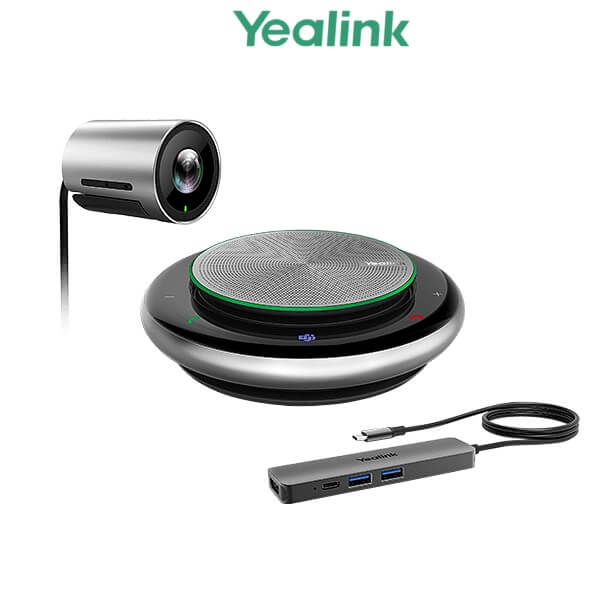
The Yealink UVC30-CP900-BYOD Meeting Kit was built for small and huddle rooms where users bring their own laptop and want the room camera, speakerphone and display to work through one simple cable. Instead of relying on a laptop webcam and weak built-in microphone, this kit combines the Yealink UVC30 Room 4K USB camera, the CP900 HD speakerphone and a BYOD box so a meeting starts when the user connects a USB-C cable to the laptop.
For Dubai offices that still run BYOD meeting rooms in DIFC, Business Bay, DMCC, JLT and branch offices across the UAE, the UVC30-CP900-BYOD kit remains easy to understand: laptop in, room camera out, room audio out, HDMI display out. For new meeting-room refresh projects, Vector Digital Systems normally recommends the newer Yealink MeetingBar A10 for huddle rooms, or A20 where the room size and meeting platform require a larger all-in-one bar.
Platform Check — BYOD Kit or Dedicated Room System?
The UVC30-CP900-BYOD is not a standalone Microsoft Teams Room or Zoom Room appliance. It is a BYOD meeting kit: the laptop runs the meeting app, and the Yealink kit provides the camera, speakerphone and screen connection. This distinction matters because many buyers search for “Teams camera kit” or “Zoom room kit” and expect certification-style room behaviour. If you need a dedicated Teams Rooms or Zoom Rooms device with room controls and admin management, ask David for the current certified Yealink MeetingBar option before ordering.
| Your Meeting Setup | Right Yealink Option | What You Need |
|---|---|---|
| BYOD laptop meetings — Teams, Zoom, Google Meet, Webex, Skype for Business | UVC30-CP900-BYOD Meeting Kit | User laptop with meeting app installed; connect one USB-C cable to use the room camera, speakerphone and display |
| Dedicated Microsoft Teams Room | Yealink MeetingBar A10 / A20 / MVC range — certification must be verified before quoting | Microsoft 365 tenant, Teams Rooms licence, room account and admin setup |
| Dedicated Zoom Room | Zoom Rooms version of the current Yealink MeetingBar range — verify certification status | Zoom Rooms licence, room account and display / network setup |
Tell David whether the room is BYOD, Microsoft Teams Rooms or Zoom Rooms before requesting a quote. The UVC30-CP900-BYOD is correct when the laptop is the meeting engine. If the room itself must sign in, schedule, join and be managed centrally, move to MeetingBar A10 or the appropriate certified room system.
The Buyer Trap — “Works with Teams” Does Not Mean “Teams Room Certified”
The UVC30-CP900-BYOD can be used for Microsoft Teams meetings when the user runs Teams on a laptop and selects the Yealink camera and speakerphone. That is different from a certified Microsoft Teams Rooms appliance. A BYOD kit depends on the laptop; a Teams Rooms device signs into the room account and is managed as room hardware. This is the main purchasing trap on older Yealink video kits, and Vector Digital Systems clarifies it before quoting so the meeting room does not end up with the wrong workflow.
One-Cable BYOD Workflow
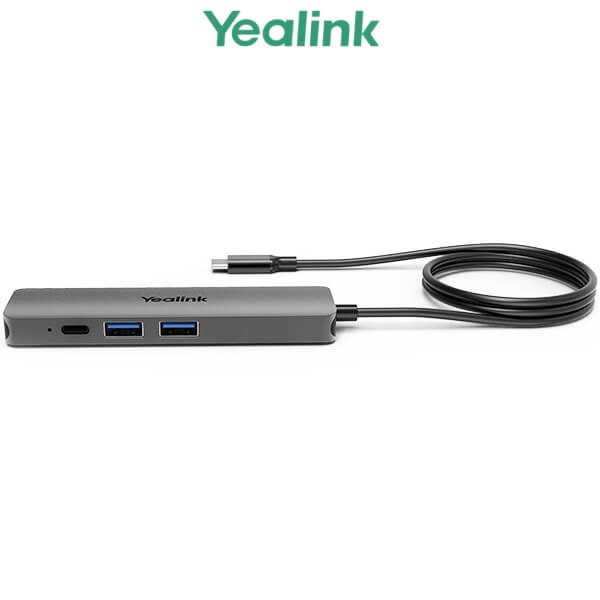
The UVC30 camera and CP900 speakerphone connect to the BYOD box, then the meeting user connects one USB-C cable to the laptop. That single-cable workflow carries the room camera, room audio and HDMI display connection into the laptop meeting. For shared offices, sales rooms and small boardrooms, it removes the usual cable confusion: no separate USB camera cable, no separate speakerphone cable and no separate HDMI handover at the table.
UVC30 Camera — 4K Video for Small Rooms
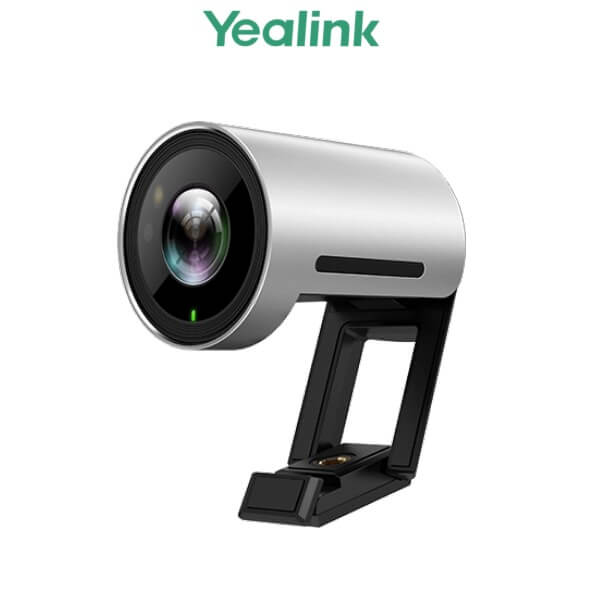
The Yealink UVC30 Room camera is the video side of the kit. It gives small meeting rooms a 4K camera with a 120-degree field of view and auto-framing, so people seated around a huddle table are captured properly without relying on a laptop placed at the wrong angle. This makes it suitable for compact rooms with two to seven participants, especially where the display is mounted at the front and the laptop sits on the table.
CP900 Speakerphone — Table Audio That Beats a Laptop Mic
The CP900 speakerphone handles room audio with full-duplex conversation, HD voice and six-microphone beamforming. Place it in the centre of the table so voices are picked up evenly from around the room. For procurement teams comparing this kit with a basic webcam, the CP900 is the part that changes meeting quality most: people at the far end hear the room rather than one person sitting next to the laptop.
UVC30-CP900-BYOD vs Current Yealink Room Options
The UVC30-CP900-BYOD belongs to the earlier BYOD meeting-room generation: separate camera, separate speakerphone and a BYOD box tying everything to the laptop. The current Yealink small-room direction is cleaner: all-in-one MeetingBar units such as A10 and A20 reduce table hardware, simplify cabling and fit dedicated Teams Rooms or Zoom Rooms workflows better when certification is required.
| Feature | UVC30 Room Camera | UVC30-CP900-BYOD Kit ★ | MeetingBar A10 / A20 |
|---|---|---|---|
| Product type | USB room camera only | BYOD meeting kit with camera, speakerphone and BYOD box | All-in-one video collaboration bar |
| Best room size | Focus / small room when paired with separate audio | Small and huddle rooms | A10 for huddle rooms; A20 for larger small rooms |
| Camera | UVC30 4K, 120° FoV | UVC30 4K, 120° FoV, auto-framing | Integrated 4K camera, model-dependent AI features |
| Audio | Requires separate speakerphone | CP900 full-duplex speakerphone with six-mic beamforming | Built-in speaker and microphone array |
| Meeting engine | Laptop | Laptop BYOD | Dedicated room appliance or BYOD mode, depending on bundle |
| Teams / Zoom use | Via laptop app | Via laptop BYOD — not a standalone room appliance | Use certified Teams / Zoom version after verification |
| Cabling | USB camera cable | One USB-C BYOD cable to laptop after room devices connect to BYOD box | Cleaner wall / display-side installation |
| Replacement path | Upgrade to full kit or MeetingBar | MeetingBar A10 for modern huddle rooms | Current room-system direction |
| Choose if… | You only need to improve video and already have room audio | You need a simple laptop-driven BYOD room with camera, audio and display connection | You are refreshing the room and want a cleaner, current all-in-one Yealink setup |
Where the UVC30-CP900-BYOD Works in Dubai
Huddle rooms in Business Bay and JLT. The UVC30-CP900-BYOD kit suits compact rooms where the meeting host brings a laptop, opens Teams or Zoom, and connects one USB-C cable. The room gets a proper 4K camera, table speakerphone and display output without turning the space into a fully managed Teams Room.
Shared offices and training rooms in DMCC and Al Barsha. BYOD rooms work well when different users, tenants or trainers bring different laptops and meeting platforms. One day the room may run Microsoft Teams, the next day Zoom, Google Meet or Webex. The Yealink kit keeps the room hardware consistent while the laptop handles the app.
Branch-office meeting rooms across the UAE. For satellite offices in Sharjah, Abu Dhabi, Ras Al Khaimah or Ajman, a BYOD kit avoids the licence and admin overhead of a dedicated room appliance. Vector Digital Systems can supply, test and label the kit before dispatch so branch staff only need to connect the camera, speakerphone, display and laptop cable.
Replacement and upgrade projects. If your office already has a UVC30-CP900-BYOD kit and wants the same workflow, ask David to confirm availability. If you are refreshing the room from scratch, the cleaner recommendation is usually Yealink MeetingBar A10 for huddle rooms or MeetingBar A20 where the room is larger and needs a stronger all-in-one video bar.
Full Technical Specifications
| Specification | Yealink UVC30-CP900-BYOD Meeting Kit |
|---|---|
| Product Type | BYOD meeting kit for small and huddle rooms |
| Kit Components | UVC30 Room USB camera, CP900 speakerphone and BYOD box |
| Camera | Yealink UVC30 Room camera |
| Camera Resolution | 4K ultra-HD video |
| Field of View | 120° wide-angle field of view for huddle rooms |
| Camera Intelligence | Auto-framing for room participants |
| Audio Device | Yealink CP900 portable HD speakerphone |
| Microphones | Six-microphone beamforming array for table pickup |
| Audio Mode | Full-duplex speakerphone audio for two-way conversation |
| BYOD Connection | One USB-C cable from BYOD box to laptop |
| Display Output | Room display connected through the BYOD workflow |
| Laptop Charging | Supports laptop charging through USB-C during meetings, subject to laptop compatibility |
| Meeting Platforms | Runs through the user laptop with Teams, Zoom, Skype for Business, Google Meet, Webex and other UC meeting apps |
| Standalone Room Account | No — this is a BYOD kit, not a standalone Microsoft Teams Rooms or Zoom Rooms appliance |
| Best Fit | Small meeting room, huddle room, shared office room or branch-office collaboration space |
| Replacement Recommendation | MeetingBar A10 for modern huddle rooms; MeetingBar A20 for larger small rooms |
Compatible Accessories and Replacement Options
| Item | Model / Option | Purpose |
|---|---|---|
| Camera | UVC30 Room | 4K USB room camera for the BYOD kit |
| Speakerphone | CP900 | Portable HD speakerphone for room audio |
| BYOD Interface | Yealink BYOD Box | Combines camera, speakerphone and display into one laptop connection |
| Huddle Room Replacement | MeetingBar A10 | Current all-in-one Yealink video bar recommendation for huddle and small rooms |
| Larger Small Room Upgrade | MeetingBar A20 | Recommended when the room is bigger or a cleaner wall-mounted all-in-one setup is preferred |
Staging Before Dispatch — What Vector Digital Systems Checks
Vector Digital Systems prepares Yealink meeting-room kits before dispatch from Dubai. For the UVC30-CP900-BYOD, the team checks the camera, speakerphone and BYOD box, confirms the USB-C workflow, verifies audio and video selection on a test laptop, confirms display handover, labels the cables for the room, and gives the buyer a clear connection sequence. For replacement projects, David can also recommend whether to keep the BYOD workflow or move to MeetingBar A10 / A20 for a cleaner room refresh.
For Teams Rooms or Zoom Rooms requirements, we do not assume certification from the name of the kit. David verifies the current Yealink certified device route before quoting, then confirms the room licence, tenant setup and display requirement with your IT team. That prevents the common mistake of buying a laptop BYOD kit when the office actually needs a managed room appliance.
Export from Dubai
Vector Digital Systems supplies Yealink video collaboration equipment to system integrators, IT resellers, hotel groups, corporate procurement teams and branch-office projects across the region. Common export routes include Oman, Saudi Arabia, Kuwait, Qatar and Bahrain in the Gulf; Jordan and Egypt for regional enterprise projects; Kenya and Tanzania for East Africa; and Pakistan and Sri Lanka for South Asian deployments.
Export shipments move FOB Dubai with commercial invoice, packing list and certificate of origin on request. For legacy UVC30-CP900-BYOD enquiries, stock status is confirmed at quotation stage. For new rooms, David can quote the current Yealink MeetingBar replacement path with VAT breakdown, delivery charges and export documentation included in the proposal.
Get a same-day quote in AED for your Yealink meeting room
Tell David your room size, meeting platform, display setup and whether you want to keep BYOD or move to MeetingBar A10 / A20. We quote with VAT breakdown and delivery included.
Frequently Asked Questions — Yealink UVC30-CP900-BYOD
Is Yealink UVC30-CP900 the same as UVC30-CP900-BYOD?
Yes. The full model name is Yealink UVC30-CP900-BYOD Meeting Kit. It combines the UVC30 Room USB camera, CP900 speakerphone and Yealink BYOD box for small and huddle rooms. Many buyers shorten the name to UVC30-CP900, but the BYOD version is the complete meeting-room kit.
Is the Yealink UVC30-CP900-BYOD still the best model to buy?
It is suitable when you specifically want a laptop-driven BYOD room with separate camera and speakerphone. For a new huddle-room refresh, Vector Digital Systems normally recommends Yealink MeetingBar A10 as the cleaner current replacement, or MeetingBar A20 where the room is larger.
Does the Yealink UVC30-CP900-BYOD work with Microsoft Teams?
Yes, but through the user laptop. The laptop runs Microsoft Teams and uses the Yealink camera and speakerphone as USB devices. This is not the same as a certified Microsoft Teams Rooms appliance. If your room must sign in as a Teams Room with central admin management, ask David for the current certified Yealink MeetingBar or MVC option.
Does the Yealink UVC30-CP900-BYOD work with Zoom?
Yes, it can be used for Zoom meetings through a laptop. The user joins the Zoom meeting on the laptop and selects the UVC30 camera and CP900 speakerphone. If you need a dedicated Zoom Room appliance instead of BYOD, Vector Digital Systems will verify the current Zoom-certified Yealink room system before quoting.
What room size is the Yealink UVC30-CP900-BYOD designed for?
The UVC30-CP900-BYOD is designed for small and huddle rooms. It is a good fit for compact meeting spaces, shared office rooms and branch-office rooms where the table is close to the display and the meeting is run from a laptop. Larger rooms should move to MeetingBar A20, A30 or a full room system after sizing.
What is included in the Yealink UVC30-CP900-BYOD kit?
The kit includes the Yealink UVC30 Room 4K USB camera, the Yealink CP900 HD speakerphone and the Yealink BYOD box. The BYOD box brings the room camera, audio and display workflow to the meeting laptop through a simplified USB-C connection.
Can the UVC30-CP900-BYOD charge a laptop during meetings?
Yes, the BYOD workflow supports laptop charging through USB-C, subject to laptop compatibility and the room power setup. Vector Digital Systems checks the cabling and connection sequence before dispatch so the buyer understands how the laptop, display, camera and speakerphone connect.
UVC30-CP900-BYOD vs MeetingBar A10 — which one should I buy?
Choose UVC30-CP900-BYOD if you want a laptop-driven room with separate USB camera and speakerphone. Choose MeetingBar A10 if you are refreshing a huddle room and want a cleaner all-in-one Yealink bar with less table hardware and a more current room-system direction.
Who is the authorised Yealink supplier in Dubai?
Vector Digital Systems LLC has supplied and integrated Yealink solutions in Dubai since 2009. David handles Yealink pre-sales guidance, model selection, room-kit replacement advice, project pricing, staging and local warranty coordination for UAE and export buyers.
Does Vector Digital Systems export Yealink meeting-room kits from Dubai?
Yes. Vector Digital Systems exports Yealink meeting-room equipment from Dubai to integrators and enterprise buyers in Oman, Saudi Arabia, Kuwait, Qatar, Bahrain, Jordan, Egypt, Kenya, Tanzania, Pakistan and Sri Lanka. Export shipments are quoted FOB Dubai with commercial invoice, packing list and certificate of origin on request.
Does Vector Digital Systems configure the Yealink UVC30-CP900-BYOD before delivery?
Yes. Vector Digital Systems checks the UVC30 camera, CP900 speakerphone and BYOD box, verifies the USB-C laptop workflow, tests audio and video selection on a laptop, confirms display handover and labels the cabling before dispatch. For new rooms, David can also recommend the MeetingBar A10 or A20 replacement path.