Description
Yealink Meeting Server YMS Private Video Conferencing Platform Dubai
Yealink Meeting Server for Private Video Collaboration in Dubai
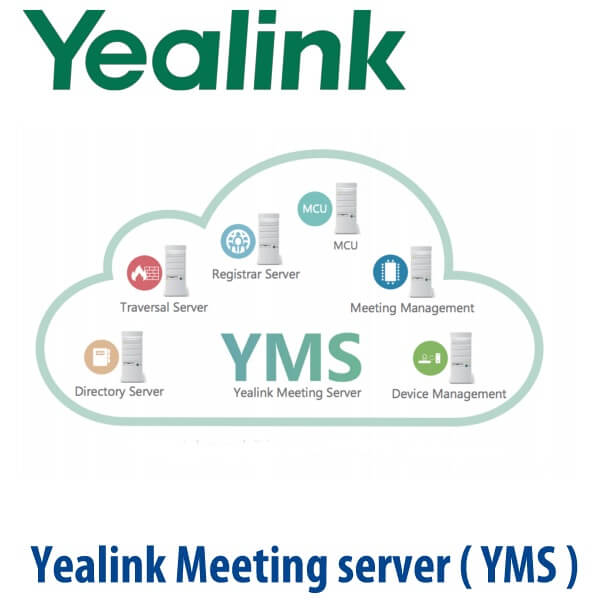
Yealink Meeting Server, usually called YMS, is the Yealink private video conferencing infrastructure for organisations that want more control than a public meeting app can offer. Instead of every meeting relying only on a public cloud service, YMS brings the core video platform into your own managed environment: MCU, registrar server, traversal server, directory server, meeting management and device management in one Yealink collaboration platform.
For Dubai enterprises, government-linked organisations, banks, schools, healthcare groups, regional HQs and system integrators, the buying question is not just “which camera should we install?” It is “where should our meetings run, who controls the users, and how do we manage Yealink video devices across sites?” YMS answers that requirement for private, SIP / H.323 video meeting environments where control, scheduling, device visibility and cross-branch access matter.
Platform Fit — YMS, Microsoft Teams or Zoom?
Yealink Meeting Server is not a Microsoft Teams Rooms appliance and it is not a Zoom Rooms kit. It is Yealink’s private video conferencing server infrastructure for Yealink VC devices and standards-based SIP / H.323 video environments. Buyers often mix up “Yealink video conferencing” with “Teams-certified Yealink room hardware”, so confirm the platform before ordering.
| Your Meeting Platform | Right Yealink Route | What You Need |
|---|---|---|
| Private Yealink / SIP / H.323 video network | Yealink Meeting Server (this page) | YMS licensing, server or virtual deployment, Yealink VC endpoints, network design and user directory plan |
| Microsoft Teams Rooms | Yealink MVC / MeetingBoard Teams Rooms hardware — verify current certified model before quoting | Microsoft 365 tenant, Teams Rooms licence and certified Teams Rooms device |
| Zoom Rooms | Zoom-certified Yealink room hardware — ask David for the current certified range | Zoom Rooms licence, certified room kit and deployment profile |
Certification note: YMS is a Yealink meeting infrastructure platform, not a Teams or Zoom endpoint. If your procurement document says “Teams certified” or “Zoom Rooms certified”, David will quote the correct Yealink MVC, MeetingBoard or Zoom-certified room device instead of YMS.
Power / Server Reality — This Is Software Infrastructure, Not a PoE Desk Device
Yealink Meeting Server is not powered like a desk phone. There is no PoE switch requirement and no phone-style power adapter issue. YMS is deployed as meeting server infrastructure, commonly as a virtualised deployment, and the sizing depends on your meeting capacity, concurrent ports, recording requirement, network topology and number of Yealink video endpoints. Vector Digital Systems scopes the server, network and licensing requirement before quoting, so your Dubai IT team receives a deployable bill of materials rather than a generic software line item.
Where YMS Sits in the Yealink Video Range
YMS is not a camera, phone or room bar. It is the meeting platform layer behind Yealink video deployments. A Yealink room endpoint gives users the camera, microphone, speaker and room interface; YMS gives the organisation the private meeting rooms, scheduling, MCU resources, traversal, directory, meeting control and remote device management.
| Feature | Yealink Room Endpoint | Yealink Meeting Server ★ | Teams / Zoom Room Kit |
|---|---|---|---|
| Role | Room hardware for one meeting space | Private meeting infrastructure for many users and rooms | Cloud-platform room endpoint |
| Best For | Single boardroom or meeting room | Multi-site private video network | Native Teams or Zoom organisations |
| Meeting Type | Endpoint joins meetings | P2P, scheduled, ad-hoc, VMR and training mode | Teams or Zoom scheduled meetings |
| Management | Device-level setup | Meeting, user, directory and device management | Teams Admin Center or Zoom admin portal |
| Video Capacity | Endpoint-dependent | 1080P30 multiparty conferencing, capacity depends on licence and server sizing | Cloud licence dependent |
| Network Traversal | Depends on deployment | ICE / TURN / STUN / NAT traversal support | Cloud platform traversal |
| Microsoft Teams | Only if certified Teams model | Not a Teams-certified endpoint | Use certified MVC / MeetingBoard hardware |
| Price Tier | Per room hardware | Project-scoped platform | Per room + cloud subscription |
| Choose if… | You need one room device only | You need a private Yealink meeting platform across rooms, users and branches | Your company standard is already Teams Rooms or Zoom Rooms |
Dubai and Export Use Cases for Yealink Meeting Server
Government and regulated enterprise meetings. Organisations in Dubai, Abu Dhabi and the wider GCC sometimes require private meeting infrastructure rather than a pure public-cloud meeting workflow. YMS supports a controlled Yealink video environment with user accounts, meeting rooms, directory services, security settings and administrator visibility.
Multi-branch corporate video networks. A group with offices in Business Bay, Jebel Ali, Sharjah and Saudi Arabia may need boardrooms, remote managers and video phones to join the same internal meeting environment. YMS provides scheduled meetings, Virtual Meeting Rooms, ad-hoc conferences and device integration across multiple sites.
Education, healthcare and training. Training mode, lecturer view, meeting control and content sharing make YMS suitable for classroom-style video sessions, clinic-to-branch consultations, internal HR training and partner enablement. The platform supports PC, mobile, browser and Yealink room access depending on the deployment design.
System integrator deployments. UAE and export-market integrators use YMS when a customer wants a Yealink-centric private video platform with device management, meeting scheduling and standards-based interoperability. Vector Digital Systems helps scope the server, Yealink endpoints, licences, deployment stages and export documentation.
Full Technical Specifications
| Specification | Yealink Meeting Server |
|---|---|
| Product Type | Private video conferencing infrastructure / meeting server platform |
| Architecture | Cloud-based distributed architecture with virtualised deployment support |
| Virtualisation | VMware deployment support |
| System Modules | MCU, registrar server, traversal server, meeting management server, device management server, enterprise directory server and SIP trunk |
| Accounts | Up to 10,000 accounts with batch creation |
| Video | 1080P30 video conferencing; video resolutions include 1080P, 720P, 360P, 4CIF and CIF |
| Content Sharing | Dual 1080P30: video + content sharing |
| Video Codecs | H.264 High Profile, H.264, H.263 |
| Audio Codecs | G.722.1C, G.722.1, G.722, G.711 µ-law / A-law |
| Conference Modes | P2P, scheduled meeting, ad-hoc conference, Virtual Meeting Room and training mode |
| Scheduling | Web scheduling and Outlook plug-in support; meeting room and video conference can be scheduled together |
| Yealink VC Integration | Conference reminder and one-touch conference access on supported Yealink video devices |
| Conference Control | Invite/remove participants, lock/unlock meeting, end conference, mute/unmute, change layout and participant role, invite H.323 / SIP device |
| MCU Features | Continuous Presence, mixed bandwidth/resolution/frame rate, flexible layouts, active speaker, video carousel, permanent VMR and cascading video conference |
| Network Traversal | ICE / TURN / STUN / NAT traversal support |
| Protocols | H.323 / SIP; H.239 / BFCP dual stream protocol |
| Security | TLS, SRTP, HTTPS, AES 128 encryption, dynamic password and SSH remote secure access |
| Management | Web UI, setup wizard, system status monitoring, licence management, statistics, global call settings, backup/restore, reboot/factory reset and system log |
| Device Management | Remote device management, automatic firmware upgrade and remote device log export |
Licensing, Deployment and Compatible Yealink Devices
| Item | What David Will Confirm Before Quote |
|---|---|
| YMS Licence | Required meeting capacity, concurrent ports, accounts, VMR requirement and feature scope |
| Server / Virtual Platform | VMware environment, compute resources, storage, network placement and public / private access design |
| Yealink VC Endpoints | Room systems, video phones, PC software, mobile access and browser access requirements |
| Directory and Users | User import, enterprise directory synchronisation, account naming and administrator roles |
| Network Traversal | ICE / TURN / STUN / NAT requirement, branch access, firewall rules and external participant policy |
| Recording | Whether an external recording server and storage policy are required for training or compliance |
Staging and Deployment Planning by Vector Digital Systems
Vector Digital Systems does not treat YMS as a simple software SKU. Before quoting, David confirms the meeting platform target, number of Yealink video rooms, expected concurrent meetings, participant types, internal and external access, directory structure, firewall requirements, recording expectations and administrator roles. The project quote includes AED pricing, VAT breakdown and delivery or deployment scope.
For deployment, our team can assist with YMS planning, server handover checklist, Yealink VC endpoint registration, meeting room templates, directory mapping, test meetings, conference control verification and admin training. For customers already running Yealink video devices, we can review the current estate and prepare a migration or expansion plan instead of starting from scratch.
Export from Dubai
Vector Digital Systems supports Yealink project buyers and system integrators across the GCC, Africa and South Asia. YMS projects are commonly quoted with Yealink room endpoints, licences and deployment documentation for Oman, Saudi Arabia, Kuwait, Bahrain, Qatar, Jordan, Egypt, Kenya, Nigeria and Pakistan. Export shipments move FOB Dubai with commercial invoice, packing list and certificate of origin on request. For software and licence-led deployments, David will confirm activation, documentation and handover steps before final quote.
Get a Yealink Meeting Server project quote in AED
Tell David your meeting platform, number of rooms, expected concurrent meetings, Yealink VC endpoint models, branch locations and whether users must join from outside the office network. We quote with VAT breakdown, deployment notes and documentation.
Frequently Asked Questions — Yealink Meeting Server
What is Yealink Meeting Server?
Yealink Meeting Server, or YMS, is Yealink’s private video conferencing infrastructure platform. It brings MCU, registrar server, traversal server, directory server, meeting management and device management into one platform for Yealink video deployments.
Does Yealink Meeting Server work with Microsoft Teams?
YMS is not a Microsoft Teams Rooms endpoint and should not be quoted as a Teams-certified device. If your office runs Microsoft Teams Rooms, Vector Digital Systems will quote a current Teams-certified Yealink MVC or MeetingBoard solution instead, after checking Microsoft’s certified device list.
Is Yealink Meeting Server the same as Zoom Rooms?
No. YMS is a private Yealink video meeting server for Yealink VC and standards-based SIP / H.323 video environments. Zoom Rooms requires Zoom Rooms licensing and Zoom-certified room hardware. David can route your quote to the correct Yealink Zoom range if Zoom is your platform.
What video quality does Yealink Meeting Server support?
YMS supports 1080P30 video conferencing, including dual 1080P30 video plus content sharing. It also supports lower resolutions such as 720P, 360P, 4CIF and CIF depending on endpoint, bandwidth and deployment design.
How many users can Yealink Meeting Server support?
Yealink lists support for up to 10,000 accounts with batch creation. Actual meeting capacity, concurrent ports and room count depend on licence, server sizing, network design and the mix of video endpoints, so Vector Digital Systems sizes YMS as a project rather than a one-line item.
Can users schedule YMS meetings from Outlook?
Yes. YMS supports scheduling through Web and Outlook, with meeting room and video conference scheduling together. Supported Yealink video devices can receive meeting reminders and one-touch conference access.
Can Yealink Meeting Server connect offices outside Dubai?
Yes, YMS supports ICE, TURN, STUN and NAT traversal for cross-network deployments. Vector Digital Systems checks firewall rules, branch connectivity, external participant policy and bandwidth before deployment.
Is Yealink Meeting Server secure for enterprise meetings?
YMS includes TLS, SRTP, HTTPS, AES 128 encryption, dynamic meeting passwords and SSH remote secure access. Security still depends on correct network placement, administrator policy, password management and endpoint configuration.
Who supplies Yealink Meeting Server in Dubai?
Vector Digital Systems LLC has supplied and integrated Yealink solutions in Dubai since 2009. David handles Yealink pre-sales scoping, project pricing, deployment planning, staging and warranty coordination for Dubai and export customers.
Does Vector Digital Systems export Yealink Meeting Server projects from Dubai?
Yes. Vector Digital Systems supports Yealink project buyers and integrators across Oman, Saudi Arabia, Kuwait, Bahrain, Qatar, Jordan, Egypt, Kenya, Nigeria and Pakistan. Export projects are quoted FOB Dubai with documentation such as commercial invoice, packing list and certificate of origin on request.