
Description
Yealink MeetingEye 600 4K AI Video Conferencing Endpoint for Medium Rooms Dubai
Yealink MeetingEye 600 for Medium Conference Rooms in Dubai
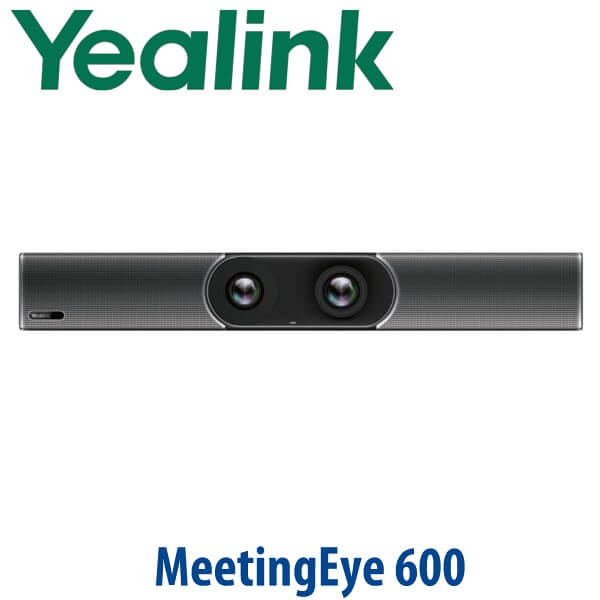
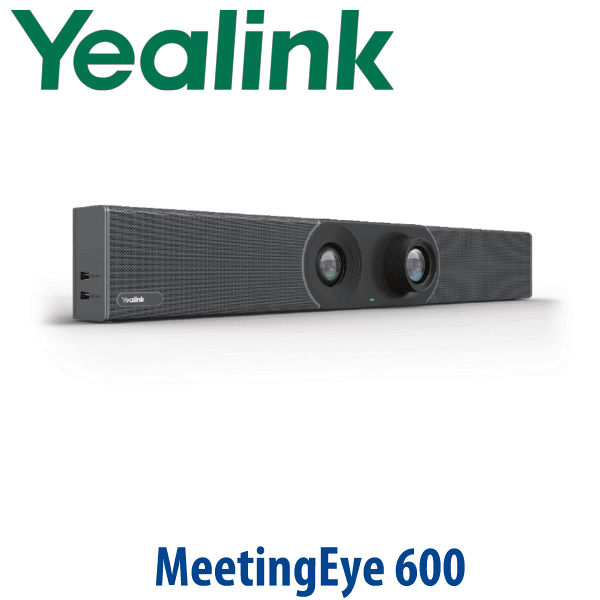
The Yealink MeetingEye 600 is built for medium meeting rooms where a basic webcam no longer looks professional and a full rack-based AV system is too much. It combines the video codec, dual 4K camera system, microphone array, speakers, Wi-Fi, Bluetooth and meeting-room control into one clean endpoint. For Dubai offices refreshing boardrooms in Business Bay, DIFC, DMCC, JLT and Sheikh Zayed Road, it gives the room a dedicated conferencing device instead of relying on a laptop, loose USB camera and portable speakerphone.
Vector Digital Systems LLC supplies Yealink meeting-room systems in Dubai, stages them before dispatch, and helps buyers choose the right model for SIP/H.323 video, USB/BYOD use, Microsoft Teams Rooms or Zoom Rooms. David, our Yealink specialist, will confirm room size, platform, display count, network, power and accessories before quoting so the installation team receives the right bundle first time.
Platform Check — SIP/H.323, USB BYOD, Teams or Zoom?
Meeting room buyers often search for one Yealink device and assume it will cover every collaboration platform natively. That is the trap. The MeetingEye 600 is a professional video conferencing endpoint for H.323/SIP environments and can also operate as PC audio/video peripherals through USB mode using VCH51. For Microsoft Teams Rooms or Zoom Rooms, certification must be verified before quoting; Teams and Zoom room systems usually use separate Yealink certified kits or MeetingBar/MVC/MeetingEye packages.
| Your Meeting Platform | Right Yealink Route | What You Need |
|---|---|---|
| H.323 / SIP video conferencing | MeetingEye 600 (this page) | SIP/H.323 account, network access, display, room configuration and test call |
| USB BYOD — laptop runs the meeting app | MeetingEye 600 with VCH51 USB mode | Laptop, USB-C connection via VCH51 and the meeting app installed on the PC |
| Microsoft Teams Rooms | Verify certified Yealink Teams room kit before quote | Teams Rooms licence, certified hardware bundle, tenant setup and room account |
| Zoom Rooms | Verify Zoom-certified Yealink room system before quote | Zoom Rooms licence, certified room hardware and controller/accessory bundle |
Tell David which platform your office uses before ordering. A SIP/H.323 endpoint, USB BYOD device, Microsoft Teams Rooms kit and Zoom Rooms appliance are not the same purchase, even when they all carry the Yealink name.
Power Truth — This Is Not a PoE Desk Phone
The MeetingEye 600 uses an external Yealink power adapter. Unlike Yealink desk phones that usually rely on PoE and ship without a PSU, this meeting-room endpoint is powered by its dedicated adapter. The network connection is via Gigabit Ethernet or built-in wireless, but power planning still matters: your installer needs a clean power point behind the display or inside the AV cabinet, plus HDMI and network routing planned before installation day.
Why the Dual Camera Matters in a Dubai Boardroom
A single wide camera can make a 10-person meeting room look stretched, while a pure PTZ camera can miss people at the edges of the table. The MeetingEye 600 uses a 20MP ultra-wide camera for the full room and an 8MP telephoto camera for closer framing. The 133° wide field of view keeps the whole table visible, while 10x hybrid zoom helps bring the active speaker closer without moving the device. AI Auto Framing and Speaker Tracking reduce manual camera control during meetings, especially in rooms where people enter, leave or present from different seats.
MeetingEye Range Position — Where the 600 Fits
The MeetingEye 600 sits in the middle of Yealink’s MeetingEye-style room endpoint family: more integrated and room-ready than a modular codec-only setup, but less complex than a large-room detachable AV build. It is the right fit when the room is too important for a laptop webcam, but the customer still wants a tidy all-in-one bar-style endpoint mounted near the display.
| Feature | MeetingEye 500 | MeetingEye 600 ★ | MeetingEye 800 |
|---|---|---|---|
| Best room fit | Flexible small/medium or multi-camera rooms | Medium rooms needing an all-in-one endpoint | Large rooms and integrated AV environments |
| Camera approach | Works with Yealink or third-party cameras | Built-in dual camera: 20MP wide + 8MP telephoto | Detachable large-room camera/audio design |
| Video quality | 4Kp30 video and content support | Up to 4Kp30 people + 4Kp15 content sharing | Dual 4K for large-room deployments |
| Audio | External microphone/soundbar options | 8 MEMS microphone array + 2×5W speakers built in | External professional audio for larger rooms |
| Wireless / Bluetooth | Depends on bundle | Built-in dual-band Wi-Fi + Bluetooth 4.2 | Depends on full system design |
| Content sharing | Multi-display room system capability | HDMI/USB-C via VCH51, WPP20, AirPlay, Miracast with WF50 | Large-room multi-display sharing |
| Replaces | Older codec-based meeting-room builds | Laptop webcam + USB speakerphone setups in medium rooms | Large-room legacy VC systems |
| Choose if… | You need a modular or multi-camera room design | You want a clean all-in-one 4K endpoint for a medium boardroom | You need a large-room integrated AV system with separate components |
Where MeetingEye 600 Works Best in Dubai
Medium executive boardrooms. In DIFC, DMCC and Business Bay offices, the MeetingEye 600 replaces messy laptop-led meetings with a dedicated endpoint mounted cleanly near the display. The wide camera covers the table, the telephoto camera improves close-ups, and the built-in mic/speaker system keeps everyday calls simple.
Regional management rooms. A Dubai HQ often connects weekly with teams in Oman, Saudi Arabia, Qatar, Bahrain, Kenya or Pakistan. The MeetingEye 600 supports H.323/SIP video workflows and can also be used in USB mode for PC-based cloud meetings when paired correctly with VCH51.
Training, finance and legal rooms. For law firms, consultancies, banks, healthcare offices and education centres, the auto privacy shutter is a practical feature: the lens visibly closes when the camera is not in use, helping users trust the room between meetings.
Post-RTO meeting room refresh. Many Dubai SMEs upgraded their meeting rooms quickly during hybrid work and now want a cleaner permanent setup. The MeetingEye 600 is a strong option where the room needs 4K video, AI framing and integrated audio, but does not justify a full large-room AV installation.
Full Technical Specifications
| Specification | Yealink MeetingEye 600 |
|---|---|
| Product Type | Smart UHD 4K video conferencing endpoint for medium rooms |
| Operating System | Android 9.0-based endpoint |
| Supported Platforms | Yealink Meeting Server, Yealink Meeting, H.323/SIP systems and USB mode via VCH51 for PC-based meeting apps |
| Wide Camera | 20MP camera with Sony 1-inch CMOS sensor, 133° field of view, 4x e-PTZ |
| Telephoto Camera | 8MP camera, 90° field of view, 10x hybrid zoom (3.5x optical + 3x digital) |
| AI Features | Auto Framing and Speaker Tracking |
| Privacy | Automatic privacy shutter with visible lens state |
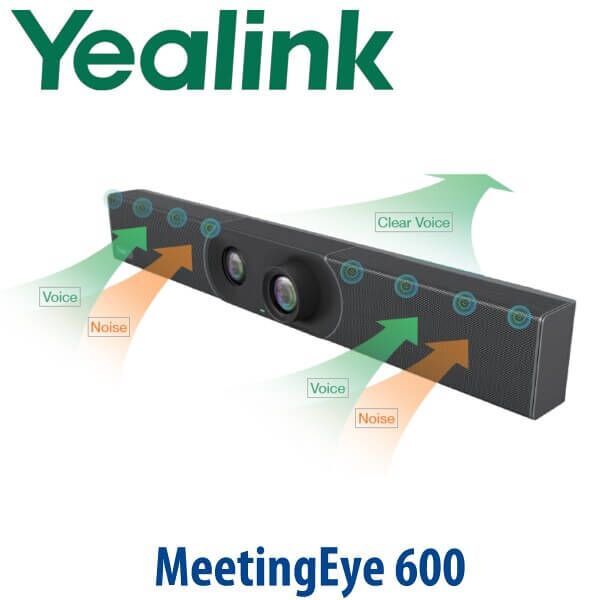
| Microphones | Built-in 8 MEMS microphone array; 10ft / 3m high-quality pickup, maximum 20ft / 6m pickup |
| Speakers | 2× built-in 5W speakers |
| Audio Technology | Yealink Noise Proof, beamforming directed voice pickup, acoustic echo cancellation, dereverberation, long-distance full-duplex pickup, AGC, CNG/PLC/AJB |
| Video Quality | Up to 4Kp30 people video + 4Kp15 content sharing |
| Bandwidth Requirements | 4Kp30 from 2Mbps or more; 1080p30 from 512Kbps or more; 720p30 from 384Kbps or more using H.265 |
| Protocols | H.323/SIP, H.239, BFCP, FECC H.224/H.281 |
| Video Codecs | H.264 SVC, H.265, H.264 High Profile, H.264, H.263, H.263+ |
| Network | 1× 10/100/1000M Ethernet, built-in dual-band Wi-Fi 802.11a/b/g/n/ac, IPv4/IPv6, DHCP/static IP, VLAN, QoS, LLDP-MED |
| Bluetooth | Bluetooth 4.2 built in |
| Security | SRTP, TLS, H.235, AES 256-bit encryption, IEEE 802.1X, anti-attack, built-in certificate, OpenVPN and firewall traversal features |
| Content Sharing | HDMI/USB-C via VCH51, WPP20 wireless presentation pod, Apple AirPlay, Miracast with external WF50, virtual whiteboard |
| Connections | 2× HDMI output, 1× line-in 3.5mm, 1× line-out 3.5mm, 2× USB 2.0, 1× Gigabit Ethernet, 1× Yealink extension port, 1× power port, security lock slot, reset slot |
| Power | External Yealink power adapter, AC 100–240V input, DC 48V/0.7A output |
| Storage | Built-in 16GB storage |
| Dimensions | 700 × 98 × 121mm |
| Package Includes | MeetingEye 600 codec with integrated camera/microphone/speaker, VCR20 remote control and wall bracket |
Compatible Accessories and Room Options
| Accessory | Model / Option | Purpose |
|---|---|---|
| Touch Panel | Yealink collaboration touch panel | Room control, meeting operation and easier user experience than remote-only control |
| Wireless Presentation | WPP20 | Wireless content sharing from a laptop for meeting rooms that need quick presenter changeover |
| Wireless Microphones | CPW90 package | Additional table audio pickup where participants sit beyond the built-in mic sweet spot |
| USB BYOD Sharing Box | VCH51 | Lets the MeetingEye 600 act as PC camera, microphone and speaker over USB mode |
| TV Mount Kit | Yealink room mount option | Cleaner display-side installation where wall mounting is not the preferred method |
| Miracast Wi-Fi Accessory | WF50 where required | Required for Miracast use according to Yealink accessory notes; confirm at quote stage |
Staging Before Dispatch — What Vector Digital Systems Configures
Vector Digital Systems stages the MeetingEye 600 before dispatch wherever customer credentials and network information are available. Our team checks firmware status, applies the room naming convention, configures SIP/H.323 or Yealink Meeting settings, verifies network mode, prepares display output, checks audio pickup, tests camera framing, validates content-sharing accessories and performs a test call before handover. For USB/BYOD rooms, David confirms whether VCH51 and the correct room cable path are included in the quote. VAT breakdown, delivery charges and installation accessories are included clearly in the AED quotation.
Export from Dubai
Vector Digital Systems exports Yealink meeting-room devices from Dubai to telecom operators, system integrators, hotel groups, universities, banks and corporate IT procurement teams. Common destinations include Oman, Saudi Arabia, Kuwait, Bahrain and Qatar across the GCC; Jordan and Lebanon where permitted; Egypt and Morocco in North Africa; Kenya, Tanzania and Uganda in East Africa; and Pakistan, Sri Lanka and Bangladesh in South Asia. Shipments move FOB Dubai with commercial invoice, packing list and certificate of origin on request. For MeetingEye 600 export orders, send David the room count, accessory list, destination country and required documentation so the quote includes packing and dispatch details.
Related Yealink Room Options to Compare
Ask David to compare the Yealink MeetingEye 600 with MeetingEye 500, MeetingEye 800, MeetingBar A20, MeetingBar A30, MeetingBar A40, MVC-series Teams Rooms kits and Yealink wireless presentation accessories. Links are added only after the corresponding vectordigitals.net product pages are confirmed live in the registry.
Get a same-day quote in AED for Yealink MeetingEye 600
Tell David: room size, seating layout, display count, platform used, whether you need SIP/H.323, USB BYOD, Teams Rooms or Zoom Rooms, and whether accessories like VCH51, WPP20 or CPW90 are required. We quote with VAT breakdown, delivery and staging included.
Frequently Asked Questions — Yealink MeetingEye 600
What room size is the Yealink MeetingEye 600 designed for?
The Yealink MeetingEye 600 is designed for medium meeting rooms. It uses a 133° wide camera to cover the table, an 8MP telephoto camera for closer speaker framing, 10x hybrid zoom, an 8 MEMS microphone array and 2×5W speakers. For smaller rooms David may recommend a MeetingBar-style option; for large rooms, compare MeetingEye 800 or a full Yealink room system.
Does the Yealink MeetingEye 600 work with Microsoft Teams or do I need a different model?
Do not assume MeetingEye 600 is the right Microsoft Teams Rooms device. It is a SIP/H.323 video endpoint and can be used in USB mode via VCH51 for PC-based meeting apps. For a native Microsoft Teams Rooms installation, David will verify the current Yealink Teams-certified room kit before quoting and match it with the required Teams Rooms licence and room account.
Can we use the MeetingEye 600 for Zoom calls as well as regular SIP video calls?
The MeetingEye 600 supports H.323/SIP video conferencing and USB mode through VCH51, so a laptop can run Zoom while using the room device as audio/video peripherals. For a native Zoom Rooms installation, David will verify the current Zoom-certified Yealink room system before quoting rather than assuming certification from the product name alone.
Does the MeetingEye 600 need PoE or a power adapter?
The MeetingEye 600 uses an external Yealink power adapter. It is not powered like a standard Yealink desk phone over PoE. Your installer should plan a power point near the display or AV cabinet, plus HDMI and network cable routing before installation day.
What is the difference between MeetingEye 600 and MeetingEye 800?
MeetingEye 600 is the cleaner all-in-one choice for medium rooms, with built-in dual cameras, microphones and speakers. MeetingEye 800 is aimed at larger rooms and integrated AV deployments where detachable cameras, external audio and more complex display layouts are required. Choose MeetingEye 600 for a simple medium-room boardroom; choose MeetingEye 800 when the room is larger or needs a full AV design.
Does the MeetingEye 600 include microphones and speakers?
Yes — the MeetingEye 600 has a built-in 8 MEMS microphone array and 2× built-in 5W speakers. The microphone pickup is rated for 10ft / 3m high-quality pickup with a maximum 20ft / 6m pickup range. For longer tables or rooms with difficult acoustics, David can add the CPW90 wireless microphone package if compatible with the room design.
Can the MeetingEye 600 share laptop content wirelessly?
Yes — the MeetingEye 600 supports wireless presentation options including WPP20, Apple AirPlay and Miracast where the required accessory setup is included. It can also support HDMI/USB-C content sharing via VCH51. David will confirm the presentation method your users prefer before quoting the accessory bundle.
Does Vector Digital Systems configure the MeetingEye 600 before delivery?
Yes — Vector Digital Systems stages the MeetingEye 600 before dispatch where customer details are available. We check firmware, room name, SIP/H.323 or Yealink Meeting settings, network mode, display output, camera framing, microphone pickup, accessories and a test call before handover.
Who is the Yealink authorised supplier in Dubai?
Vector Digital Systems LLC has supplied and integrated Yealink solutions in Dubai since 2009. David handles Yealink pre-sales specification, room-device selection, staging, project pricing and local warranty support, so Dubai customers do not need to manage international courier claims for standard warranty handling.
What is the best Yealink video conferencing device for a medium boardroom in Dubai?
For a medium room that needs an all-in-one 4K endpoint with AI framing, built-in microphones and built-in speakers, the MeetingEye 600 is the right model to shortlist. For a small room, David may compare MeetingBar A20 or A30 depending on platform. For a large boardroom or training room, compare MeetingEye 800, A40 or MVC-series Yealink room systems.
Does Vector Digital Systems export Yealink MeetingEye 600 from Dubai?
Yes — Vector Digital Systems exports Yealink meeting-room devices from Dubai to integrators, operators and enterprise buyers in Oman, Saudi Arabia, Kuwait, Bahrain, Qatar, Jordan, Egypt, Kenya, Tanzania, Uganda, Pakistan, Sri Lanka and Bangladesh. Shipments move FOB Dubai with commercial invoice, packing list and certificate of origin on request.
