
Description
Yealink MTouch Plus 11.6-Inch Teams Rooms Touch Panel Dubai
Yealink MTouch Plus Dubai — the Touch Panel That Makes the Room Usable
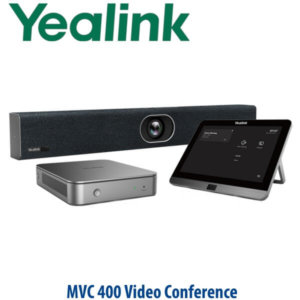
The Yealink MTouch Plus is the meeting-room controller that sits on the table and makes a Yealink MVC room feel simple: one-touch join, camera control, content sharing, volume, participant control and meeting layout from a dedicated 11.6-inch touch panel. For Dubai offices moving away from laptop-on-HDMI meetings, the MTouch Plus is the difference between a room that technically works and a room that every visitor, director and department head can actually use.
Vector Digital Systems LLC supplies Yealink MTouch Plus for Dubai, Abu Dhabi and export projects, with pre-sales room design, MVC kit matching, staging and warranty handling locally. We have supplied Yealink solutions since 2009, and David handles Yealink product matching for meeting-room, Teams Rooms and video collaboration deployments.
Platform Fit — MTouch Plus Is for Room Systems, Not a SIP Desk Phone
The most common buying error is treating MTouch Plus like a universal tablet. It is not a normal Android tablet, not a SIP phone, and not a standalone Microsoft Teams desk phone. It is a Yealink meeting-room touch console used with compatible Yealink room systems, especially MVC Microsoft Teams Rooms on Windows bundles with MCore/MCore Pro. Match the room platform before ordering.
| Your Platform | Right Yealink Product | What You Need |
|---|---|---|
| Microsoft Teams Rooms on Windows | Yealink MVC room system with MTouch Plus | Teams Rooms licence, MCore/MCore Pro, camera, audio and room display |
| Zoom Rooms | Yealink Zoom Rooms kit or compatible Zoom-certified room hardware | Zoom Rooms licence and supported Yealink room bundle |
| SIP PBX / desk-phone deployment | Yealink T7 SIP desk phone or CP-series conference phone | SIP credentials from 3CX, Yeastar, UCM, Asterisk or hosted PBX |
Certification note: Microsoft Teams certification must be checked at room-system bundle level. Yealink MVC bundles listed by Microsoft include MTouch Plus as part of the room system, but Vector Digital Systems verifies the exact MVC bundle and certification status before quoting.
Power and Cabling Truth — Do Not Order the Panel Alone for a Room
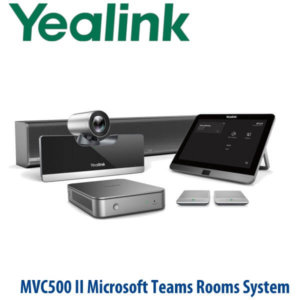
MTouch Plus is part of a room-system architecture. It connects to the Yealink room compute side, such as MCore/MCore Pro, and the room also needs the correct camera, audio device, display connection, Teams Rooms or Zoom licence, network, and mounting path. For USB-C laptop sharing with power delivery, the PD power supply is an additional design item. We check the cable route, table box, wall route and room layout before dispatch so the installer does not discover a missing cable or power accessory on site.
Why the 11.6-Inch Panel Matters in Dubai Boardrooms
A meeting room can have an excellent camera and still fail if users cannot start the call quickly. The MTouch Plus gives a larger 11.6-inch 1080P control surface than earlier compact panels, with a room-ready interface for joining scheduled meetings, controlling camera views, sharing content, muting audio and managing participants. In DIFC boardrooms, Business Bay management rooms, DMCC hybrid-work spaces and hotel meeting suites, the larger panel reduces “where do I click?” friction at the start of every meeting.
Sibling Comparison — MTouch II vs MTouch Plus vs MTouch Plus-MB
| Feature | MTouch II | MTouch Plus ★ | MTouch Plus-MB |
|---|---|---|---|
| Display | 8″ IPS, 1280×800 | 11.6″ IPS, 1080P | 11.6″ IPS, 1080P |
| Main role | Earlier MVC touch panel | Current MVC Teams Rooms touch panel | MeetingBoard / MTRoW board console |
| Room control | Meeting, camera and sharing control | Meeting, camera, layout, sharing and room control | MeetingBoard room control |
| Content sharing | Wired and wireless sharing support | USB-C, WPP30 and supported casting options | USB-C, PD and board-specific sharing |
| Multi-panel control | Limited / legacy design | Supports multi-panel room designs with MTouch Plus-EXT | Board-room specific deployment |
| Installation | Desk panel | Desktop fixed, flat or wall-mounted | MeetingBoard room table or wall deployment |
| Best fit | Replacement in older MVC rooms | New Yealink MVC Teams Rooms projects | Yealink MeetingBoard MTR-W rooms |
| Price tier | Legacy / replacement | Current standard | Board-specific accessory |
| Choose if… | You are replacing a panel in an older MVC room | You are building or refreshing a Yealink MVC meeting room in Dubai | Your room is built around Yealink MeetingBoard with Windows room mode |
Where MTouch Plus Works Best in Dubai
DIFC and Downtown boardrooms. Executive rooms need one-touch join without a laptop owner becoming the meeting operator. Pair MTouch Plus with the correct Yealink MVC bundle, room display, camera and audio so visitors can walk in, tap the scheduled meeting and start.
Business Bay and DMCC hybrid-work rooms. Teams Rooms adoption is high in multi-branch UAE companies, but meeting friction usually comes from cabling and user control. MTouch Plus gives a fixed control point on the table, while USB-C and wireless sharing options keep laptop sharing clean.
Hotel meeting suites and training rooms. For hospitality spaces in Deira, Barsha, JLT and Marina, a wall-mounted or fixed-table MTouch Plus reduces staff dependency. The room can be set up as a repeatable, guest-friendly video room rather than a one-off AV installation.
Large boardrooms and divisible rooms. With multi-panel design using compatible MTouch Plus-EXT layouts, participants can control the meeting from more than one position in the room. This is useful for long boardroom tables, divisible training rooms and ProAV spaces where the presenter is not always seated beside the main console.
Full Technical Specifications
| Specification | Yealink MTouch Plus |
|---|---|
| Product type | Meeting-room touch control panel for Yealink room systems |
| Display | 11.6-inch IPS touchscreen |
| Resolution | 1920×1080 Full HD / 1080P |
| Screen finish | Anti-fingerprint and anti-glare surface |
| Primary platform | Yealink MVC Microsoft Teams Rooms on Windows systems; verify exact room bundle before quoting |
| Room compute connection | MCore / MCore Pro connection in compatible Yealink room systems |
| Meeting control | Join, end, mute, volume, camera control, layout and participant control depending on room platform |
| Content sharing | USB-C wired sharing; WPP30 wireless sharing and supported AirPlay, Miracast or Google Cast options where enabled |
| USB ports | USB-C for content sharing, USB-C PD port for laptop charging design, USB-A ports for compatible accessories |
| Audio/headset port | 3.5mm headset port |
| Wireless support | Wi-Fi and Bluetooth support per Yealink datasheet; use depends on room-system design |
| Wake-up | Automatic wake-up when paired with Yealink RoomSensor in supported room designs |
| Multi-panel rooms | Supports multiple touch-panel room-control designs with compatible MTouch Plus-EXT deployment |
| Installation | Desktop fixed, flat surface or wall-mounted installation |
| Weight | Approx. 0.967 kg panel weight |
| Typical room kits | Yealink MVC S50, MVC S80, MVC S90, MVC S98 and other compatible MVC room systems — confirm exact bundle |
Compatible Accessories and Room Components
| Item | Model / Type | Purpose |
|---|---|---|
| Room compute | Yealink MCore / MCore Pro | Runs the Teams Rooms on Windows room system; required in MVC architecture |
| Wireless presentation | Yealink WPP30 | Wireless content sharing where supported in the room design |
| Room wake sensor | Yealink RoomSensor | Automatically wakes the room when people enter, depending on supported setup |
| Extension touch panel | MTouch Plus-EXT | Adds extra room-control points for long tables, divisible rooms and ProAV spaces |
| PD power supply | USB-C PD power design item | Allows laptop charging through USB-C content-sharing path where specified |
| Mounting | Desk / wall / flat installation kit | Fixes the controller securely to the meeting table, wall or presentation area |
Staging Before Dispatch
Vector Digital Systems does not simply ship a touch panel and leave the room integration to guesswork. For Yealink room-system projects, we confirm the Teams Rooms or Zoom Rooms platform, licence path, MCore/MCore Pro pairing, camera and audio model, display count, table-cable route, network readiness, content-sharing requirement and mounting method. Where the full room kit is supplied by us, we stage the kit before dispatch, label the cables, test the controller workflow and confirm the user journey: walk in, wake room, join meeting, share content, end meeting.
Export from Dubai
Vector Digital Systems exports Yealink MTouch Plus and compatible MVC room-system components from Dubai to system integrators, AV contractors, telecom operators and enterprise procurement teams. Common export destinations include Oman, Saudi Arabia, Kuwait, Bahrain and Qatar in the GCC; Jordan and Egypt in the wider region; Kenya, Tanzania and Nigeria in Africa; and Pakistan, Sri Lanka and Bangladesh for South Asian projects. Shipments are quoted FOB Dubai with commercial invoice, packing list and certificate of origin on request. VAT, delivery and project quantities are quoted clearly — no fixed online price is displayed.
Get a same-day Yealink MTouch Plus quote in AED
Tell David your room platform, room size, existing Yealink MVC model, display count, table cable route and whether you need wired USB-C sharing, WPP30 wireless sharing, RoomSensor or multi-panel control. We quote with VAT breakdown, delivery and staging notes.
Frequently Asked Questions — Yealink MTouch Plus
What is the Yealink MTouch Plus used for?
The Yealink MTouch Plus is an 11.6-inch touch control panel for Yealink meeting room systems. It is used to join meetings, control camera views, manage participants, adjust volume, mute audio, share content and operate a Teams Rooms or compatible Yealink room setup from the meeting table.
Does the Yealink MTouch Plus work as a standalone Microsoft Teams device?
No. MTouch Plus is not a standalone Teams phone or tablet. It is a room-system touch panel used with compatible Yealink MVC Microsoft Teams Rooms bundles, typically with MCore or MCore Pro. Vector Digital Systems verifies the exact Microsoft-listed room bundle and certification status before quoting.
Can I use MTouch Plus with Zoom Rooms?
MTouch Plus is primarily specified for Yealink room-system deployments, and the correct Zoom or Teams fit depends on the complete Yealink room bundle. If your office runs Zoom Rooms, David will verify the compatible Yealink Zoom-certified hardware before quoting instead of assuming the Teams Rooms bundle is correct.
MTouch Plus vs MTouch II — which one should I buy?
For a new Yealink MVC room, choose MTouch Plus. It has a larger 11.6-inch 1080P touch display and supports the current room-control workflow. MTouch II is mainly relevant when replacing a panel in an older MVC installation. Send David your current MVC model and he will confirm the correct replacement.
Does MTouch Plus support wired and wireless content sharing?
Yes, in supported room-system designs MTouch Plus supports USB-C wired content sharing and wireless sharing using Yealink WPP30 or compatible casting options such as AirPlay, Miracast or Google Cast where enabled. We confirm the sharing method during room design because features depend on the full Yealink room bundle and firmware.
Can MTouch Plus be wall-mounted or fixed to a meeting table?
Yes. MTouch Plus supports flexible installation including wall mounting, fixed desktop installation and flat-surface placement. For Dubai boardrooms and hotel meeting rooms, we recommend confirming the cable route and table box before delivery so the panel looks clean and cannot be moved or unplugged by users.
Can one Yealink room use more than one MTouch Plus panel?
Yes, multi-panel room control is possible in supported designs using MTouch Plus and compatible extension touch-panel architecture. This is useful for long boardroom tables, divisible rooms and ProAV meeting spaces where meeting control is needed from more than one seat or wall position.
Who is the authorised Yealink supplier for MTouch Plus in Dubai?
Vector Digital Systems LLC supplies Yealink products in Dubai and has been a Yealink reseller and system integrator since 2009. David handles Yealink room-system specification, project pricing, staging and warranty coordination locally, so your MTouch Plus order is matched to the correct room bundle before dispatch.
What is the best Yealink touch panel for a Teams meeting room in Dubai?
For a current Yealink MVC Microsoft Teams Rooms project, MTouch Plus is the standard recommendation because it gives a large 11.6-inch 1080P control surface, content-sharing options and flexible mounting. For MeetingBoard-based Windows rooms, ask David to verify whether MTouch Plus-MB is the correct board-specific console.
Does Vector Digital Systems configure Yealink MTouch Plus before delivery?
Yes, when supplied as part of a Yealink room-system project, Vector Digital Systems stages the room kit before dispatch: platform checked, MCore pairing confirmed, camera and audio mapped, cable labels prepared, content-sharing path tested and the meeting join workflow verified before delivery.
Does Vector Digital Systems export Yealink MTouch Plus from Dubai?
Yes. Vector Digital Systems exports Yealink MTouch Plus and MVC room-system components from Dubai to integrators and enterprise buyers in Oman, Saudi Arabia, Kuwait, Bahrain, Qatar, Jordan, Egypt, Kenya, Nigeria, Pakistan and other markets. Shipments are quoted FOB Dubai with commercial invoice, packing list and certificate of origin on request.