
Description
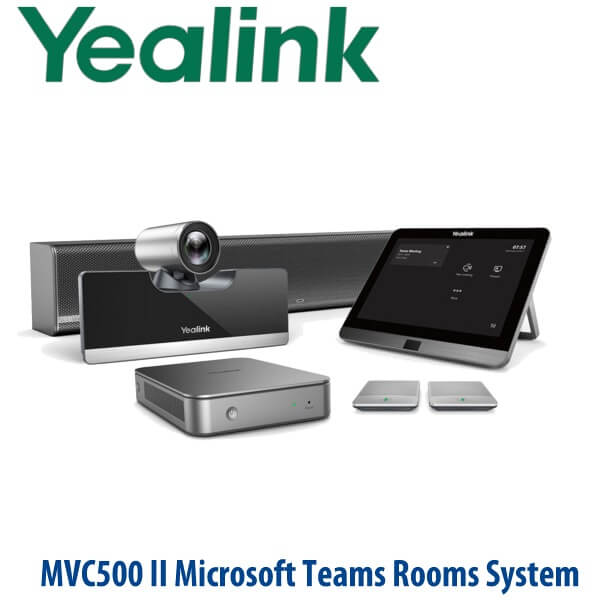
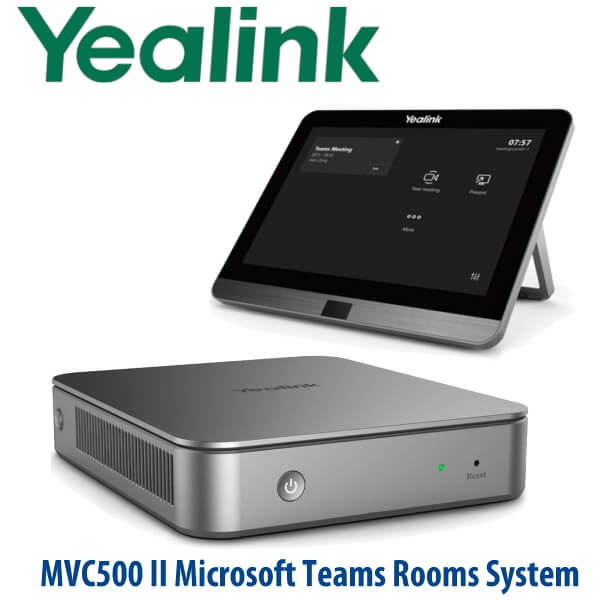
Yealink MVC500 II Microsoft Teams Rooms System Dubai
Yealink MVC500 II Is EOL — Order the MVC640 Successor for Medium Teams Rooms
The Yealink MVC500 II was one of the earlier Microsoft Teams Rooms bundles used in small and medium meeting rooms. It has now reached Yealink end-of-life status, so Vector Digital Systems recommends the Yealink MVC640 for current medium-room Microsoft Teams Rooms projects in Dubai. The MVC640 gives your meeting room a dedicated Teams Rooms on Windows experience with a room PC, table touch console, 4K PTZ camera and room audio package — staged and tested before delivery by Vector Digital Systems LLC, Dubai’s Yealink specialist team since 2009.
This page is written for buyers who searched for the MVC500 II because an old quotation, tender, consultant schedule or installed room still names that model. For new supply, the safer decision is not to chase EOL stock. Choose the MVC640, confirm the room size, displays, Microsoft Teams Rooms licence plan and cabling route, then let David prepare a same-day AED quote with VAT and delivery shown clearly.
Platform Check — Teams Rooms, Zoom Rooms or SIP Conference?
The MVC640 is a Microsoft Teams Rooms system. It is not a SIP conference phone and it is not a Zoom Rooms kit. This matters because the room account, licence and admin workflow are different from a normal desk phone or USB camera. Microsoft Teams Rooms certification was checked against Microsoft’s certified hardware list on 24 July 2026, where Yealink MVC640 is listed under Teams Rooms on Windows certified systems.
| Your Room Platform | Right Yealink Device | What You Need |
|---|---|---|
| Microsoft Teams Rooms | Yealink MVC640 — this page | Microsoft 365 tenant, Teams Rooms licence, room account and meeting-room network access |
| Zoom Rooms | Zoom-certified Yealink room kit — ask David to verify the current certified SKU | Zoom Rooms licence, Zoom admin access and room calendar configuration |
| SIP conference calls only | Yealink CP-series conference phone, not an MVC room system | SIP credentials from 3CX, Yeastar, Grandstream UCM, hosted PBX or operator service |
Power and Cabling Truth — This Is a Room System, Not a Desk Phone
The MVC640 is not powered like a normal Yealink desk phone. A Teams Rooms installation needs a planned display wall, table console position, camera mounting point, room PC location, power sockets, HDMI routes, Ethernet, and any required USB or CAT cabling between the front-of-room and table area. Vector Digital Systems confirms these details before quoting so the room is not delayed by missing power, display cables, licence access or network permissions on installation day.
Why the MVC640 Is the Sensible MVC500 II Replacement
The MVC500 II used a UVC50 1080p PTZ camera, MTouch II touch panel, MCore mini-PC, soundbar and CPW90 wireless microphones. The MVC640 moves the medium-room buyer into the newer MVC range, with a stronger UVC84 4K PTZ camera, 12× optical zoom and current Microsoft Teams Rooms certification. For Dubai offices refreshing post-RTO meeting rooms in Business Bay, DIFC, DMCC, JLT and Dubai Internet City, the upgrade solves the real problem: the room becomes a dedicated Teams space instead of another laptop-and-speakerphone setup.
MVC640 in the Yealink Teams Rooms Range
Use the MVC640 when the room is too important for a basic huddle device but does not need the larger-room MVC840 or MVC900 II style design. It is the practical medium-room choice for 6–12 person boardrooms, management rooms, training spaces and client presentation rooms where camera reach, audio pickup and one-touch Teams join matter more than the cheapest hardware cost.
| Feature | MVC400 | MVC640 ★ | MVC840 |
|---|---|---|---|
| Room fit | Small meeting rooms | Medium meeting rooms | Large meeting rooms |
| Platform | Microsoft Teams Rooms | Microsoft Teams Rooms | Microsoft Teams Rooms |
| Camera tier | Small-room camera bundle | UVC84 4K PTZ camera | Large-room UVC84-based bundle |
| Camera reach | Huddle / small table | 4K sensor, 12× optical zoom | Larger-room camera coverage |
| Touch control | Table touch console | MTouch touch console | MTouch touch console |
| Audio approach | Small-room audio | Medium-room wireless or wired audio bundle options | Larger-room expandable audio |
| Replaces / upgrade context | Small MVC rooms | MVC500 II medium-room refresh | MVC800 II / larger-room refresh |
| Price tier | Lower | Medium | Higher |
| Choose if… | The room is small and cost-sensitive | You need the current medium-room replacement for MVC500 II | The room is large, long, or needs stronger audio coverage |
Where the MVC640 Works in Dubai
DIFC and DMCC boardrooms. Legal, finance and trading teams need a room that joins Teams meetings without someone bringing a laptop, HDMI adapter and Bluetooth speaker every morning. The MVC640 gives the room a permanent Teams identity, a touch controller on the table and a PTZ camera that frames participants properly.
Business Bay and JLT management rooms. Medium rooms used for weekly management calls, client demos and regional reviews need reliability more than novelty. Vector Digital Systems stages the camera, audio, display outputs and room sign-in path before handover, so the first meeting does not become the test meeting.
Post-RTO hybrid meeting refreshes. Many UAE offices returned to the boardroom after years of laptop-based video calls. The MVC640 is the clean upgrade path when the room now needs a permanent Microsoft Teams Rooms experience, scheduled calendar join, remote participant visibility and clear table audio.
Consultant and tender replacements for MVC500 II. If your bill of quantity still says MVC500 II, send it to David. We will quote the MVC640 as the current replacement direction, flag any licence or room-design changes, and keep the commercial response simple for procurement.
Full Technical Specification
| Specification | Yealink MVC640 |
|---|---|
| Product type | Microsoft Teams Rooms system for medium meeting rooms |
| Certification status | Listed on Microsoft Teams Rooms on Windows certified hardware list — checked 24 July 2026 |
| Recommended room size | Medium meeting rooms, management rooms, boardrooms and client presentation rooms |
| Core components | MCore mini-PC, MTouch touch console, UVC84 camera and room audio bundle; exact microphone/speaker package depends on selected SKU |
| Camera | Yealink UVC84 4K PTZ camera |
| Camera zoom | 12× optical zoom |
| Camera intelligence | Auto-framing and PTZ control for meeting-room participants |
| Touch panel | MTouch table console for meeting join, call control, content sharing and camera control |
| Room PC | MCore mini-PC for Microsoft Teams Rooms on Windows |
| Display support | Meeting-room display output via HDMI; confirm single or dual display layout before quoting |
| Content sharing | Wired and wireless sharing options depending on selected room bundle and accessories |
| Microsoft requirements | Teams Rooms licence, room account, Microsoft 365 admin readiness and Teams Rooms policy configuration |
| Network requirements | Stable meeting-room Ethernet, access to Microsoft Teams services and approved firewall/proxy rules |
| Power and cabling | Requires planned power, HDMI, Ethernet and room cabling; not a single PoE desk-phone install |
| Replaces | Recommended current medium-room replacement direction for Yealink MVC500 II projects |
Compatible Accessories and Room Add-ons
| Accessory / Add-on | Use in MVC640 Room | Order Note |
|---|---|---|
| Wireless microphones | Flexible table audio without fixed mic cabling | Confirm exact microphone bundle at quote stage |
| Wired microphone option | Cleaner fixed-room install where wireless charging or movement is not required | Best for permanent boardroom tables |
| Wireless presentation pod | Quick laptop content sharing without searching for adapters | Availability and regional bundle inclusion confirmed before quoting |
| Dual displays | One screen for people, one for shared content | Tell David your display size and wall layout |
| Mounting and cabling kit | Cleaner camera, PC and display-wall installation | Recommended for new fit-outs and boardroom refreshes |
Staging Before Dispatch — What Vector Digital Systems Checks
Vector Digital Systems stages Yealink Teams Rooms systems before handover wherever tenant access and project timing allow. The staging workflow includes hardware inspection, bundle verification, firmware readiness check, display output test, camera framing test, microphone/speaker test, touch-console check, cabling review and Teams Rooms sign-in guidance for your Microsoft 365 admin. For Dubai projects, David confirms the room account, Teams Rooms licence plan, display count, room size, table position and site delivery schedule before dispatch.
This is the practical difference between buying a box and buying a working room. The MVC640 arrives with the installation path already discussed, not as a pile of components waiting for the IT team to discover missing HDMI, blocked firewall access or an unlicensed room account.
Export from Dubai
Vector Digital Systems supplies Yealink MVC Teams Rooms systems from Dubai to system integrators, corporate IT teams and AV contractors across the region. Common export routes include Oman, Saudi Arabia, Kuwait, Qatar and Bahrain in the Gulf; Jordan and Lebanon where permitted in the Levant; Egypt and Morocco in North Africa; Kenya, Tanzania and Uganda in East Africa; and Pakistan, Sri Lanka and Bangladesh in South Asia. Shipments are quoted FOB Dubai with commercial invoice, packing list and certificate of origin on request.
For export buyers replacing old MVC500 II room systems, David can quote the MVC640 successor direction with accessory bundle, room size notes and documentation for procurement approval. Multi-room pricing is available for hotel groups, banking branch networks, government IT departments, telecom operators and regional system integrators.
Get a same-day quote in AED — MVC500 II replacement guidance included
Tell David your room size, display count, Microsoft Teams Rooms licence status, cabling condition and whether the room is replacing an MVC500 II. We quote with VAT breakdown, delivery and staging scope included.
Frequently Asked Questions — Yealink MVC640 / MVC500 II Replacement
Is the Yealink MVC500 II still available?
The Yealink MVC500 II is an end-of-life model. Yealink announced end-of-sale on 30 April 2021 and end-of-life on 30 April 2026. For new Microsoft Teams Rooms projects in Dubai, Vector Digital Systems recommends quoting the current MVC640 medium-room system instead of sourcing old MVC500 II stock.
Is the Yealink MVC640 the replacement for the MVC500 II?
For most medium-room MVC500 II replacement projects, yes — the MVC640 is the practical current recommendation. It moves the room to a newer Yealink Teams Rooms bundle with a UVC84 4K PTZ camera, Teams Rooms touch control and current Microsoft Teams Rooms certification. David can confirm whether MVC640, MVC400 or MVC840 is the best fit after checking your room size.
Is the Yealink MVC640 Microsoft Teams certified?
Yes — the Yealink MVC640 is listed on Microsoft’s Teams Rooms on Windows certified hardware list. Vector Digital Systems checked the certification status on 24 July 2026 before preparing this page. For any future Teams Rooms quote, David verifies the certified device list again before confirming the final SKU.
Does the MVC640 work with Zoom Rooms?
The MVC640 is a Microsoft Teams Rooms system. If your room is standardised on Zoom Rooms, ask David for the current Zoom-certified Yealink kit instead of ordering an MVC Teams Rooms bundle. Teams Rooms, Zoom Rooms and SIP conference devices use different licensing and admin workflows, so the platform must be confirmed before purchase.
What room size is the Yealink MVC640 designed for?
The MVC640 is designed for medium meeting rooms. It suits Dubai boardrooms, management rooms, client presentation spaces and hybrid meeting rooms where a small huddle device is not enough but a large-room MVC840-style deployment may be more than required.
MVC400 vs MVC640 vs MVC840 — which one should I buy?
Choose MVC400 for smaller rooms, MVC640 for medium rooms and MVC840 for larger rooms that need more coverage. If you are replacing an MVC500 II, the MVC640 is usually the first model to review because it targets the medium-room use case and gives you a stronger 4K PTZ camera platform.
Does the MVC640 need a Microsoft Teams Rooms licence?
Yes — a Teams Rooms system needs the correct Microsoft Teams Rooms licence, a room account, calendar setup and Microsoft 365 admin configuration. Vector Digital Systems supplies and stages the Yealink hardware; your Microsoft tenant admin or IT partner must provide the licence and room-account access for final sign-in.
Does Vector Digital Systems configure the MVC640 before delivery?
Yes — Vector Digital Systems checks the hardware bundle, display output, camera, audio, touch console, firmware readiness and room setup requirements before handover wherever project access allows. For Dubai installations, David confirms room size, display count, network readiness and Teams Rooms licence status before dispatch.
Who is the Yealink authorised supplier in Dubai?
Vector Digital Systems LLC has supplied and supported Yealink products in Dubai since 2009. David handles Yealink pre-sales specification, Microsoft Teams Rooms replacement guidance, project pricing, staging coordination and local warranty handling for Dubai and export customers.
What is the best Yealink Teams Rooms kit for a medium boardroom in Dubai?
For a medium Microsoft Teams boardroom, the Yealink MVC640 is the standard recommendation. It gives the room a dedicated Teams Rooms experience, 4K PTZ camera coverage, touch control and room audio options. For a smaller room, review MVC400; for a larger boardroom or training room, step up to MVC840.
Does Vector Digital Systems export Yealink MVC Teams Rooms systems from Dubai?
Yes — Vector Digital Systems exports Yealink MVC Teams Rooms systems from Dubai to integrators, AV contractors and corporate IT teams in Oman, Saudi Arabia, Kuwait, Qatar, Bahrain, Egypt, Kenya, Tanzania, Pakistan and Sri Lanka. Exports are quoted FOB Dubai with commercial invoice, packing list and certificate of origin on request.