Description
Yealink WPP20 Wireless Presentation Pod One-Tap 1080p Content Sharing for Yealink Meeting Rooms Dubai
Yealink WPP20 — One-Tap Wireless Presentation for Cleaner Meeting Rooms
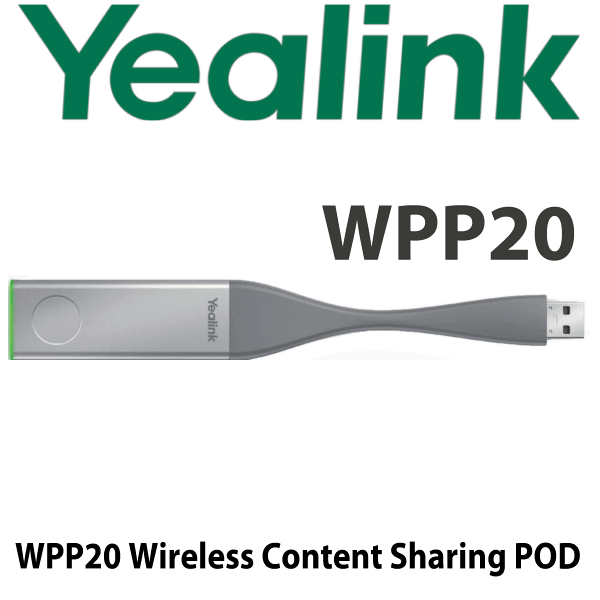
The Yealink WPP20 is the simple answer to the cable problem in Dubai boardrooms: no HDMI cable across the table, no adapter hunt before the meeting starts, and no five-minute delay while someone searches for the right input. Plug the WPP20 into a laptop, press the button, and share content wirelessly to a compatible Yealink video conferencing system in up to 1080p/30fps Full HD. Vector Digital Systems supplies the Yealink WPP20 in Dubai with compatibility checking, room-system pairing guidance, VAT breakdown, delivery options, and same-day quote in AED.
Platform Fit — WPP20 Is for Yealink Room Systems, Not a Generic HDMI Dongle
The buyer mistake with the WPP20 is assuming it works like a universal wireless HDMI adapter. It does not. It is a Yealink room accessory designed to pair with compatible Yealink video conferencing systems and room devices. Tell David which Yealink room system you have before ordering so the correct presentation accessory is quoted.
| Your Meeting Room Setup | Right Choice | What to Check Before Ordering |
|---|---|---|
| Compatible Yealink video conferencing system | Yealink WPP20 wireless presentation pod | Room-system model, firmware, and number of presenters required |
| New Yealink room refresh with 4K sharing requirement | Ask David about Yealink PA20 | 4K/30fps need, USB-C laptops, and room-system compatibility |
| Non-Yealink display or standalone TV | Verify before buying — WPP20 is not a universal TV casting dongle | Display input, meeting app, operating system, and room workflow |
| Microsoft Teams Rooms or Zoom Rooms | Use the accessory approved for your exact Yealink room package | Room kit model, touch panel, Teams/Zoom mode, and certified accessory list |
Power Truth — No PSU, No PoE, It Runs from USB
The Yealink WPP20 is powered by the laptop USB port. It is not a PoE network device and it does not need a separate power adapter for normal use. The room system must already be installed and powered separately. For multi-room deployments, Vector Digital Systems pairs and labels each WPP20 against the correct room before dispatch where the room hardware is available for staging.
Why Dubai Meeting Rooms Buy the WPP20
Dubai offices often run mixed laptop fleets: Windows notebooks for finance and operations, MacBooks for marketing and leadership, and visiting consultants bringing their own devices. The WPP20 removes the usual cable and adapter friction. It creates a self-built 5GHz 802.11ac wireless link to the compatible Yealink room system, so the meeting does not depend on the guest Wi-Fi network or a loose HDMI cable under the table.
WPP20 in the Yealink Presentation Accessory Range
Choose the WPP20 when the room needs reliable 1080p wireless content sharing with existing compatible Yealink systems. Choose the newer PA20 when the project requires 4K/30fps sharing, USB-C workflows, and the latest Yealink room accessory platform. For older rooms that still rely on HDMI only, the first upgrade is not the pod — it is checking whether the Yealink room endpoint supports wireless presentation accessories.
| Feature | Cabled HDMI / Native App Share | Yealink WPP20 ★ | Yealink PA20 |
|---|---|---|---|
| Best for | Basic rooms with fixed cable | 1080p wireless sharing on compatible Yealink systems | Newer 4K Yealink room deployments |
| Resolution | Depends on cable/display | Up to 1080p/30fps | Up to 4K/30fps |
| Laptop connection | HDMI/USB-C adapter required | USB 2.0 | USB-C / USB-A workflow |
| Wireless network | Not wireless | 5GHz 802.11ac self-built Wi-Fi | Wi-Fi 6 |
| Connected devices | One cable user at a time | Up to 8 connected pods | Project-dependent — verify room system |
| Simultaneous streams | Usually one | Up to 4 on supported systems | Up to 4 on supported systems |
| AirPlay | No | Supported for iPhone/iPad workflow | Verify by room system and firmware |
| Price tier | Lowest hardware cost, highest user friction | Mid-tier room accessory | Step-up 4K accessory |
| Choose if… | You only need a fixed cable and one presenter | You need simple 1080p one-tap sharing for an existing Yealink room | You are building a new room and want 4K wireless presentation |
Dubai Use Cases for Yealink WPP20
DIFC and Business Bay boardrooms. Executives walk in with different laptop brands and expect the presentation to start instantly. The WPP20 gives them a physical button and a predictable workflow instead of asking IT to keep HDMI, USB-C, Mini DisplayPort, and guest Wi-Fi sharing instructions ready on every table.
Training rooms in DMCC, JLT, and Dubai Silicon Oasis. Trainers often switch between their own laptop, a trainee device, and the room PC. On supported Yealink systems, multiple WPP20 pods can be connected and up to four streams can be shown at the same time, making side-by-side document review easier than passing one cable around the room.
Hotel meeting rooms and serviced offices. Guest presenters do not want to install software or change network settings before a client meeting. A paired WPP20 gives the venue a clean, repeatable handover: plug in, press, present. It also keeps the meeting table tidy for premium client-facing spaces.
Hybrid meeting rooms with Yealink video systems. When the video bar or room endpoint is already Yealink, the WPP20 becomes the practical accessory that makes the room feel complete. Content, video, and room control stay inside one tested ecosystem instead of being stitched together with third-party adapters.
Full Technical Specifications
| Specification | Yealink WPP20 |
|---|---|
| Product Type | Wireless presentation pod for compatible Yealink video conferencing systems |
| Primary Function | One-click wireless content sharing from laptop to Yealink room system |
| Interface | USB 2.0 × 1 |
| Wi-Fi Protocol | 802.11b/g/n/ac |
| Wi-Fi Frequency | 2.4GHz / 5GHz, with 5GHz 802.11ac content-sharing workflow |
| Resolution | Up to 1080p/30fps Full HD |
| Average Latency | 120ms average latency |
| Connected Devices | Up to 8 WPP20 devices connected simultaneously to one supported room system |
| Simultaneous Content Streams | Up to 4 streams on supported Yealink systems |
| Operating Systems | Windows 7/8/10 and macOS 10.10 or later for supported sharing workflows |
| AirPlay | Supported for Apple mobile-device sharing workflow; confirm room-system firmware before deployment |
| Meeting Assistant Functions | Invite, end call, start/stop content sharing, volume, mute, camera control, layout, member list, DTMF, DND — subject to room-system compatibility |
| Recording | Recording to PC on supported workflows |
| Encryption | WPA-PSK / WPA2-PSK |
| Button | Start/Stop button × 1 |
| Input Power | 5V / 500mA from USB |
| Power Consumption | 2.5W |
| Dimensions | 26mm × 183.2mm × 9mm |
| US Market Note | WPP20 is unavailable in the United States market; UAE and export-region availability must be confirmed at quote stage |
Compatible Accessories and Room-System Checks
| Item | What David Checks | Why It Matters |
|---|---|---|
| Yealink room endpoint | Exact model and firmware | WPP20 must be compatible with the room system before pairing |
| Touch panel / room controller | Pairing workflow and content-sharing setting | Some rooms require content sharing to be enabled before the pod works correctly |
| Presenter laptops | Windows/macOS mix and USB access | Avoids ordering the wrong sharing accessory for USB-C-only laptop fleets |
| PA20 upgrade option | 4K/30fps requirement and current room compatibility | PA20 is the better choice for new premium 4K room projects |
Staging Before Dispatch
Vector Digital Systems checks the Yealink WPP20 against your meeting-room hardware before dispatch. For project orders, David’s team confirms the room-system model, sharing requirement, firmware readiness, number of pods per room, and whether the newer PA20 is a better fit. Where the matching Yealink room hardware is supplied with the order, we pair and label the pods by room name before delivery so your IT team is not guessing which device belongs in which boardroom.
Export from Dubai
Vector Digital Systems supplies Yealink presentation accessories from Dubai to system integrators, hotel AV teams, corporate IT departments, and meeting-room installers across the region. Common export routes include Oman, Saudi Arabia, Kuwait, Bahrain, Qatar, Jordan, Egypt, Kenya, Pakistan, and Sri Lanka. Shipments move FOB Dubai with commercial invoice, packing list, and certificate of origin on request. For multi-room rollouts, send David the room list and Yealink endpoint models so we can quote the correct quantity, accessory mix, VAT treatment, and export documentation.
Get a same-day AED quote for Yealink WPP20 in Dubai
Tell David your Yealink room-system model, quantity, whether the room needs 1080p or 4K sharing, and whether the order is for Dubai delivery or export. We quote with VAT breakdown and delivery charges included.
Frequently Asked Questions — Yealink WPP20
What is the Yealink WPP20 used for?
The Yealink WPP20 is a wireless presentation pod for compatible Yealink video conferencing systems. It lets a presenter plug the pod into a laptop, press the button, and share content wirelessly to the meeting-room display without using an HDMI cable across the table.
Does the Yealink WPP20 work with any TV or projector?
No — the WPP20 is not a generic wireless HDMI dongle. It is designed to work with compatible Yealink room systems. Before quoting, Vector Digital Systems checks your room-system model and firmware so you do not buy a pod that cannot pair with the display setup.
Does the Yealink WPP20 support Microsoft Teams or Zoom rooms?
The WPP20 is an accessory, not a Teams or Zoom endpoint by itself. It may be used only where the exact Yealink room package supports that wireless sharing workflow. For Microsoft Teams Rooms or Zoom Rooms projects, ask David to verify the current Yealink accessory compatibility before ordering.
What resolution does the Yealink WPP20 support?
The WPP20 supports wireless content sharing up to 1080p/30fps Full HD on compatible Yealink systems. If your meeting room requires 4K/30fps presentation, ask David about the Yealink PA20 step-up option instead.
How many Yealink WPP20 pods can connect at the same time?
On supported Yealink systems, up to 8 WPP20 pods can be connected at the same time, and up to 4 content streams can be shown simultaneously. Actual behaviour depends on the paired Yealink room system, so Vector Digital Systems verifies the room model before dispatch.
Does the Yealink WPP20 need Wi-Fi from our office network?
The WPP20 uses a self-built 5GHz 802.11ac wireless connection with the compatible Yealink room system, so it does not rely on the normal office router for presentation sharing. This helps avoid guest Wi-Fi problems in busy Dubai meeting rooms.
Does the Yealink WPP20 come with a power adapter?
No separate power adapter is needed for the WPP20 during normal use. It draws power from the laptop USB port. The Yealink room system itself must be powered and configured separately.
Yealink WPP20 vs PA20 — which one should I buy?
Choose the WPP20 for existing compatible Yealink rooms that need simple 1080p wireless content sharing. Choose the PA20 for newer meeting-room projects where 4K/30fps sharing, USB-C workflows, and the latest Yealink accessory platform are required. David can check your room model and quote the correct option.
Who is the authorised Yealink supplier in Dubai?
Vector Digital Systems LLC has supplied Yealink solutions in Dubai since 2009. David is the Yealink specialist for product selection, compatibility checks, project pricing, staging, and local warranty handling before dispatch.
Does Vector Digital Systems export Yealink WPP20 from Dubai?
Yes — Vector Digital Systems exports Yealink accessories from Dubai to integrators and enterprise buyers in Oman, Saudi Arabia, Kuwait, Bahrain, Qatar, Jordan, Egypt, Kenya, Pakistan, and Sri Lanka. Shipments are quoted FOB Dubai with commercial invoice, packing list, and certificate of origin on request.
Does Vector Digital Systems configure the Yealink WPP20 before delivery?
Yes — for project orders where the matching Yealink room hardware is supplied or available, Vector Digital Systems checks compatibility, pairs pods where possible, labels them by room, and confirms the sharing workflow before dispatch. For accessory-only orders, David confirms the room model and setup steps before quoting.