Description
Yealink EXP40 Expansion Module Dubai
Yealink EXP40 Expansion Module for Legacy T46 and T48 Desks
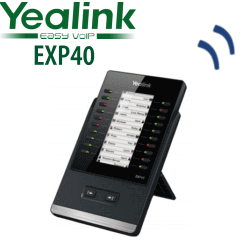
The Yealink EXP40 Expansion Module is the legacy LCD sidecar used with Yealink SIP-T46S, SIP-T46G, SIP-T48S and SIP-T48G desk phones. It gives receptionists, office administrators and supervisor desks a visible BLF wall for extensions, speed dials, call pickup, transfer, park and other daily telephony functions. If your Dubai office already runs a T46S, T46G, T48S or T48G fleet and you need the exact matching expansion module, this is the EXP40 page to use — not a substitute model.
Compatibility First — EXP40 Is Not Universal
The most important buying point is compatibility. The EXP40 is a legacy accessory for selected T46/T48 S and G generation phones. It is not the correct module for T46U, T48U or the newer T7 series. If you order the wrong expansion module, the physical and provisioning match will fail at the desk.
| Phone Model | EXP40 Compatibility | Buyer Note |
|---|---|---|
| Yealink SIP-T46S | Compatible | Common legacy reception-desk pairing |
| Yealink SIP-T46G | Compatible | Used in older T46G office fleets |
| Yealink SIP-T48S | Compatible | Touchscreen executive and operator desks |
| Yealink SIP-T48G | Compatible | Older T48G installations and replacement projects |
| T46U / T48U / T43U | Not EXP40 | These belong to the newer T4U accessory generation |
| T73U / T74U / T74W / T77U | Not EXP40 | T7-series desks use the newer T7/T8 expansion family, not EXP40 |
Platform Table — This Is a SIP Desk Phone Accessory
The EXP40 does not register to a phone system by itself. It works as an expansion module attached to a compatible Yealink SIP desk phone. Your SIP account, BLF status and key functions still come from the connected T46S, T46G, T48S or T48G phone and the PBX behind it.
| Your Platform | Right Use of EXP40 | What You Need |
|---|---|---|
| SIP PBX — 3CX, Yeastar, UCM, Asterisk, hosted PBX | EXP40 connected to a compatible T46/T48 legacy SIP phone | BLF and DSS key programming from your SIP PBX |
| Microsoft Teams | Do not buy EXP40 for a Teams-only desk | Ask David for the current Teams-certified Yealink MP-series option |
| Zoom Phone | Verify phone model and Zoom certification before quoting | Zoom Phone licence and compatible certified endpoint |
PoE and Power Truth for EXP40 Desks
The EXP40 is powered through the connected Yealink desk phone. The phone itself still needs a valid power source: either PoE from the network switch or the correct Yealink power supply for that phone model. Many legacy T46/T48 desks in Dubai were installed years ago with mixed PoE and adapter setups, so Vector Digital Systems confirms the phone model, power source and key map before dispatch. No buyer surprises at delivery.
Where EXP40 Fits in the Yealink Accessory Range
EXP40 is the correct accessory only when the desk still uses the T46S/T46G/T48S/T48G generation. It is not the accessory for T46U/T48U, and it is not the accessory for the current T7 generation. This page is intentionally written for exact-model legacy demand: offices that need a matching EXP40 for an installed phone estate, a spare reception sidecar, or a staged BLF console for an older but still working Yealink desk.
| Feature | Legacy Phone Without Module | EXP40 Module ★ | Wrong-Generation Module |
|---|---|---|---|
| Use Case | Basic desk calling | Reception, admin, operator and supervisor BLF desk | Avoid — may not fit or provision correctly |
| Compatible Phones | T46S/T46G/T48S/T48G alone | T46S, T46G, T48S, T48G | T46U/T48U/T7 models need different accessory families |
| Keys | Phone keys only | 20 physical keys, 2 pages, up to 40 programmable functions | Depends on module — verify before ordering |
| Display | Phone display only | 160×320 graphic LCD | Different generation display format |
| Best For | Individual user desk | Monitoring extensions and one-touch call handling | Only if matched to the exact phone generation |
| Choose if… | The user only handles their own calls | You need the exact EXP40 sidecar for a T46S/T46G/T48S/T48G desk | Do not guess — send the phone model to David before ordering |
Dubai Use Cases for the Yealink EXP40
Reception desks in older T46/T48 offices. Many Dubai offices still run Yealink T46S, T46G, T48S or T48G phones at reception. The EXP40 gives the receptionist labelled keys for management, sales, accounts, warehouse, meeting rooms and branch extensions without searching through the phone directory.
Hotels, clinics and service counters. A hotel front desk in Deira, a clinic reception in Jumeirah, or a service counter in Al Quoz often needs one-touch pickup, transfer and park keys. EXP40 turns the compatible Yealink desk phone into a simple operator console without adding a separate PC switchboard.
Call-centre supervisor desks. Supervisors using legacy Yealink T46/T48 phones can monitor common queues, senior agents, overflow lines and escalation contacts on a visible LCD key panel. Vector Digital Systems can pre-map the BLF and speed-dial layout before dispatch so the module arrives ready for the desk.
Full Technical Specifications
| Specification | Yealink EXP40 Expansion Module |
|---|---|
| Product Type | LCD expansion module / DSS sidecar for compatible Yealink SIP phones |
| Compatible Phones | Yealink SIP-T46S, SIP-T46G, SIP-T48S and SIP-T48G |
| Not Compatible With | T46U, T48U, T43U, T53/T54/T57, T73U, T74U, T74W, T77U and other T7-series phones |
| Display | 160×320 graphic LCD |
| Physical Keys | 20 physical keys with dual-colour LED indication |
| Page Keys | 2 independent control keys for fast page switching |
| Programmable Functions | Up to 40 functions across two pages |
| Common DSS Functions | BLF/BLA, speed dial, call forward, transfer, park, pickup and related PBX features |
| Stand | Two adjustable desk angles |
| Wall Mount | Wall-mountable |
| Power | Powered through the connected compatible Yealink phone; phone requires PoE or correct PSU |
| Status | Legacy / discontinued model; supplied only where exact EXP40 stock is required |
Accessories and Ordering Notes
| Item | Model / Detail | Purpose |
|---|---|---|
| Expansion Module | Yealink EXP40 | Exact LCD expansion sidecar for T46S/T46G/T48S/T48G |
| Host Phone | T46S, T46G, T48S or T48G | Required — EXP40 does not operate standalone |
| Power Supply | Depends on connected phone model | Needed if the connected phone is not powered by PoE |
| Provisioning | BLF / DSS key map | Vector Digital Systems can stage labels, extension keys and call-control functions |
Staging Before Dispatch
Vector Digital Systems can stage the EXP40 with the connected Yealink phone before dispatch: BLF keys, speed dials, transfer keys, park slots, pickup groups and page layout are programmed according to your office extension list. For 3CX, Yeastar P-Series, Grandstream UCM, Asterisk and hosted SIP PBX deployments, we test the desk-phone registration and confirm the key map before delivery. The receptionist or supervisor receives a usable console, not a blank sidecar.
Export from Dubai
Vector Digital Systems supplies Yealink legacy accessories and exact-model replacement items from Dubai to system integrators, PABX installers, hotel groups and enterprise IT teams. EXP40 requests commonly come from installed-base support projects where the customer already owns T46S, T46G, T48S or T48G phones and needs matching modules rather than a platform refresh. Export support is available for Oman, Saudi Arabia, Kuwait, Bahrain, Qatar, Jordan, Egypt, Kenya, Nigeria and Pakistan. Shipments move FOB Dubai with commercial invoice, packing list and certificate of origin on request.
Get a same-day quote in AED for the exact Yealink EXP40
Send David your phone model number first — T46S, T46G, T48S or T48G — so we confirm EXP40 compatibility before quoting. VAT breakdown and delivery charges are included in the quote.
Frequently Asked Questions — Yealink EXP40 Expansion Module
Which Yealink phones are compatible with the EXP40?
The Yealink EXP40 is compatible with SIP-T46S, SIP-T46G, SIP-T48S and SIP-T48G phones. It is not the right expansion module for T46U, T48U, T43U or the newer T7-series models such as T74U and T77U.
Is this page for the exact Yealink EXP40 model?
Yes — this page is for the exact Yealink EXP40 Expansion Module. It is written for buyers who need the legacy EXP40 sidecar for compatible T46S, T46G, T48S or T48G phones, not a replacement-module page.
Does the EXP40 work with Yealink T46U or T48U?
No. The EXP40 is not the correct module for T46U or T48U phones. Before ordering, send David a photo of the phone label or the exact model number so Vector Digital Systems can confirm the correct accessory.
How many programmable keys does the Yealink EXP40 provide?
The EXP40 has 20 physical keys with dual-colour LED status indication and two page-switch keys. Across two pages, it supports up to 40 programmable functions such as BLF, speed dial, transfer, call park and pickup.
Does the EXP40 register to 3CX, Yeastar or Grandstream UCM by itself?
No. The EXP40 is an expansion module, not a standalone SIP phone. It connects to a compatible Yealink T46S, T46G, T48S or T48G desk phone, and the connected phone registers to your SIP PBX such as 3CX, Yeastar, Grandstream UCM, Asterisk or a hosted provider.
Does the EXP40 need a separate power adapter?
The EXP40 is powered through the connected compatible Yealink phone. The phone itself must be powered by PoE from the network switch or by the correct Yealink PSU for that phone model. Vector Digital Systems confirms your power setup before dispatch.
Can Vector Digital Systems configure the EXP40 keys before delivery?
Yes — Vector Digital Systems can configure the EXP40 key layout before dispatch. Send the extension list and required functions, and we can stage BLF, speed dial, transfer, park, pickup and page layout on the connected Yealink phone.
Is the Yealink EXP40 suitable for a reception desk in Dubai?
Yes, if the reception desk uses a compatible T46S, T46G, T48S or T48G phone. The EXP40 gives the receptionist visible extension keys and one-touch call handling for transfers, pickup groups and common contacts.
Who supplies Yealink EXP40 expansion modules in Dubai?
Vector Digital Systems LLC supplies Yealink phones and accessories in Dubai and has supported Yealink deployments since 2009. David handles Yealink product matching, project quoting, staging and local warranty coordination.
Does Vector Digital Systems export Yealink EXP40 modules from Dubai?
Yes — Vector Digital Systems can export exact-model Yealink accessories from Dubai for installed-base support projects. Export destinations include Oman, Saudi Arabia, Kuwait, Bahrain, Qatar, Jordan, Egypt, Kenya, Nigeria and Pakistan, with FOB Dubai documentation available on request.