Description
Yealink USB Connect Headset Webcam & Speakerphone Management Software Dubai
Yealink USB Connect — The Missing Tool Behind a Clean Yealink Desk Setup
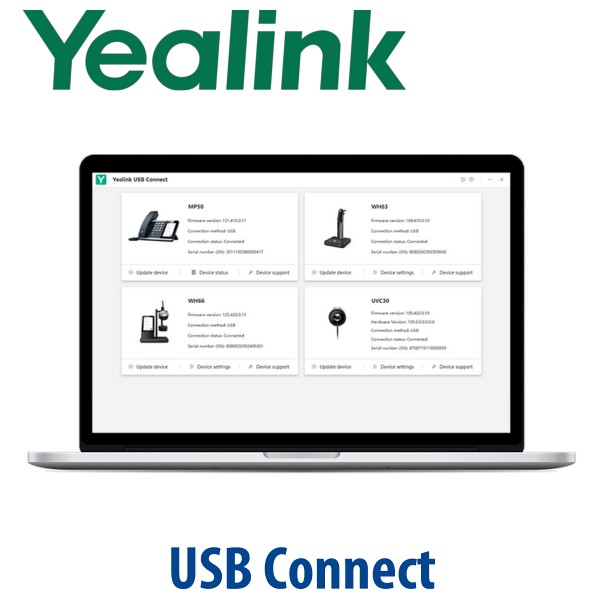
A Yealink headset, speakerphone or webcam should not be treated as a plug-and-forget accessory. Firmware versions, button behaviour, audio settings, camera settings and diagnostic logs all matter when the device is used every day for Teams, Zoom, SIP softphone calls or hybrid work. Yealink USB Connect is the official desktop utility used to personalise and manage Yealink USB devices including headsets, speakerphones and webcams. For Dubai offices standardising on Yealink audio and video devices, it gives IT a cleaner way to prepare, update and troubleshoot endpoints before users complain about mute buttons, call control or audio quality.
What Yealink USB Connect Does — and What It Does Not Replace
Yealink USB Connect is not a calling platform and it does not replace Microsoft Teams, Zoom, 3CX or your hosted PBX. It is the device management layer for Yealink USB peripherals connected to a computer. Use it to update firmware, adjust device settings, restart or reset supported devices, and collect logs when support needs evidence.
| Your Need | Right Tool | What It Handles |
|---|---|---|
| Manage a Yealink USB headset, webcam or speakerphone | Yealink USB Connect | Firmware updates, device settings, restart/reset, logs and local troubleshooting |
| Make Microsoft Teams calls | Microsoft Teams desktop app + Teams-certified Yealink device where required | Calling, meetings, Teams Phone and user account sign-in |
| Make Zoom calls | Zoom desktop app + compatible Yealink device | Zoom Meetings, Zoom Phone and camera/audio selection |
| Manage a large Yealink estate centrally | Ask David about Yealink device management options | Fleet-level administration, support policy and deployment planning |
The Buyer Error: Software Cannot Fix the Wrong Hardware Choice
USB Connect is powerful, but it does not turn a non-Teams device into a Teams-certified endpoint and it does not convert a desk phone into a USB headset. If your requirement is Microsoft Teams certification, Zoom certification, headset call control, DECT wireless range or desk-phone compatibility, choose the correct Yealink hardware first. Vector Digital Systems checks this before quoting so the device, platform and user workflow match from day one.
Download-Only Truth — There Is No Box, PSU or Hardware Included
Yealink USB Connect is software, not a physical accessory. It is installed on the user’s Windows or macOS computer and works with compatible Yealink USB devices connected to that computer. If you are buying Yealink headsets, speakerphones or webcams from Vector Digital Systems, ask David to confirm which devices should be updated through USB Connect before deployment. For desk phones, DECT bases and expansion modules, the usual Yealink power rules still apply separately — PoE or optional PSU depending on the hardware.
Where USB Connect Sits in the Yealink Management Stack
Think of Yealink USB Connect as the personal desktop tool. It is best for the user’s own headset, webcam or speakerphone, or for an IT technician preparing a batch of USB devices before handover. Larger Yealink environments may also need device management platforms, support tools or room management workflows. David can advise which layer is right for your Dubai office, call centre or hybrid team.
| Feature | Basic OS Settings | Yealink USB Connect ★ | Yealink Fleet Management |
|---|---|---|---|
| Scope | Computer audio/video selection | Local Yealink USB device management | Larger device estate planning |
| Devices | Any selected microphone, speaker or camera | Yealink headsets, speakerphones and webcams | Multiple Yealink endpoints by project |
| Firmware Updates | No Yealink firmware control | Yes, for supported USB devices | Project-dependent |
| Settings | Volume, microphone and camera selection | Device-specific Yealink settings and behaviour | Policy-led deployment planning |
| Support Logs | Limited | Useful for troubleshooting and support evidence | Depends on deployed management layer |
| Best For | One-off device selection | Users, IT support desks and pre-deployment staging | Large multi-site rollouts |
| Choose if… | You only need to select a microphone or camera in Windows/macOS | You want firmware, settings and logs for Yealink USB devices | You are planning a managed Yealink estate across departments or branches |
Where Yealink USB Connect Helps in Dubai
Call centres in Business Bay and Deira. When agents use the same Yealink USB headset every day, firmware consistency matters. USB Connect helps the support team prepare headsets, verify device status and collect logs before the issue becomes a floor-wide complaint.
Hybrid teams in DIFC and DMCC. A user may work from a laptop at home, a hot desk in the office and a meeting room speakerphone during the same week. USB Connect gives the user and IT team a single Yealink utility for supported USB headsets, webcams and speakerphones instead of relying only on Teams or Zoom settings.
IT support desks and system integrators. Before dispatching a Yealink headset, webcam or speakerphone to a branch in Abu Dhabi, Sharjah, Jebel Ali or Ras Al Khaimah, Vector Digital Systems can check the device, update it where required and confirm the correct workflow for the buyer’s platform.
Training rooms and reception desks. Shared USB speakerphones and cameras often fail because nobody knows which firmware or setting is active. USB Connect gives technicians a proper Yealink-side view before blaming the laptop, hub, Teams client or Zoom client.
Technical Specification — Yealink USB Connect
| Specification | Detail |
|---|---|
| Product Type | Yealink desktop software utility / USB endpoint management tool |
| Primary Use | Personalise and manage Yealink USB headsets, webcams and speakerphones |
| Device Categories | Supported Yealink USB headsets, speakerphones and webcams |
| Firmware Management | Update supported devices to current firmware through Yealink’s software workflow |
| Device Settings | Adjust available settings for supported headsets, speakerphones and webcams |
| Maintenance Tools | Device status check, one-click upgrade, restart/reset where supported, support log collection |
| Operating Systems | Download packages listed by Yealink Support for Windows, Windows ARM and macOS. Confirm the current installer before deployment. |
| Calling Platform | Platform-independent utility. Use with Teams, Zoom, SIP softphones or UC apps depending on the connected Yealink hardware. |
| Licence / Hardware | Software utility only. It does not include a Yealink headset, webcam, speakerphone, Teams licence, Zoom licence or SIP service. |
| Best Fit | Users, IT support teams, call centres, hybrid workers and integrators preparing Yealink USB devices before handover |
Compatible Yealink Device Families
| Device Family | Typical Use | USB Connect Role |
|---|---|---|
| Yealink USB / DECT Headsets | Call-centre agents, Teams users, Zoom users, reception and hybrid workers | Firmware updates, device settings and support logs for compatible headset models |
| Yealink Speakerphones | Huddle rooms, shared desks, training rooms and portable meeting kits | Status checking, firmware maintenance and troubleshooting before meetings |
| Yealink Webcams | Laptop users, executive desktops, training rooms and BYOD meeting spaces | Camera-side settings and firmware maintenance where supported |
| Yealink Desk Phones | SIP, Teams or Zoom desk calling depending on model family | Not the primary management route for desk phones. Ask David for the correct Yealink phone provisioning method. |
Staging Before Delivery — What Vector Digital Systems Checks
When Vector Digital Systems supplies Yealink headsets, speakerphones or webcams, we can prepare them before dispatch: model compatibility checked, firmware reviewed where required, user workflow confirmed, Teams/Zoom/SIP use case clarified, and device pairing explained to the buyer. For larger Dubai call-centre or hybrid-work deployments, David can help standardise which Yealink headset or speakerphone model should be issued to each user type before the purchase order is finalised.
Export from Dubai
Vector Digital Systems exports Yealink headsets, speakerphones, webcams and desk devices from Dubai to system integrators, telecom operators and enterprise procurement teams across Oman, Saudi Arabia, Kuwait, Bahrain, Qatar, Jordan, Egypt, Kenya, Tanzania and Pakistan. Yealink USB Connect itself is software, but the devices it supports are often shipped as part of headset, BYOD room or hybrid-worker kits. Export shipments move FOB Dubai with commercial invoice, packing list and certificate of origin on request. Project pricing is available for multi-unit Yealink orders.
Need Yealink headsets, webcams or speakerphones in Dubai?
Contact David, our Yealink specialist in Dubai. Tell us your platform, user count, headset style, meeting-room size and whether your IT team wants devices staged before dispatch. We quote in AED with VAT breakdown and delivery noted.
Frequently Asked Questions — Yealink USB Connect
What is Yealink USB Connect?
Yealink USB Connect is Yealink’s desktop software utility for managing supported Yealink USB devices such as headsets, speakerphones and webcams. It helps users and IT teams update firmware, adjust available device settings, check device status and collect logs for troubleshooting.
Does Yealink USB Connect make calls by itself?
No. Yealink USB Connect is not a calling app. Calls still happen through Microsoft Teams, Zoom, 3CX, a SIP softphone or another UC application. USB Connect manages the connected Yealink device, while your calling platform handles the meeting or phone call.
Which devices work with Yealink USB Connect?
Yealink positions USB Connect for multiple Yealink USB devices including headsets, speakerphones and webcams. Compatibility depends on the exact device model and firmware generation, so Vector Digital Systems checks the model before recommending it for a Dubai deployment.
Can Yealink USB Connect update headset firmware?
Yes, firmware updates are one of the main reasons to use Yealink USB Connect with supported devices. For call-centre and hybrid-work deployments, Vector Digital Systems can check headset firmware before delivery so users start with a clean, consistent setup.
Does Yealink USB Connect work with Microsoft Teams?
Yealink USB Connect can manage compatible Yealink USB devices that you may use during Teams calls, but it does not replace the Microsoft Teams app and it does not create Teams certification for a device. If Teams certification is required, ask David to verify the exact Yealink model before quoting.
Does Yealink USB Connect work with Zoom?
Yes, it can be used to manage compatible Yealink USB devices that are then selected inside Zoom for audio or video. Zoom calling and meeting features remain inside the Zoom app; USB Connect handles the Yealink device-side settings and maintenance.
Can Vector Digital Systems install or configure Yealink USB Connect?
Vector Digital Systems can guide Dubai buyers on using Yealink USB Connect with supported Yealink headsets, webcams and speakerphones. For device purchases, we can check compatibility, review firmware where required and explain the correct workflow before dispatch.
Who is the authorised Yealink supplier in Dubai?
Vector Digital Systems LLC has supplied Yealink products and VoIP solutions in Dubai since 2009. David handles Yealink product selection, pre-sales configuration, staging, project pricing and local warranty coordination for supported Yealink devices.
What is the best Yealink headset setup for a Dubai call centre?
For fixed agents, a Yealink DECT or wired headset should be selected based on shift length, desk layout, noise level and whether remote answer is needed. Yealink USB Connect helps maintain compatible USB-connected models after selection. For larger supervisor or agent teams, ask David to recommend the headset model and staging workflow together.
Does Vector Digital Systems export Yealink USB devices from Dubai?
Yes. Vector Digital Systems exports Yealink headsets, speakerphones, webcams and desk devices from Dubai to integrators and enterprise buyers in Oman, Saudi Arabia, Kuwait, Bahrain, Qatar, Jordan, Egypt, Kenya, Tanzania and Pakistan. Shipments are quoted FOB Dubai with export documentation on request.