Description
Yealink CTP18 Collaboration Touch Panel 8-Inch MeetingBar Controller Dubai
Yealink CTP18: Put Meeting Control on the Conference Table
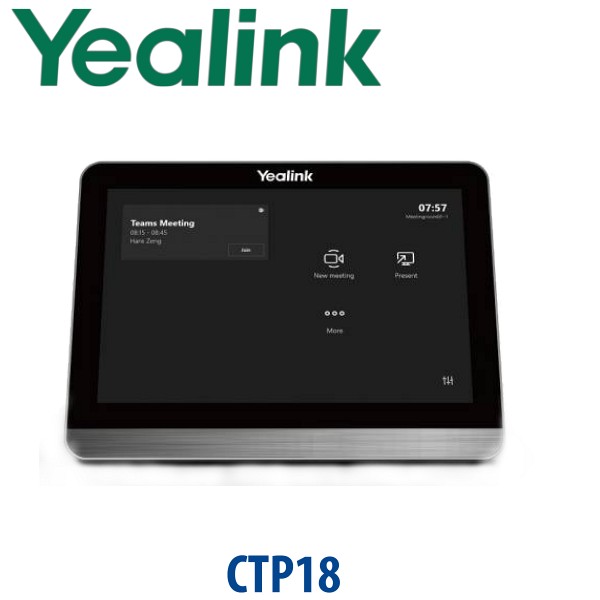
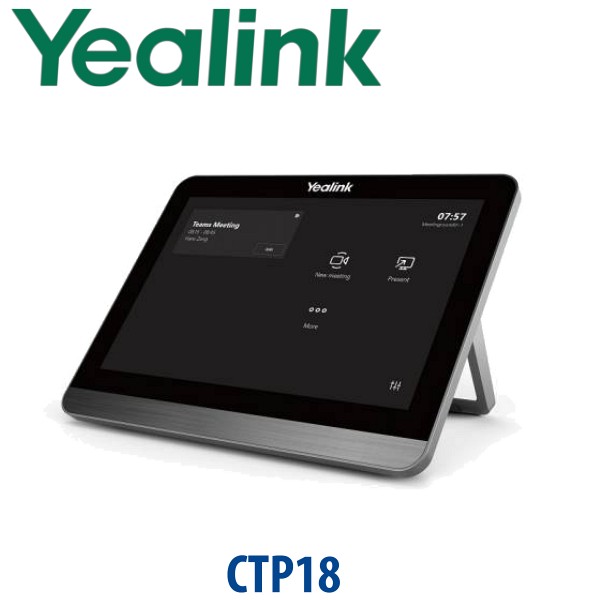
The Yealink CTP18 Collaboration Touch Panel is the 8-inch table controller for Yealink video conferencing rooms. Instead of walking to the display, searching for a remote, or asking the IT team to start every call, users can join meetings, control layouts, preview the camera, manage participants, and annotate shared content directly from the table. For Dubai offices upgrading huddle rooms, management meeting rooms, training rooms, and hybrid-work spaces, the CTP18 turns a Yealink MeetingBar or compatible video endpoint into a room system that normal users can operate without helpdesk support.
Vector Digital Systems LLC supplies Yealink meeting room hardware in Dubai, stages the room kit before dispatch, checks the platform requirement, and quotes in AED with VAT and delivery noted. Tell David whether the room is Microsoft Teams, Zoom Rooms, SIP/H.323 video, or BYOD-first before ordering — the touch panel is only useful when it is matched to the correct Yealink room system.
Platform Check — CTP18 Is a Controller, Not the Video Bar
The biggest buyer mistake is ordering the touch panel alone and expecting it to replace the video bar. The CTP18 is a meeting controller. It must be paired with a compatible Yealink video conferencing endpoint such as a MeetingBar or supported Yealink room system. Teams and Zoom certification applies to the complete room system or certified bundle, not to a loose touch panel sitting by itself.
| Your Meeting Platform | Right Yealink Setup | What You Need |
|---|---|---|
| Microsoft Teams Rooms | Certified Yealink MeetingBar / Teams Rooms kit with compatible touch controller | Teams Rooms licence, Microsoft 365 tenant, verified certified bundle before quote |
| Zoom Rooms | Yealink Zoom Rooms appliance such as MeetingBar A20/A30 with touch control | Zoom Rooms licence and same-LAN pairing between endpoint and touch panel |
| SIP / H.323 video endpoint | Compatible Yealink video conferencing endpoint plus CTP18 | Network registration, room display, camera/audio endpoint, and endpoint firmware check |
| BYOD laptop meetings | Yealink MeetingBar/BYOD-capable system — not CTP18 alone | USB/BYOD workflow confirmed before ordering |
Certification status verified on 21 July 2026: CTP18 is used with Yealink Teams and Zoom room solutions, but Vector Digital Systems verifies the exact room kit against Microsoft or Zoom certification lists before quoting. Do not order a panel-only item for a Teams or Zoom room until David confirms the complete bundle.
PoE Truth — One Clean Cable, But You Need a PoE Port
The CTP18 is powered by PoE, not by a normal phone charger. The RJ45 connection carries power and data when connected to an IEEE 802.3af PoE switch or injector. This keeps the meeting table clean and avoids a power adapter under the table, but it also means your network port must supply PoE. If your conference table has only a passive LAN point, ask David to include the correct PoE injector or installation accessory in the quote.
Why CTP18 Beats a Remote Control in Dubai Meeting Rooms
A remote control is easy to lose, hard to share, and awkward in rooms where the display is mounted at the front. The CTP18 sits on the table with an adjustable 28° to 50° viewing angle, so anyone leading the meeting can start the call, change layout, manage camera preview, and control the session from the same place they are presenting. For DIFC boardrooms, Business Bay management rooms, DMCC sales offices, and training spaces where visitors join calls every day, that small usability upgrade reduces IT interruptions.
Where the CTP18 Sits in the Yealink Room-Control Range
The CTP18 is the practical touch controller for established Yealink small and medium room systems. Choose it when you already have, or are buying, a compatible Yealink MeetingBar or video endpoint. For very simple legacy video rooms a handheld remote may be enough; for newer enterprise Teams Rooms packages, David may recommend a newer certified console such as CTP25 depending on the MeetingBar generation.
| Feature | VCR20 Remote | CTP18 ★ | CTP25 Console |
|---|---|---|---|
| Display | No touch display | 8″ 1280×800 touch screen | Newer touch console for selected room kits |
| Accounts / Room Login | Controlled by endpoint | Controlled by paired endpoint | Controlled by paired certified kit |
| Programmable / Meeting Keys | Basic buttons | Touch meeting controls, layouts, camera preview, annotation | Touch meeting controls for newer systems |
| GigE / Network | Not applicable | RJ45 for PoE and data | Depends on kit |
| Wi-Fi / Bluetooth | Not a network controller | 2.4G/5G Wi-Fi pairing to supported Yealink endpoint | Depends on certified kit |
| Conference Control | Basic control | Full table-side touch control | Full touch control for selected newer bundles |
| Expansion / Multiple Panels | Single-room remote | Up to 4 panels on supported systems | Depends on system design |
| Replaces / Upgrades | Basic remote-only control | Cleaner table control for MeetingBar and compatible video endpoints | Recommended for selected newer A-series room kits |
| Price Tier | Lowest | Mid — best usability upgrade | Higher / kit-dependent |
| Choose if… | You only need simple endpoint control | You want a proper table touch panel for Yealink meeting rooms | You are buying a newer certified Teams Rooms package that requires it |
Dubai Meeting Room Use Cases
Small Teams and Zoom rooms in Business Bay. Many SMEs have upgraded from laptop-on-HDMI meetings to dedicated room systems. A CTP18 on the table makes the room feel like a real meeting space: one-touch join, camera control, participant layout, and less cable confusion for guests.
DIFC and DMCC executive rooms. Senior users do not want to search for remotes or ask IT to start every board call. The CTP18 puts the controls where the meeting leader sits, so hybrid meetings start on time and visitors can use the room with minimal instruction.
Training rooms and multi-panel layouts. On supported Yealink systems, up to four CTP18 units can work with one video conferencing device. That matters in training rooms, divided meeting spaces, and long boardrooms where more than one person may need control or annotation access.
Hotel and serviced-office meeting rooms. Dubai hotels, business centres, and serviced offices often rent meeting rooms to guests who do not know the AV system. A table touch panel is easier to explain than a hidden rack controller or missing remote. Vector Digital Systems can stage the panel with the matching Yealink endpoint before delivery.
Full Technical Specifications
| Specification | Yealink CTP18 Collaboration Touch Panel |
|---|---|
| Product Type | Collaboration touch panel / meeting room controller |
| Room Fit | Small and medium rooms using compatible Yealink video endpoints |
| Operating System | Android 9.0 |
| Display | 8-inch IPS FHD capacitive touch screen |
| Resolution | 1280×800, 16:10 |
| Touch | 10-point multi-touch |
| Meeting Control | Join/start meetings, camera preview and adjustment, layout control, recording and meeting controls depending on platform |
| Annotation | Annotation on shared content when used with Yealink WPP20 Wireless Presentation Pod and supported endpoint |
| Multiple Panel Support | Up to 4 CTP18 units on supported Yealink systems; compatibility depends on endpoint and firmware |
| Endpoint Connection | Cable connection, same-LAN pairing, or Wi-Fi connection to supported Yealink video conferencing endpoint |
| Wi-Fi | 2.4G/5G Wi-Fi, IEEE 802.11n/ac; designed for connection to supported Yealink endpoint Wi-Fi |
| Ethernet | 1× RJ45 Ethernet for power and data connection |
| USB | 1× USB-C for device debugging |
| Power | Power over Ethernet, IEEE 802.3af |
| Power Input | PoE 48V 0.27A |
| Power Consumption | 7W maximum |
| Stand | Adjustable angle, 28° to 50° |
| Dimensions | 202mm × 151mm × 100mm |
| Security | Security lock slot for anti-theft protection |
| Included Mounting Accessory | Wall mount bracket included |
Compatible Accessories and Room Components
| Item | Model / Type | Purpose |
|---|---|---|
| Video Endpoint | Yealink MeetingBar / compatible video conferencing endpoint | The CTP18 controls the endpoint; it is not a camera, microphone, or speaker by itself |
| Wireless Presentation | Yealink WPP20 | Enables wireless sharing, annotation, and reverse control on supported systems |
| PoE Network | IEEE 802.3af PoE switch or injector | Powers the CTP18 and carries data over the RJ45 connection |
| Ethernet Cable | CAT5e or higher | Required for PoE table installation and stable same-LAN pairing |
| Mounting | Wall mount bracket | For rooms where the panel should be mounted rather than left loose on the table |
Staging Before Dispatch — What Vector Digital Systems Configures
Vector Digital Systems does not simply hand over the box. For Yealink room projects, we confirm the room platform, endpoint model, firmware requirement, network layout, PoE availability, Teams or Zoom licence readiness, and pairing method before delivery. Where the full Yealink room kit is supplied, we stage the endpoint and CTP18 together, test table control, check meeting join flow, confirm camera and audio controls, and label the hardware before dispatch. For multi-room Dubai projects, we can prepare room names, device allocation, and installation notes so your IT team knows exactly which panel goes into which room.
Export from Dubai
Vector Digital Systems LLC exports Yealink collaboration hardware from Dubai to system integrators, AV installers, telecom operators, and corporate procurement teams across Oman, Saudi Arabia, Kuwait, Bahrain, Qatar, Jordan, Egypt, Kenya, Pakistan, and Sri Lanka. CTP18 panels are often shipped as part of complete Yealink MeetingBar room kits, with FOB Dubai documentation, commercial invoice, packing list, and certificate of origin on request. For project quantities, send David the room count, platform, destination country, and whether the panels are required as spare controllers or full meeting room bundles.
Get a same-day Yealink CTP18 quote in AED
Tell David your meeting platform, the Yealink video bar or endpoint model, room count, PoE availability, and whether you need installation accessories. We quote with VAT breakdown and Dubai delivery noted.
Frequently Asked Questions — Yealink CTP18
What is the Yealink CTP18 used for?
The Yealink CTP18 is an 8-inch collaboration touch panel used to control compatible Yealink video conferencing endpoints. It lets users join or control meetings, manage layouts, preview and adjust the camera, and annotate shared content when used with supported Yealink systems and accessories.
Does the Yealink CTP18 work with Microsoft Teams?
The CTP18 can be used in Yealink Teams room solutions when paired with the correct certified Yealink room system. It should not be treated as a standalone Teams-certified device by itself. Vector Digital Systems verifies the exact Microsoft-certified Yealink bundle before quoting, because Teams Rooms certification belongs to the complete room system and firmware combination.
Does the Yealink CTP18 work with Zoom Rooms?
Yes, the CTP18 is used with Yealink Zoom Rooms appliance setups such as MeetingBar A20 and A30 room scenarios. The panel must be paired with the correct Zoom-capable Yealink endpoint on the same network, and the room must have the appropriate Zoom Rooms licence.
Can I use the CTP18 without a Yealink MeetingBar or video endpoint?
No. The CTP18 is a controller, not a camera, speaker, microphone, or standalone meeting device. It must be paired with a compatible Yealink video conferencing endpoint. If you need a complete room system, ask David for the correct Yealink MeetingBar bundle for your room size and platform.
Does the Yealink CTP18 need PoE?
Yes. The CTP18 is powered by IEEE 802.3af Power over Ethernet through its RJ45 port. If your meeting table or room switch does not provide PoE, ask Vector Digital Systems to include the correct PoE injector or network accessory in the Dubai quote.
How many CTP18 panels can be used in one room?
On supported Yealink systems, up to four CTP18 panels can be connected to one video conferencing device. This is useful for long boardrooms, training rooms, and multi-presenter rooms, but compatibility depends on the Yealink endpoint model and firmware version.
Can users annotate shared content on the CTP18?
Yes, annotation is supported when the CTP18 is used with the Yealink WPP20 Wireless Presentation Pod and a compatible Yealink video conferencing system. Users can annotate or control shared content from the touch panel, which is helpful in design reviews, training sessions, and management meetings.
CTP18 vs CTP25 — which one should I buy?
Choose CTP18 when it is listed as compatible with your existing Yealink video endpoint or MeetingBar bundle. Choose CTP25 when David confirms your newer Yealink Teams Rooms or MeetingBar package requires the newer console. The safest rule is to quote the touch panel together with the exact video bar model and platform.
Who is the authorised Yealink supplier in Dubai?
Vector Digital Systems LLC has supplied and integrated Yealink solutions in Dubai since 2009. David handles Yealink room-system selection, CTP18 compatibility checks, project pricing, staging, and local warranty coordination before dispatch.
Does Vector Digital Systems export Yealink CTP18 panels from Dubai?
Yes. Vector Digital Systems exports Yealink CTP18 panels and complete MeetingBar room kits from Dubai to integrators and enterprise buyers in Oman, Saudi Arabia, Kuwait, Bahrain, Qatar, Jordan, Egypt, Kenya, Pakistan, and Sri Lanka. Export shipments are quoted FOB Dubai with commercial invoice, packing list, and certificate of origin on request.
Does Vector Digital Systems configure the CTP18 before delivery?
Yes. When supplied with the matching Yealink room system, Vector Digital Systems checks platform compatibility, verifies firmware needs, confirms PoE, pairs the CTP18 with the endpoint, tests room control, and labels the hardware before dispatch. The goal is a clean installation with no room-side pairing surprises.