Description
Yealink EXP50 Colour Expansion Module for T53 T54W T57W T58A Dubai
Yealink EXP50 Colour Expansion Module for Busy T5-Series Desks
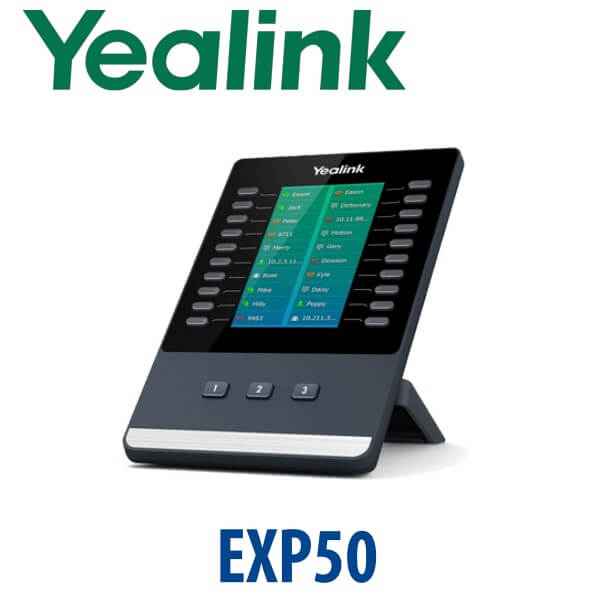
The Yealink EXP50 is the colour-screen expansion module built for Yealink T5 and T58-series operator desks. If your receptionist, clinic front desk, hotel operator or call-centre supervisor needs more one-touch BLF, speed-dial, transfer and call-park keys than the phone body can provide, the EXP50 turns a compatible Yealink phone into a proper operator console. Each module gives 20 physical keys across three pages — up to 60 programmable functions per module — and up to three EXP50 modules can be attached to a compatible phone for 180 additional keys.
Vector Digital Systems LLC supplies the Yealink EXP50 in Dubai with compatibility checking, BLF planning and staging before dispatch. Tell David which Yealink phone you have — T53, T53W, T54W, T57W, T58A or T58W — and we will confirm whether EXP50 is the correct module, whether you need one, two or three units, and whether an additional power adapter must be included in the quote.
Compatibility First: EXP50 Is Not for T7 Phones
The most important buying rule is simple: EXP50 is for Yealink T5/T58 phones, not for the current T7 series. If you are buying a new T73U, T74U, T74W or T77U, you need the EXP55 module instead. Ordering EXP50 for a T7 phone is the accessory mistake we prevent before dispatch.
| Your Yealink Phone | Correct Expansion Module | What to Order |
|---|---|---|
| T53 / T53W / T54W / T57W / T58A / T58W | EXP50 | This page — confirm quantity and BLF layout with David |
| T73U / T73W / T74U / T74W / T77U | EXP55 | Do not order EXP50 — ask for the T7/T8-series EXP55 module |
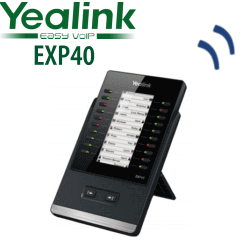
| T46U / T48U legacy phones | EXP40 | Legacy accessory only — confirm phone model before quoting |
| Microsoft Teams MP phones | Teams-compatible expansion accessory varies by model | Ask David to verify the current Teams phone and accessory compatibility before ordering |
Power Truth: One Module Is Simple, Multiple Modules Need Extra Power
A single EXP50 connects to the compatible Yealink phone by USB and normally receives power from the host phone. When you connect more than one EXP50 to the same phone, Yealink requires an additional 5V/2A power adapter connected to one of the modules. The adapter is purchased separately, so we include it in the quote whenever a desk needs two or three EXP50 modules. This prevents the common Dubai installation issue where the console arrives but the extra modules cannot be powered correctly.
What the EXP50 Adds to a Yealink Desk Phone
The EXP50 gives the user a large 4.3-inch colour display, 20 physical keys with dual-colour LED status, and three illuminated page keys. That means each module can present up to 60 programmable functions such as BLF, speed dial, call transfer, call park, pickup, forward, shared line, LDAP access and XML applications. Instead of paper labels, the operator sees names and status clearly on the module screen.
Accessory Ladder: EXP40 vs EXP50 vs EXP55
Yealink expansion modules are generation-specific. EXP40, EXP50 and EXP55 are not interchangeable. Use the table below to match the desk phone generation before buying.
| Feature | EXP40 | EXP50 ★ | EXP55 |
|---|---|---|---|
| Phone generation | Legacy T46U / T48U | T5 / T58 series | Current T7 / T8 series |
| Display | Legacy screen | 4.3″ 272×480 colour LCD | 5.5″ colour LCD |
| Keys per module | Legacy key layout | 20 keys × 3 pages = 60 | 26 keys × 3 pages = 78 |
| Maximum modules | Confirm by phone model | Up to 3 modules | Up to 3 modules |
| Maximum added keys | Legacy-dependent | 180 additional keys | 234 additional keys |
| Best use case | Keeping older T46U/T48U desks alive | T53/T54W/T57W/T58 operator desks | New T7 reception and supervisor consoles |
| Power note | Confirm before quoting | Extra 5V/2A PSU for 2–3 modules | External PSU for 2–3 modules |
| Choose if… | You are supporting a legacy T46U/T48U estate | You have a T53, T54W, T57W or T58-series desk that needs more BLF keys | You are buying current T7 phones such as T74U or T77U |
Where EXP50 Works in Dubai
Hotel reception and front office. A Deira or Business Bay hotel front desk may monitor reservations, housekeeping, manager extensions, room service, security and back-office lines at the same time. One or two EXP50 modules on a compatible Yealink T5 phone give the receptionist named BLF keys instead of memorised extension numbers.
Clinics and medical centres. Dubai clinics often route calls between reception, doctors’ rooms, nurses, insurance desk, pharmacy and lab counters. The EXP50 gives front-desk staff a clear one-touch layout for transfer, pickup and internal status without asking patients to wait on hold.
Call-centre supervisor desks. Supervisors in Al Quoz, Jebel Ali, Dubai Silicon Oasis and DMCC offices use expansion modules to monitor agent availability and handle quick transfers. Three EXP50 modules can add 180 programmable keys to a compatible host phone, making the desk suitable for larger teams without a separate console PC.
Corporate admin and executive assistant desks. Assistants supporting multiple directors need visible status, one-touch dialling and call park keys. EXP50 keeps those functions labelled on-screen, reducing transfer mistakes during peak call periods.
Full Technical Specifications
| Specification | Yealink EXP50 |
|---|---|
| Product Type | Colour-screen expansion module for compatible Yealink IP phones |
| Compatible SIP Phones | Yealink T53, T53W, T54W, T57W, T58A and T58W |
| Not Compatible With | T73U, T73W, T74U, T74W, T77U and other T7/T8 phones — use EXP55 instead |
| Display | 4.3-inch 272×480-pixel colour LCD with backlight |
| Keys | 20 physical keys per page with dual-colour LEDs |
| Pages | 3 pages controlled by illuminated page keys |
| Programmable Functions | Up to 60 functions per module |
| Maximum Expansion | Up to 3 EXP50 modules per compatible phone — 180 additional programmable keys maximum |
| Supported Key Types | BLF, speed dial, call transfer, call park, pickup, forward, shared line, LDAP and XML applications |
| Connection | USB connection between host phone and EXP50 module |
| Power | Powered from host phone for single-module use; additional Yealink 5V/2A PSU required when using more than one module |
| Desk Stand | Adjustable stand with two viewing angles |
| Typical Users | Receptionists, administrative assistants, contact-centre workers and call-centre supervisors |
| In Box | EXP50 module, stand, connecting sheet, USB cable, screws, screwdriver and quick start guide |
Accessories and Order Notes
| Item | When You Need It | Order Advice |
|---|---|---|
| EXP50 Module | For compatible T53/T54W/T57W/T58-series phones needing more keys | Send David the host phone model and number of extensions to monitor |
| Yealink 5V/2A Power Adapter | Required when using two or three EXP50 modules on one phone | We add it automatically for multi-module console quotes |
| EXP55 | Required for T7/T8 phones such as T74U, T74W and T77U | Do not mix EXP50 and EXP55 — confirm before buying |
| Host Phone Upgrade | When the existing phone is EOL, damaged or not compatible | David can quote the matching T7 phone and EXP55 console instead |
Staging Before Dispatch — BLF Layout Done for You
Vector Digital Systems does more than supply the module. For EXP50 console orders, we ask for your extension list, department names and call-handling pattern. We then prepare the BLF and speed-dial layout, label keys clearly on-screen, confirm page structure, test the host phone and module connection, and include the correct power adapter when multiple modules are used. Your receptionist or supervisor receives a desk console that is ready to use instead of a blank accessory that still needs programming.
Export from Dubai
Vector Digital Systems exports Yealink EXP50 modules and compatible Yealink phones from Dubai to telecom operators, system integrators, PABX installers, hotel groups and corporate IT teams. Common export destinations include Oman, Saudi Arabia, Kuwait, Bahrain and Qatar across the GCC; Jordan and Lebanon where permitted; Kenya, Tanzania and Uganda in East Africa; and Pakistan, Sri Lanka and Bangladesh for South Asian projects. Shipments move FOB Dubai with commercial invoice, packing list and certificate of origin on request.
Get a same-day quote in AED for Yealink EXP50
Tell David your Yealink phone model, number of extensions to monitor, and whether you need one, two or three EXP50 modules. We quote with VAT breakdown, delivery and any required power adapter included.
Frequently Asked Questions — Yealink EXP50
Which Yealink phones work with the EXP50?
The EXP50 is designed for Yealink T53, T53W, T54W, T57W, T58A and T58W phones. Before quoting, Vector Digital Systems checks the exact phone model so the module, USB connection and power requirements are correct.
Does the Yealink EXP50 work with T74U, T74W or T77U?
No. The EXP50 does not fit the current Yealink T7 series. T73U, T73W, T74U, T74W and T77U use the EXP55 expansion module instead. If you are replacing an older T5 desk with a new T7 phone, ask David to quote EXP55, not EXP50.
How many keys does one Yealink EXP50 add?
One EXP50 adds 20 physical keys across three pages, giving up to 60 programmable functions. These keys can be used for BLF, speed dial, transfer, call park, pickup, forward, shared line and other phone-system functions.
How many EXP50 modules can I connect to one phone?
Up to three EXP50 modules can be connected to a compatible Yealink phone. That gives a maximum of 180 additional programmable keys, making the setup suitable for reception, operator and call-centre supervisor desks.
Does the Yealink EXP50 need a power adapter?
A single EXP50 is normally powered by the compatible host phone through the USB connection. If you connect more than one EXP50 module, Yealink requires an additional 5V/2A power adapter connected to one module. The adapter is purchased separately, and Vector Digital Systems includes it in multi-module quotes.
EXP50 vs EXP55 — which one should I buy?
Choose EXP50 if your phone is a compatible T5/T58 model such as T53W, T54W, T57W or T58A. Choose EXP55 if your phone is a current T7 model such as T74U, T74W or T77U. The modules are generation-specific and are not interchangeable.
Can Vector Digital Systems program the EXP50 keys before delivery?
Yes. Vector Digital Systems can stage the host phone and EXP50 before dispatch: SIP registration, provisioning template, BLF and speed-dial keys, page layout, extension names and live call testing. The console arrives ready for the receptionist or supervisor to use.
Who is the authorised Yealink supplier in Dubai?
Vector Digital Systems LLC has supplied and integrated Yealink systems in Dubai since 2009. David handles Yealink product selection, compatibility checks, staging, project pricing and local warranty support for Dubai and export buyers.
What is the best Yealink expansion module for a reception desk in Dubai?
For an existing compatible T5/T58 phone, the EXP50 is the correct choice. One module suits small reception desks; two or three modules suit hotels, clinics and call-centre supervisor desks with larger BLF maps. For new T7 phones, the correct module is EXP55.
Does Vector Digital Systems export Yealink EXP50 modules from Dubai?
Yes. Vector Digital Systems exports Yealink EXP50 modules and compatible Yealink phones from Dubai to Oman, Saudi Arabia, Kuwait, Bahrain, Qatar, Jordan, Kenya, Tanzania, Pakistan and Sri Lanka. Export shipments are FOB Dubai with commercial invoice, packing list and certificate of origin on request.