Description
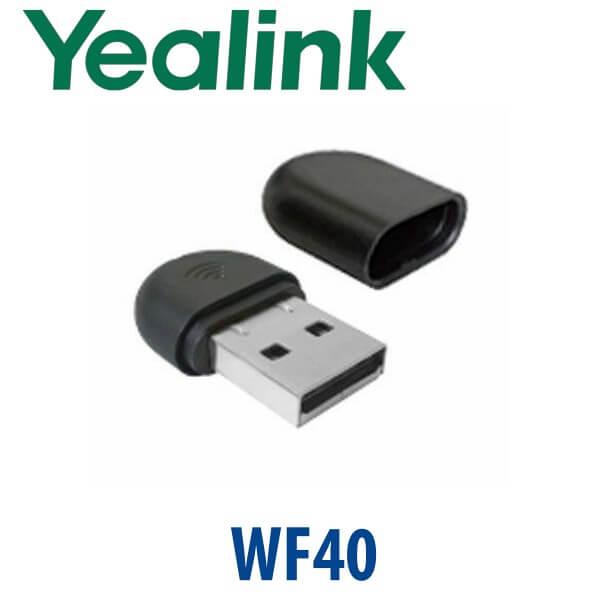
Yealink WF40 Wi-Fi USB Dongle 2.4GHz Wireless Adapter for Yealink IP Phones Dubai
Yealink WF40 Wi-Fi Dongle for Desks Without Network Cabling
The Yealink WF40 is the small USB Wi-Fi adapter used when a compatible Yealink IP phone needs wireless network access instead of a wired Ethernet cable. It is a practical fix for Dubai offices where the desk has power but no LAN point: temporary project rooms, serviced offices, reception counters, warehouse admin desks, clinic extensions, and rented office spaces where cabling is slow or not allowed.
WF40 connects over 2.4GHz Wi-Fi and supports up to 150 Mbps, which is sufficient for SIP voice registration and normal IP phone traffic when the wireless signal is stable. It is not a universal USB Wi-Fi adapter and it is not for every Yealink phone. Vector Digital Systems checks the exact phone model, firmware level, Wi-Fi band requirement, and PBX platform before quoting so the correct accessory is supplied the first time.
Compatibility First — WF40 Is for Specific Yealink Phones Only
The most common buying mistake is assuming that any Yealink USB phone accepts any Yealink Wi-Fi dongle. WF40 is mainly for selected Yealink T2, T4, T5 and T-U series phones. Newer T7 wireless models such as T73W and T74W already have Wi-Fi 6 built in, while T77U wireless deployments normally use the WF50 accessory instead. Ask David to verify your phone label before ordering.
| Your Phone / Platform Situation | Right Answer | What to Check Before Ordering |
|---|---|---|
| Compatible Yealink SIP phone needing 2.4GHz Wi-Fi | Yealink WF40 | Phone model, firmware version, Wi-Fi signal strength and SIP provisioning |
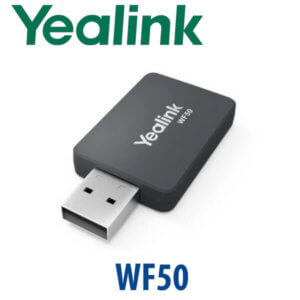
| Need 5GHz or dual-band Wi-Fi | Yealink WF50, if supported by the phone | Phone compatibility and firmware version |
| T73W / T74W wireless desk phone | No WF40 needed | These models have built-in Wi-Fi and Bluetooth |
| Microsoft Teams office | WF40 does not convert a SIP phone into a Teams phone | Teams Phone users need Yealink MP-series Teams devices verified separately |
Important Platform Trap: Wi-Fi Is Not a Teams Upgrade
The WF40 only changes how a compatible phone connects to the network. It does not change the phone firmware, licence model, or calling platform. A SIP phone remains a SIP phone for 3CX, Yeastar, Grandstream UCM, Asterisk, FreePBX or hosted PBX services. If your office runs Microsoft Teams Phone, you need the correct Yealink MP-series Teams phone instead of adding WF40 to a SIP handset.
PoE Truth: WF40 Solves Network Cabling, Not Power
WF40 gives the phone Wi-Fi data connectivity; it does not power the phone. If you remove the Ethernet cable from a PoE-powered phone, the phone still needs a power source. For a Wi-Fi desk setup you normally need the phone’s optional Yealink power supply unless the phone is still connected to a PoE cable for power only. We confirm this at quote stage so the phone does not arrive without a way to switch on.
WF40 vs WF50 vs Built-In Wi-Fi — Which One Should You Buy?
| Feature | Keep Ethernet Cable | WF40 ★ | WF50 / Built-In Wi-Fi |
|---|---|---|---|
| Best For | Permanent desks with LAN cabling | Compatible older Yealink phones needing 2.4GHz Wi-Fi | Newer phones needing 5GHz or integrated wireless |
| Wireless Band | Not wireless | 2.4GHz | 2.4GHz + 5GHz on WF50, or Wi-Fi 6 built in on W models |
| Max Rate | Depends on phone Ethernet port | 150 Mbps | Up to 433 Mbps on 5GHz WF50; model-dependent for built-in Wi-Fi |
| Compatibility | Any Ethernet phone | Selected Yealink T2 / T4 / T5 / T-U phones | Selected newer Yealink models only |
| Power Requirement | PoE or PSU | Phone still needs PSU or PoE power | Phone still needs PSU or PoE power |
| Price Tier | Lowest if cabling exists | Affordable accessory fix | Higher, but better for modern Wi-Fi networks |
| Choose if… | You have stable LAN cabling and PoE at the desk | You need a simple 2.4GHz Wi-Fi fix for a compatible Yealink phone | You need 5GHz, lower interference, or a new phone with wireless built in |
Where WF40 Works in Dubai
Serviced offices and rented suites. In Business Bay, JLT, Barsha Heights and DIFC serviced offices, adding a new wired LAN point can take longer than the phone requirement itself. WF40 lets a compatible Yealink SIP phone join the office Wi-Fi while Vector Digital Systems configures the SIP account, provisioning and dial plan before dispatch.
Reception counters and temporary desks. Clinics, training centres, real estate offices and event teams often need a phone at a counter where no network socket exists. WF40 is a neat accessory when the phone model supports it and the Wi-Fi signal is reliable.
Warehouse and back-office extensions. In Jebel Ali, DIP and Al Quoz, the admin desk may move as the warehouse layout changes. WF40 avoids running a fresh Ethernet cable for every temporary position, while keeping the extension on the same SIP PBX as the rest of the company.
Full Technical Specifications
| Specification | Yealink WF40 |
|---|---|
| Product Type | USB Wi-Fi dongle for compatible Yealink IP phones |
| Wireless Standard | IEEE 802.11b/g/n |
| Frequency Band | 2.4GHz |
| Transmission Rate | Up to 150 Mbps |
| Interface | USB 2.0 |
| Security | 64/128/152-bit WEP, WPA-PSK, WPA2-PSK |
| Dimensions | 26.9mm × 18mm × 8mm |
| Working Temperature | 0°C to +40°C |
| Storage Temperature | -40°C to +85°C |
| Compatible Phone Families | Selected Yealink SIP-T27G, T29G, T46G, T48G, T41S, T42S, T46S, T48S, T42U, T43U, T44U, T46U, T48U, T52S, T54S and T53 models. Firmware requirements apply. |
| Not For | Not a generic PC Wi-Fi adapter, not a Teams conversion tool, and not required for Yealink phones with built-in Wi-Fi |
Compatible Accessories and Alternatives
| Item | Use | Buyer Note |
|---|---|---|
| Yealink WF40 | 2.4GHz Wi-Fi for compatible Yealink IP phones | Best for supported legacy and T-U models where 2.4GHz is acceptable |
| Yealink WF50 | Dual-band 2.4GHz / 5GHz Wi-Fi for supported phones | Recommended when 5GHz Wi-Fi is required or 2.4GHz is congested |
| Yealink PSU | Powers the phone when Ethernet PoE is not used | Often required for Wi-Fi desk setups because Wi-Fi does not provide power |
| T73W / T74W | New Yealink T7 desk phones with built-in Wi-Fi 6 and Bluetooth | Better choice for new wireless desk phone deployments instead of adding a dongle to an older phone |
Staging Before Dispatch
Vector Digital Systems does more than sell the dongle. For Yealink Wi-Fi phone deployments, David checks the phone model and firmware, confirms whether WF40 or WF50 is the correct adapter, adds the PSU if the desk will not use PoE, registers the SIP account, loads the provisioning template, tests Wi-Fi connection, confirms dial plan and performs a live call test before dispatch. The phone and accessory arrive ready for installation, not as loose parts for your IT team to troubleshoot.
Export from Dubai
Vector Digital Systems supplies Yealink WF40 Wi-Fi dongles and compatible Yealink IP phone accessories to system integrators, telecom installers, PABX companies and enterprise IT buyers across the region. Export routes include Oman, Saudi Arabia, Kuwait, Bahrain, Qatar, Jordan, Egypt, Kenya, Pakistan and Sri Lanka. Shipments move FOB Dubai with commercial invoice, packing list and certificate of origin on request. For bulk orders, send David the phone model list and destination country so compatibility and documentation are checked before quotation.
Get a same-day quote in AED — Yealink WF40 in Dubai
Tell David your Yealink phone model, firmware version if known, Wi-Fi band requirement, quantity and delivery location. Quote includes VAT breakdown, delivery and PSU recommendation where needed.
Frequently Asked Questions — Yealink WF40
What does the Yealink WF40 do?
The Yealink WF40 is a USB Wi-Fi dongle that adds 2.4GHz wireless network connectivity to compatible Yealink IP phones. It is used when the phone desk has no Ethernet cable or when a temporary desk needs SIP phone service over office Wi-Fi.
Does WF40 work with every Yealink phone?
No. WF40 works only with selected Yealink models including listed T2, T4, T5 and T-U series phones, and some models require specific firmware versions. Send David the phone model printed on the label before ordering so compatibility is checked.
WF40 vs WF50 — which one should I buy?
WF40 is the 2.4GHz adapter with up to 150 Mbps transmission rate. WF50 is the dual-band option for supported phones, adding 5GHz Wi-Fi for lower interference and higher wireless speed. Choose WF40 for compatible older phones on 2.4GHz networks; choose WF50 where the phone supports it and the office uses 5GHz Wi-Fi.
Does WF40 power the phone over Wi-Fi?
No. WF40 only provides wireless data connectivity. The Yealink phone still needs power from a PoE Ethernet connection or from the correct Yealink power supply. If the phone will run fully wireless without Ethernet, add the PSU to the quote.
Can WF40 convert my Yealink SIP phone into a Microsoft Teams phone?
No. WF40 only changes the network connection from wired Ethernet to Wi-Fi. It does not change SIP firmware into Microsoft Teams firmware. Teams Phone users need a Yealink MP-series Teams phone verified against the current Microsoft certified device list.
Will WF40 work with 3CX, Yeastar or Grandstream UCM?
Yes, when the attached Yealink phone is compatible with WF40 and is registered as a SIP endpoint. WF40 provides the Wi-Fi network path; the phone still registers normally to 3CX, Yeastar P-Series, Grandstream UCM, Asterisk, FreePBX or hosted PBX services.
What is the best Yealink Wi-Fi option for a new desk phone in Dubai?
For a new wireless Yealink desk phone, the T73W or T74W is usually the better choice because Wi-Fi 6 and Bluetooth are built in. WF40 is better for adding 2.4GHz Wi-Fi to a compatible existing Yealink phone where replacing the phone is not necessary.
Does Vector Digital Systems configure Yealink phones with WF40 before delivery?
Yes. Vector Digital Systems checks the phone model, confirms WF40 compatibility, adds the correct power supply if needed, configures SIP registration, loads the provisioning template, tests Wi-Fi connection and completes a live call test before dispatch.
Who supplies Yealink WF40 in Dubai?
Vector Digital Systems LLC has supplied Yealink phones and accessories in Dubai since 2009. David handles Yealink accessory compatibility, project pricing, staging and local warranty support for UAE and export customers.
Does Vector Digital Systems export Yealink WF40 from Dubai?
Yes. Vector Digital Systems exports Yealink WF40 and other Yealink accessories from Dubai to integrators and enterprise buyers in Oman, Saudi Arabia, Kuwait, Bahrain, Qatar, Jordan, Egypt, Kenya, Pakistan and Sri Lanka. Export shipments are quoted FOB Dubai with documentation.