Description
Yealink WF50 Wi-Fi USB Dongle Dual-Band Wi-Fi Adapter for Yealink IP Phones Dubai
Add Wi-Fi to Compatible Yealink Desk Phones
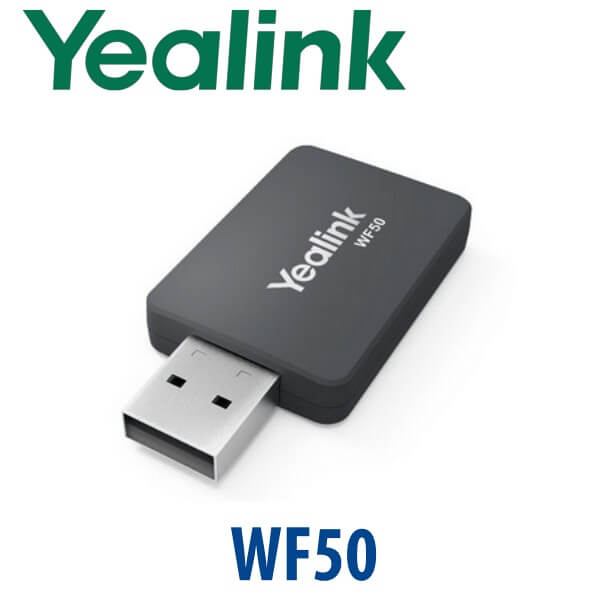
The Yealink WF50 is a compact dual-band Wi-Fi USB dongle for compatible Yealink IP phones. It is used when a desk needs a Yealink phone but does not have a practical Ethernet cable run — for example a temporary reception counter, serviced office, clinic room, training desk, warehouse office, or Dubai fit-out where the network port is not ready yet.
WF50 supports both 2.4GHz and 5GHz Wi-Fi networks, with 2.4GHz up to 150 Mbps and 5GHz up to 433 Mbps. The 5GHz band is especially useful in busy Dubai offices where many nearby devices compete on 2.4GHz. Vector Digital Systems supplies the correct Yealink dongle version, confirms phone compatibility, updates firmware where required, connects the phone to your office Wi-Fi, and tests SIP registration before dispatch.
Important Compatibility Note — WF50 vs WF50 (V1)
Do not buy WF50 only by shape or photo. Yealink compatibility depends on the phone model and firmware version. For current wired T7 phones such as T73U, T74U, and T77U, the compatibility matrix points to WF50 (V1). Older models such as T42U, T43U, T46U, T48U, T53, and selected legacy phones may use WF50 or WF50 (V1) depending on firmware. Vector Digital Systems checks this before quoting so the adapter is detected correctly when plugged in.
| Phone Type | Wi-Fi Recommendation | Buyer Note |
|---|---|---|
| T73U / T74U / T77U wired T7 phones | WF50 (V1), compatibility checked before supply | Good for desks where Ethernet is not available |
| T73W / T74W wireless T7 phones | No WF50 required | Wi-Fi 6 and Bluetooth 5.0 are already built in |
| T42U / T43U / T46U / T48U / T53 and selected older models | WF50 or WF50 (V1), firmware dependent | Firmware must be checked before dispatch |
Platform Trap: Wi-Fi Does Not Change SIP vs Teams
WF50 only adds Wi-Fi network connectivity to a compatible phone. It does not convert a SIP phone into a Microsoft Teams phone, it does not add Bluetooth headset pairing, and it does not make a non-compatible phone wireless. If your office uses Microsoft Teams Phone, you need a Yealink MP-series Teams phone verified against Microsoft’s certified device list — not a T7 SIP phone with a Wi-Fi dongle.
| Your Platform | Right Device Route | What WF50 Does |
|---|---|---|
| SIP PBX — 3CX, Yeastar, UCM, Asterisk, hosted PBX | Compatible SIP phone + WF50 where supported | Connects the phone to office Wi-Fi instead of Ethernet |
| Microsoft Teams | Yealink MP-series Teams phone — ask David for the current certified model | Does not turn a SIP phone into a Teams phone |
| Zoom Phone | Zoom-certified Yealink range — ask David | Only provides Wi-Fi if the device supports it |
PoE Truth: WF50 Removes the Data Cable, Not the Power Requirement
A Wi-Fi phone still needs power. Yealink desk phones normally draw power from a PoE switch through the Ethernet cable. If you remove the Ethernet cable and connect the phone by Wi-Fi using WF50, the phone still needs an external Yealink power supply. The WF50 does not power the phone. When Vector Digital Systems quotes a Wi-Fi desk phone setup, we confirm whether you need the matching PSU so there are no missing parts at delivery.
WF50 in the Yealink Accessory Range
WF50 sits in the Yealink accessory range between older Wi-Fi adapters and Bluetooth accessories. It is the Wi-Fi dongle for supported phone models; BT41 is for Bluetooth where supported; and the better option for a new wireless desk may be a W-series phone such as T74W with Wi-Fi 6 and Bluetooth built in. The correct choice depends on whether you are upgrading an existing phone or buying a new phone for a cable-free desk.
| Feature | WF40 / Older Wi-Fi Adapter | WF50 / WF50 (V1) ★ | Built-in Wi-Fi Phone |
|---|---|---|---|
| Purpose | Basic Wi-Fi on selected older Yealink phones | Dual-band Wi-Fi for compatible Yealink phones | Wireless desk phone without dongle |
| Wi-Fi Bands | Model dependent | 2.4GHz + 5GHz | Built-in wireless radio |
| Wireless Standard | Older generation | 802.11a/b/g/n/ac | Depends on phone model — T73W/T74W use Wi-Fi 6 |
| Bluetooth | No | No — Wi-Fi only | Built in on T73W/T74W |
| Best For | Legacy phone support where compatible | Adding Wi-Fi to supported wired Yealink desk phones | New cable-free desks |
| Compatibility Risk | High — firmware/model dependent | Must confirm WF50 version and firmware | Lowest — wireless designed into phone |
| Choose if… | You are supporting an older known-compatible phone | You need Wi-Fi for a compatible Yealink wired phone and want VDS to verify it | You are buying a new desk phone and want wireless built in from day one |
Where WF50 Helps in Dubai Offices
Temporary reception counters and serviced offices. Many Dubai offices in Business Bay, JLT, and Sheikh Zayed Road open before final structured cabling is ready. WF50 lets a compatible Yealink phone register over office Wi-Fi while the final network port is being arranged.
Clinics, salons, and retail desks. Reception furniture often moves after the fit-out. Instead of running a visible Ethernet cable across the counter, a supported Yealink phone can connect by Wi-Fi using WF50 while still receiving power from the matching PSU.
Warehouse and back-office desks. Jebel Ali, Al Quoz, and DIP sites often have one network point serving a printer, PC, or access-control device. WF50 can be useful for a compatible Yealink phone where pulling another cable is slow or expensive.
T77U wireless accessory planning. The T77U does not include built-in Wi-Fi or Bluetooth. If a flagship touchscreen desk phone needs wireless networking, David will confirm the correct WF50 version, firmware, and power supply before dispatch.
Full Technical Specifications
| Specification | Yealink WF50 |
|---|---|
| Product Type | Dual-band Wi-Fi USB dongle for compatible Yealink devices |
| Wireless Bands | 2.4GHz and 5GHz |
| Transmission Rate | 2.4GHz up to 150 Mbps; 5GHz up to 433 Mbps |
| Wi-Fi Standard | IEEE 802.11a/b/g/n/ac |
| Security | WPA/WPA2 encryption support |
| Connection | USB dongle inserted into the supported Yealink phone USB port |
| Bluetooth | No — WF50 is Wi-Fi only. Use the correct Yealink Bluetooth accessory where supported. |
| PC / Laptop Use | Not sold as a general PC or laptop Wi-Fi adapter — intended for compatible Yealink devices |
| Current T7 Compatibility Note | T73U, T74U, and T77U require the compatible WF50 version and firmware check before supply; T73W and T74W already include Wi-Fi |
| Power Requirement | The dongle does not power the phone. If the phone is not connected to PoE Ethernet, add the matching Yealink PSU. |
| Best Use Case | Cable-free network connection for a compatible Yealink IP phone where Ethernet is unavailable or inconvenient |
Compatible Accessories and Alternatives
| Item | When to Use | Buyer Note |
|---|---|---|
| WF50 / WF50 (V1) | Add Wi-Fi to a compatible Yealink IP phone | Version and firmware must be verified before dispatch |
| BT41 Bluetooth Adapter | Add Bluetooth where the phone supports it | Not a Wi-Fi adapter; separate use case from WF50 |
| Yealink PSU | Power the phone when it is not receiving PoE | Usually required for a true Wi-Fi desk-phone setup |
| T73W / T74W | New desk-phone purchase where wireless is required | Built-in Wi-Fi 6 and Bluetooth 5.0; cleaner than adding dongles |
Staging Before Dispatch — What We Configure
Vector Digital Systems does not ship WF50 as a blind accessory when it is ordered with a phone. We check the phone model, firmware requirement, and correct dongle version; connect the phone to your Wi-Fi SSID; confirm SIP account registration; test an outbound and inbound call; and confirm whether an external PSU is needed. For project orders, we can pre-label adapters by desk, department, branch, or room so the installer knows exactly where each unit goes.
Export from Dubai
Vector Digital Systems exports Yealink accessories and phones from Dubai to telecom installers, system integrators, hotel groups, and corporate IT teams across Oman, Saudi Arabia, Qatar, Bahrain, Kuwait, Kenya, Tanzania, Nigeria, Pakistan, and Sri Lanka. WF50 is light and easy to consolidate with phone shipments, spare PSUs, headsets, and expansion modules. Export shipments move FOB Dubai with commercial invoice, packing list, and certificate of origin on request.
Get a same-day quote in AED — WF50 compatibility checked before supply
Tell David your Yealink phone model, firmware version if known, Wi-Fi SSID/security type, and whether the phone will still have PoE. We quote the correct dongle version, PSU if needed, VAT breakdown, and Dubai delivery.
Frequently Asked Questions — Yealink WF50
What does the Yealink WF50 do?
The Yealink WF50 is a dual-band Wi-Fi USB dongle for compatible Yealink IP phones. It lets a supported phone connect to a 2.4GHz or 5GHz Wi-Fi network instead of using Ethernet for network data. It does not power the phone and it does not add Bluetooth.
Does WF50 work with the Yealink T77U?
Yes, but the version matters. Current Yealink compatibility guidance points T77U users to WF50 (V1), with firmware compatibility checked before installation. Vector Digital Systems confirms the exact dongle version and firmware before dispatch so the T77U detects the adapter correctly.
Do I need WF50 for the Yealink T73W or T74W?
No. The T73W and T74W already include Wi-Fi 6 and Bluetooth 5.0 built in, so they do not need WF50. WF50 is mainly for compatible wired phones such as T73U, T74U, T77U, and selected older Yealink models where the correct version and firmware are supported.
Will WF50 make my Yealink phone work with Microsoft Teams?
No. WF50 only adds Wi-Fi network connectivity to a compatible phone. It does not convert a SIP phone into a Microsoft Teams phone. If your office uses Teams Phone, ask David for a current Yealink MP-series Teams model verified against Microsoft’s certified device list.
Does WF50 provide Bluetooth for wireless headsets?
No. WF50 is a Wi-Fi adapter only. It does not add Bluetooth and it does not pair with Bluetooth headsets. For Bluetooth, use the correct Yealink Bluetooth accessory where the phone supports it, or choose a model with Bluetooth built in such as T73W or T74W.
Does a Yealink phone need a power adapter when using WF50?
Usually yes. WF50 replaces the Ethernet data connection with Wi-Fi, but it does not power the phone. If the phone is not connected to a PoE Ethernet port, you need the matching Yealink PSU. Vector Digital Systems confirms the power requirement before quoting.
Can I use WF50 as a Wi-Fi adapter for my laptop or desktop PC?
No. WF50 is supplied as a Yealink phone accessory for supported Yealink devices. It should not be treated as a general laptop, desktop PC, tablet, or gaming-device Wi-Fi adapter.
WF50 vs built-in Wi-Fi — which should I choose?
Choose WF50 when you already have a compatible wired Yealink phone and need to add Wi-Fi. Choose a built-in Wi-Fi model such as T74W when buying a new desk phone for a cable-free location. Built-in wireless is cleaner for new purchases; WF50 is useful for upgrades and special desk layouts.
Who is the Yealink authorised supplier for WF50 in Dubai?
Vector Digital Systems LLC has supplied Yealink phones and accessories in Dubai since 2009. David handles Yealink product selection, compatibility checks, staging, project pricing, and local warranty support before delivery or export.
Does Vector Digital Systems export Yealink WF50 from Dubai?
Yes. Vector Digital Systems exports Yealink accessories including WF50 with phone and headset shipments to system integrators and corporate buyers across Oman, Saudi Arabia, Qatar, Bahrain, Kuwait, Kenya, Tanzania, Nigeria, Pakistan, and Sri Lanka. Shipments are FOB Dubai with export documentation available.