Description
Yealink YLPOE30 PoE Adapter Gigabit PoE Injector for CP960 CP965 & Yealink IP Phones Dubai
Yealink YLPOE30 PoE Adapter for Clean Desk Power
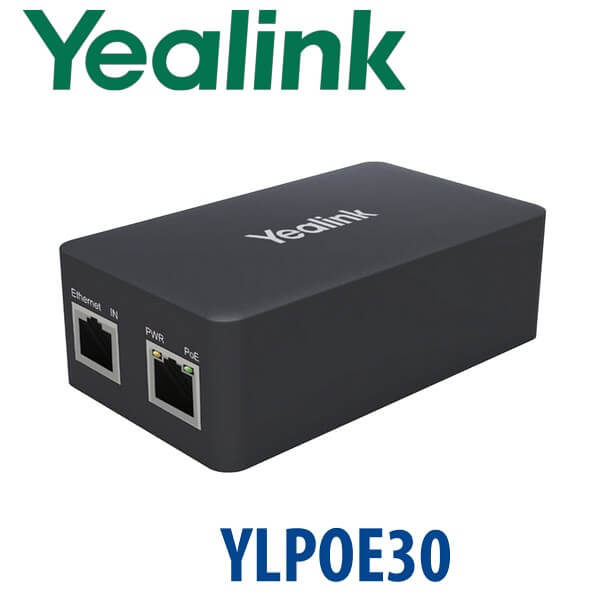
The Yealink YLPOE30 is the correct PoE adapter when you need to power a Yealink conference phone or PoE-supported IP phone but the network point is not connected to a PoE switch. It combines data and power through one Ethernet run, keeping the meeting-room table or office desk clean instead of running separate power beside the network cable. For Dubai offices using Yealink CP960, CP965 or other Yealink PoE-featured phones, Vector Digital Systems supplies the YLPOE30 with same-day quote in AED, VAT breakdown, delivery options and staging guidance from David, our Yealink specialist.
What the YLPOE30 Does — and What It Does Not Do
A PoE adapter is often confused with a normal phone power supply. The YLPOE30 is different: it takes AC power from the wall, takes network data from your LAN, and outputs both power and data through the PoE Ethernet port to the Yealink device. It is ideal where the phone supports PoE but the switch port does not.
| Your Situation | Correct Power Option | What David Checks Before Quote |
|---|---|---|
| PoE switch already installed | No YLPOE30 required for that port | Switch supports PoE/PoE+ and has enough power budget |
| Non-PoE switch or standard LAN point | Yealink YLPOE30 PoE adapter | Device model, cable path and desk or meeting-room layout |
| Desk phone needs DC barrel power only | Model-specific Yealink PSU, not YLPOE30 | Exact phone model and UAE 220V power requirement |
PoE Truth: Do Not Buy Blind
The YLPOE30 is used when your LAN point does not provide PoE. Many Yealink desk phones and conference phones are PoE-capable, but PoE is supplied by the switch port — it is not a magic feature inside the cable. If your switch is not PoE-capable, the phone may have network but no power. The YLPOE30 solves that by injecting power into the Ethernet link. For phones that require a normal DC power adapter instead, David will quote the correct Yealink PSU rather than the YLPOE30.
Platform Trap: Power Is Not the Same as SIP, Teams or Zoom
The YLPOE30 only supplies power and network connectivity. It does not change the platform firmware of the phone. A SIP phone remains a SIP phone, a Microsoft Teams phone remains a Teams phone, and a Zoom-certified device remains a Zoom device. If you are buying the YLPOE30 with a Yealink phone, tell David the phone model and your calling platform so the power accessory and the phone platform are both correct before dispatch.
| Your Platform | What YLPOE30 Handles | What It Does Not Handle |
|---|---|---|
| SIP PBX — 3CX, Yeastar, UCM, hosted | Powers a compatible PoE Yealink SIP device from a non-PoE LAN point | It does not register the SIP account by itself |
| Microsoft Teams | May power compatible Yealink PoE Teams devices where specified | It does not convert SIP phones into Teams phones |
| Zoom Phone / Zoom Rooms | May power compatible Yealink PoE Zoom devices where specified | It does not create Zoom certification for an unsupported device |
Where the YLPOE30 Sits in a Yealink Deployment
Think of the YLPOE30 as the clean single-device fix between a full PoE switch upgrade and a simple DC power supply. It is especially useful for one or two meeting rooms, temporary offices, serviced offices, reception desks and conference-room tables where the existing switch is not PoE but the Yealink phone is designed to receive power over Ethernet.
| Feature | Yealink PSU | YLPOE30 ★ | PoE Switch Port |
|---|---|---|---|
| Primary Use | Direct DC power for supported phones | Inject PoE into one Ethernet run | Power many phones from the network switch |
| Data + Power on One Cable | No | Yes | Yes |
| Network Ports | Not applicable | 10/100/1000M PoE ports | Depends on switch model |
| Best For | Single desk phone needing adapter power | CP960, CP965 or PoE phone where the switch is not PoE | New office build or multi-phone rollout |
| Desk Cleanliness | Power and data are separate | Power and data leave as one Ethernet cable | Cleanest at scale |
| Deployment Cost Logic | Lowest if the phone supports DC input | Best for one-off PoE injection | Best for 5+ phones or new cabling plans |
| Choose if… | Your phone needs a normal Yealink power adapter | You have a PoE-capable Yealink device but no PoE switch port | You are powering many Yealink phones from one network cabinet |
Dubai Use Cases for the Yealink YLPOE30
Meeting rooms in Business Bay and DIFC. Conference phones often sit in the centre of the room, while the available LAN point is under the table or on the wall. The YLPOE30 keeps the setup clean by sending power and data through one Ethernet run to a compatible Yealink conference phone.
Serviced offices and temporary project sites. In Dubai serviced offices, fit-out sites and short-term branch offices, the switch infrastructure may not be PoE-ready. Instead of replacing the switch for one Yealink phone, the YLPOE30 provides a quick plug-and-play power path.
Hotel, clinic and reception deployments. Reception desks and meeting rooms in Deira, Al Barsha, JLT and Dubai Marina often need one or two extra Yealink devices after the main network was already installed. The YLPOE30 avoids a cabinet change when the existing LAN port is data-only.
Full Technical Specifications
| Specification | Yealink YLPOE30 |
|---|---|
| Product Type | PoE adapter / PoE injector for Yealink IP devices |
| Primary Compatibility | Yealink CP960, CP965 and other Yealink IP phones that support PoE |
| PoE Standard | IEEE 802.3af and IEEE 802.3at |
| Ethernet Interface | 10/100/1000M PoE ports |
| LED Indicators | PWR and PoE |
| AC Input | 100–240V AC, 50/60Hz, 1.0A |
| DC Output | 54V, 0.56A |
| PIN Definition | 1/2 positive, 3/6 negative |
| Operating Temperature | 0°C to 40°C |
| Storage Temperature | -40°C to 70°C |
| Operating Humidity | 10% to 90%, non-condensing |
| Storage Humidity | 5% to 90%, non-condensing |
| Package Contents | PSE unit, 2m CAT5E FTP Ethernet cable and power cord |
| Giftbox Size | 120mm × 180mm × 105mm |
| Carton Quantity | 20 pieces per carton |
| Carton Weight | 10.4 kg net / 11.4 kg gross |
Compatible Yealink Devices and Related Accessories
| Item | Use With YLPOE30 | Buyer Note |
|---|---|---|
| Yealink CP960 | Primary conference-phone compatibility | Use when the meeting-room LAN point is not PoE-enabled |
| Yealink CP965 | Current conference-phone compatibility listed by Yealink | Confirm platform and room setup before quote |
| Other Yealink PoE IP Phones | Compatible where the phone supports PoE | Share the exact phone model with David before ordering |
| Model-Specific Yealink PSU | Alternative, not the same product | Use only when the phone requires direct DC power instead of PoE injection |
Staging and Dispatch from Vector Digital Systems
For Yealink accessory orders, Vector Digital Systems checks the phone model, power requirement, switch type and cable path before dispatch. If the YLPOE30 is ordered with a Yealink phone, our team can stage the phone before delivery: SIP registration, provisioning template, BLF or speed-dial setup, dial-plan test and live call test. For meeting-room devices, David also confirms whether your room needs PoE injection, a PoE switch, or a different power accessory so the installer does not discover a missing power path on site.
Export from Dubai
Vector Digital Systems supplies Yealink YLPOE30 adapters for Dubai projects and export orders across the region. We support system integrators, telecom operators, PABX installers, hotel groups and enterprise IT teams shipping to Oman, Saudi Arabia, Kuwait, Qatar, Bahrain, Jordan, Kenya, Tanzania, Pakistan and Sri Lanka. Export shipments move FOB Dubai with commercial invoice, packing list and certificate of origin on request. For bulk Yealink accessory quantities, send David the device list and destination so we can quote with carton quantity, VAT status and documentation clearly shown.
Get a same-day Yealink YLPOE30 quote in AED
Tell David your Yealink phone model, quantity, whether your switch is PoE-capable, and whether the order is for Dubai delivery or export. We quote with VAT breakdown and delivery charges included.
Frequently Asked Questions — Yealink YLPOE30
What is the Yealink YLPOE30 used for?
The Yealink YLPOE30 is a PoE adapter used to provide both network data and electric power over one Ethernet cable to compatible Yealink PoE devices. It is commonly used with Yealink CP960, CP965 and other Yealink IP phones that support PoE when the available switch port is not PoE-capable.
Does the YLPOE30 work with the Yealink CP960 and CP965?
Yes. Yealink lists the YLPOE30 as a power supply for the CP960 and CP965 IP conference phones, and also states compatibility with other Yealink IP phones that support PoE. Share the exact device model with David before ordering so we confirm the correct power accessory.
Is the YLPOE30 the same as a normal Yealink power adapter?
No. A normal Yealink PSU provides direct DC power to a phone. The YLPOE30 is a PoE injector: it takes AC power and LAN data, then outputs both power and data through the Ethernet cable to a PoE-compatible Yealink device.
Do I need the YLPOE30 if my switch already supports PoE?
Usually no. If your network switch port already supplies PoE or PoE+ and has enough power budget, the phone can normally be powered directly from that switch port. The YLPOE30 is mainly for non-PoE switch ports or standard LAN points.
Does the YLPOE30 support Gigabit Ethernet?
Yes. The YLPOE30 has 10/100/1000M PoE ports, so it is suitable for Yealink devices on Gigabit office networks. David can confirm the complete cable path if a laptop or meeting-room device shares the same network run.
What comes in the Yealink YLPOE30 package?
The Yealink YLPOE30 package includes the PSE unit, a 2m CAT5E FTP Ethernet cable and a power cord. Vector Digital Systems confirms the correct UAE power lead and quantity before dispatch.
Will the YLPOE30 make a SIP phone work with Microsoft Teams?
No. The YLPOE30 only provides power and network connectivity. It does not change the phone platform. A SIP Yealink phone remains SIP-only, while Microsoft Teams requires a separate Teams-capable Yealink device verified against Microsoft’s certified device list.
Who is the Yealink authorised supplier in Dubai?
Vector Digital Systems LLC has supplied Yealink phones, accessories and VoIP systems in Dubai since 2009. David handles Yealink product selection, project pricing, staging guidance and local warranty support for Dubai and export customers.
Does Vector Digital Systems configure Yealink phones when I order the YLPOE30 with a phone?
Yes. When the YLPOE30 is supplied with a Yealink phone, Vector Digital Systems can stage the phone before delivery: SIP registration, provisioning template, BLF or speed-dial setup, dial-plan test and live call test. The power accessory is matched to the deployment before dispatch.
Does Vector Digital Systems export Yealink YLPOE30 adapters from Dubai?
Yes. Vector Digital Systems exports Yealink YLPOE30 adapters and other Yealink accessories from Dubai to integrators and enterprise buyers in Oman, Saudi Arabia, Kuwait, Qatar, Bahrain, Jordan, Kenya, Tanzania, Pakistan and Sri Lanka. Shipments move FOB Dubai with commercial invoice, packing list and certificate of origin on request.