Description
Yealink EHS36 Wireless Headset Adapter Legacy EHS Adapter for Yealink SIP Phones Dubai
Yealink EHS36 Wireless Headset Adapter for Legacy Yealink SIP Phones
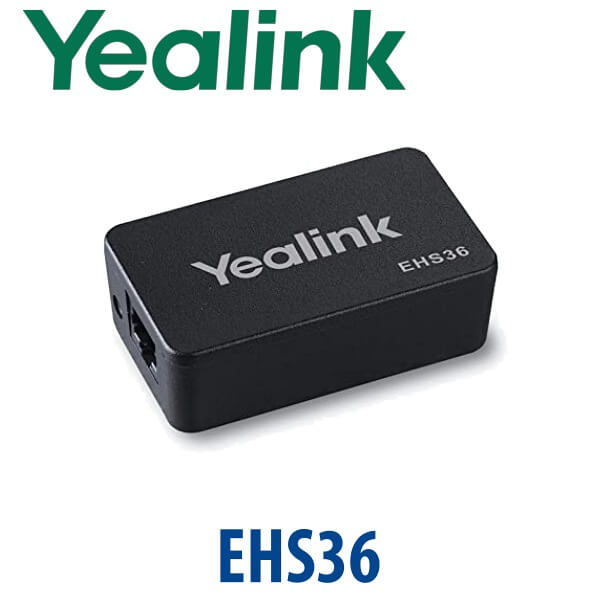
The Yealink EHS36 is the legacy Electronic Hook Switch adapter used to connect compatible older Yealink SIP phones to supported wireless headset systems. It allows users to answer and end calls from the headset instead of reaching for the phone every time — a small accessory that makes a big difference at reception desks, call-centre positions, finance counters, clinic front desks and busy SME offices in Dubai.
Because EHS compatibility depends on the exact phone body and headset model, Vector Digital Systems treats the EHS36 as a compatibility-checked accessory. Share your Yealink phone model and headset model with David before ordering. If you are buying for a newer Yealink T7 or T8 deployment, do not assume EHS36 is correct — we verify the current adapter before quoting.
Platform and Phone Generation Check Before You Order
The EHS36 does not turn a phone into a Microsoft Teams phone, Zoom phone or wireless headset by itself. It only provides the hook-switch control path between a compatible Yealink SIP phone and a supported wireless headset base. The phone platform must still be correct.
| Your Setup | Right Accessory Route | What David Checks |
|---|---|---|
| Older Yealink SIP phone + wireless headset | EHS36 may be suitable | Phone model, EXT port, headset brand and cable set |
| New Yealink T7 / T8 series desk phone | Verify the current EHS adapter — do not assume EHS36 | Exact phone model, headset model and Yealink compatibility list |
| Microsoft Teams desk phone | Separate MP-series accessory check | Teams-certified phone model, headset certification and cable path |
What the EHS36 Actually Does
The EHS36 gives compatible wireless headsets electronic hook-switch control. That means the user can answer an incoming call, end the call, and move away from the desk within headset range without pressing the phone’s handset key. For receptionists, call-centre agents and supervisors who answer dozens of calls per hour, this removes a repetitive desk movement and keeps both hands free.
Legacy Accessory Warning — Do Not Use It for Every Yealink Phone
EHS36 is not a universal Yealink accessory. It belongs to the older Yealink SIP phone generation. Newer Yealink desk phones and current T7/T8 deployments may require a different EHS accessory path. Vector Digital Systems confirms the exact combination before dispatch so the adapter, headset base and phone all work together on installation day.
PoE Truth: The Adapter Does Not Power the Phone
The EHS36 is a headset-control adapter, not a phone power supply. Your Yealink desk phone still needs its normal power method: PoE from a capable switch or the correct optional Yealink PSU if PoE is not available. If you are ordering a phone, headset and EHS adapter together, tell David whether your switch ports provide PoE so the quote includes everything needed for a working desk.
EHS36 in the Yealink Accessory Range
Use the EHS36 only when the desk phone and headset combination calls for it. For older Yealink phones still deployed across Dubai offices, it remains a useful support accessory. For new T7-series rollouts, the safer route is to specify the current headset adapter during the project quote instead of reusing a legacy part number.
| Feature | RJ9 / Wired Headset | EHS36 ★ | Current EHS Adapter Check |
|---|---|---|---|
| Use case | Basic desk headset | Wireless headset remote answer/hang-up | New phone + headset deployments |
| Phone generation | Many Yealink phones with headset port | Older compatible Yealink SIP phones | T7/T8, MP-series and newer models |
| Remote call control | No, usually phone-side control | Yes, with supported headset base | Depends on phone and headset |
| Headset type | Wired RJ9 / QD setups | Wireless headset base systems | DECT, Bluetooth, USB or Teams-certified headsets |
| Best buyer | Budget desk user | Reception, call centre, support desk, supervisor | New deployments and fleet refreshes |
| Price tier | Lowest | Low accessory cost | Depends on phone/headset combination |
| Choose if… | You only need a simple wired headset | You have a compatible older Yealink SIP phone and need wireless remote call control | You are buying for T7/T8, MP-series or a new headset rollout |
Where the EHS36 Still Helps in Dubai
Reception desks with older Yealink phones. Many Dubai offices still run older Yealink SIP phones at reception and admin desks. Adding EHS36 with a compatible wireless headset lets the receptionist answer while checking visitors, handling documents or walking a few steps away from the desk.
Call centres and service teams. A headset-control adapter saves time on every call. For support desks in Business Bay, Deira, Al Quoz and Jebel Ali, remote answer/hang-up reduces handset handling and keeps agents focused on the customer screen.
Clinics, finance counters and back offices. Teams that answer calls while checking files, appointment systems or transaction screens benefit from wireless movement. The EHS36 is especially useful when the desk phone is staying in service but the user needs a headset upgrade.
Full Technical Specifications
| Specification | Yealink EHS36 |
|---|---|
| Product type | Wireless headset Electronic Hook Switch adapter |
| Main function | Remote answer and hang-up control between compatible Yealink SIP phones and wireless headset bases |
| Phone compatibility | Legacy/older compatible Yealink SIP phone models — exact model must be confirmed before quoting |
| Headset compatibility | Compatible wireless headset base systems from major headset brands, subject to cable and model check |
| Connection method | Connects to the supported phone’s EXT/EHS path and headset base using the required cable set |
| Supported actions | Answer call, end call and headset-side call control where supported by the phone/headset combination |
| Power note | Does not power the phone. Phone still requires PoE or the correct Yealink PSU. |
| Best applications | Reception desks, call centres, finance counters, healthcare desks, service teams and SME offices |
| Current status | Legacy support accessory — confirm availability and suitability with David before ordering |
Compatible Accessories and Related Items
| Item | Why It Matters | Order Note |
|---|---|---|
| Wireless headset base | The EHS36 provides remote call control only when paired with a supported headset base. | Share headset brand and exact model with David. |
| Yealink desk phone | Compatibility depends on the phone generation and ports. | Send a photo of the phone label if unsure. |
| Correct cable set | Wireless headset brands may require different cable paths. | Vector Digital Systems checks the cable requirement before dispatch. |
| Phone PSU if no PoE | The adapter does not replace the phone’s normal power requirement. | Tell David if your switch is not PoE-capable. |
Staging and Testing Before Dispatch
Vector Digital Systems can test the EHS36 with the phone and headset combination before dispatch where the full set is supplied together. We confirm the desk phone model, headset base, cable path and answer/hang-up behaviour so the user receives a working setup instead of a loose adapter that still needs troubleshooting on-site. For larger deployments, we label each adapter kit by user, department or extension before delivery.
Export from Dubai
Vector Digital Systems supplies Yealink accessories from Dubai to telecom installers, PABX integrators and corporate IT teams across Oman, Saudi Arabia, Kuwait, Bahrain, Qatar, Jordan, Kenya, Tanzania, Pakistan and Sri Lanka. EHS36 orders are usually shipped with Yealink phones, headsets or replacement accessory kits. Export shipments can be arranged FOB Dubai with commercial invoice, packing list and certificate of origin on request.
Get a same-day quote in AED — compatibility checked before supply
Tell David your Yealink phone model, headset brand, headset model and quantity required. Vector Digital Systems quotes with VAT breakdown, delivery charges and compatibility notes included.
Frequently Asked Questions — Yealink EHS36
What is the Yealink EHS36 used for?
The Yealink EHS36 is an Electronic Hook Switch adapter for compatible older Yealink SIP phones. It lets a supported wireless headset answer and end calls remotely, so the user does not need to press the phone handset or speaker key for every call.
Does the Yealink EHS36 work with every Yealink phone?
No. EHS36 is a legacy accessory for specific older Yealink SIP phones. It should not be assumed for newer T7/T8 phones or MP-series Teams phones. Vector Digital Systems checks the exact phone model before quoting so the correct EHS adapter is supplied.
Does the EHS36 work with Microsoft Teams?
The EHS36 is not a Teams device and does not add Teams support to a phone. It is only a headset-control adapter. If your office uses Microsoft Teams Phone, ask David for the correct Yealink MP-series phone and a compatible headset setup verified for that model.
Which headset brands can be used with the EHS36?
The EHS36 is commonly used with supported wireless headset bases from major headset brands such as Jabra, Plantronics/Poly and Sennheiser/EPOS. The exact model and cable set must be checked before supply because headset compatibility depends on the phone and base station.
Does the EHS36 power the Yealink phone?
No. The EHS36 only provides headset call-control signalling. Your Yealink phone still needs its normal power source: PoE from the network switch or the correct optional Yealink power adapter if PoE is not available.
EHS36 vs EHS40 — which one should I buy?
Do not choose by adapter name alone. EHS36 is for older compatible Yealink SIP phones, while newer Yealink phones may require a different EHS accessory path. Send David your phone model and headset model and Vector Digital Systems will confirm the correct adapter before quoting.
Can Vector Digital Systems test the EHS36 before delivery?
Yes. When the phone, headset and EHS adapter are supplied together, Vector Digital Systems can check the connection path and test remote answer/hang-up behaviour before dispatch. For bulk orders, kits can be labelled by user, desk or department.
Who is the Yealink authorised supplier in Dubai?
Vector Digital Systems LLC has supplied and staged Yealink solutions in Dubai since 2009. David handles Yealink accessory checks, project pricing, staging notes and local warranty support so customers do not need to manage international supplier claims.
What is the best Yealink headset setup for a reception desk in Dubai?
For an older compatible Yealink phone, EHS36 with a supported wireless headset base can be the right setup because the receptionist can answer calls from the headset. For a new T7/T8 desk phone or Teams phone, ask David to specify the current compatible headset and EHS path instead of assuming EHS36.
Does Vector Digital Systems export Yealink EHS36 accessories from Dubai?
Yes. Vector Digital Systems exports Yealink phones, headsets and accessories from Dubai to integrators and corporate buyers in Oman, Saudi Arabia, Kuwait, Bahrain, Qatar, Jordan, Kenya, Tanzania, Pakistan and Sri Lanka. Shipments can be arranged FOB Dubai with commercial invoice, packing list and certificate of origin on request.