Description
Yealink WPP30 Wireless Presentation Pod 4K USB-C Screen Sharing Dubai
Yealink WPP30 — One-Press 4K Wireless Sharing for Dubai Meeting Rooms
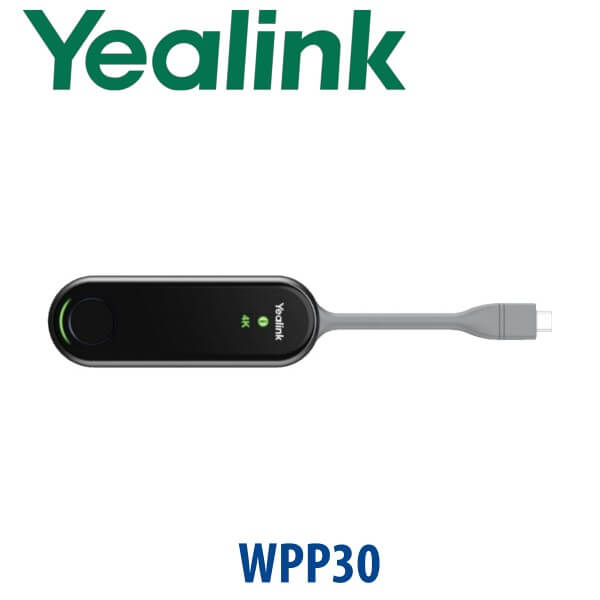
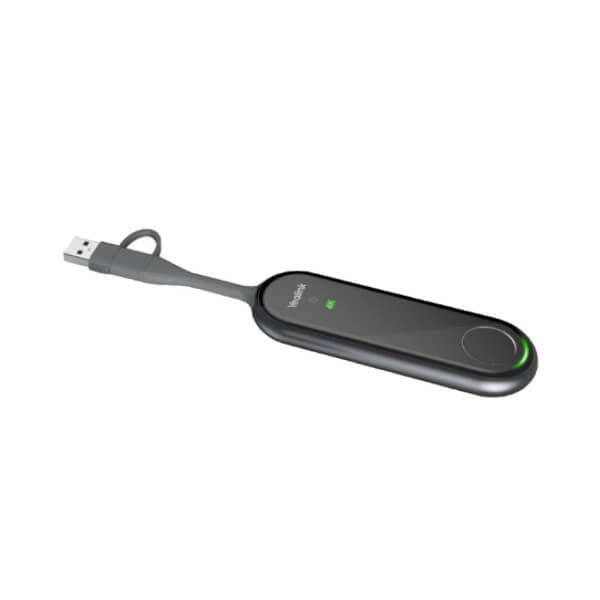
The Yealink WPP30 is the small accessory that fixes a common meeting-room problem: presenters arriving with different laptops, different ports and no patience for HDMI cables, drivers or screen-share troubleshooting. Plug the WPP30 into a laptop’s USB-C port, press the button, and share content wirelessly to a compatible Yealink room display or room system in up to 4K/30fps. For Dubai boardrooms, training rooms, executive meeting spaces and hybrid-work huddle rooms, it keeps the table clean and the meeting moving.
Platform Check — What the WPP30 Is, and What It Is Not
The WPP30 is a wireless presentation pod, not a standalone video conferencing codec, Teams phone or Zoom Room appliance. It is normally specified with Yealink room systems, MeetingBoard, RoomCast, MeetingBar and compatible presentation environments. If your room runs Microsoft Teams Rooms or Zoom Rooms, David will confirm the full Yealink room-device bundle and certification status before quoting — the WPP30 itself is the content-sharing pod in the room workflow.
| Your Room Setup | Right Yealink Approach | What You Need |
|---|---|---|
| Yealink MeetingBoard / RoomCast / compatible room system | WPP30 wireless presentation pod | Pairing with the room display or room system before use |
| Microsoft Teams Room | Yealink Teams Room system plus verified sharing accessory | Teams Rooms licence, certified room device and correct sharing workflow |
| Zoom Room | Yealink Zoom Room system plus verified sharing accessory | Zoom Rooms licence, compatible room device and display routing |
| Standalone TV with no Yealink receiver | Ask David to verify RoomCast / room-system requirement | The WPP30 is a pod; the room still needs a compatible receiver/display system |
Power Truth — USB Powered, Not a PoE Desk Phone
The WPP30 is powered from the presenter’s laptop or device through USB. It is not a PoE desk phone and it does not need a desk-phone power adapter. The practical check for buyers is different: confirm that your presenters use USB-C, USB-A, or mixed laptop ports, and confirm that your meeting room has the compatible Yealink receiving device. Vector Digital Systems pairs and tests the pod with the room system before delivery so the first meeting is not a troubleshooting session.
Why WPP30 Instead of HDMI Cables?
HDMI cables work until the presenter has USB-C only, the cable is missing, the table box is loose, or the laptop display settings delay the meeting. The WPP30 removes the cable from the table and gives users a repeatable one-press workflow. It supports duplicated display for simple presenting and extended display for presenter-view use cases, making it suitable for board packs, training decks, sales demos, finance reviews and multi-presenter workshops.
WPP30 in the Yealink Sharing Range — Where It Sits
For most current Yealink meeting-room deployments, the WPP30 is the practical 4K presentation pod to quote. Older WPP20 deployments may still exist in installed rooms, while PA20 is the step-up IP BYOD device where the room design needs broader wireless BYOD behaviour. David will match the accessory to the Yealink room system you already own or plan to buy.
| Feature | WPP20 | WPP30 ★ | PA20 |
|---|---|---|---|
| Primary role | Legacy wireless presentation pod | Current 4K wireless presentation pod | 4K IP BYOD device |
| Maximum casting | Verify by installed room system | Up to 4K/30fps | Up to 4K/30fps |
| Connector | USB presentation pod format | Full-featured USB-C + USB-A adapter | USB-C / USB-A workflow |
| Wireless | 5GHz wireless generation | 2×2 MIMO Wi-Fi 6, 2.4/5GHz | 2×2 MIMO Wi-Fi 6, 2.4/5GHz |
| Multi-screen sharing | Verify per room system | Up to 4 streams | Use where BYOD design requires PA20 |
| Security | Verify by firmware | AES, WPA-PSK, WPA2-PSK | Enterprise BYOD design |
| Best for | Existing older Yealink rooms | Meeting rooms needing simple 4K one-button sharing | Rooms needing IP BYOD design |
| Price tier | Legacy / sell-through | Standard room accessory | Step-up BYOD accessory |
| Choose if… | You are supporting an older installed room | You want clean 4K wireless presenting with one press | Your room design needs the PA20 IP BYOD workflow |
Where the WPP30 Works in Dubai
Executive boardrooms in DIFC and Downtown Dubai. Senior teams do not want to pass HDMI cables around the table. The WPP30 gives the presenter a clear button: plug in, press, present. It is especially useful for finance packs, legal reviews, investor decks and board presentations where multiple people may share content in one meeting.
Training rooms in Business Bay, JLT and DMCC. Trainers often switch between a main laptop, a participant laptop and a guest presenter. With up to four-screen sharing support in compatible setups, the WPP30 helps compare documents, dashboards and slides without changing cables between every presenter.
Hybrid meeting rooms after return-to-office. Dubai SMEs are upgrading meeting rooms for in-person and remote collaboration. Pairing WPP30 with a suitable Yealink room system lets the room keep a clean table while supporting fast content sharing for Teams, Zoom, BYOD and internal meetings — subject to the correct room device and platform licensing.
Education, healthcare and project offices. University classrooms, clinic meeting rooms, construction consultant offices and government supplier teams often need guest-friendly screen sharing. The WPP30 reduces IT support calls because users do not need to install presentation software just to show a deck.
Full Technical Specifications
| Specification | Yealink WPP30 |
|---|---|
| Product type | Wireless presentation pod for Yealink meeting-room environments |
| Maximum presentation quality | Up to 4K / 30fps UHD content sharing |
| Hardware encoding | Built-in hardware encoding chip for low CPU burden during presenting |
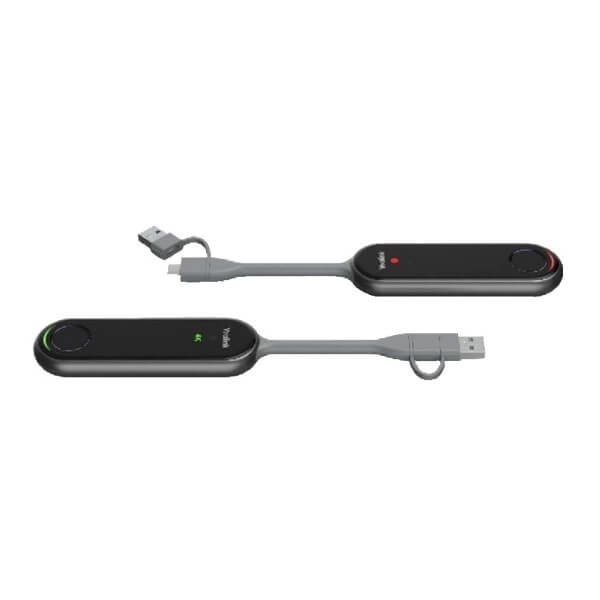
| Interface | 1× full-featured USB Type-C; USB-C to USB-A adapter included |
| Button | 1× start / stop presentation button |
| Indicators | 4K/UHD indicator, system error indicator, system status indicator |
| Wi-Fi standard | Wi-Fi 6, 802.11 a/b/g/n/ac/ax, 2×2 MIMO |
| Wireless frequency | 2.4GHz and 5GHz dual-band wireless |
| Security | AES encryption plus WPA-PSK / WPA2-PSK support |
| Bluetooth | Bluetooth 5.0 |
| Display modes | Duplicated display and extended display |
| Collaboration features | Annotation, virtual whiteboard, intuitive reverse control, multiple-screen sharing |
| Input power | 5V / 600mA via USB |
| Typical power consumption | 2.2W typical |
| Operating temperature | -10°C to 40°C |
| Operating humidity | 0 to 95%, non-condensing |
| Dimensions | 220mm × 38mm × 16mm |
| Weight | 75g |
| Best paired with | Compatible Yealink MeetingBoard, RoomCast, MeetingBar and room-system deployments — confirm exact compatibility before quote |
Compatible Accessories and Room Bundles
| Item | Use | Buyer Note |
|---|---|---|
| Yealink WPP30 | Presenter-side wireless sharing pod | Quote one or more pods depending on the number of regular presenters in the room |
| USB-C to USB-A adapter | Allows use with laptops that do not have USB-C | Included with WPP30 package; keep it attached to the pod to avoid loss |
| Yealink RoomCast / RoomCast E2 | Wireless presentation receiver / collaboration endpoint for display-side setup | David will confirm whether your room needs RoomCast, MeetingBoard or another Yealink receiver |
| Yealink MeetingBoard / MeetingBar room systems | Complete Teams, Zoom or BYOD meeting-room deployments | Certification and room platform must be verified before quoting the full room package |
Staging Before Dispatch — What Vector Digital Systems Checks
Before the WPP30 leaves our Dubai office, Vector Digital Systems checks the room workflow: pod pairing, firmware status where applicable, presentation start/stop behaviour, duplicated and extended display mode, 4K sharing path where supported, and compatibility with the room device being supplied. For project orders, we label each pod by room name — Boardroom, Training Room, CEO Office, Client Meeting Room — so the facilities team can deploy without confusion.
Export from Dubai
Vector Digital Systems supplies and exports Yealink WPP30 wireless presentation pods to system integrators, AV installers, telecom operators and corporate IT buyers across the region. Common export destinations include Oman, Saudi Arabia, Kuwait, Bahrain and Qatar in the GCC; Jordan and Egypt for regional projects; Kenya, Tanzania and Nigeria for African deployments; and Pakistan, Sri Lanka and Bangladesh for South Asian integrators. Shipments are quoted FOB Dubai with commercial invoice, packing list and certificate of origin on request. Same-day quote in AED is available, with VAT and UAE delivery noted clearly for local buyers.
Get a same-day WPP30 quote in AED — Dubai supply and export
Tell David your room system model, number of meeting rooms, laptop port mix (USB-C / USB-A), and whether you need the full Yealink room bundle. We quote with VAT breakdown and delivery charges included.
Frequently Asked Questions — Yealink WPP30
What is the Yealink WPP30 used for?
The Yealink WPP30 is a wireless presentation pod for meeting rooms. It lets a presenter share laptop content wirelessly to a compatible Yealink room system or display workflow in up to 4K/30fps, using a simple plug-in and press-button experience.
Does the Yealink WPP30 work with Microsoft Teams or Zoom?
The WPP30 is not a Teams or Zoom device by itself; it is a content-sharing accessory. It can be part of a Yealink meeting-room setup, but the Teams Rooms or Zoom Rooms certification belongs to the full room system, not the pod alone. Vector Digital Systems verifies the current room-device certification before quoting any Teams or Zoom bundle.
Does the WPP30 need software or drivers?
For the standard USB-C hardware-encoding workflow, the WPP30 is designed for plug-and-play presenting without installing an extra driver. Users plug the pod into the laptop, wait for the sharing workflow, and press the button to start or stop presenting.
Can the WPP30 share in 4K?
Yes — the WPP30 supports up to 4K/30fps UHD content sharing when used with a compatible Yealink room setup and display path. For older room systems or mixed AV installations, David will confirm the actual supported resolution before quoting.
Does the WPP30 work with USB-A laptops?
Yes — the WPP30 has a full-featured USB Type-C connector and includes a USB-C to USB-A adapter. This is useful in Dubai offices where presenters may use a mix of new USB-C laptops and older USB-A laptops.
How many screens can share at the same time with WPP30?
The WPP30 supports up to four streams on the main screen in compatible Yealink room setups. This is useful for training rooms, design reviews, dashboard comparisons and workshops where more than one presenter needs to show content.
WPP30 vs PA20 — which one should I buy?
Choose the WPP30 when you need simple one-press 4K wireless presentation for a compatible Yealink room system. Choose PA20 when the room design needs Yealink’s IP BYOD workflow. For most standard meeting rooms, David will first check your room device, then specify WPP30 or PA20 based on the exact sharing requirement.
Who is the Yealink authorised supplier for WPP30 in Dubai?
Vector Digital Systems LLC has supplied Yealink products and VoIP solutions in Dubai since 2009. David handles Yealink product selection, room-accessory matching, project pricing, staging and local warranty support before dispatch.
Does Vector Digital Systems configure the WPP30 before delivery?
Yes — for Yealink room-system orders, Vector Digital Systems pairs and tests the WPP30 with the room device, checks presentation start/stop behaviour, verifies the sharing workflow and labels pods by room name for project deployments.
Does Vector Digital Systems export Yealink WPP30 from Dubai?
Yes — Vector Digital Systems exports Yealink WPP30 pods and room accessories from Dubai to integrators and corporate buyers in Oman, Saudi Arabia, Kuwait, Bahrain, Qatar, Jordan, Egypt, Kenya, Tanzania, Nigeria, Pakistan and Sri Lanka. Export quotes are FOB Dubai with commercial invoice, packing list and certificate of origin on request.