Description
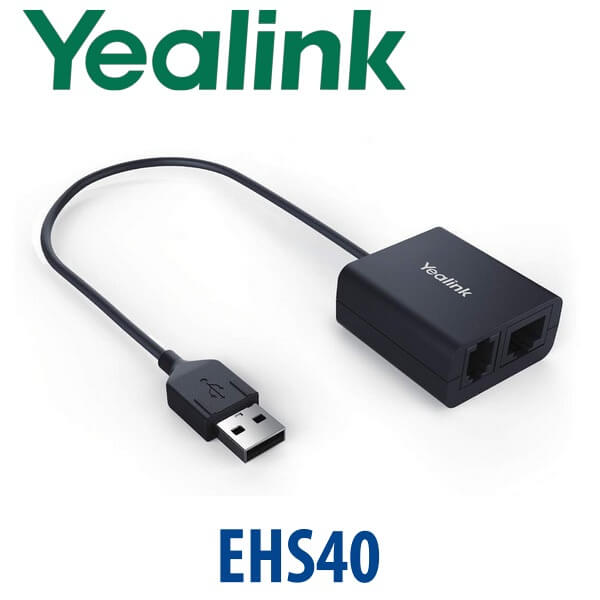
Yealink EHS40 Wireless Headset Adapter Remote Answer Cable for T4U T5W Phones Dubai
Answer Yealink Desk Phone Calls Without Running Back to the Handset
The Yealink EHS40 is the small accessory that makes a big difference on busy desks. It gives compatible Yealink IP phones an electronic hook switch connection to supported wireless headset bases, so the user can answer and end calls from the headset button instead of touching the phone. For reception teams, call-centre agents, finance desks and service coordinators in Dubai, that means fewer missed calls, faster response and a cleaner hands-free workflow.
Vector Digital Systems supplies the Yealink EHS40 in Dubai for compatible Yealink phone fleets, especially T4U, T4S, T5W/T5-series and VP59-era deployments. Tell David your phone model and headset brand before ordering — we confirm compatibility, cable requirement and firmware condition before dispatch, so the adapter arrives ready for the exact desk where it will be used.
Important Compatibility Note — EHS40 Is Not a Universal Yealink Adapter
The EHS40 is built for specific Yealink phones and specific wireless headset bases. It is commonly used with supported Yealink T41S, T42S, T46S, T48S, T42U, T43U, T44U, T44W, T46U, T48U, T53, T53W, T54W, T57W, T58A, T58W and VP59 models. It is not something to buy blindly for every Yealink phone. If you are using the new T7 series — T73U, T73W, T74U, T74W or T77U — ask David to verify the current headset compatibility path before ordering. Do not assume EHS40 support for T7 unless confirmed from Yealink’s current compatibility matrix.
Platform Fit — SIP Phone, Teams Phone or USB Headset?
The EHS40 does not convert a SIP phone into a Microsoft Teams phone, and it does not change the phone platform. It only provides remote call-control between a compatible desk phone and a compatible wireless headset base. Get the platform right first, then choose the headset accessory.
| Your Desk Setup | Right Accessory Path | What You Need |
|---|---|---|
| Compatible Yealink SIP phone + wireless headset base | Yealink EHS40 | Supported phone model, supported headset base and correct Y-cord |
| Microsoft Teams desk phone user | Teams-certified Yealink MP-series phone or Teams-certified headset path | Microsoft 365 tenant + Teams Phone licence per user; certification to be verified before quote |
| New T7-series Yealink phone | Verify current headset compatibility before ordering EHS40 | Phone model, headset model and Yealink compatibility confirmation |
PoE Truth — The EHS40 Does Not Power the Phone
The EHS40 is a headset control adapter, not a power supply. Your Yealink desk phone still needs its normal power source: PoE from a network switch, or the correct optional Yealink PSU where PoE is not available. Many Yealink desk phones ship without a power adapter in the box, so Vector Digital Systems confirms your PoE situation when quoting the EHS40 with a phone or headset bundle. No buyer surprises at delivery.
Where EHS40 Sits in the Yealink Accessory Range
The EHS40 is mainly for offices that already have compatible Yealink desk phones and want to add professional wireless headset control without replacing the phone. It is the practical accessory for legacy fleets such as T46U, T54W and T57W that are still installed across Dubai offices. For new T7 deployments, the correct headset route must be checked separately before quoting.
| Feature | EHS36 | EHS40 ★ | Yealink WH / USB Headset Path |
|---|---|---|---|
| Main Use | Older Yealink EHS deployments | Remote call control for compatible T4/T5/VP59-era phones | Direct headset workflow where supported |
| Connection | Model-dependent | Phone USB port + headset Y-cord | USB, DECT base or Bluetooth depending on model |
| Phone Compatibility | Legacy phones only — verify before use | Selected T4S/T4U/T5/VP59 models | Depends on exact Yealink phone and headset |
| Headset Brands | Verify per headset | Jabra, Poly/Plantronics, Sennheiser/EPOS compatible ranges | Yealink UH/WH/BH ranges and selected third-party models |
| Remote Answer / Hang-up | Yes, where supported | Yes — primary reason to buy | Yes, depending on headset and phone support |
| Best Fit | Older installed estates | Dubai offices with compatible T46U/T54W/T57W/T5/T4 fleets | New headset deployments and T7-era desks after compatibility check |
| Price Tier | Legacy accessory | Low-cost productivity add-on | Depends on headset model |
| Choose if… | You are replacing an older EHS36 setup and compatibility is confirmed | You need remote answer/hang-up on a compatible Yealink T4/T5/VP59 desk phone | You are designing a new headset standard and want the cleanest current workflow |
Where the Yealink EHS40 Works in Dubai
Reception desks and front offices. A receptionist in Business Bay or Deira may move between printer, visitor desk and extension panel all day. With a supported wireless headset and EHS40, incoming calls can be answered from the headset button while the phone remains on the desk.
Call-centre and customer service desks. Dubai service teams using Yealink T46U, T54W or T57W phones can keep existing handsets and add headset mobility. The agent hears the ring through the headset, answers remotely and ends the call without reaching for the phone after every interaction.
Finance, logistics and operations teams. Staff in Jebel Ali, Al Quoz, DIP and DMCC offices often work across calls, ERP screens and paperwork. EHS40 reduces handset handling and keeps the desk workflow cleaner, especially when paired with the right Jabra, Poly/Plantronics or Sennheiser/EPOS wireless headset base.
Legacy Yealink fleet support. Many UAE businesses still run T46U, T48U, T54W and T57W phones. Instead of replacing the entire desk phone fleet only to add wireless headset control, the EHS40 can extend the working life of compatible phones while the business plans a T7-series refresh separately.
Full Technical Specifications
| Specification | Yealink EHS40 |
|---|---|
| Product Type | Electronic hook switch / wireless headset adapter |
| Primary Function | Remote answer and hang-up control from compatible wireless headset |
| Phone Connection | Connects to the USB port of the compatible Yealink phone |
| Headset Connection | Y-cord connection to compatible wireless headset base |
| Supported Headset Brands | Compatible Jabra, Poly/Plantronics and Sennheiser/EPOS wireless headset models — exact model must be checked |
| Supported Yealink Phones | Selected VP59, T58W, T58A, T57W, T54W, T53W, T53, T42U, T43U, T44U, T44W, T46U, T48U, T48S, T46S, T42S and T41S models. Confirm before order. |
| T7-Series Note | Do not assume EHS40 compatibility with T73U, T73W, T74U, T74W or T77U. Ask Vector Digital Systems to verify the current Yealink compatibility path. |
| Installation | Plug-and-play once the phone model, headset base and cable are correct |
| Power | No separate phone power function — the phone still needs PoE or the correct Yealink PSU |
| Typical Use Cases | Reception, call-centre agents, finance desks, customer service, logistics coordinators and any desk where wireless headset mobility is needed |
| In Box | EHS40 adapter, headset brand Y-cords and user guide. Contents can vary by region — confirm at quote stage. |
Compatible Accessories and Bundle Options
| Item | Model / Range | Purpose |
|---|---|---|
| Wireless Headset Base | Compatible Jabra, Poly/Plantronics or Sennheiser/EPOS models | Provides the wireless headset connection used with EHS40 remote call control |
| Compatible Yealink Phone | T46U, T48U, T54W, T57W and other supported models | Desk phone must be in the EHS40 compatibility list before quoting |
| Yealink PSU | Correct PSU for the phone model | Needed if the phone is not powered by PoE. EHS40 does not replace phone power. |
| Replacement / Upgrade Phone | Yealink T7-series — T73U, T74U, T74W, T77U | For new deployments, ask David whether a direct USB/WH headset path is cleaner than EHS40 |
Staging Before Dispatch — What We Check
Before dispatching the Yealink EHS40, Vector Digital Systems checks the phone model, headset brand, headset base model and cable requirement. For project orders we can label each adapter by desk, match it to the correct headset base, confirm the phone has the right USB support, and test the remote answer/hang-up workflow before delivery. If the order includes Yealink desk phones, we can also stage SIP registration, provisioning template, BLF/speed-dial keys and dial-plan testing before dispatch.
Export from Dubai
Vector Digital Systems exports Yealink accessories and phone bundles from Dubai to system integrators, telecom installers and enterprise procurement teams across Oman, Saudi Arabia, Kuwait, Qatar, Bahrain, Jordan, Kenya, Nigeria, Pakistan and Sri Lanka. EHS40 is commonly ordered with Yealink desk phones, wireless headset bases and spare PSUs for rollout projects. Export shipments move FOB Dubai with commercial invoice, packing list and certificate of origin on request. Send David your phone model list, headset list and destination country for a same-day quote in AED with VAT and delivery details where applicable.
Get a same-day Yealink EHS40 quote in AED
Tell David your Yealink phone model, headset brand, headset base model and quantity. We confirm compatibility before dispatch and include VAT breakdown and delivery charges in the quote.
Frequently Asked Questions — Yealink EHS40
What does the Yealink EHS40 do?
The Yealink EHS40 is an electronic hook switch adapter. It connects a compatible Yealink IP phone to a compatible wireless headset base so the user can answer and end calls from the headset button instead of touching the phone.
Which Yealink phones work with the EHS40?
EHS40 supports selected Yealink VP59, T58W, T58A, T57W, T54W, T53W, T53, T42U, T43U, T44U, T44W, T46U, T48U, T48S, T46S, T42S and T41S phones. Compatibility should be checked before order because firmware, region and headset base model can affect the final working setup.
Does the Yealink EHS40 work with the T73U, T74U, T74W or T77U?
Do not assume EHS40 compatibility with the new T7-series phones. For T73U, T73W, T74U, T74W and T77U, ask Vector Digital Systems to verify the current Yealink headset compatibility path before quoting. A direct USB headset or Yealink WH-series workflow may be the better option depending on the phone and headset.
Does the EHS40 work with Microsoft Teams?
EHS40 does not make a phone Microsoft Teams compatible. It only adds remote headset call-control to compatible Yealink desk phones. If your office uses Teams Phone, ask David for the current Yealink MP-series Teams phone or Teams-certified headset path, with certification verified before quote.
Which headset brands can connect through the Yealink EHS40?
EHS40 is designed for compatible wireless headset models from Jabra, Poly/Plantronics and Sennheiser/EPOS. The exact headset base model matters, so share the headset model with David before ordering. Vector Digital Systems confirms the cable and compatibility before dispatch.
Does the EHS40 need a separate power adapter?
The EHS40 itself is a headset control adapter and does not replace the phone power supply. Your Yealink phone still needs PoE from the network switch or the correct optional Yealink PSU. Many Yealink desk phones ship without a PSU, so Vector Digital Systems confirms the power requirement when quoting.
EHS40 vs EHS36 — which one should I buy?
Buy the adapter confirmed for your exact Yealink phone and wireless headset base. EHS40 is the common choice for supported T4S, T4U, T5 and VP59-era phones. EHS36 belongs to older compatibility paths. If you are unsure, send David the phone model and headset model and we will confirm the correct accessory before dispatch.
Can Vector Digital Systems test the EHS40 before delivery?
Yes — for project orders, Vector Digital Systems can match the EHS40 to the phone and headset base, label units by desk, check the cable set and test remote answer/hang-up before dispatch. If the order includes phones, we can also stage SIP registration, provisioning, BLF keys and dial-plan testing.
Who is the authorised Yealink supplier in Dubai?
Vector Digital Systems LLC has supplied and integrated Yealink products in Dubai since 2009. David handles Yealink pre-sales, compatibility checks, project pricing, staging and local warranty support, so buyers do not need to manage international courier claims for eligible local warranty cases.
Does Vector Digital Systems export Yealink EHS40 from Dubai?
Yes — Vector Digital Systems exports Yealink accessories and phone bundles from Dubai to integrators and enterprise buyers in Oman, Saudi Arabia, Kuwait, Qatar, Bahrain, Jordan, Kenya, Nigeria, Pakistan and Sri Lanka. Shipments are quoted FOB Dubai with commercial invoice, packing list and certificate of origin on request.