Description
Yealink BLT60 Busylight Status Light for WH Series Headsets Dubai
Stop Desk Interruptions Before They Happen
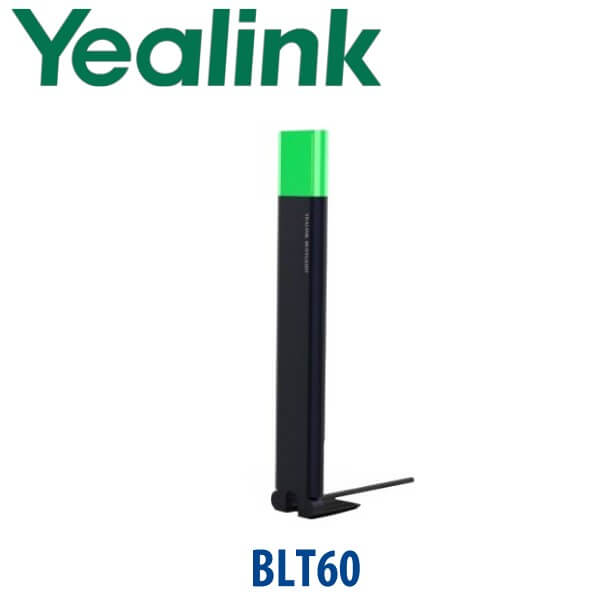
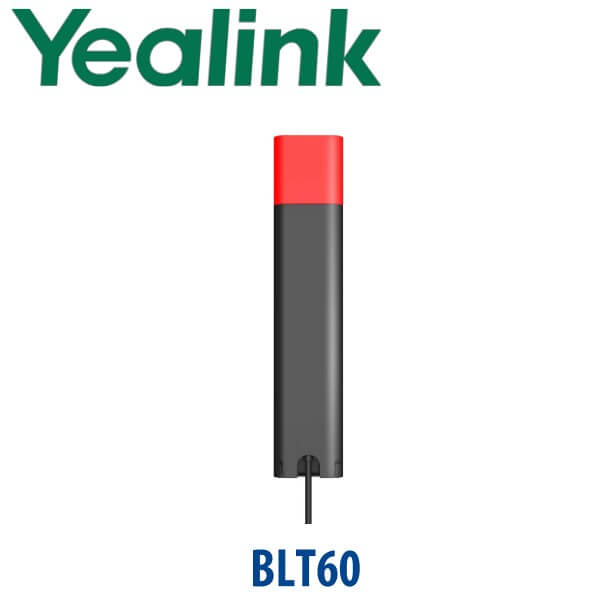
The Yealink BLT60 is the small accessory that solves a very common Dubai office problem: people interrupting agents, receptionists, finance teams, and managers while they are already on a call. Connected to a compatible Yealink WH-series headset base, the BLT60 displays the user’s live working status with a visible busylight. When the light turns red, colleagues know the user is in a call and should not be interrupted. For call centres, open-plan offices, reception counters, clinics, and hybrid desks, this is a low-cost accessory that protects call quality and keeps conversations professional.
Compatibility First — Match the BLT60 to the Right Yealink Headset
The BLT60 is not a universal wall light and it is not a standalone phone. It is a Yealink headset accessory designed for compatible Yealink WH-series headset environments. Before quoting, Vector Digital Systems checks your exact headset model, desk phone, softphone, and connection method so the busylight behaves correctly on live calls.
| Your Setup | Right Accessory | What We Check Before Quote |
|---|---|---|
| Yealink WH-series headset desk | Yealink BLT60 busylight | Exact WH headset model, base station support, firmware status, and call platform |
| Desk phone + Yealink wireless headset | BLT60 plus the correct headset / EHS setup if required | Desk phone model, headset connection method, answer / hang-up behaviour, and status sync |
| Softphone / UC app on PC | BLT60 with compatible Yealink headset workflow | Softphone support, Yealink USB Connect configuration, and working-state behaviour |
Platform Note — SIP, Teams, and Softphone Status Are Not the Same Thing
A busylight depends on the headset and call platform reporting status correctly. A SIP desk phone, Microsoft Teams softphone, Zoom softphone, and browser calling platform may not expose presence status in exactly the same way. That is why we do not sell the BLT60 as a blind accessory. David confirms your Yealink headset model and platform before dispatch, then advises whether the BLT60 will show the status you expect in your office workflow.
| Calling Platform | BLT60 Use Case | Buyer Check |
|---|---|---|
| SIP desk phone — 3CX, Yeastar, UCM, hosted PBX | Desk call status through compatible Yealink headset setup | Confirm phone model, headset model, and EHS / USB connection route |
| Microsoft Teams softphone | Status light for compatible Yealink headset workflow | Verify headset compatibility and Teams behaviour before quote |
| Zoom / other UC softphone | Visible busy / call alert where supported | Confirm softphone support and firmware before deployment |
Power Truth — No PoE, No PSU, No Separate Wall Power
The BLT60 is a headset accessory, not a PoE device. It does not connect to your network switch and it does not need a separate Yealink desk-phone power adapter. It plugs into the compatible Yealink headset base station. For a full headset desk, the important power check is the headset base and desk phone setup — not the BLT60 itself. Vector Digital Systems confirms the complete desk chain before dispatch so your call-centre or reception team receives the right accessory bundle.
Where the BLT60 Sits in the Yealink Accessory Range
The BLT60 sits in Yealink’s headset accessory category. It is not an expansion module like EXP55, not a desk phone adapter like EHS60 / EHS61, and not a wireless charger like WHC60. Its job is simple: make the user’s call state visible across the room. That makes it especially useful where the user is wearing a headset and colleagues cannot tell whether they are speaking to a customer, listening to a caller, or free for a question.
| Feature | EHS Adapter | BLT60 ★ | WHC60 Charger |
|---|---|---|---|
| Accessory Type | Headset control adapter | Visible busy / call-status light | Wireless headset charger |
| Main Purpose | Remote answer / hang-up | Reduce interruptions during calls | Charge supported WH headset |
| Best Desk | Desk phone + wireless headset | Agent, receptionist, manager, hybrid worker | Executive or shared headset desk |
| Visible Status | No | Yes — light shows working state | No |
| Cable / Placement | Desk phone cable path | 1.8m cord for visible placement | Desk charging position |
| Price Tier | Low accessory cost | Low accessory cost | Low accessory cost |
| Choose if… | You need headset remote call control from a desk phone | You need colleagues to see when a headset user is busy or ringing | You need convenient headset charging for a supported WH model |
Where the Yealink BLT60 Works in Dubai
Call centres in Business Bay, Deira, and Al Quoz. Agents using Yealink WH-series headsets are often focused on live customer calls while supervisors, colleagues, and visitors approach the desk. A BLT60 makes call status visible instantly, reducing interruptions and helping agents keep a professional tone with customers.
Reception desks in clinics, hotels, and service centres. A receptionist can be on a patient call, room-booking call, supplier call, or internal extension transfer while someone is standing at the counter. The BLT60 gives the room a simple visual signal: wait, the user is on a call.
Hybrid and executive desks in DIFC, DMCC, and Dubai Internet City. Managers and hybrid workers often jump between desk phone calls, softphone calls, and online meetings. With the right Yealink headset setup, the BLT60 helps colleagues understand when the user should not be disturbed.
Shared office and coworking spaces. In open-plan rooms where everyone wears a headset, the BLT60 gives each desk a visible boundary without needing signs, gestures, or repeated interruptions.
Full Technical Specifications
| Specification | Yealink BLT60 |
|---|---|
| Product Type | Busylight / call-status light accessory |
| Primary Function | Displays current desk phone / softphone working state using visible colour status |
| Typical Status Behaviour | Red during call; flashing red for incoming call / alert where supported by platform and headset setup |
| Compatibility | Designed for compatible Yealink WH-series headset environments; confirm exact model before quote |
| Installation | Plug-and-play connection to compatible headset base station |
| Cable Length | 1.8 metres |
| Placement | Desk corner, monitor edge, divider, reception counter, or any visible desk position within cable reach |
| Power | Powered through compatible headset base connection; no PoE switch port and no separate desk-phone PSU required for the BLT60 itself |
| Package Content | BLT60 busylight and Quick Start Guide |
| Gift Box Size | 47mm × 23mm × 133mm |
| Carton Quantity | 200 pieces per carton |
| Carton Weight | 9.42kg net / 10.17kg gross |
| Best Use | Call centres, reception desks, hybrid workstations, shared offices, supervisor desks, and open-plan teams |
Compatible Accessories and Bundle Checks
| Item | Model / Family | Why It Matters |
|---|---|---|
| Wireless Headset | Yealink WH-series | The BLT60 is designed for compatible Yealink WH headset environments; David confirms the exact model before quote. |
| Desk Phone | Yealink T-series / compatible SIP phone setup | If the headset is used with a desk phone, we verify the phone model and headset connection route. |
| EHS Adapter | EHS60 / EHS61 where required | Needed in some desk phone + wireless headset deployments for remote call control; confirmed per phone and headset. |
| Headset Management Tool | Yealink USB Connect | Used where supported to check headset firmware and configure busylight behaviour for softphone workflows. |
Staging Before Dispatch — What We Check
For BLT60 orders, Vector Digital Systems checks more than the part number. We confirm your Yealink headset model, desk phone or softphone platform, whether the headset base supports the busylight connection, and whether any EHS adapter or USB configuration is needed. For project orders, we label units by desk or agent group before dispatch and can stage the headset workflow with SIP registration, provisioning template, BLF / speed-dial setup on the phone, dial-plan test, and final call-status test where the full Yealink desk bundle is supplied by us.
Export from Dubai
Vector Digital Systems exports Yealink BLT60 busylights, WH-series headsets, desk phones, and headset accessories from Dubai to system integrators, telecom operators, PABX installers, call-centre contractors, hotel groups, banking branch networks, and corporate procurement teams. Common destinations include Oman, Saudi Arabia, Kuwait, Bahrain, Qatar, Jordan, Egypt, Kenya, Nigeria, and Pakistan. Multi-unit headset accessory orders are supplied FOB Dubai with commercial invoice, packing list, and certificate of origin on request. Ask David for project pricing when buying BLT60 units with WH headsets for multiple agents.
Get a same-day quote in AED — Yealink BLT60 in Dubai
Tell David your headset model, desk phone or softphone platform, quantity, and delivery location. We quote with VAT breakdown and delivery charges included.
Frequently Asked Questions — Yealink BLT60
What is the Yealink BLT60 used for?
The Yealink BLT60 is a busylight accessory that shows the working state of a compatible Yealink headset user. It gives colleagues a visible signal when the user is on a call, ringing, or unavailable, depending on the headset and platform behaviour. It is useful for call centres, reception desks, hybrid workers, and open-plan Dubai offices where headset users are interrupted too often.
Does the Yealink BLT60 work with every Yealink phone?
No. The BLT60 is not a universal phone accessory. It is designed for compatible Yealink WH-series headset environments and must be matched with the correct headset base, desk phone, softphone, and connection method. Vector Digital Systems checks your exact model before quoting so the busylight status behaves as expected.
Does the Yealink BLT60 work with Microsoft Teams?
The BLT60 can be used in compatible Yealink headset workflows, but Teams behaviour depends on the exact headset model, firmware, and how the headset connects to the PC or phone. Do not buy it only by the word “Teams” on a listing. Ask David to verify your Yealink headset and Teams setup before ordering.
Does the Yealink BLT60 need PoE or a power adapter?
No. The BLT60 is not powered by a PoE network switch and it does not need a separate Yealink desk-phone power adapter. It plugs into the compatible Yealink headset base station. If you are buying a full desk bundle, we still check the desk phone, headset base, and any EHS adapter or PSU needs separately.
How long is the Yealink BLT60 cable?
The Yealink BLT60 has a 1.8 metre cord. That gives enough reach to place the light on a monitor edge, desk corner, divider, reception counter, or another visible spot near the user rather than hiding it behind the headset base.
What is the best Yealink accessory for reducing interruptions at a call-centre desk in Dubai?
For compatible Yealink WH-series headset desks, the BLT60 is the best low-cost accessory for reducing interruptions. It gives a visible busy indicator so supervisors and colleagues can see when an agent is on a call. For larger needs, combine it with the correct Yealink WH headset, EHS adapter where required, and a properly staged SIP desk phone.
BLT60 vs EHS adapter — which one do I need?
They do different jobs. The BLT60 is a visible busylight that shows call or working status. An EHS adapter is used in some desk phone + wireless headset setups to allow remote answer and hang-up from the headset. Many headset desks may use one, the other, or both depending on the phone and headset model.
Who is the authorised Yealink supplier in Dubai?
Vector Digital Systems LLC has been a Yealink reseller and VoIP system integrator in Dubai since 2009. David handles Yealink product selection, headset compatibility checks, project pricing, staging, and local warranty support for BLT60, WH-series headsets, desk phones, and accessories.
Does Vector Digital Systems configure the Yealink BLT60 before delivery?
For BLT60-only accessory orders, we verify compatibility before dispatch. For full headset or phone bundles, Vector Digital Systems can stage the desk setup with SIP registration, provisioning template, headset connection checks, BLF / speed-dial configuration, dial-plan test, and a working call-status test where supported.
Does Vector Digital Systems export Yealink BLT60 busylights from Dubai?
Yes. Vector Digital Systems exports Yealink BLT60 accessories and WH-series headset bundles from Dubai to integrators, call-centre contractors, telecom operators, and corporate buyers in Oman, Saudi Arabia, Kuwait, Bahrain, Qatar, Jordan, Egypt, Kenya, Nigeria, and Pakistan. Shipments are FOB Dubai with commercial invoice, packing list, and certificate of origin on request.