Description
Yealink SIP-T56A Teams Edition 7-Inch Microsoft Teams HD IP Phone Dubai
Yealink T56A Teams Edition for Microsoft Teams Desks in Dubai
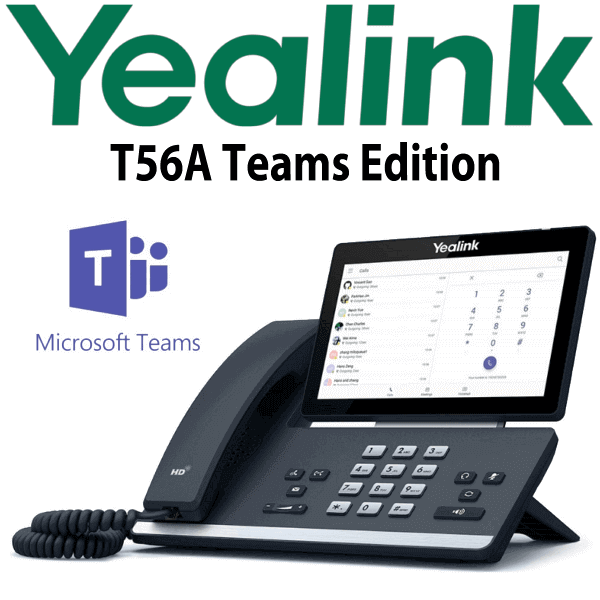
The Yealink SIP-T56A Teams Edition is a 7-inch Android-based Teams desk phone built for office workers who want a dedicated Microsoft Teams calling device instead of relying only on a laptop headset. It gives users a Teams-tailored interface, one-touch calling workflow, clear directory display, HD audio and a familiar desk-phone experience for daily business calls. Vector Digital Systems supplies and stages Yealink Teams phones in Dubai with same-day quote in AED, VAT breakdown and delivery details included.
Teams, SIP or Zoom? Choose the Correct Platform Before Ordering
The T56A Teams Edition is not a normal SIP desk phone. It is a Microsoft Teams phone designed for Teams voice users. If your office runs 3CX, Yeastar, Grandstream UCM or another SIP PBX, ask David for a SIP desk-phone model instead. If your office runs Teams Phone, confirm your Microsoft 365 tenant, Teams Phone licence and device certification requirements before ordering. Certification status was checked against Microsoft’s certified-device list on 5 Aug 2026; because this is a legacy Teams model, Vector Digital Systems will verify suitability for your tenant before quoting.
| Your Platform | Right Phone Path | What You Need |
|---|---|---|
| Microsoft Teams Phone | Yealink SIP-T56A Teams Edition — this page, subject to tenant/certification verification | Microsoft 365 tenant, Teams Phone licence and admin approval |
| SIP PBX — 3CX, Yeastar, UCM, hosted PBX | Choose a Yealink SIP desk phone instead | SIP credentials from your PBX or hosted provider |
| Zoom Phone | Choose a Zoom-certified Yealink device | Zoom Phone licence and certified-device check |
PoE Truth — Power Adapter Is Optional
The Yealink T56A Teams Edition supports Power over Ethernet, but the external power adapter is optional. For most Dubai office installations, the cleanest setup is a PoE switch port at the desk. If your switch is not PoE-capable, ask David to include the correct Yealink power adapter in the quote. This check is done before dispatch so the phone does not arrive without the power option your desk needs.
Gigabit Desk Passthrough
The T56A includes dual Gigabit Ethernet ports, so the phone can sit between the network wall point and the user’s laptop without forcing the desk down to 100Mbps. In Dubai offices where Teams calling, SharePoint, OneDrive and cloud ERP all run over the same desk network, Gigabit passthrough matters. David will confirm whether your cabling and switch ports are ready for PoE and Gigabit before staging the device.
T56A in the Yealink Teams Phone Range
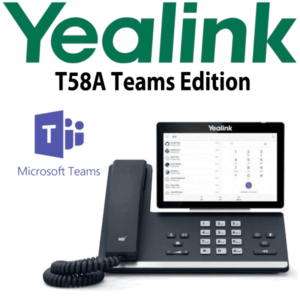
The T56A sits in the touchscreen Teams desk-phone tier: larger and more visual than the compact T55A, but below the premium T58A video-phone style desk device. This page stays focused on the T56A Teams Edition itself — no replacement wording, no successor positioning, and no SIP/T7 confusion.
| Feature | T55A Teams | T56A Teams Edition ★ | T58A Teams |
|---|---|---|---|
| Display | Compact touch display | 7″ 1024×600 capacitive touch | Premium 7″ touch display |
| Platform | Microsoft Teams | Microsoft Teams | Microsoft Teams |
| Best Fit | Cost-focused Teams desk | Office worker Teams calling desk | Executive or premium desk |
| GigE | Confirm before quote | Dual Gigabit Ethernet | Dual Gigabit Ethernet |
| Wi-Fi / Bluetooth | Confirm before quote | BT41 / WF50 accessory route | Model-dependent; verify before quote |
| Conference | Teams meetings | One-click Teams meeting join | Teams meetings |
| Expansion | Not the focus | Not for modern BLF console builds | Verify before quote |
| Model Status | Legacy Teams phone | Same-model T56A Teams Edition page | Legacy premium Teams phone |
| Choose if… | You want the lowest-cost Teams desk phone route | You want a 7-inch Teams desk phone for office workers | You want a premium desk device for senior users |
Where the T56A Teams Edition Works in Dubai
Teams calling desks in DIFC and Business Bay. For users who spend the day in Microsoft Teams but still prefer a physical handset, dial pad and speakerphone, the T56A gives a dedicated Teams voice endpoint without tying every call to a laptop headset.
Admin, finance and operations users. The 7-inch touch display makes contacts, call history, voicemail and meeting join flows easier to see than on compact desk phones. This is useful for office workers who handle regular internal and external Teams calls but do not need a full video-room system.
Teams Phone migration projects. Dubai companies moving users from desk PBX habits into Teams Phone often need a familiar handset on key desks. Vector Digital Systems helps confirm the tenant, licence, network, PoE and certification requirements before dispatch so the phone is ordered for the correct platform.
Full Technical Specifications
| Specification | Yealink SIP-T56A Teams Edition |
|---|---|
| Platform | Microsoft Teams Edition, Android-based |
| Display | 7-inch 1024×600 capacitive touch screen, 5-point multi-touch |
| User Interface | Microsoft Teams-tailored interface with full keyboard and multilingual UI |
| Audio | HD handset, HD speaker, Optima HD Voice, full-duplex hands-free speakerphone with AEC |
| Handset | Hearing aid compatible handset |
| Teams Calling | P2P call, Cloud PSTN call, hold, mute, transfer, forward, Group SimRing and call history sync |
| Teams Meetings | One-click join, add participant, mute/unmute participants, meeting info, calendar access and schedule Teams meeting |
| Presence and Directory | Presence sync, corporate directory access, contact picture, placed/received/missed call logs |
| Network Ports | Dual-port Gigabit Ethernet |
| Power | PoE IEEE 802.3af Class 3; optional external Yealink AC adapter available |
| USB | 1× USB 2.0 port, supports USB headset |
| Bluetooth | Bluetooth headset support via BT41 adapter |
| Wi-Fi | Wi-Fi support via WF50 adapter where firmware and site policy allow; confirm before quote |
| Security | IPv4/IPv6, HTTPS web server, TLS/SRTP, HTTPS certificate manager, digest authentication, IEEE 802.1X |
| Management | Microsoft Device Management Platform, Yealink Device Management Platform and Unify Square Device Management Platform |
| Package Contents | T56A IP phone, handset with cord, Ethernet cable, stand and quick start guide; power adapter optional |
Compatible Accessories
| Accessory | Model | Purpose |
|---|---|---|
| Bluetooth Adapter | BT41 | Bluetooth headset pairing, subject to firmware and tenant policy |
| Wi-Fi Adapter | WF50 | Wireless network connection where supported; confirm before quote |
| USB Headset | Yealink USB headset range | Direct USB headset connection for Teams calling desks |
| Power Supply | Yealink AC adapter | Required when the desk does not have a PoE switch port |
Staging Before Dispatch
Vector Digital Systems stages Yealink Teams phones before delivery wherever tenant access and customer policy allow: network readiness checked, PoE requirement confirmed, firmware and device policy reviewed, Teams sign-in path prepared, basic call handling verified and desk delivery notes included. For project orders, David coordinates with the customer’s Microsoft 365 administrator so the rollout is handled desk by desk instead of leaving users to troubleshoot sign-in on arrival.
Export from Dubai
Vector Digital Systems exports Yealink Teams phones and accessories from Dubai to system integrators, telecom operators and enterprise IT buyers across Oman, Saudi Arabia, Kuwait, Bahrain, Qatar, Jordan, Egypt, Kenya, Nigeria and Pakistan. Shipments are quoted FOB Dubai with commercial invoice, packing list and certificate of origin on request. For legacy Teams phone models such as the T56A, David will confirm availability, firmware expectations and certification suitability before export quoting.
Get a same-day quote in AED for Yealink T56A Teams Edition
Tell David your quantity, Microsoft Teams Phone tenant status, PoE availability, headset requirement and delivery location. Quote includes VAT breakdown and delivery charges.
Frequently Asked Questions — Yealink T56A Teams Edition
Does the Yealink T56A Teams Edition work with Microsoft Teams?
Yes, the Yealink T56A Teams Edition was built as a Microsoft Teams desk phone with a Teams-tailored interface. Because it is a legacy Teams model, Vector Digital Systems verifies current tenant suitability and certification status before quoting or deployment.
Is the T56A Teams Edition the same model as the SIP-T56A?
It uses the T56A hardware family, but the Teams Edition is configured for Microsoft Teams rather than a normal SIP PBX workflow. For 3CX, Yeastar, Grandstream UCM or hosted SIP PBX users, David will recommend a SIP desk phone instead.
Does the Yealink T56A Teams Edition come with a power adapter?
The phone supports PoE and normally connects to a PoE switch port. The external Yealink AC adapter is optional and should be added when the desk does not have PoE. David confirms this before dispatch so the installation is not delayed.
Can I use the T56A Teams Edition with 3CX or a SIP PABX?
This page is for the Microsoft Teams Edition. If your phone system is 3CX, Yeastar, Grandstream UCM, Asterisk or another SIP PBX, ask David for a SIP phone model rather than ordering a Teams Edition device.
T55A vs T56A Teams Edition — which one should I buy?
Choose the T56A Teams Edition when the user needs a larger 7-inch touchscreen and a more comfortable Teams desk-phone experience. The T55A is the more compact choice for cost-focused Teams desks, while the T56A is better for daily office users who handle more calls.
Does the T56A Teams Edition support USB headsets?
Yes, the T56A Teams Edition includes a USB 2.0 port for USB headset support. Bluetooth headset pairing can also be supported through the BT41 adapter, subject to firmware and customer policy.
Does the T56A Teams Edition support Gigabit passthrough?
Yes, the T56A Teams Edition has dual Gigabit Ethernet ports. It can connect to the network and pass a Gigabit connection through to the user’s laptop, avoiding the 100Mbps bottleneck found on older desk phones.
Who is the Yealink supplier in Dubai for Teams phones?
Vector Digital Systems LLC has supplied and staged Yealink phones in Dubai since 2009. David handles Yealink pre-sales specification, Teams phone checks, project pricing, staging and local warranty coordination.
What is the best Yealink Teams phone for an office worker in Dubai?
For a legacy 7-inch Teams desk-phone requirement, the T56A Teams Edition is suitable when availability and tenant compatibility are confirmed. For new Microsoft Teams Phone projects, David will verify the current certified Yealink Teams phone range before quoting.
Does Vector Digital Systems export Yealink T56A Teams Edition phones from Dubai?
Yes, Vector Digital Systems exports Yealink phones from Dubai to integrators and enterprise buyers in Oman, Saudi Arabia, Kuwait, Bahrain, Qatar, Jordan, Egypt, Kenya, Nigeria and Pakistan. Export quotes include FOB Dubai terms, commercial invoice, packing list and certificate of origin on request.
Does Vector Digital Systems configure the T56A Teams Edition before delivery?
Yes, Vector Digital Systems stages the phone before dispatch wherever customer tenant access and IT policy allow. The team checks network readiness, PoE, firmware expectations, Teams sign-in path and basic calling workflow before desk delivery.