Description
Yealink UVC30 Desktop 4K USB Webcam for Teams, Zoom & PC Video Calls Dubai
Yealink UVC30 Desktop — 4K Video for the Modern Dubai Desk
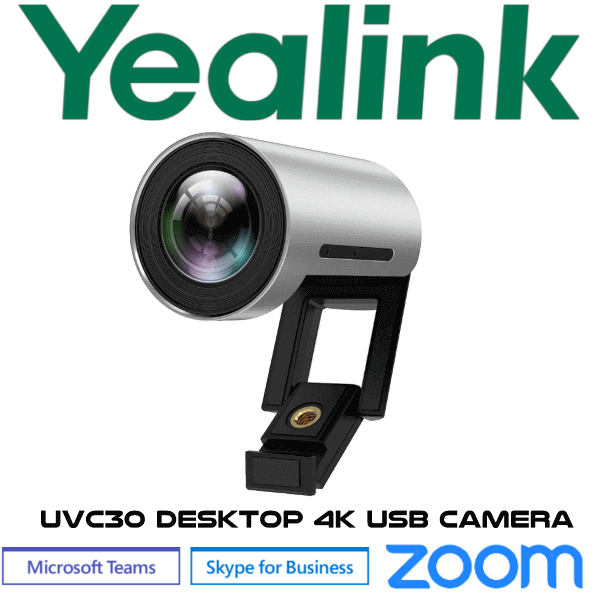
The Yealink UVC30 Desktop is the compact 4K USB webcam for executives, hybrid workers, reception video desks, and small meeting corners that need better video than a laptop camera can deliver. It gives you a sharp 4K image, a wide 120-degree field of view, auto framing, EPTZ control, and a built-in microphone in one clean desktop camera. For Dubai offices running Teams, Zoom, Google Meet, Webex, softphone video, or browser-based meetings, the UVC30 Desktop is the simple plug-and-play upgrade: connect it by USB, place it on the monitor, and your video presence immediately looks more professional.
Platform Fit — USB Camera, Not a Room Codec
The UVC30 Desktop is a USB camera for a PC or laptop. It is not a standalone Teams phone, not a SIP desk phone, and not a complete meeting-room codec. Use it when the meeting app runs on the user’s computer. If the project needs a certified Microsoft Teams Room or Zoom Room package, ask David to verify the current certified Yealink room system before quoting.
| Your Setup | Right Yealink Device | What You Need |
|---|---|---|
| PC-based Teams, Zoom, Google Meet, Webex or soft client | Yealink UVC30 Desktop (this page) | Laptop or desktop PC with USB connection |
| Small huddle room using a room PC | UVC30 Desktop for personal / very small table use, or UVC30 Room for room positioning | USB camera plus suitable speakerphone or room audio |
| Certified Teams Room or Zoom Room | Yealink MVC / MeetingBar / certified room range — verify certification status before quoting | Room licence, certified room hardware, display, audio and deployment plan |
USB Powered — No PoE, No Desk Phone PSU Confusion
The UVC30 Desktop is powered by USB from the connected computer. Unlike Yealink IP desk phones, there is no PoE switch requirement and no separate phone-style power adapter to add. The standard desktop setup is simple: camera to PC by USB, meeting app on the PC, and optional Yealink speakerphone or headset for better audio.
Why 4K Matters on a Small Camera
The UVC30 Desktop uses a 1/2.5-inch CMOS sensor with 8.51 megapixels, giving the camera enough image detail for clean 4K30 output. Even when the meeting app sends 1080p, the higher-quality sensor helps produce a sharper, more natural image than a standard laptop webcam. For managers in DIFC, DMCC, Business Bay, and JLT who spend hours in client video calls, the difference is visible immediately: cleaner face detail, wider framing, and better presentation from the same desk.
Auto Framing for Solo Desks and Small Groups
The adjustable 70°, 90°, and 120° field of view lets the UVC30 Desktop work as a tight executive webcam, a wider standing-desk camera, or a small table camera for two to three people. Auto framing keeps the active user centred, while EPTZ and 3× digital zoom allow the camera to adjust the image without mechanical movement. It is a practical upgrade for Dubai offices where one device may be used for daily one-to-one calls in the morning and a small hybrid meeting in the afternoon.
UVC30 Desktop Family Fit — Same Model, No Replacement Language
For this page, the comparison is written around the same Yealink camera family rather than an old-model replacement. The UVC30 Desktop is the personal PC camera. The UVC30 Room is the room-oriented edition for small and huddle spaces. If you are buying for a desk, choose UVC30 Desktop. If you are buying for a meeting table, ask David whether UVC30 Room or a full Yealink room system is the better fit.
| Feature | UVC30 Desktop | UVC30 Desktop ★ | UVC30 Room |
|---|---|---|---|
| Best Fit | Personal desk camera | Personal desk camera | Small / huddle room camera |
| Maximum Resolution | 4K | 4K | 4K |
| Sensor | 1/2.5″ CMOS, 8.51MP | 1/2.5″ CMOS, 8.51MP | 1/2.5″ CMOS, 8.51MP |
| Field of View | 70° / 90° / 120° | 70° / 90° / 120° | Wide room framing |
| Auto Framing | Yes | Yes | Yes |
| Zoom / Movement | EPTZ, 3× digital zoom | EPTZ, 3× digital zoom | EPTZ, room framing |
| Connection | USB 3.0 to PC | USB 3.0 to PC | USB to room PC / room setup |
| Typical Buyer | Executive, hybrid worker, sales desk | Executive, hybrid worker, sales desk | Huddle room, meeting room integrator |
| Choose if… | You need a clean 4K webcam for one user | You want the correct personal Yealink camera for PC-based video calls | You are building a small room setup instead of a personal desk |
Where the UVC30 Desktop Works in Dubai
Executive and sales desks. For managers in DIFC, Business Bay, JLT and DMCC who spend the day on video calls, the UVC30 Desktop gives a cleaner image than a laptop camera without turning the desk into a meeting-room installation. It is ideal for client calls, distributor meetings, internal reviews and online demos.
Hybrid workers and WFH desks. A Dubai employee working between office and home needs the same video quality in both locations. The UVC30 Desktop pairs well with a Yealink USB or Bluetooth headset for a clean home-office setup in Dubai Marina, JVC, Al Barsha, Mirdif or Sharjah commuter homes.
Reception video desks and service counters. Clinics, training centres, real-estate offices and customer support teams can use the UVC30 Desktop for video verification, online consultations, remote demos and browser-based video support. The wide field of view makes it practical when the user occasionally needs to show paperwork, a product, or a second person at the desk.
Small huddle corners. For a two-person table with a PC-based meeting app, the UVC30 Desktop can work as a compact camera while a separate Yealink speakerphone handles audio. If the table becomes a permanent meeting room, ask David whether the UVC30 Room, MeetingBar, or MVC room system is the better long-term choice.
Full Technical Specifications
| Specification | Yealink UVC30 Desktop |
|---|---|
| Product Type | 4K USB desktop webcam for PC-based video meetings |
| Camera Sensor | 1/2.5″ CMOS, 8.51 megapixels |
| Maximum Resolution | 4K |
| Video Output | 4K30, 1080p30, 720p30 |
| Field of View | 70° / 90° / 120° |
| Auto Framing | Supported |
| PTZ / Zoom | EPTZ with 3× digital zoom |
| Microphone | Built-in microphone |
| Infrared Camera | Supported |
| Certification | Windows Hello certified |
| UVC Protocol | UVC 1.5 / UVC 1.0 |
| USB Cable | 1× 1.6m USB 3.0 cable |
| Wide Dynamic Range | Supported |
| White Balance | ATW / Auto / Manual |
| Shutter Speed | 1/60 to 1/10000 seconds |
| Minimum Illumination | 0.5 lux in daylight, 0.1 lux at night |
| Dimensions | 59 mm × φ45 mm |
| System Requirement | Windows 7, Windows 10, Mac OS 10.10 or higher |
Compatible Accessories and Pairings
| Pairing | Recommended Use | Notes |
|---|---|---|
| Yealink USB Headset | Personal desk video calls | Best for private audio and noisy open-plan offices |
| Yealink Bluetooth Headset | Hybrid worker desk | Useful when the same user moves between laptop and mobile calls |
| Yealink Speakerphone | Two-person desk or huddle table | Use a dedicated speakerphone when more than one person is speaking |
| UVC30 Room / Yealink Room System | Permanent meeting-room deployment | Ask David to size the room and verify Teams / Zoom certification status where required |
Staging Before Dispatch — What We Check
Vector Digital Systems checks every UVC30 Desktop before dispatch in Dubai: physical inspection, USB recognition test, camera image check, firmware / utility guidance where required, and basic video-call readiness advice for the buyer’s platform. For project orders, we can label units by user, department or branch before dispatch, making multi-desk rollout easier for IT teams. If the camera is being paired with Yealink headsets, speakerphones or meeting-room devices, David will confirm the correct bundle before quoting.
Export from Dubai
Vector Digital Systems supplies and exports Yealink UVC30 Desktop cameras from Dubai to system integrators, IT resellers, corporate procurement teams and hybrid-work project buyers. Common routes include Oman, Saudi Arabia, Kuwait, Qatar and Bahrain across the GCC; Jordan and Egypt for regional IT projects; Kenya, Tanzania and Nigeria for African deployments; and Pakistan, Sri Lanka and Bangladesh for South Asian buyers. Export shipments move FOB Dubai with commercial invoice, packing list and certificate of origin on request. For multi-unit orders, ask David for project pricing, VAT treatment, delivery lead time and documentation.
Get a same-day quote in AED — Yealink UVC30 Desktop in Dubai
Tell David your quantity, whether the cameras are for personal desks or huddle spaces, and whether you need Yealink headsets or speakerphones bundled. We quote with VAT breakdown and delivery charges included.
Frequently Asked Questions — Yealink UVC30 Desktop
Is the Yealink UVC30 Desktop a 4K webcam?
Yes — the Yealink UVC30 Desktop is a 4K USB webcam with a 1/2.5-inch CMOS sensor and 8.51 megapixels. It is designed for PC-based video calls where the user wants better image quality than a built-in laptop camera.
Does the Yealink UVC30 Desktop work with Microsoft Teams and Zoom?
The UVC30 Desktop works as a USB camera for PC-based meeting apps such as Microsoft Teams, Zoom, Google Meet, Webex and browser video tools. If your project specifically requires a certified Teams Room or Zoom Room device, ask David to verify the current Yealink certified room system before quoting.
Is the UVC30 Desktop the same as the UVC30 Room?
They are from the same Yealink UVC30 camera family but are used differently. The UVC30 Desktop is for a personal PC or laptop desk. The UVC30 Room is aimed at small and huddle meeting-room setups. For one user at a desk, choose UVC30 Desktop. For a meeting table, ask David to size the room first.
Does the UVC30 Desktop need PoE or a power adapter?
No — the UVC30 Desktop is powered over USB from the connected computer. It does not need a PoE switch port and does not use the separate power adapter style required by many IP desk phone installations.
What field of view does the Yealink UVC30 Desktop support?
The UVC30 Desktop supports 70°, 90° and 120° field-of-view options. Use the narrower view for a single executive desk and the wider view when two or more people need to appear in frame.
Does the UVC30 Desktop have auto framing?
Yes — the UVC30 Desktop supports auto framing, EPTZ and 3× digital zoom. This helps keep the user centred on video calls without requiring a motorised PTZ camera.
Does the Yealink UVC30 Desktop have a built-in microphone?
Yes — the UVC30 Desktop includes a built-in microphone for simple personal video calls. For noisy offices, shared desks or longer meetings, Vector Digital Systems recommends pairing it with a Yealink headset or speakerphone for better audio pickup.
Is the UVC30 Desktop Windows Hello certified?
Yes — the UVC30 Desktop includes an infrared camera and is Windows Hello certified, making it suitable for secure PC sign-in where Windows Hello is enabled by the customer’s IT policy.
Who is the Yealink authorised supplier in Dubai?
Vector Digital Systems LLC has supplied Yealink products in Dubai since 2009. David handles Yealink pre-sales advice, project quotations, staging guidance, local warranty handling and export support for UAE and regional buyers.
Does Vector Digital Systems export Yealink UVC30 Desktop cameras from Dubai?
Yes — Vector Digital Systems exports Yealink UVC30 Desktop cameras from Dubai to integrators and enterprise buyers in Oman, Saudi Arabia, Kuwait, Qatar, Bahrain, Jordan, Egypt, Kenya, Nigeria, Pakistan, Sri Lanka and Bangladesh. Export documentation can include commercial invoice, packing list and certificate of origin on request.