Description
Yealink MVC500 Microsoft Teams Room System Small Meeting Room Kit Dubai
Yealink MVC500 Teams Room System for Small Meeting Rooms in Dubai
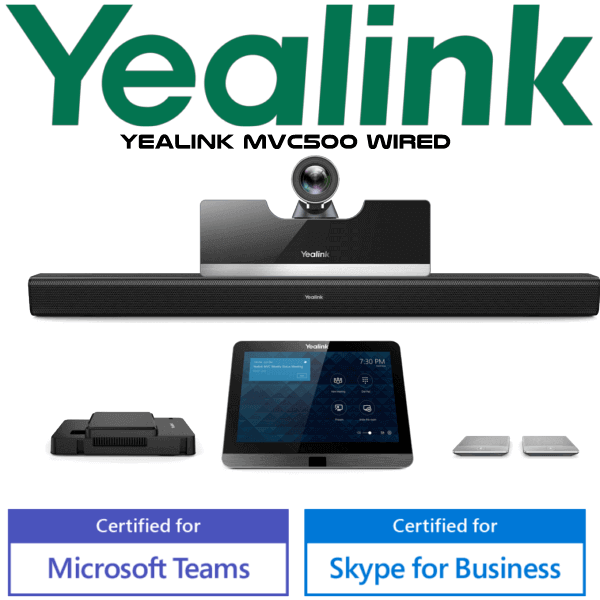
The Yealink MVC500 is a complete Microsoft Teams Room system for small meeting rooms that need a proper one-touch meeting experience instead of a laptop, loose webcam, and speakerphone on the table. It brings together the UVC50 PTZ camera, MTouch touch console, MShare content sharing unit, CPW90 wireless microphones, and Mini-PC into one room kit. Vector Digital Systems LLC supplies, stages, tests, and supports the MVC500 in Dubai for offices that want a clean Teams meeting room with local warranty handling and same-day quote in AED.
Platform Check — Teams Room, Zoom Room, or SIP Conference?
The MVC500 is a Microsoft Teams Rooms system. It is not a SIP conference phone and it is not a generic Zoom Room kit. Before ordering, confirm the meeting platform your office actually uses. The MVC500 is the right fit when the room is dedicated to Microsoft Teams meetings and your IT team has the correct Microsoft Teams Rooms licence ready.
| Your Meeting Platform | Right Yealink Choice | What You Need |
|---|---|---|
| Microsoft Teams Rooms | Yealink MVC500 — this page | Microsoft Teams Rooms licence, room account, display, network, and installation plan |
| Zoom Rooms | Ask David for the current Zoom-certified Yealink room system | Zoom Rooms licence and compatible certified hardware |
| SIP audio conferencing | Yealink CP-series conference phone | SIP credentials from 3CX, Yeastar, Grandstream UCM, or hosted PBX |
Certification note: Microsoft’s certified Teams Rooms hardware list includes Yealink MVC500 with Intel NUC. Certification status checked on 6 Aug 2026 before writing this page.
Power, Network, and Room Readiness
A Teams Room kit is not installed like a desk phone. The MVC500 needs a prepared meeting room: display screen, power sockets, stable wired network, Microsoft Teams Rooms account, Teams Rooms licence, and suitable cable routing for the camera, console, Mini-PC, and content-sharing unit. Vector Digital Systems confirms these details before dispatch so the room does not stall on installation day because of a missing display cable, unlicensed room account, or unprepared network point.
What Comes Together in the MVC500 Room Kit
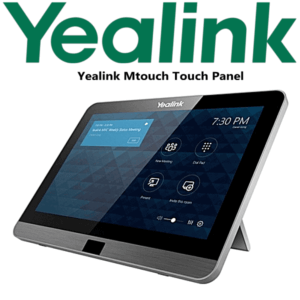
The MVC500 package is built around the UVC50 5× optical PTZ camera for room video, the MTouch 8-inch touch console for meeting control, MShare for wired content sharing, CPW90 wireless microphones for table audio pickup, and the Mini-PC that runs the Microsoft Teams Rooms experience. The Mini-PC can be placed on the table, wall-mounted, or set behind the display for a cleaner meeting-room table.
MVC500 in the Yealink MVC Room Range
Use the MVC500 when the room is small and the team wants a native Microsoft Teams Rooms experience with wireless table microphones and a PTZ camera. For focus rooms, a smaller MVC kit may be enough. For medium and large rooms, move up within the MVC family for broader camera and audio coverage. This comparison keeps the same MVC family and does not position the MVC500 as a replacement for another model.
| Feature | MVC300 | MVC500 ★ | MVC800 |
|---|---|---|---|
| Room fit | Focus and small rooms | Small meeting rooms | Medium and large rooms |
| Platform | Microsoft Teams Rooms | Microsoft Teams Rooms | Microsoft Teams Rooms |
| Camera style | Compact room camera | UVC50 5× PTZ camera | Larger room camera setup |
| Touch console | Teams room console | MTouch 8-inch console | Teams room console |
| Audio pickup | Small-room audio | CPW90 wireless microphones | Expanded room audio |
| Content sharing | Teams content sharing | MShare HDMI / Mini-DP + WPP20 option | Teams content sharing |
| Price tier | Lower | Mid | Higher |
| Choose if… | You need a compact Teams Room for a focus space | You need a complete small-room Teams kit with PTZ camera, touch console, and wireless table mics | You need wider coverage for a medium or large meeting room |
Where the MVC500 Works in Dubai
DIFC and Business Bay meeting rooms. The MVC500 fits small executive meeting rooms where Teams calls happen daily with regional offices, banks, legal teams, and clients. The touch console gives a familiar Teams interface, so users can walk in and start the meeting without opening a laptop.
DMCC and JLT hybrid-work offices. For companies running hybrid meetings between Dubai, Saudi Arabia, Oman, India, and Europe, the MVC500 gives the room a permanent Teams identity. The camera, microphones, display connection, and room account are always ready instead of depending on whoever brought the laptop.
SME boardrooms and owner offices. Many Dubai SMEs need one clean Teams room for sales calls, vendor reviews, remote interviews, and management meetings. The MVC500 is a practical small-room kit because it combines video, audio, touch control, and content sharing in one staged package.
Full Technical Specifications
| Specification | Yealink MVC500 |
|---|---|
| Product type | Microsoft Teams Room system for small meeting rooms |
| Certification | Microsoft Teams Rooms certified hardware list includes Yealink MVC500 with Intel NUC — checked 6 Aug 2026 |
| Room size | Small meeting rooms |
| Camera | Yealink UVC50 5× optical PTZ camera |
| Video | 1080p video, up to 60fps camera output |
| Camera field of view | 91° field of view with auto-framing support |
| Touch console | MTouch 8-inch touch-control display with Microsoft Teams interface |
| Motion sensor | Embedded human motion sensor in MTouch for automatic wake-up |
| Microphones | CPW90 wireless microphones with 360° voice pickup up to 3 metres radius |
| Wireless mic distance | DECT communication distance up to 50 metres, subject to room and site conditions |
| Content sharing | MShare with HDMI and Mini-DP input; supports 1080p/30fps Teams content sharing |
| Wireless presentation option | Yealink WPP20 wireless presentation pod option |
| Compute | Mini-PC / Intel NUC Teams Rooms compute depending on bundle supply |
| Deployment | Mini-PC can be table-mounted, wall-mounted, or placed on a TV cart |
| Management | Remote monitoring, configuration, update, and diagnosis through Yealink device management platform / cloud service |
Compatible Accessories and Room Add-ons
| Accessory / Add-on | Purpose | Ordering note |
|---|---|---|
| WPP20 | Wireless content sharing from laptop into the Teams Room | Ask David to include it if users prefer wireless presentation |
| Additional display cables | Connect front-of-room display and content sources cleanly | Confirm display location and cable path before quote |
| Mounting accessories | Camera, Mini-PC, and room display placement | Specified after room layout review |
| Network and power readiness | Stable Teams Room performance | We confirm wired network, room account, Teams licence, and power points before dispatch |
Staging Before Dispatch — What Vector Digital Systems Checks
Vector Digital Systems stages the MVC500 before dispatch wherever customer credentials and project timing allow. We confirm the Microsoft Teams Rooms account, licence readiness, room naming, display plan, camera and console connection, content-sharing workflow, firmware readiness, and test-call process. For Dubai projects, David coordinates the quote with VAT breakdown, delivery charges, and any required installation accessories so procurement receives a complete room package rather than a loose hardware list.
Export from Dubai
Vector Digital Systems exports Yealink MVC room systems from Dubai to system integrators, enterprise IT teams, hotel groups, and corporate procurement teams across Oman, Saudi Arabia, Kuwait, Bahrain, Qatar, Jordan, Egypt, Kenya, Pakistan, and Sri Lanka. Export quotes are prepared FOB Dubai with commercial invoice, packing list, and certificate of origin on request. For multi-room projects, share the number of rooms, room sizes, display plan, destination country, and timeline with David for a project quote.
Get a same-day quote in AED for Yealink MVC500
Tell David your meeting platform, room size, number of rooms, display availability, Teams Rooms licence status, and whether you need wireless presentation. We quote with VAT breakdown and delivery included.
Frequently Asked Questions — Yealink MVC500
Is the Yealink MVC500 a Microsoft Teams Rooms system?
Yes. The Yealink MVC500 is a Microsoft Teams Rooms system for small meeting rooms. Microsoft’s certified Teams Rooms hardware list includes Yealink MVC500 with Intel NUC, and Vector Digital Systems verified that status on 6 Aug 2026 before preparing this page.
What room size is the Yealink MVC500 designed for?
The MVC500 is designed for small meeting rooms. It suits compact Dubai boardrooms, manager meeting rooms, and hybrid-work rooms where users need a permanent Teams Room with a PTZ camera, touch console, wireless microphones, and content sharing.
Does the Yealink MVC500 work with Zoom Rooms?
The MVC500 is positioned as a Microsoft Teams Rooms system. If your room is built around Zoom Rooms, ask David for the current Zoom-certified Yealink room system instead of assuming the MVC500 is the right platform.
What is included with the Yealink MVC500?
The MVC500 bundle includes the UVC50 5× optical PTZ camera, MTouch 8-inch touch console, MShare content sharing unit, CPW90 wireless microphones, and Mini-PC / Intel NUC Teams Rooms compute depending on the supplied bundle.
Can users share laptop content on the MVC500?
Yes. The MVC500 uses MShare for wired content sharing through HDMI and Mini-DP input, with 1080p/30fps content sharing in Microsoft Teams Rooms. The optional Yealink WPP20 can be added for one-click wireless presentation.
MVC300 vs MVC500 vs MVC800 — which one should I buy?
Choose MVC300 for a focus room or very compact meeting space, MVC500 for a small Teams Room with PTZ camera and wireless table microphones, and MVC800 for medium or large rooms that need broader room coverage. Share your room size and table layout with David before ordering.
Does Vector Digital Systems configure the MVC500 before delivery?
Yes. Vector Digital Systems checks room-readiness details such as Teams Rooms account, licence status, display plan, network, camera, console, content sharing, firmware readiness, and test-call process before dispatch wherever customer credentials and project timing allow.
Who is the authorised Yealink supplier in Dubai?
Vector Digital Systems LLC has supplied and supported Yealink solutions in Dubai since 2009. David handles Yealink room-system specification, same-day quote in AED, local warranty coordination, staging, and project pricing for multi-room deployments.
What is the best Yealink Teams Room kit for a small meeting room in Dubai?
For a small Microsoft Teams meeting room, the Yealink MVC500 is a strong fit because it includes the UVC50 PTZ camera, MTouch console, CPW90 wireless microphones, MShare content sharing, and Teams Rooms compute in one kit. For larger rooms, ask David to size the next MVC option.
Does Vector Digital Systems export Yealink MVC500 systems from Dubai?
Yes. Vector Digital Systems exports Yealink MVC room systems from Dubai to integrators and enterprise buyers across Oman, Saudi Arabia, Kuwait, Bahrain, Qatar, Jordan, Egypt, Kenya, Pakistan, and Sri Lanka. Export quotes are prepared FOB Dubai with commercial invoice, packing list, and certificate of origin on request.