Description
Yealink CP960 Skype for Business Conference Phone 5-Inch Touchscreen Meeting Phone Dubai
Yealink CP960 Skype for Business Conference Phone in Dubai
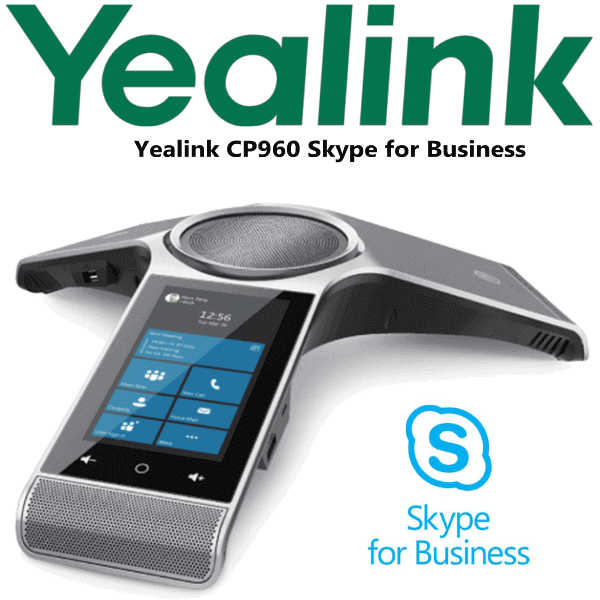
The Yealink CP960 Skype for Business Edition is a premium touchscreen conference phone for meeting rooms that still run Skype for Business, Office 365 voice workflows, presence, calendar and enterprise calling features. It gives the meeting room a dedicated audio endpoint instead of relying on a laptop speaker, a small USB puck or a mobile phone on loudspeaker. With a 5-inch 720×1280 multi-touch screen, 360-degree microphone pickup, Yealink Noise Proof Technology, Bluetooth, Wi-Fi and USB Micro-B pairing, the CP960 is designed for Dubai boardrooms, management meeting rooms, training rooms and regional call rooms that need clear voice pickup around the table.
Vector Digital Systems LLC supplies, stages and supports Yealink conference phones in Dubai. Tell David, our Yealink specialist, whether the room will be used for Skype for Business, SIP PBX calls, Teams, Zoom, or USB/Bluetooth audio from a laptop. We confirm the right firmware/platform before quoting so the phone arrives ready for the room, not just ready to unbox.
Platform Check — Skype, SIP, Teams or Zoom?
The CP960 body exists across different platform editions, and this is where many conference-room orders go wrong. This page is for the Yealink CP960 Skype for Business Edition. Do not assume that a Skype phone, SIP phone and Teams phone are interchangeable at delivery stage. The firmware and service sign-in path must match your meeting platform.
| Your Platform | Right CP960 Choice | What You Need |
|---|---|---|
| Skype for Business / Office 365 voice environment | Yealink CP960 Skype for Business Edition — this page | Skype for Business account, user credentials/PIN or web sign-in, calendar/presence configuration |
| SIP PBX — 3CX, Yeastar, Grandstream UCM, hosted PBX | CP960 SIP firmware / SIP conference configuration | SIP credentials from your PBX or hosted VoIP provider |
| Microsoft Teams Phone / Teams meetings | Verify current Microsoft certification before quoting | Microsoft 365 tenant, Teams Phone licence and a currently certified Teams device |
| Zoom Phone / Zoom Rooms audio | Zoom-certified Yealink range — ask David to verify the current model | Zoom Phone or Zoom Rooms licence and certified hardware selection |
Certification note: Microsoft certification status changes over time. For Teams deployments, Vector Digital Systems checks Microsoft’s certified devices list before quoting and will write “verify certification status” unless the exact device is listed at the time of order.
Power and PoE Truth — Confirm the Room Port Before Delivery
The CP960 is powered by PoE. The Yealink documentation lists Power over Ethernet IEEE 802.3af Class 4, and the external Yealink PoE adapter YLPOE30 is optional. That means your meeting-room network point must supply PoE, or the order needs the matching external PoE adapter. This is checked before dispatch because boardrooms often have a floor box with Ethernet but no PoE switch behind it. We confirm the cabling, PoE and room layout before sending the phone.
Room Size and Pickup Range
The CP960 uses a built-in 3-microphone array with 360-degree voice pickup and a 20-foot / 6-metre pickup range, making it suitable for medium to large meeting rooms. For longer tables, optional CPW90 wireless microphones can extend pickup to participants seated farther from the main unit. This makes the CP960 a strong fit for Dubai boardrooms in Business Bay, DIFC, JLT, DMCC and hotel meeting spaces where one device must cover the full table without cable clutter.
CP960 Platform Position — Same Body, Different Use Cases
The CP960 is best understood as a conference-phone platform. The buying decision is not “newer versus older” — it is “which CP960 firmware and platform does this room need?” The Skype for Business Edition is for organisations still using Skype for Business workflows, presence and calendar. The SIP configuration is for PBX calling. Teams and Zoom rooms require certification checks before purchase.
| Feature | CP920 SIP | CP960 Skype ★ | CP960 SIP / Teams-check |
|---|---|---|---|
| Best room fit | Small to medium SIP rooms | Medium to large Skype rooms | SIP PBX or verified Teams requirement |
| Display | Touch-sensitive controls | 5″ 720×1280 multi-touch | 5″ 720×1280 multi-touch |
| Platform | SIP PBX | Skype for Business / Office 365 | SIP or Teams status verified before quote |
| Pickup pattern | 360-degree conference pickup | 360-degree, 6m / 20ft | 360-degree, 6m / 20ft |
| Wireless microphones | Model-dependent | Optional CPW90 | Optional CPW90 |
| Bluetooth / Wi-Fi | No / limited by model | Built-in Bluetooth 4.0 + Wi-Fi | Built-in Bluetooth 4.0 + Wi-Fi |
| PC audio pairing | Basic conference use | USB Micro-B and Bluetooth pairing | Depends on firmware/platform |
| Price tier | Entry conference | Premium conference | Premium / platform-dependent |
| Choose if… | You need a simple SIP conference phone for a smaller room | Your room uses Skype for Business and needs touchscreen calendar, presence and strong table audio | You need CP960 hardware for SIP, or you need David to verify Teams suitability before quoting |
Where the CP960 Skype Works in Dubai
Executive meeting rooms. For boardrooms in DIFC, Business Bay and Sheikh Zayed Road offices, the CP960 gives the table a dedicated audio endpoint with calendar, presence and one-tap meeting workflows instead of asking the first attendee to connect a laptop speaker.
Regional coordination rooms. Dubai offices coordinating with Saudi Arabia, Oman, Qatar, Bahrain and Kuwait often keep Skype for Business or hybrid Office 365 voice infrastructure for internal calls. The CP960 supports Skype for Business conference functions, Boss/Admin workflows, Common Area Phone use and hot desking for shared rooms.
Training rooms and hotel meeting spaces. The 360-degree 6-metre pickup pattern suits rectangular meeting tables, training rooms and hotel boardrooms. When the table is longer, CPW90 wireless microphones can be added without dragging microphone cables across the room.
Hybrid audio rooms. The CP960 can pair with a smartphone over Bluetooth or connect to a PC/tablet through USB Micro-B, allowing the room to use the conference phone as a loudspeaker and microphone for supported audio workflows. This is useful where the room alternates between Skype calls, PBX calls and laptop-based meetings.
Full Technical Specifications
| Specification | Yealink CP960 Skype for Business Edition |
|---|---|
| Product Type | Skype for Business HD IP conference phone |
| Display | 5-inch 720×1280 capacitive multi-touch screen |
| Operating Platform | Android-based CP960 Skype for Business interface |
| Room Size | Medium to large meeting rooms |
| Microphone Pickup | Built-in 3-microphone array, 360-degree pickup, 20-foot / 6-metre range |
| Speaker | 56mm diameter 10W speaker, full-duplex speakerphone with AEC |
| Audio Features | Optima HD audio, Yealink Noise Proof Technology, background noise suppression, echo cancellation |
| Codecs | SILK, G.722, G.723, G.729, G.726, iLBC, G.711(A/µ) |
| Skype Features | Skype for Business conference, presence, calendar, Boss/Admin, Common Area Phone, hot desking, call recording |
| Sign-in Methods | User credentials, PIN authentication, phone UI sign-in, web sign-in, BToE sign-in |
| Network Port | 1× RJ45 10/100M Ethernet port |
| Wi-Fi | Built-in 2.4GHz/5GHz Wi-Fi, 802.11a/b/g/n/ac |
| Bluetooth | Built-in Bluetooth 4.0 |
| USB | 2× USB 2.0 ports, 1× USB 2.0 Micro-B device port |
| Audio Output | 1× 3.5mm audio-out port |
| Microphone Ports | 2× wired microphone ports for compatible wired expansion microphones |
| Security | TLS, SRTP, HTTPS certificate manager, IEEE 802.1X, EWS authentication, digest authentication |
| Power | PoE IEEE 802.3af Class 4; external Yealink PoE adapter YLPOE30 optional |
| Power Consumption | 5.25W–12.3W over PoE |
| Dimensions | 338mm × 338mm × 74mm |
| Package Contents | CP960 conference phone, 7.5m CAT5E Ethernet cable, Quick Start Guide. CPW90, CPE90 and YLPOE30 are optional. |
Compatible Accessories
| Accessory | Model | Purpose |
|---|---|---|
| Wireless Expansion Microphones | CPW90 | Extends room pickup without running microphone cables across the table |
| Wired Expansion Microphones | CPE90 | For rooms that prefer wired microphone placement |
| PoE Adapter | YLPOE30 | Optional external PoE adapter where the meeting-room switch port does not provide PoE |
| USB / Laptop Audio | USB Micro-B cable | Connects the CP960 as a room speakerphone for supported PC/tablet audio workflows |
Staging Before Dispatch
Every Yealink CP960 Skype for Business conference phone supplied by Vector Digital Systems is checked and staged before dispatch. We confirm the platform edition, update and prepare the unit as required, configure sign-in guidance, validate network settings, confirm PoE or optional YLPOE30 requirement, test microphone and speaker audio, and label the unit for the meeting room. For project orders, we prepare a room-by-room deployment sheet so each CP960 lands in the correct boardroom with the right accessories.
Export from Dubai
Vector Digital Systems exports Yealink CP960 Skype conference phones and meeting-room accessories from Dubai to system integrators, telecom operators, hotel groups, enterprise IT teams and PABX installers. Common export routes include Oman, Saudi Arabia, Kuwait, Bahrain and Qatar across the Gulf; Jordan and Egypt for regional enterprise projects; Kenya and Tanzania for East Africa deployments; and Pakistan and Sri Lanka for South Asian integrators. Shipments are quoted FOB Dubai with commercial invoice, packing list and certificate of origin on request. Same-day quote in AED, VAT breakdown and UAE delivery charges are included in the quote.
Get a same-day Yealink CP960 Skype quote in AED
Tell David your meeting platform, room size, PoE availability, microphone requirement and delivery location. We quote with VAT breakdown, delivery and staging included.
Frequently Asked Questions — Yealink CP960 Skype for Business
Is the Yealink CP960 Skype for Business Edition the same CP960 conference phone body?
Yes. The CP960 Skype for Business Edition uses the CP960 conference phone platform with Skype for Business firmware and interface. The buying decision is platform-specific: Skype for Business, SIP PBX, Teams and Zoom deployments must be checked before quoting so the room receives the correct edition and configuration.
Does the Yealink CP960 Skype work with Microsoft Teams?
Do not assume Teams compatibility from the CP960 Skype name. This page is for Skype for Business workflows. Microsoft Teams deployments require a currently certified Teams device, Microsoft 365 tenant and Teams Phone licence. Vector Digital Systems verifies Microsoft certification status before quoting any Teams conference phone.
Does the CP960 Skype come with a power adapter, or do I need PoE?
The CP960 is PoE powered and uses IEEE 802.3af Class 4. The Yealink YLPOE30 external PoE adapter is optional and should be added if the meeting-room network port does not provide PoE. Vector Digital Systems checks this before dispatch so the boardroom installation is not delayed.
What room size is the Yealink CP960 Skype designed for?
The CP960 Skype is designed for medium to large conference rooms. Its built-in 3-microphone array gives 360-degree pickup with a 20-foot / 6-metre range. For longer tables, optional CPW90 wireless microphones can extend pickup for participants seated farther from the main unit.
Can I use the CP960 Skype as a speakerphone for a laptop?
Yes. The CP960 Skype supports PC/tablet audio pairing through the USB Micro-B device port and can also pair with a smartphone using Bluetooth. This allows the meeting room to use the CP960 as a higher-quality speaker and microphone for supported audio workflows.
Will the CP960 Skype work with our 3CX, Grandstream UCM or SIP PABX?
A SIP PBX deployment should be quoted as a SIP CP960 configuration, not assumed from the Skype for Business edition. Tell David whether your room will register to 3CX, Yeastar, Grandstream UCM, Asterisk or a hosted PBX so Vector Digital Systems can confirm the correct firmware and provisioning path.
CP920 vs CP960 Skype — which Yealink conference phone should I buy?
Choose the CP920 for a simpler SIP conference room with smaller meeting requirements. Choose the CP960 Skype when the room needs a premium touchscreen experience, Skype for Business calendar and presence workflows, 6-metre pickup, Bluetooth, Wi-Fi and optional wireless expansion microphones.
Who is the Yealink authorised supplier in Dubai?
Vector Digital Systems LLC has supplied, staged and supported Yealink solutions in Dubai since 2009. David is the Yealink product specialist for pre-sales selection, room sizing, platform checks, project pricing, staging and local warranty handling.
What is the best Yealink conference phone for a Skype meeting room in Dubai?
For a Skype for Business meeting room that needs touchscreen control, presence, calendar and strong table audio, the CP960 Skype for Business Edition is the right Yealink conference-room choice. Add CPW90 wireless microphones for longer tables or training rooms where participants sit beyond the main unit’s pickup area.
Does Vector Digital Systems export Yealink CP960 Skype phones from Dubai?
Yes. Vector Digital Systems exports Yealink conference phones from Dubai to integrators and enterprise buyers in Oman, Saudi Arabia, Kuwait, Bahrain, Qatar, Jordan, Egypt, Kenya, Tanzania, Pakistan and Sri Lanka. Shipments are quoted FOB Dubai with commercial invoice, packing list and certificate of origin on request.
Does Vector Digital Systems configure the CP960 Skype before delivery?
Yes. Vector Digital Systems checks the CP960 platform edition, prepares the device, confirms PoE or YLPOE30 power requirement, validates audio, labels the unit for the correct room and stages project orders room by room before dispatch.