Description
Yealink N7i5-MS Intel i5 Mini-PC Package for Microsoft Teams Rooms Dubai
Yealink N7i5-MS Mini-PC Package for Microsoft Teams Rooms in Dubai
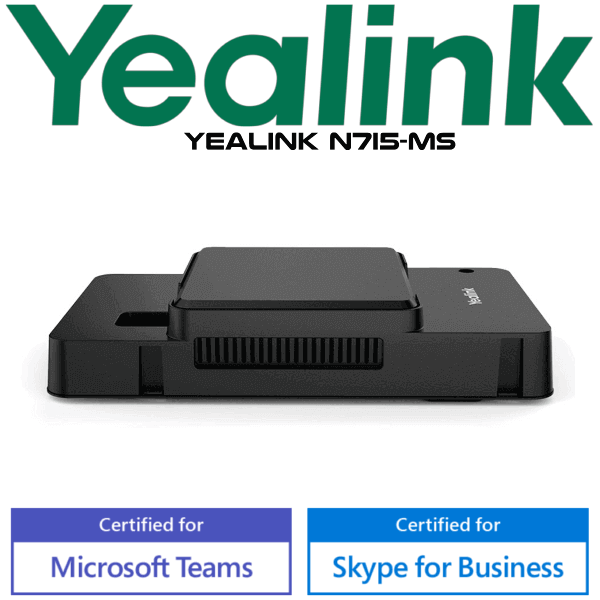
The Yealink N7i5-MS is the Intel i5 mini-PC package used in Yealink Microsoft Teams Rooms deployments. It is designed for meeting rooms that need a dedicated Windows-based room computer instead of a laptop on the table. For Dubai offices building Teams meeting rooms, boardrooms, huddle rooms, training spaces, or hybrid-work rooms, the N7i5-MS gives the room system its compute core: Windows 10 IoT Enterprise, Microsoft Teams Rooms app, Yealink camera control plug-in, HDMI outputs, USB connectivity, Wi-Fi, Bluetooth, Gigabit Ethernet, and a cable management box for clean installation.
Platform Check — This Is for Microsoft Teams Rooms, Not SIP Desk Calling
The Yealink N7i5-MS belongs in the meeting-room category. It is not a SIP desk phone, not a receptionist phone, and not a standalone PBX endpoint. Use it when the requirement is a dedicated Microsoft Teams Rooms setup with Yealink room peripherals. For SIP desk phones, use the Yealink T-series. For Teams calling at a personal desk, use Yealink MP-series phones. For Zoom Rooms, ask David to verify the correct Zoom-certified Yealink room device before quoting.
| Your Requirement | Right Yealink Category | What You Need |
|---|---|---|
| Microsoft Teams meeting room | Yealink Teams Rooms system using N7i5-MS mini-PC package | Teams Rooms licence, Teams tenant, room account, display, camera, audio and touch console |
| Microsoft Teams desk phone | Yealink MP-series Teams phone | Teams Phone licence per user and certified Teams phone model |
| SIP PBX calling — 3CX, Yeastar, UCM, hosted PBX | Yealink SIP-T series desk phone | SIP credentials from your phone system |
| Zoom Rooms | Zoom-certified Yealink room range — verify before order | Zoom Rooms licence and compatible certified room hardware |
Certification Note — Verify the Room Bundle, Not Only the Mini-PC Name
Microsoft certification is normally listed by complete room system or compute-console bundle, not by every internal package name. The N7i5-MS is the mini-PC package used inside Yealink MVC room configurations. Before quoting, Vector Digital Systems verifies the exact room bundle, camera, touch console, audio device and Teams Rooms licence requirement so the installed solution matches Microsoft Teams Rooms expectations. Certification status verified on Microsoft Teams Rooms certified hardware list: 05 August 2026.
Power and Cabling Truth — This Is a Room Computer, Not PoE Desk Hardware
The Yealink N7i5-MS uses its own power port and does not run from PoE like a desk phone. Plan a clean power point, HDMI runs to the room display, Ethernet to the corporate network, and USB connections to Yealink room peripherals. The cable management box is important in Dubai meeting rooms because it keeps the mini-PC, display cables, USB links and power connection secure behind the screen or inside the AV cabinet.
Where the N7i5-MS Fits in a Yealink Teams Room
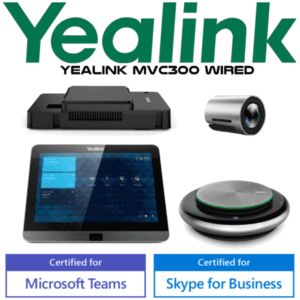
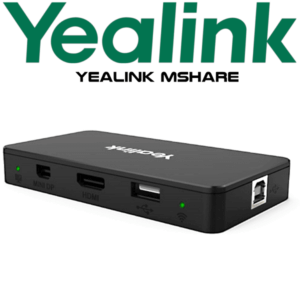
The N7i5-MS is the compute core. It works with Yealink room components such as the MTouch touch console, MShare content sharing device, UVC camera family, CP900 speakerphone or larger room audio devices depending on the package. Dubai buyers often search the mini-PC part number when they are replacing a room PC, expanding a Microsoft Teams Rooms project, or matching an existing Yealink MVC installation. This page keeps the focus on the same N7i5-MS model and does not redirect the buyer to a replacement model.
| Feature | MVC300-style Focus Room | N7i5-MS Mini-PC Package ★ | MVC500 / MVC800-style Larger Room |
|---|---|---|---|
| Role | Complete small-room Teams bundle | Mini-PC compute package | Complete medium or large-room Teams bundle |
| Processor | Intel Core i5 room compute | 7th-gen Intel Core i5 | Intel Core i5 room compute |
| Memory / Storage | 8GB / 128GB SSD | 8GB / 128GB SSD | 8GB / 128GB SSD |
| Display Output | Room display via HDMI | 2× HDMI outputs | Dual-display room layouts supported by bundle design |
| USB | Camera / console / audio connections | 4× USB 3.0 Type-A | Multiple room peripherals |
| Network | Wired network recommended | 1× Gigabit Ethernet + Wi-Fi | Wired network recommended |
| Best For | Focus rooms and small meeting rooms | Replacing or specifying the room compute package | Boardrooms, training rooms and larger spaces |
| Choose if… | You need a complete small-room Yealink Teams bundle | You specifically need the N7i5-MS mini-PC package for a Teams Rooms project | You need a full Yealink system for a larger meeting room |
Dubai Use Cases for Yealink N7i5-MS
DIFC and Business Bay Teams Rooms. Many Dubai offices now want a permanent Microsoft Teams meeting room instead of a laptop-and-webcam setup. The N7i5-MS gives the room its dedicated compute layer, so users walk in, tap the room console, and join meetings without borrowing someone’s notebook.
Existing Yealink MVC installations. If your room already uses Yealink cameras, MTouch console, MShare, CP900 or other MVC peripherals, ordering by the N7i5-MS model keeps the project aligned with the same room architecture. David checks the exact bundle and room wiring before quoting.
Training rooms and hybrid boardrooms. For offices in JLT, DMCC, Dubai Internet City and Abu Dhabi branches, the mini-PC package supports a cleaner permanent room setup: HDMI to display, USB to camera and audio, wired network to the corporate LAN, and cable management behind the screen or AV cabinet.
Full Technical Specifications
| Specification | Yealink N7i5-MS Mini-PC Package |
|---|---|
| Product Type | Mini-PC package for Yealink Microsoft Teams Rooms deployments |
| Processor | 7th-generation Intel® Core™ i5 |
| Memory | 8GB RAM — 2×4GB |
| Storage | 128GB SSD |
| Operating System | Windows 10 IoT Enterprise X64 with Windows 10 IoT Enterprise licence |
| Preloaded Software | Microsoft Teams Rooms app and Yealink Camera Control Plug-in |
| Video Output | 2× HDMI video outputs |
| USB Ports | 4× USB 3.0 Type-A |
| Network | 1× 10/100/1000M Gigabit Ethernet port |
| Wireless | Built-in Wi-Fi and Bluetooth |
| Power | Dedicated power port — not PoE powered |
| Security | 1× security lock slot |
| Included Hardware | Mini-PC package with cable management box |
| Typical Room Components | MTouch touch console, MShare content sharing, Yealink UVC camera and room audio device — confirmed by bundle |
Compatible Room Components and Accessories
| Component | Typical Yealink Item | Purpose |
|---|---|---|
| Touch Console | Yealink MTouch | Room control, meeting join, call control and calendar interaction |
| Content Sharing | Yealink MShare | Wired and wireless presentation sharing depending on room design |
| Camera | Yealink UVC series | Room video capture; exact camera depends on room size and seating layout |
| Audio | CP900, microphones, speakerphone or room audio kit | Voice pickup and playback matched to room size |
| Installation Hardware | Cable management box, HDMI, USB and network cabling | Clean behind-screen or cabinet installation |
Staging Before Dispatch
Vector Digital Systems stages Yealink Teams Rooms hardware before dispatch wherever the project details are available: Windows and Teams Rooms readiness check, room account sign-in guidance, firmware check for Yealink peripherals, camera and audio test, display output test, cable map review, network readiness notes, and handover checklist for the IT team. For Dubai meeting-room projects, we confirm the display count, HDMI length, LAN point, power location, room account status and Teams Rooms licence before the hardware leaves our side.
Export from Dubai
Vector Digital Systems exports Yealink Teams Rooms hardware and room components from Dubai to system integrators, AV installers, telecom suppliers and enterprise IT teams. Common project routes include Oman, Saudi Arabia, Qatar, Kuwait and Bahrain in the Gulf; Jordan and Egypt for regional offices; Kenya and Tanzania for East African deployments; and Pakistan and Sri Lanka for South Asian projects. Shipments are quoted FOB Dubai with commercial invoice, packing list and certificate of origin on request. VAT, delivery and export documentation are clarified in the quote.
Get a same-day quote in AED for Yealink N7i5-MS
Tell David your room size, display count, existing Yealink peripherals, Teams Rooms licence status and whether you need installation accessories. Quote includes VAT breakdown and delivery options.
Frequently Asked Questions — Yealink N7i5-MS
What is the Yealink N7i5-MS?
The Yealink N7i5-MS is an Intel Core i5 mini-PC package used in Yealink Microsoft Teams Rooms deployments. It provides the Windows-based room compute platform with Teams Rooms app, HDMI outputs, USB ports, Wi-Fi, Bluetooth, Gigabit Ethernet and cable management for meeting-room installation.
Is the Yealink N7i5-MS a Microsoft Teams Rooms device?
The N7i5-MS is the mini-PC package used inside Yealink Teams Rooms configurations. Microsoft usually certifies complete room systems or compute-console bundles, so Vector Digital Systems verifies the exact Yealink room bundle, peripherals and Teams Rooms licence requirement before quoting.
Does the Yealink N7i5-MS work as a SIP phone or PBX endpoint?
No. The Yealink N7i5-MS is not a SIP desk phone and does not register to 3CX, Yeastar, Grandstream UCM or hosted PBX as a telephone endpoint. It is room compute hardware for Microsoft Teams Rooms. For SIP desk calling, choose a Yealink T-series IP phone.
Does the Yealink N7i5-MS need PoE?
No. The Yealink N7i5-MS is not PoE powered. It uses its own power port, and the meeting room should have a planned power point, HDMI routes to the display, Ethernet to the network and USB routes to the Yealink room peripherals.
What are the main specifications of the Yealink N7i5-MS?
The Yealink N7i5-MS package includes a 7th-generation Intel Core i5 mini-PC with 8GB RAM, 128GB SSD, 2× HDMI outputs, built-in Wi-Fi and Bluetooth, 4× USB 3.0 Type-A ports, 1× Gigabit Ethernet port, power port, security lock slot and cable management box.
Can I buy only the Yealink N7i5-MS mini-PC package?
Yes, the N7i5-MS can be quoted as a mini-PC package when that is the exact requirement. David will confirm whether you need the mini-PC only or a complete Yealink Teams Rooms bundle with touch console, camera, speakerphone, microphones and cabling.
Which rooms is the Yealink N7i5-MS suitable for?
The N7i5-MS is used as the compute package inside Yealink Teams Rooms systems for focus rooms, small meeting rooms, boardrooms and larger spaces depending on the complete bundle. The final room suitability depends on the camera, microphone, speaker and display configuration, not the mini-PC alone.
Does Vector Digital Systems configure the Yealink N7i5-MS before delivery?
Yes. Vector Digital Systems can stage Yealink room hardware before dispatch, including Windows and Teams Rooms readiness checks, firmware review, room account guidance, camera and audio testing, display output checks and a cable map for the installer or IT team.
Who supplies Yealink N7i5-MS in Dubai?
Vector Digital Systems LLC supplies Yealink meeting-room and telephony hardware in Dubai and has been operating since 2009. David is the Yealink specialist for pre-sales specification, project quotes, staging and local warranty coordination.
Does Vector Digital Systems export Yealink N7i5-MS from Dubai?
Yes. Vector Digital Systems exports Yealink Teams Rooms hardware and components from Dubai to Oman, Saudi Arabia, Qatar, Kuwait, Bahrain, Jordan, Egypt, Kenya, Tanzania, Pakistan and Sri Lanka. Export quotes are prepared FOB Dubai with commercial invoice, packing list and certificate of origin on request.