Description
Yealink MeetingBar A10 Teams Rooms All-in-One 4K Video Bar for Small Rooms Dubai
Yealink A10 Teams Rooms for Small Dubai Meeting Spaces
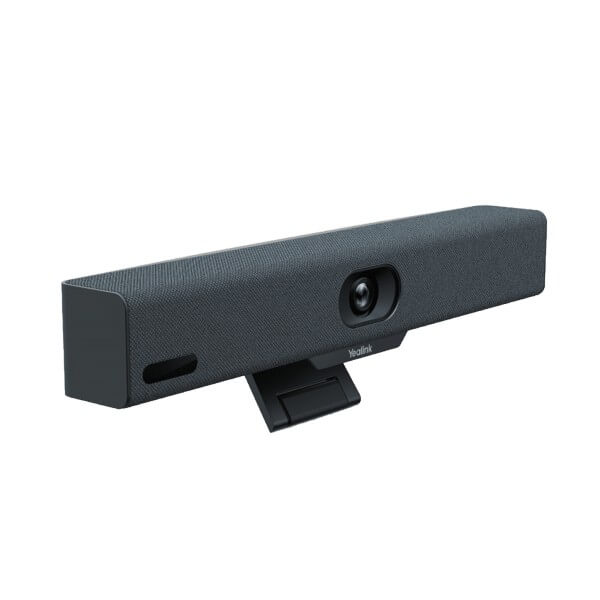
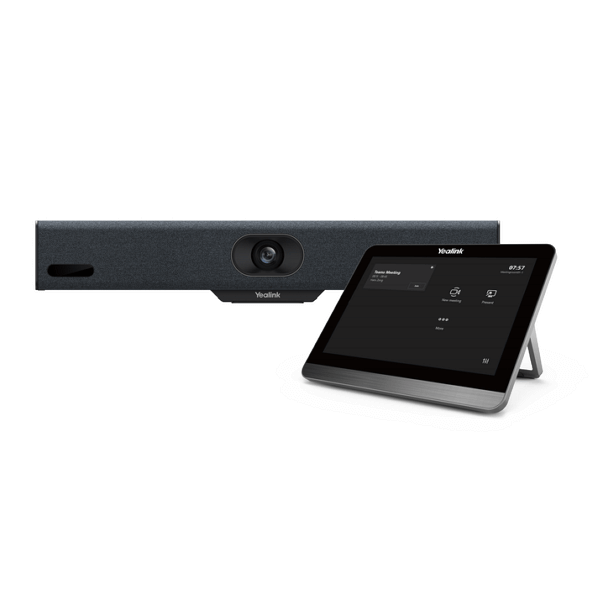
The Yealink MeetingBar A10 is the compact all-in-one Microsoft Teams Rooms device for offices that have outgrown laptop meetings but do not need a full boardroom system. It combines the Android room computer, 4K camera, microphone array, speaker, Wi-Fi, Bluetooth and mounting hardware into one video bar for phone rooms, executive offices and huddle rooms. For Dubai SMEs in Business Bay, DIFC, DMCC and JLT, the A10 is the clean way to turn a 1–5 person room into a proper Teams meeting space without building a rack, adding a separate PC or leaving users to fight with USB cables before every call.
Teams Rooms, Zoom Rooms or BYOD? Get the Platform Right First
The A10 is a room system, not a SIP desk phone. It is designed for video collaboration platforms, especially Microsoft Teams Rooms on Android. Certification status was checked against Microsoft’s official Teams devices list on 16 July 2026. If your office uses regular SIP calling, choose a Yealink T-series desk phone or CP-series SIP conference phone instead. If your meeting rooms are standardised on Zoom Rooms, specify the Zoom version when asking David for a quote.
| Your Platform | Right Yealink Device | What You Need |
|---|---|---|
| Microsoft Teams Rooms | Yealink MeetingBar A10 Teams Rooms on Android — this page | Microsoft 365 tenant, Teams Rooms licence and room resource account |
| Zoom Rooms | Yealink MeetingBar A10 Zoom Rooms edition — specify Zoom when requesting a quote | Zoom Rooms licence and Zoom admin access |
| Bring Your Own Device / Laptop Meetings | A10 Device Mode with USB-C cable or wireless presentation accessory | User laptop, supported meeting app and room display |
| SIP PBX Voice Calls | Choose a Yealink SIP desk phone or SIP conference phone instead | SIP server such as 3CX, Yeastar, Grandstream UCM or hosted PBX |
Power Truth — A10 Uses a Power Adapter, Not PoE
The Yealink A10 is not powered from a PoE switch. It uses its supplied AC power adapter, while the Ethernet port is for network data. That matters in Dubai fit-outs where meeting-room cabling is often planned around a single network point behind the screen. We confirm power socket location, display HDMI reach, network access, wall or screen mounting and controller choice before dispatch, so the installer is not opening the room ceiling twice.
Where the A10 Sits in the Yealink MeetingBar Range
The A10 is the entry MeetingBar for small spaces. Choose it for one-to-five-person rooms, executive offices, phone booths and compact huddle spaces. Step up to the A20 for larger small rooms, wider usage and more demanding audio/video coverage. Step up again to A30 or A40 when the room size moves into medium-room territory and participants sit farther from the screen.
| Feature | Laptop + USB Camera | MeetingBar A10 ★ | MeetingBar A20 |
|---|---|---|---|
| Best room fit | Ad-hoc desk or temporary room | Home office, phone room, huddle room, 1–5 pax | Larger small room, typically 6–10 pax |
| Room computer | User laptop required | Built-in Android Teams Rooms appliance | Built-in Android Teams Rooms appliance |
| Camera | Depends on USB camera | 4K camera, 120° DFoV, 105° HFoV | Higher-capacity MeetingBar camera system |
| AI video | Limited or software dependent | Auto Framing, Speaker Tracking, Multi-focus Framing | Advanced room framing for larger spaces |
| Microphones | USB device dependent | 8 MEMS array, 4.5m pickup, 3.5m high-quality pickup | Larger-room audio coverage |
| User experience | Plug laptop, select camera, select mic | One-touch Teams join with CTP18 or remote option | One-touch Teams join for larger rooms |
| Power | USB/laptop powered | Supplied AC power adapter | Supplied room-system power adapter |
| Price tier | Lowest upfront cost | Entry dedicated Teams Rooms system | Step-up small-room system |
| Choose if… | The room is temporary and users can bring laptops | You want a clean, dedicated Teams Rooms experience for a compact room | The room is larger or you expect more people around the table |
Where the Yealink A10 Works in Dubai
Executive offices and partner rooms. DIFC law firms, advisory offices and finance teams often need a small private Teams room for client calls. The A10 gives that room a fixed camera, fixed microphone and one-touch join, so the partner is not borrowing someone’s laptop or asking IT to reconnect the webcam five minutes before a board call.
SME huddle rooms in Business Bay and DMCC. Post-RTO teams are using small rooms all day for hybrid check-ins. A shared laptop setup turns every meeting into a setup job. A10 makes the room predictable: scheduled Teams meeting, tap to join, camera frames the group, microphones pick up the table and the room stays ready for the next team.
Phone rooms and focus booths. In JLT, Dubai Internet City and free-zone offices, small acoustic booths are now used for Teams calls with overseas clients. A10’s compact body, 120° field of view and 8 MEMS microphone array fit these rooms better than oversized boardroom hardware.
Branch meeting spaces. For UAE branch rollouts, the A10 keeps the bill of materials simple: display, network, power, Teams Rooms licence, A10 bar and controller option. Vector Digital Systems stages the unit in Dubai before dispatch so each branch receives the same meeting-room experience.
Full Technical Specifications
| Specification | Yealink MeetingBar A10 |
|---|---|
| Product Type | All-in-one Android video collaboration bar for Microsoft Teams Rooms, Zoom Rooms and supported BYOD use |
| Recommended Room | Home office, phone room, huddle room and small meeting room; typically 1–5 people for Teams Rooms planning |
| Teams Certification | Microsoft Teams Rooms device status verified on Microsoft Teams enabled devices list — 16 July 2026 |
| Operating System | Android 13 |
| Camera | 4K camera; video resolution 1080p30 and 720p30 |
| Field of View | 120° diagonal field of view; 105° horizontal field of view |
| Camera Control | 4× e-PTZ camera control with electric privacy shutter |
| AI Video Features | Auto Framing, Speaker Tracking, Multi-focus Framing; Smart Gallery available for Zoom use |
| Microphones | Built-in 8 MEMS microphone array |
| Pickup Distance | 4.5m pickup distance; 3.5m high-quality pickup distance |
| Audio Processing | AI noise cancellation, full-duplex audio, automatic gain control and echo cancellation |
| Speaker | Built-in 5W high-fidelity speaker; maximum power 8W |
| Network | 1× 10/100/1000M Ethernet; built-in dual-band Wi-Fi 2.4GHz / 5GHz; IPv4 / IPv6 |
| Bluetooth | Built-in Bluetooth 4.2 |
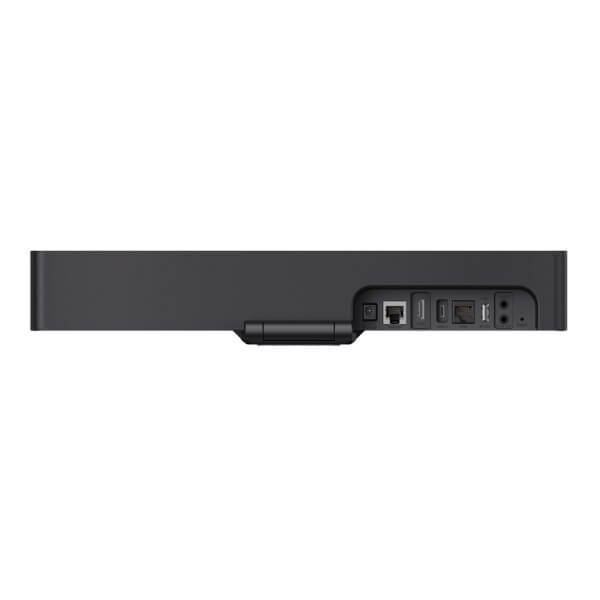
| Ports | 1× HDMI output, 1× USB 2.0, 1× USB-C for content sharing, 1× line in/out, 1× Gigabit Ethernet, 1× Yealink VCH RJ-45 port, power port, security lock slot and reset slot |
| Security | TLS 1.2 / 1.3, AES 256-bit encryption, VLAN, LLDP, 802.1X and built-in certificate support |
| Power | AC 100–240V input; DC 48V / 0.7A output power adapter included |
| Dimensions | 380mm × 57mm × 57mm |
| Package Options | A10-010 with VCR11 remote; A10-020 with CTP18 touch console |
| In the Box | MeetingBar A10 endpoint, 3m Ethernet cable, 1.8m HDMI cable, mounting bracket and accessories, power adapter and quick start guide; controller depends on kit |
Compatible Accessories and Kit Choices
| Accessory / Kit | Model | Purpose |
|---|---|---|
| Remote Kit | A10-010 with VCR11 | Good for compact rooms where users prefer remote control instead of a table touch panel |
| Touch Console Kit | A10-020 with CTP18 | Recommended for shared Teams Rooms where users expect one-touch join from the table |
| Wireless Presentation | WPP30 | Wireless content sharing from a laptop without changing room cabling; confirm availability for UAE stock |
| Wired BYOD / Sharing | Full-featured USB-C cable | Use the A10 as a room camera and audio device for laptop meetings, or share content into the room |
Staging Before Dispatch — What Vector Digital Systems Configures
Vector Digital Systems stages the Yealink A10 before dispatch in Dubai. We confirm the room type, display connection, controller choice, network method, Teams Rooms licence readiness, room resource account, firmware status and admin handover. For Teams Rooms deployments, we guide your IT team on tenant preparation and sign-in workflow, then label the kit for the correct room before delivery. For multi-branch projects, the same staging checklist is repeated room by room, so each location receives a consistent meeting experience.
Export from Dubai
Vector Digital Systems exports Yealink Teams Rooms and MeetingBar systems from Dubai to telecom operators, system integrators, hotel groups, corporate procurement teams and government IT departments. Common export routes include Oman, Saudi Arabia, Kuwait, Qatar and Bahrain in the Gulf; Jordan and Egypt in the wider Arab market; Kenya and Tanzania in East Africa; and Pakistan and Sri Lanka for South Asian projects. Shipments are quoted FOB Dubai with commercial invoice, packing list and certificate of origin on request. Send David your quantity, destination, room sizes and required kit version — A10-010 or A10-020 — for a same-day AED quote with VAT and delivery clearly separated.
Get a same-day quote in AED — Yealink A10 Teams Rooms Dubai
Tell David your room size, Teams Rooms licence status, preferred kit version, mounting location, display size and delivery destination. We quote with VAT breakdown, delivery and staging included.
Frequently Asked Questions — Yealink MeetingBar A10 Teams Rooms
Is the Yealink A10 certified for Microsoft Teams Rooms?
Yes — the Yealink MeetingBar A10 is listed as a Microsoft Teams enabled device for Microsoft Teams Rooms. Vector Digital Systems verified the A10 certification status against Microsoft’s official Teams devices list on 16 July 2026 before writing this page.
What room size is the Yealink A10 designed for?
The A10 is designed for home offices, phone rooms, huddle rooms and small meeting rooms. In practical Dubai office planning, choose it for 1–5 people seated close to the display. For larger rooms, ask David to quote the Yealink A20, A30 or A40 instead.
Does the Yealink A10 work with Zoom as well as Microsoft Teams?
Yes, Yealink offers A10 platform support for Teams Rooms and Zoom Rooms, but the correct edition and licence must be specified before quoting. If your office runs Zoom Rooms rather than Teams Rooms, tell David at the start so the right kit and setup path are selected.
Does the Yealink A10 need a laptop in the meeting room?
No. In Teams Rooms mode, the A10 acts as the room system, so users join scheduled meetings from the room controller or remote without bringing a laptop. A laptop can still be used for content sharing or BYOD mode when required.
Does the Yealink A10 come with a power adapter, or does it use PoE?
The A10 uses the supplied AC power adapter. It is not powered by PoE. The Ethernet port is for network data, so your meeting room needs both a network connection and a nearby power socket behind the display or near the mounting point.
Yealink A10 vs A20 — which one should I buy?
Choose the A10 for compact rooms, phone booths and small huddle spaces where people sit close to the screen. Choose the A20 when the room is larger, has more participants, or needs a stronger small-room video bar. David can size the room from a photo, seating count and display wall distance.
What is the best Yealink Teams Rooms device for a small office in Dubai?
For a 1–5 person room, the Yealink MeetingBar A10 with CTP18 touch console is the recommended Teams Rooms starting point. It gives a dedicated room experience, 4K camera, AI framing, built-in microphones and one-touch join. For a larger meeting room, step up to the Yealink A20 or A30.
Does Vector Digital Systems configure the Yealink A10 before delivery?
Yes — Vector Digital Systems stages the A10 before dispatch, checks firmware, confirms the kit version, labels the room system, verifies network and display requirements, and guides your IT team through the Teams Rooms account and sign-in workflow. The goal is a room that works on delivery day.
Who is the authorised Yealink supplier in Dubai?
Vector Digital Systems LLC has supplied Yealink solutions in Dubai since 2009. David is the Yealink specialist for product selection, Teams Rooms sizing, project pricing, staging and local warranty handling. Quotes include VAT breakdown and delivery details.
Does Vector Digital Systems export Yealink A10 Teams Rooms systems from Dubai?
Yes — Vector Digital Systems exports Yealink A10 systems from Dubai to system integrators, telecom operators and enterprise buyers in Oman, Saudi Arabia, Kuwait, Qatar, Bahrain, Jordan, Egypt, Kenya, Tanzania, Pakistan and Sri Lanka. Exports are quoted FOB Dubai with commercial invoice, packing list and certificate of origin on request.