
Description
Yealink MP58-WH E2 7-Inch Executive Microsoft Teams IP Phone Dubai
Executive Microsoft Teams Calling, Built for Dubai Offices
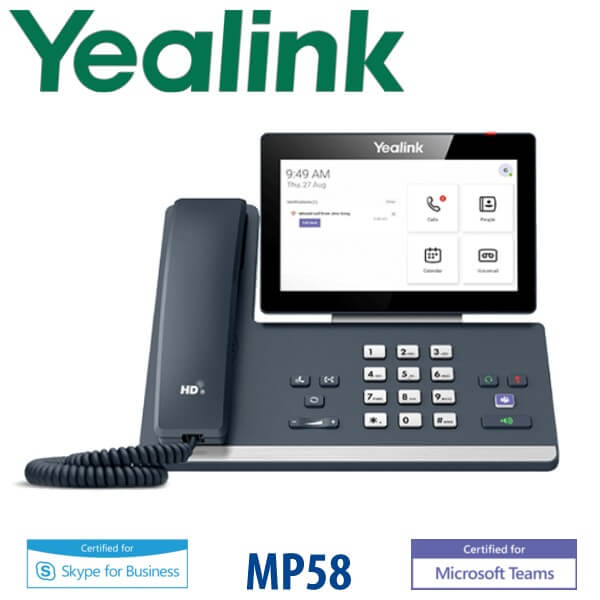
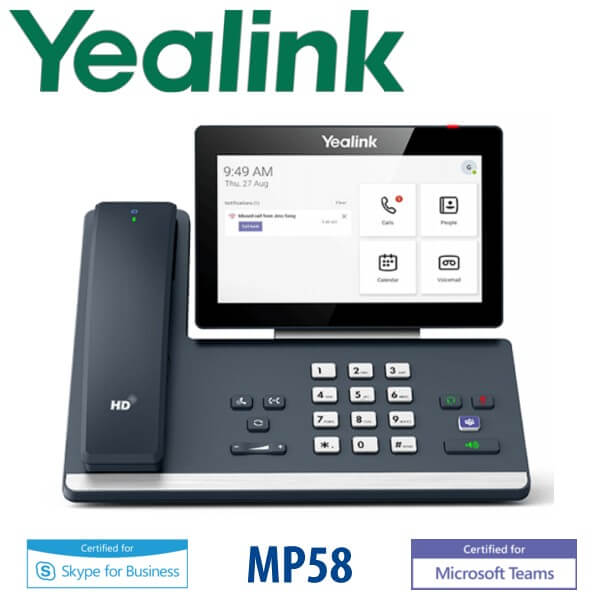
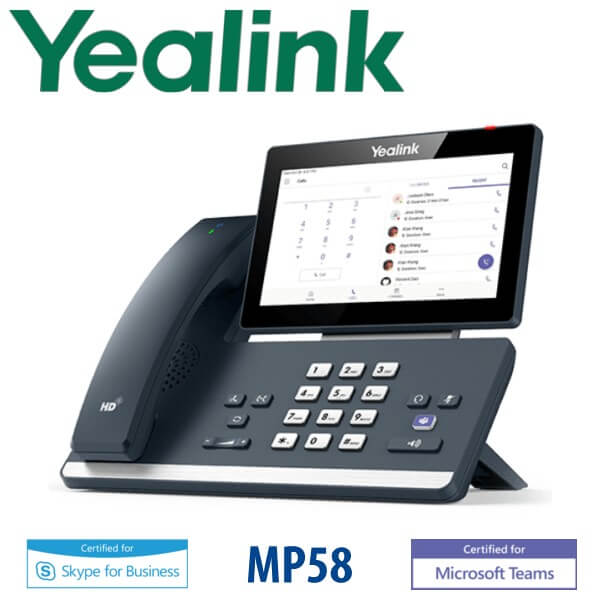
The Yealink MP58-WH E2 Teams phone is the premium desktop choice for executives, senior managers, reception supervisors, and Microsoft Teams Phone users who want a real handset instead of making every call from a laptop. It combines a 7-inch adjustable touchscreen, a dedicated Teams button, built-in Wi-Fi and Bluetooth, dual Gigabit Ethernet, and the BTH58 Bluetooth wireless handset so users can step away from the desk while staying on the call. Vector Digital Systems supplies the MP58-WH E2 in Dubai with Teams deployment checks, local warranty support, VAT and delivery quoted in AED, and staging before dispatch.
Platform Check — This Is a Microsoft Teams Phone, Not a SIP T7 Phone
The MP58-WH E2 belongs to Yealink’s Microsoft Teams MP-series. It is not the same product family as the SIP-only T7 series such as T74U or T77U. This matters because a Teams desk phone needs a Microsoft 365 tenant and Teams Phone licensing, while a SIP phone needs SIP credentials from a PBX such as 3CX, Yeastar, Grandstream UCM, Asterisk, or a hosted VoIP provider. Ordering the wrong platform is the most expensive Yealink buying mistake in UAE offices.
| Your Platform | Right Phone | What You Need |
|---|---|---|
| Microsoft Teams Phone | Yealink MP58-WH E2 Teams phone (this page) | Microsoft 365 tenant, Teams Phone licence, user sign-in or device account |
| SIP PBX — 3CX, Yeastar, UCM, Asterisk, hosted PBX | Yealink SIP T7-series phone such as T74U, T74W or T77U | SIP credentials from your phone system |
| Zoom Phone | Zoom-certified Yealink phone — verify model before ordering | Zoom Phone licence per user |
Microsoft certification note: the Yealink MP58-WH E2 Teams model was checked against Microsoft’s Teams enabled devices list on 23 July 2026 before this page was written. Ask David to re-check certification status at quote stage for large corporate rollouts, because Microsoft device listings can change over time.
PoE Truth — Confirm Power Before Delivery
Do not assume a power adapter is included. The MP58-WH E2 supports Power over Ethernet from a PoE switch, and the Yealink AC adapter is listed as optional. If the desk does not have a PoE-capable network port, ask David to add the correct Yealink power supply to the quote. This prevents the common Dubai installation problem: the phone arrives, the Teams account is ready, but the desk has no PoE power.
Where the MP58-WH E2 Sits in the Yealink Teams Range
The MP58-WH E2 is the premium executive model in Yealink’s MP E2 Microsoft Teams desk phone line. The MP56 E2 is the standard choice for front desks and general office users; the MP58-WH E2 adds the executive-grade 7-inch screen experience and Bluetooth wireless handset; and for operators or assistants who monitor many contacts, the MP58-WH E2 can be paired with up to three EXP50 Teams expansion modules.
| Feature | MP56 E2 | MP58-WH E2 ★ | MP58-WH E2 + EXP50 |
|---|---|---|---|
| Best fit | Standard Teams desk or front desk | Executive, manager or premium Teams user | Receptionist, assistant or supervisor |
| Display | Touchscreen Teams display | 7″ 1024×600 adjustable touchscreen | 7″ touchscreen plus EXP50 side display |
| Handset | Standard desk handset | BTH58 Bluetooth wireless handset | Wireless handset plus operator keys |
| Wi-Fi / Bluetooth | Built in on E2 range | Built-in dual-band Wi-Fi + Bluetooth 5.2 | Built-in wireless plus expansion support |
| Network | Gigabit Ethernet | Dual Gigabit Ethernet with PoE | Dual Gigabit Ethernet with PoE |
| Expansion | Not the main buying reason | Supports EXP50 modules | Up to 3× EXP50, up to 180 contacts |
| Platform | Microsoft Teams Phone | Microsoft Teams Phone | Microsoft Teams Phone |
| Replaces | Older MP56 / common-area phones | Older MP58 / executive Teams phones | Assistant consoles and contact-heavy Teams desks |
| Choose if… | You need a standard Teams phone for everyday users | You want the premium executive Teams phone with wireless handset freedom | You need contact monitoring or admin-assistant workflows on Teams |
Where the MP58-WH E2 Works in Dubai
Executive offices in DIFC, DMCC and Business Bay. Senior managers often live inside Microsoft Teams but still want a dedicated desk phone for clear voice calls, quick meeting joins and a physical handset. The MP58-WH E2 gives them a premium Teams interface without forcing every call through a laptop speaker or headset.
Teams Phone rollouts after PBX migration. Many UAE companies are moving from SIP PBX extensions to Teams Phone, Operator Connect or Direct Routing. The MP58-WH E2 is the right conversation when the buyer says, “We are removing desk PBX phones but still need a real phone for directors, reception and senior staff.” If the site is still on SIP, choose a Yealink T7-series phone instead.
Reception, assistant and supervisor desks. With EXP50 expansion modules, the MP58-WH E2 becomes a Teams contact console for assistants, receptionists and department supervisors who need quick access to colleagues, call controls and Teams presence. This is especially useful in clinics, consultancies, hotels, corporate HQs and banking branches where a laptop-only Teams setup feels too slow at the front desk.
Hybrid work teams with strict device management. IT teams can manage the phone through Microsoft device management and Yealink management platforms, while users get a familiar Teams interface, dedicated button, visual voicemail, meeting join and call controls. For Dubai enterprises with multiple branches, this makes deployment repeatable instead of desk-by-desk manual setup.
Full Technical Specifications
| Specification | Yealink MP58-WH E2 Teams |
|---|---|
| Platform | Microsoft Teams Phone — certified status checked 23 July 2026 |
| Operating System | Android 13.0 |
| Display | 7″ 1024×600 capacitive adjustable touchscreen, 5-point multi-touch, 48° tilt |
| Teams Controls | Dedicated Microsoft Teams button, meeting join, call controls, presence integration, visual voicemail |
| Handset | BTH58 Bluetooth wireless handset included in MP58-WH E2 package |
| Audio | Yealink Optima HD audio, Noise Proof Technology, full-duplex speakerphone with AEC, HAC handset, SILK codec support |
| Network | Dual-port Gigabit Ethernet |
| Power | PoE IEEE 802.3af Class 3; optional external Yealink AC adapter 100–240V input, DC 12V/1A output |
| Wi-Fi | Built-in dual-band 2.4G/5G Wi-Fi |
| Bluetooth | Built-in Bluetooth 5.2 for BTH58 wireless handset and Bluetooth headsets |
| USB Ports | 2× USB Type-A ports for USB headsets, USB flash drive and EXP50 modules; 1× USB Type-C port |
| Headset Ports | RJ9 headset port, Bluetooth headset support, USB headset support |
| Expansion | Supports up to 3× Yealink EXP50 expansion modules, up to 180 contacts |
| Teams Phone Features | Call hold, mute, transfer, forward, synchronized call logs, emergency calls, hot desking, Boss/Admin function, Common Area Phone support |
| Hybrid Mode | Teams & SIP Hybrid mode supported on Teams version — confirm deployment requirement with David |
| Management | Microsoft device management platform, Yealink YDMP/YMCS, browser/phone/auto provisioning, RPS activation |
| Security | TLS, HTTPS certificate manager, IEEE 802.1X, security lock port, IPv4/IPv6 |
| Dimensions | 259 × 196 × 164 × 45 mm |
| Package Content | MP58 E2 IP phone, BTH58 Bluetooth wireless handset, Ethernet cable, Type-C cable, stand, quick start guide. Power adapter optional. |
Compatible Accessories
| Accessory | Model | Purpose |
|---|---|---|
| Bluetooth Wireless Handset | BTH58 | Included with MP58-WH E2 package; gives executives freedom from the desk during calls |
| Teams Expansion Module | EXP50 | Up to 3 modules for admin, assistant and reception workflows; up to 180 contacts |
| Power Supply | Yealink 12V/1A PSU | Optional power supply for non-PoE desks; confirm UAE 220V requirement when ordering |
| USB Headset | Yealink UH / WH range | Connect through USB-A or Bluetooth depending on headset model; confirm Teams certification if required |
| Bluetooth Headset | Yealink BH / WH range | Wireless headset pairing for executives, hybrid workers and long-call users |
Staging Before Dispatch — What Vector Digital Systems Checks
Every Yealink MP58-WH E2 supplied by Vector Digital Systems is checked before delivery: device firmware status, Microsoft Teams sign-in method, Teams Phone licence requirement, network VLAN notes, PoE availability, Wi-Fi requirement, Bluetooth handset pairing, headset requirement, and EXP50 expansion module plan where needed. For project deployments, we can prepare user assignment notes, device labels, admin handover details and delivery batches so the Teams rollout is clean across Dubai offices and UAE branches.
Export from Dubai
Vector Digital Systems exports Yealink Microsoft Teams phones from Dubai to system integrators, telecom operators, Microsoft 365 deployment partners and enterprise procurement teams. Common export routes include Oman, Saudi Arabia, Kuwait, Qatar and Bahrain across the GCC; Jordan and Egypt in the broader region; Kenya and Tanzania in East Africa; and Pakistan, Sri Lanka and Bangladesh in South Asia. Shipments are quoted FOB Dubai with commercial invoice, packing list and certificate of origin on request. Ask David for project pricing when ordering 5+ units, especially for Teams Phone migrations, branch rollouts and executive desk refreshes.
Get a same-day quote in AED for Yealink MP58-WH E2 Teams
Tell David your quantity, Microsoft 365 tenant status, Teams Phone licence plan, PoE switch availability, headset requirement and whether you need EXP50 modules. Quote includes VAT breakdown and Dubai delivery charges.
Frequently Asked Questions — Yealink MP58-WH E2 Teams
Is the Yealink MP58-WH E2 certified for Microsoft Teams?
Yes — the Yealink MP58-WH E2 Teams model was checked against Microsoft’s Teams enabled devices list on 23 July 2026. For large corporate deployments, Vector Digital Systems re-checks certification status at quote stage because Microsoft device listings and lifecycle status can change.
Does the Yealink MP58-WH E2 work with 3CX, Yeastar or Grandstream UCM?
The MP58-WH E2 is primarily a Microsoft Teams Phone device. It is not the right default choice for a pure SIP PBX deployment such as 3CX, Yeastar P-Series, Grandstream UCM or Asterisk. For SIP systems, ask David for the correct Yealink T7-series phone such as T74U, T74W or T77U.
Does the Yealink MP58-WH E2 come with a power adapter, or do I need PoE?
The MP58-WH E2 supports Power over Ethernet, and the Yealink AC adapter is optional. If your desk network point is not connected to a PoE switch, ask David to add the correct Yealink power supply to your order. Vector Digital Systems confirms power before dispatch so the phone is ready on installation day.
What Microsoft licence do I need for the MP58-WH E2?
You need a Microsoft 365 environment with Teams Phone capability for the user or device account. The exact licence depends on your Microsoft plan, calling setup, Operator Connect, Direct Routing or calling plan arrangement. Vector Digital Systems checks the deployment scenario before quoting so you do not buy Teams hardware before the tenant is ready.
MP56 E2 vs MP58-WH E2 — which Teams phone should I buy?
Choose the MP56 E2 for standard office users and front desks that need a reliable Teams phone at a lower tier. Choose the MP58-WH E2 for executives, directors and premium users who want the larger 7-inch adjustable display, BTH58 Bluetooth wireless handset, built-in wireless connectivity and a more executive desktop experience.
Can I use the MP58-WH E2 for reception or assistant desks?
Yes — the MP58-WH E2 supports up to three EXP50 expansion modules for contact-heavy Teams workflows. This makes it suitable for receptionists, assistants, department coordinators and supervisors who need quick access to colleagues and Teams presence from the desk phone.
Does the MP58-WH E2 include Wi-Fi and Bluetooth?
Yes — the MP58-WH E2 includes built-in dual-band 2.4G/5G Wi-Fi and Bluetooth 5.2. The Bluetooth connection supports the BTH58 wireless handset and compatible Bluetooth headsets, while Wi-Fi helps when the executive desk has limited cabling.
Who is the authorised Yealink supplier in Dubai?
Vector Digital Systems LLC has supplied Yealink phones and VoIP solutions in Dubai since 2009. David handles Yealink pre-sales, model selection, Teams deployment checks, project pricing, staging and local warranty support, so buyers do not need to manage international courier claims for warranty cases.
What is the best Yealink Teams phone for executives in Dubai?
The Yealink MP58-WH E2 is the best Yealink Teams desk phone for executives who want a premium screen, physical handset, wireless handset freedom and dedicated Teams controls. For everyday users, the MP56 E2 is usually enough; for reception or assistant desks, add EXP50 expansion modules to the MP58-WH E2.
Does Vector Digital Systems export Yealink Teams phones from Dubai?
Yes — Vector Digital Systems exports Yealink Teams phones from Dubai to Microsoft 365 partners, system integrators and enterprise buyers in Oman, Saudi Arabia, Kuwait, Qatar, Bahrain, Jordan, Egypt, Kenya, Tanzania, Pakistan and Sri Lanka. Shipments are quoted FOB Dubai with commercial invoice, packing list and certificate of origin on request.
Does Vector Digital Systems configure the MP58-WH E2 before delivery?
Yes — Vector Digital Systems checks the MP58-WH E2 before dispatch, including firmware status, Teams sign-in method, licence readiness, PoE availability, Wi-Fi requirement, Bluetooth handset pairing, headset requirement and EXP50 expansion module plan where applicable. For project rollouts, devices can be labelled and staged by user or location.