Description
Yealink MVC800 II Video Conference System Microsoft Teams Rooms for Medium & Large Rooms Dubai
Yealink MVC800 II Video Conference System for Dubai Teams Rooms
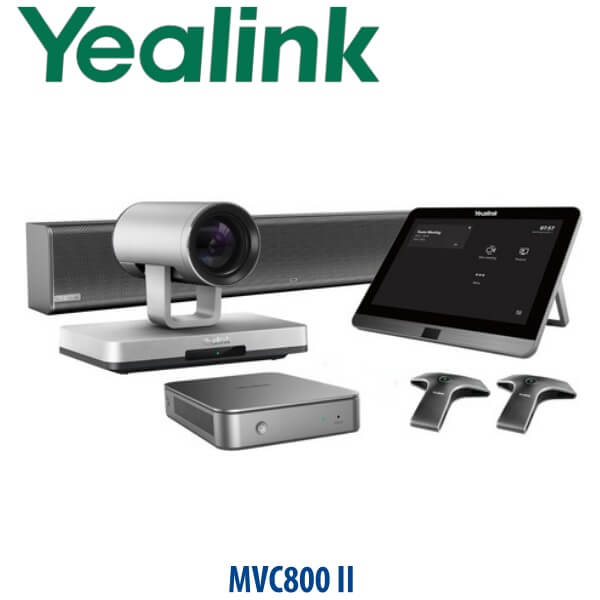
The Yealink MVC800 II is a Microsoft Teams Rooms video conference system built for medium and large meeting rooms. It combines the UVC80 PTZ camera, MCore mini-PC, MTouch II touch controller, VCM34 table microphones and MSpeaker room audio into one dedicated Teams Rooms solution. For Dubai offices that want a proper meeting-room appliance instead of a laptop, webcam and loose speakerphone, the MVC800 II gives a more stable boardroom experience: one-touch meeting join, front-of-room camera, table microphone pickup and room-ready audio.
Vector Digital Systems LLC supplies Yealink room systems in Dubai with pre-sales room sizing, staging, local warranty support and export documentation. David, our Yealink specialist, can quote the MVC800 II in AED with VAT breakdown, delivery charges and the required bundle details confirmed before dispatch.
Platform Table — Teams Rooms, SIP Conference or Zoom?
The MVC800 II is a Microsoft Teams Rooms system, not a SIP conference phone. This is the most important buying point. A Teams Rooms kit, a SIP audio conference phone and a Zoom Rooms kit may all sit in a meeting room, but they are not the same product and they do not use the same licence path.
| Your Platform | Right Yealink Product Type | What You Need |
|---|---|---|
| Microsoft Teams Rooms | Yealink MVC800 II — this page | Microsoft 365 tenant, Teams Rooms licence, room resource account and network access |
| SIP / PABX audio conference | Yealink CP-series conference phone — ask David for the correct SIP model | SIP credentials from 3CX, Yeastar, Grandstream UCM, hosted PBX or another SIP server |
| Zoom Rooms | Zoom-certified Yealink room system — verify certification status before quote | Zoom Rooms licence and admin access for activation |
Tell David whether the room runs Microsoft Teams, Zoom or SIP before requesting a quote. That one detail prevents the most common meeting-room ordering mistake.
Power, Cabling and Licence Truth
The MVC800 II is not a PoE desk phone. It is a complete room system with a mini-PC, touch panel, PTZ camera, microphones and speaker components. Your room needs planned power, Ethernet, display connection, Teams Rooms licensing and a room account. We confirm the display count, network point, table-to-screen cable route, room mailbox and Teams Rooms licence before staging, so the system is not just delivered as boxes — it is prepared for a working meeting room.
What the MVC800 II Includes
The MVC800 II bundle is designed around Microsoft Teams Rooms. The UVC80 PTZ camera gives 12× optical zoom for capturing participants across a longer table. The VCM34 array microphones provide 360-degree pickup with up to 20 ft / 6 m range per microphone, while the MSpeaker handles room playback from the front of the room. The MTouch II panel sits on the table for meeting join, call control and content sharing workflow.
MVC800 II in the Yealink Room System Range
| Feature | MVC500 II | MVC800 II ★ | MVC900 II |
|---|---|---|---|
| Room fit | Focus and small rooms | Medium and large rooms | Extra-large rooms |
| Platform | Microsoft Teams Rooms | Microsoft Teams Rooms | Microsoft Teams Rooms |
| Camera | Smaller-room camera bundle | UVC80 PTZ camera | Extra-large-room camera bundle |
| Optical zoom | Room dependent | 12× optical zoom | For deeper boardrooms |
| Microphones | Smaller-room audio package | 2 or 3× VCM34 array microphones | Expanded room coverage |
| Controller | MTouch room control | MTouch II touch panel | MTouch room control |
| Price tier | Lower | Mid-high room system | Highest large-room tier |
| Choose if… | You are equipping a smaller meeting room | You need a dedicated Teams Rooms system for a medium or large boardroom | Your room is extra-large and needs more coverage |
Where MVC800 II Works in Dubai
DIFC and DMCC boardrooms. The MVC800 II suits executive rooms where regional managers, auditors and overseas stakeholders join Teams meetings every week. The UVC80 PTZ camera gives the room a proper front-of-room view, while VCM34 microphones keep voices clear from across the table.
Business Bay and Sheikh Zayed Road offices. Many UAE teams have moved from laptop-based meetings to dedicated Teams Rooms because reception, admin and visiting managers need a predictable workflow: tap to join, share content, speak normally and end the meeting without borrowing an employee laptop.
Training rooms and multi-branch reviews. For logistics groups in Jebel Ali, clinic networks across Dubai and Sharjah, and corporate teams running branch review calls, the MVC800 II gives a more professional Teams meeting setup than a portable webcam placed at the end of a long table.
Full Technical Specifications
| Specification | Yealink MVC800 II |
|---|---|
| Product type | Microsoft Teams Rooms video conference system |
| Room size | Medium and large meeting rooms |
| Core bundle | MCore mini-PC, MTouch II touch panel, UVC80 PTZ camera, VCM34 array microphones and MSpeaker audio system |
| Camera | Yealink UVC80 PTZ camera |
| Camera zoom | 12× optical zoom |
| Touch controller | MTouch II room touch panel for meeting join, call control and content workflow |
| Mini-PC | MCore mini-PC for Microsoft Teams Rooms operation |
| Microphones | Two or three VCM34 array microphones depending on bundle |
| Microphone pickup | 360° voice pickup, up to 20 ft / 6 m per VCM34 microphone |
| Speaker | MSpeaker soundbar / front-of-room speaker system |
| Platform requirement | Microsoft 365 tenant, Teams Rooms licence and room resource account required |
| Network requirement | Room Ethernet and internet access required; firewall and tenant policies should allow Teams Rooms operation |
| Installation notes | Requires display, power, network, camera placement and table-to-front-room cabling plan |
| Lifecycle note | Listed by Yealink under EoL products; availability is subject to stock and project confirmation |
Compatible Accessories and Room Options
| Accessory / Option | Model | Purpose |
|---|---|---|
| Array microphone | VCM34 | Table microphone pickup for medium and large rooms; bundle quantity confirmed before quote |
| Room speaker | MSpeaker | Front-of-room playback for Teams meeting audio |
| Touch controller | MTouch II | Meeting join, call control and content workflow from the room table |
| Room display and mounting | Room dependent | Camera height, display count, wall position and table cabling checked before deployment |
Staging Before Dispatch — What We Configure
Vector Digital Systems stages the Yealink MVC800 II before delivery where customer tenant access is available. The staging workflow includes MCore power-on check, MTouch II connection, UVC80 camera test, VCM34 microphone pickup test, MSpeaker playback test, display output check, network readiness review and Teams Rooms sign-in assistance. For customer-managed tenants, we coordinate with your Microsoft 365 administrator so the room account, Teams Rooms licence, password policy and meeting calendar are ready before installation.
For Dubai meeting-room deployments, David also checks the room layout before quoting: number of seats, distance from camera to far participant, display count, table cable route, microphone positions, room network point and whether the system is replacing an older MVC installation.
Export from Dubai
Vector Digital Systems exports Yealink video conference systems from Dubai to system integrators, corporate IT teams, hotel groups, telecom operators and government suppliers. Common export destinations include Oman, Saudi Arabia, Kuwait, Bahrain and Qatar in the GCC; Jordan and Egypt for regional deployments; Kenya and Tanzania for East Africa; and Pakistan and Sri Lanka for South Asian projects. Export shipments move FOB Dubai with commercial invoice, packing list and certificate of origin on request. Share the room count, destination, bundle requirement and delivery timeline for a same-day AED quote.
Get a same-day MVC800 II quote in AED
Tell David your room size, number of seats, Microsoft Teams Rooms licence status, display count, cable route and required quantity. VAT breakdown and delivery charges are included in the quote.
Frequently Asked Questions — Yealink MVC800 II
Is the Yealink MVC800 II a Microsoft Teams Rooms system?
Yes — the Yealink MVC800 II is a Microsoft Teams Rooms video conference system for medium and large meeting rooms. It is designed for Teams meeting-room use with a Microsoft 365 tenant, Teams Rooms licence and room resource account.
Does the Yealink MVC800 II work with Zoom or SIP phone systems?
The MVC800 II is designed for Microsoft Teams Rooms. It is not a SIP conference phone for 3CX, Yeastar or Grandstream UCM. For Zoom Rooms or SIP/PABX audio conferencing, ask David for the correct Yealink Zoom-certified or CP-series conference model.
What room size is the Yealink MVC800 II designed for?
The MVC800 II is designed for medium and large meeting rooms. It is a good fit for boardrooms, training rooms and management meeting rooms where a front-wall PTZ camera and table microphones are needed to cover several participants.
What camera comes with the Yealink MVC800 II?
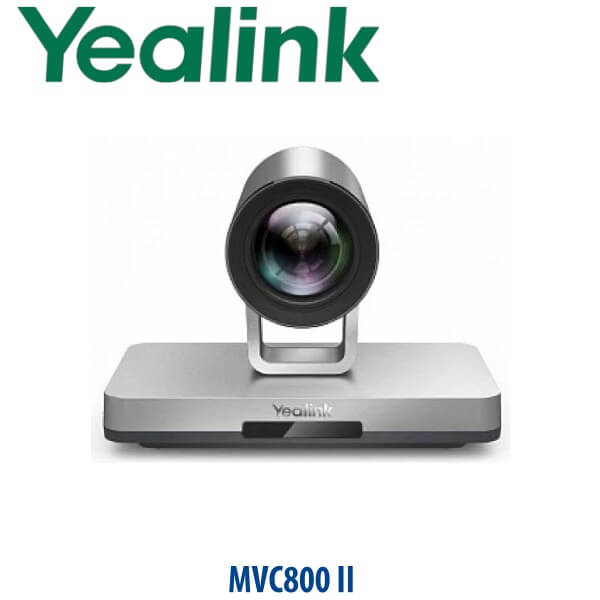
The MVC800 II uses the Yealink UVC80 PTZ camera. The UVC80 provides 12× optical zoom, making it suitable for longer conference tables where participants sit several metres away from the display wall.
How many microphones are included with the MVC800 II?
MVC800 II bundles are supplied with two or three VCM34 array microphones depending on the package. Each VCM34 provides 360° voice pickup up to 20 ft / 6 m, helping cover medium and large meeting-room tables.
Does the MVC800 II need a Teams Rooms licence?
Yes — the MVC800 II requires a Microsoft Teams Rooms licence and a room resource account in your Microsoft 365 tenant. Vector Digital Systems can coordinate with your IT administrator before staging so the room is ready for sign-in and testing.
Is the Yealink MVC800 II still current?
Yealink lists MVC800 II under EoL products, so availability depends on remaining stock and project requirements. Vector Digital Systems can quote the MVC800 II when the same model is required, and can also advise on current Yealink alternatives if you are planning a new long-term room standard.
Does Vector Digital Systems configure the MVC800 II before delivery?
Yes — Vector Digital Systems stages the MVC800 II before dispatch where tenant access is available. We check the MCore, MTouch II, UVC80 camera, VCM34 microphones, MSpeaker audio, display output, network readiness and Teams Rooms sign-in workflow before delivery.
Who is the authorised Yealink supplier in Dubai?
Vector Digital Systems LLC has supplied and integrated Yealink solutions in Dubai since 2009. David handles Yealink room-system specification, project pricing, staging coordination and local warranty support for Dubai and export customers.
Does Vector Digital Systems export Yealink MVC800 II systems from Dubai?
Yes — Vector Digital Systems exports Yealink room systems FOB Dubai to integrators and enterprise buyers in Oman, Saudi Arabia, Kuwait, Bahrain, Qatar, Jordan, Egypt, Kenya, Tanzania, Pakistan and Sri Lanka. Commercial invoice, packing list and certificate of origin are available on request.