Description
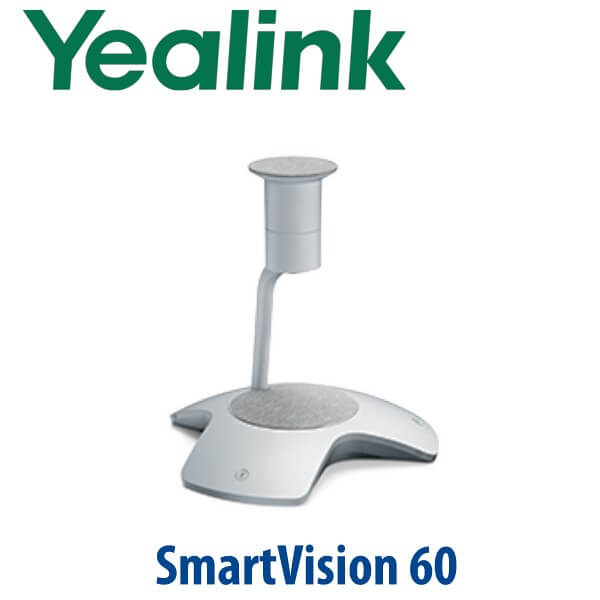
Yealink SmartVision 60 360° 10K Intelligent Camera for Microsoft Teams Rooms Dubai
Put Every Person in the Teams Room Into the Meeting
The Yealink SmartVision 60 is built for the modern Dubai boardroom where remote participants should not feel like second-class attendees. Instead of mounting a single front-of-room camera that shows the table from one angle, SmartVision 60 sits at the centre of the table and captures the full room with a 10K 360° panoramic camera. Microsoft Teams Rooms can then use intelligent framing, People Feed and participant identification to show in-room speakers more clearly to remote attendees. For DIFC boardrooms, Business Bay management rooms, DMCC project offices and hybrid meeting spaces across the UAE, this is the upgrade from “everyone looks tiny at the far end of the table” to a meeting experience where every participant is visible.
Platform Check — Teams Rooms First, Zoom Only After Verification
SmartVision 60 is a Microsoft Teams Rooms intelligent camera, not a SIP conference phone and not a standalone Zoom Room appliance. Microsoft lists the Yealink SmartVision 60 under certified Teams Rooms peripherals, verified on 16 July 2026. If the room is Teams-based, this is the correct product family. If the room is Zoom-based, ask David to verify the current Zoom-certified Yealink room kit before quoting — do not assume Zoom certification from the camera name alone.
| Your Meeting Platform | Right Yealink Choice | What You Need |
|---|---|---|
| Microsoft Teams Rooms | Yealink SmartVision 60 or MVC S60 room system | Teams Rooms licence, compatible room compute, touch console and display setup |
| Zoom Rooms | Verify certification status before ordering | Zoom Rooms licence and a Zoom-certified Yealink room kit if required |
| BYOD laptop meeting | Confirm the exact room wiring and USB mode before quote | USB-C connection, correct cable length and a tested laptop workflow |
| SIP audio conference call | Use a Yealink CP-series conference phone instead | SIP account from 3CX, Yeastar, Grandstream UCM or hosted PBX |
Power and Cabling Truth — This Is Not a PoE Desk Phone
SmartVision 60 is powered by an external Yealink 15V/2.4A power adapter and connects over USB Type-C 3.0. It is not powered like a Yealink SIP desk phone, and it should not be treated as a PoE endpoint. The deployment detail that matters most is cable length and room layout: centre-table placement gives the 360° camera its value, so Vector Digital Systems confirms USB distance, table cut-out, display location, MCore/PC position and power access before dispatch. For longer runs, ask David for the correct Yealink-certified USB 3.0 cable option.
Why the Centre-of-Table View Matters
A front camera works well when one person presents to a room. It works badly when six people discuss a project around a table. SmartVision 60 solves that by putting the camera and microphones in the middle of the conversation. The 360° horizontal field of view captures the full table, while the recommended 0.5m–2m coverage range keeps participants close enough for clean framing. The 6m pickup range covers small-to-medium rooms, and the built-in speaker keeps the device self-contained for many Teams Rooms layouts.
SmartVision 60 in the Yealink Room Camera Range
SmartVision 60 sits between compact intelligent room cameras and higher-end multi-camera or PTZ room designs. It is the clean choice when the room is built around a conference table and the goal is inclusive Microsoft Teams participation. Step down where the room is smaller or budget is tighter; step up where the boardroom needs PTZ, production-style camera control or a larger room design.
| Feature | SmartVision 40 | SmartVision 60 ★ | SmartVision 80 / Advanced MVC Room |
|---|---|---|---|
| Best room type | Small meeting room | Small-to-medium boardroom with centre table | Medium-to-large boardroom or advanced AV room |
| Camera style | Compact intelligent camera | 10K 360° centre-table panoramic camera | Advanced PTZ / larger-room camera design |
| Teams AI experience | Room-dependent | People Feed, Multi-Stream IntelliFrame, participant identification | Advanced framing and room automation options |
| Pickup / audio role | Small-room audio | 360° audio pickup, 6× MEMS mic array, built-in speaker | Often paired with external room audio |
| Deployment style | Simple room camera | Centre-table intelligent Teams Rooms camera | Designed AV layout with camera positioning |
| Price tier | Lower | Mid-to-premium | Premium / project AV |
| Choose if… | You need a smaller-room Yealink camera with lower budget | You want every in-room participant visible in a Teams boardroom | You need PTZ, larger-room coverage or advanced AV integration |
Where SmartVision 60 Works in Dubai
Executive Teams Rooms in DIFC and Downtown Dubai. Leadership rooms often have six to ten people around a table with remote directors joining from London, Riyadh or Singapore. SmartVision 60 gives the remote side a clearer view of individual speakers instead of one wide shot of the room.
Project rooms in DMCC, JLT and Business Bay. Hybrid teams need to see who is speaking during design reviews, finance calls and client approvals. The 10K 360° view and Teams AI framing help remote participants follow table discussion without asking, “Who said that?” every few minutes.
Training rooms and consulting suites. A centre-table camera is useful when the meeting is conversational rather than lecture-style. SmartVision 60 suits professional services, legal, real estate, healthcare management and system integrator demonstration rooms where multiple people speak from different seats.
Regional HQ meeting rooms. UAE offices that report to teams in Saudi Arabia, Oman, Qatar, Europe or India need consistent meeting quality. Vector Digital Systems can stage the Yealink room kit before dispatch, label cables, test the Teams Rooms workflow and hand over a cleaner installation package to your IT or AV team.
Full Technical Specifications
| Specification | Yealink SmartVision 60 |
|---|---|
| Product Type | 360° all-in-one intelligent audio and video device for Microsoft Teams Rooms |
| Certification | Microsoft Teams Rooms certified peripheral — verified 16 July 2026 |
| Camera | 10K panoramic camera |
| Field of View | 360° horizontal field of view, 60° vertical field of view |
| Recommended Coverage | 0.5m–2m recommended participant range from device position |
| Digital Zoom | Adaptive digital zoom |
| Meeting Microphones | 6× MEMS microphone array; 100Hz–10kHz frequency response; 56dB SNR |
| Speech Recognition Microphones | 6+1 intelligent speech recognition microphone array; 100Hz–8kHz frequency response; 66dB SNR |
| Sound Pickup | 360° audio pickup, up to 6m room pickup range |
| Speaker | Built-in speaker; 5W maximum power; upward-facing sound emission |
| Teams AI Features | Multi-Stream IntelliFrame, People Feed, participant identification, phonetic transcription, automatic translation, Cortana voice assistant |
| Privacy | Electric privacy cover plus physical camera mute button |
| Controls | 2× microphone mute/unmute buttons, 1× camera mute/unmute button, 1× reset button |
| Interface | 1× USB Type-C 3.0 interface |
| Power | External Yealink power adapter: AC 100–240V input, DC 15V/2.4A output |
| Operating Environment | 0–40°C operating temperature; 10–95% operating humidity |
| Weight | Net weight 3.246kg; gross weight 5.524kg |
| Carton Dimensions | 402mm × 390mm × 430mm |
Compatible Room Components and Accessories
| Item | Role in the Room | Ordering Note |
|---|---|---|
| Yealink MVC S60 | Complete Microsoft Teams Rooms bundle built around SmartVision 60 | Choose this when building a full new Teams Room, not just replacing the camera |
| MCore Pro / MCore room compute | Runs the Microsoft Teams Rooms system | Compatibility and licence readiness checked before quote |
| MTouch Plus / MTouch E2 | Touch console for joining meetings and controlling the room | Recommended for dedicated Teams Rooms deployments |
| RoomSensor | Occupancy and room environment sensing in supported MVC room kits | Useful for managed meeting room estates |
| Yealink-certified USB 3.0 cables | Stable connection where the camera is placed away from the compute unit | Confirm 3m, 15m or 30m requirement based on table and wall-routing layout |
Staging Before Dispatch — What Vector Digital Systems Checks
Vector Digital Systems stages Yealink room hardware before dispatch wherever the project scope allows: Teams Rooms hardware compatibility, MCore or room-PC readiness, MTouch pairing, USB cable length, display handoff, camera orientation, privacy cover operation, microphone mute buttons, Teams Room sign-in readiness, firmware check and a test meeting workflow. For Dubai installations, we also label cables, note table placement, confirm VAT and delivery in the quote, and brief your IT or AV installer before the room kit leaves our office.
Export from Dubai
Vector Digital Systems supplies Yealink SmartVision 60 and MVC room systems from Dubai to system integrators, AV contractors, hotel groups, corporate IT teams and government procurement departments across the region. Export buyers commonly route Yealink meeting room hardware to Oman, Saudi Arabia, Kuwait, Qatar, Bahrain, Jordan, Egypt, Kenya, Nigeria and Pakistan. Shipments are quoted FOB Dubai with commercial invoice, packing list and certificate of origin on request. Ask David for a same-day AED quote with VAT, delivery, cable options and export documentation clearly separated.
Get a same-day quote in AED for Yealink SmartVision 60
Tell David your platform, room size, table shape, display count, cable distance and whether you need SmartVision 60 alone or the complete MVC S60 Microsoft Teams Rooms bundle. We quote with VAT breakdown, delivery and staging notes included.
Frequently Asked Questions — Yealink SmartVision 60
Is the Yealink SmartVision 60 certified for Microsoft Teams Rooms?
Yes. The Yealink SmartVision 60 is listed by Microsoft as a certified Teams Rooms peripheral, verified on 16 July 2026. It is designed for Microsoft Teams Rooms deployments that need an intelligent centre-of-table 360° camera with People Feed, Multi-Stream IntelliFrame and participant identification.
Does the Yealink SmartVision 60 work with Zoom Rooms?
Do not assume Zoom certification for SmartVision 60. This page is written for Microsoft Teams Rooms. If your meeting room is Zoom-based, ask David to verify the current Zoom-certified Yealink room kit before quoting so the correct hardware is supplied.
What room size is the Yealink SmartVision 60 designed for?
SmartVision 60 is best for small-to-medium meeting rooms and boardrooms where participants sit around a table. Yealink lists a 0.5m–2m recommended participant coverage range and a 6m sound pickup range, so centre-table placement is important for best results.
What is the difference between SmartVision 60 and MVC S60?
SmartVision 60 is the 360° intelligent camera and audio device. MVC S60 is the complete Microsoft Teams Rooms system that includes SmartVision 60 with the Yealink room compute, touch console and room components needed for a full dedicated Teams Room.
Does the Yealink SmartVision 60 use PoE?
No. SmartVision 60 is not powered like a Yealink SIP desk phone. It uses an external Yealink power adapter with AC 100–240V input and DC 15V/2.4A output, and it connects to the room system through USB Type-C 3.0.
Can the SmartVision 60 identify who is speaking in a Teams meeting?
Yes, in a correctly configured Microsoft Teams Rooms environment, SmartVision 60 supports Teams AI features such as People Feed, Multi-Stream IntelliFrame, participant identification, phonetic transcription and automatic translation. Feature availability can depend on the Teams Rooms licence, tenant settings and Microsoft cloud support.
Where should the SmartVision 60 be installed in the room?
SmartVision 60 should be placed at the centre of the meeting table so the 360° camera and 360° microphone pickup can cover all seated participants. Before quoting, Vector Digital Systems checks table shape, cable route, display position, power access and USB distance.
Who is the authorised Yealink supplier in Dubai for SmartVision 60?
Vector Digital Systems LLC has supplied Yealink solutions in Dubai since 2009. David handles Yealink pre-sales, room hardware selection, project pricing, staging coordination and local warranty support for SmartVision 60 and MVC Teams Rooms projects.
Does Vector Digital Systems configure the SmartVision 60 before delivery?
Yes. For project orders, Vector Digital Systems checks Teams Rooms compatibility, MCore or room-PC readiness, MTouch pairing, USB cable length, camera orientation, mute controls, firmware status and test meeting workflow before dispatch wherever the project scope allows.
Does Vector Digital Systems export Yealink SmartVision 60 from Dubai?
Yes. Vector Digital Systems exports Yealink SmartVision 60 and MVC room systems from Dubai to integrators and enterprise buyers in Oman, Saudi Arabia, Kuwait, Qatar, Bahrain, Jordan, Egypt, Kenya, Nigeria and Pakistan. Shipments are quoted FOB Dubai with commercial invoice, packing list and certificate of origin on request.