Description
Yealink MVC S90 Microsoft Teams Rooms Multi-Camera Boardroom System Dubai
Yealink MVC S90 for Dubai Boardrooms That Need More Than One Camera
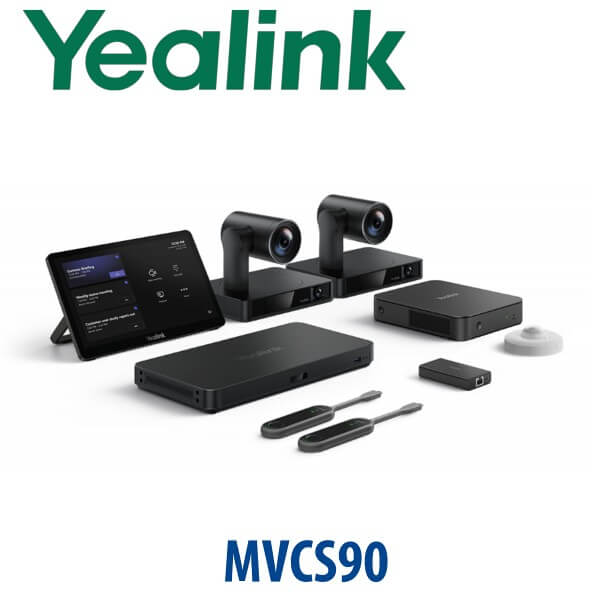
The Yealink MVC S90 is built for large Microsoft Teams Rooms where a single front camera cannot cover the whole table properly. In a Dubai boardroom, training room or executive meeting suite, remote participants need to see the active speaker, the table, the presenter and the room context without watching one PTZ camera mechanically pan across the space. MVC S90 solves that with a multi-camera Teams Rooms design: MCore 4 mini-PC, MTouch Plus touch console, AVHub audio/video processor, RoomSensor and dual UVC86 4K PTZ cameras as the core room system.
Vector Digital Systems LLC supplies, stages and deploys Yealink Teams Rooms systems in Dubai for corporate offices, banks, free zone companies, education groups and regional headquarters. We quote in AED with VAT breakdown, delivery, installation scope and room-specific audio/video accessories clearly listed — no fixed online price, because the final MVC S90 design depends on displays, microphones, speakers, cabling and installation conditions.
Platform Check — Teams Rooms, SIP or Zoom?
The MVC S90 is a Microsoft Teams Rooms on Windows system. It is not a SIP conference phone and it is not a Zoom Rooms kit. This matters before procurement: a Teams Rooms system requires a Microsoft 365 tenant and the right Teams Rooms licence, while SIP and Zoom rooms use different Yealink product lines. Microsoft certification for Yealink MVC S90-C5U was checked on 16 July 2026 before writing this page.
| Your Meeting Platform | Right Yealink Range | What You Need |
|---|---|---|
| Microsoft Teams Rooms | Yealink MVC S90-C5U — this page | Microsoft 365 tenant, Teams Rooms licence, room resource account and meeting-room display setup |
| SIP / regular phone conference | Yealink CP-series or SIP conference solution — ask David | SIP credentials from your PBX or hosted voice provider |
| Zoom Rooms | Zoom-certified Yealink room kit — verify certification status before order | Zoom Rooms licence and Zoom-certified room hardware |
Power, Cabling and Room-Readiness Truth
MVC S90 is a room system, not a single plug-in desk device. The final installation needs proper display connections, network access, power points, camera placement, microphone/speaker planning and Teams Rooms account preparation. Before dispatch or installation, Vector Digital Systems confirms the room layout, display count, network point location, table cable path, wall or table position for MTouch Plus, camera mounting height and whether the room needs ceiling microphones, soundbar audio or integration with an existing DSP.
This is where many Dubai meeting-room projects fail: the hardware is ordered correctly, but the room is not prepared. We stage the MCore 4, update firmware where required, connect and test the MTouch Plus, check camera switching, confirm RoomSensor pairing and guide your IT team on the Teams Rooms account before the system reaches the room.
Where MVC S90 Sits in the Yealink MVC Range
Choose MVC S90 when the room is too important or too large for a single-camera solution. MVC S80 is a strong choice for large rooms that can be covered with a SmartVision 80-based setup. MVC S90 steps up to the UVC86 multi-camera boardroom architecture with AVHub. MVC S98 is the higher-end SmartVision 80 plus AVHub tier for premium multi-camera and ProAV-style rooms. David will map the exact room size, seating shape and display plan before quoting.
| Feature | MVC S80 | MVC S90 ★ | MVC S98 |
|---|---|---|---|
| Room type | Large room | Large / extra-large boardroom | Premium extra-large / ProAV room |
| Camera architecture | SmartVision 80 | Dual UVC86 multi-camera | SmartVision 80 with AVHub |
| Compute | MCore 4 | MCore 4 | MCore 4 |
| Touch control | MTouch Plus | MTouch Plus | MTouch Plus |
| AV processor | Depends on kit | AVHub included | AVHub included |
| Best fit | Large rooms needing a simpler Teams Rooms build | Boardrooms, training rooms and long tables needing multi-camera coverage | Premium rooms needing the most advanced Yealink camera architecture |
| Price tier | High | Higher | Highest |
| Choose if… | You need a strong large-room Teams kit without a complex multi-camera boardroom design | You need dual UVC86 cameras, AVHub and intelligent speaker coverage for a serious boardroom | You want the top-tier Yealink ProAV-style Teams Rooms experience |
Dubai Use Cases for Yealink MVC S90
Executive boardrooms in DIFC and Downtown Dubai. A long boardroom table needs more than a basic video bar. MVC S90 gives remote directors and regional teams a clearer view of the active speaker while keeping the room professional for Microsoft Teams meetings, investor calls and board sessions.
Training rooms in Business Bay, Dubai Internet City and DMCC. The UVC86 multi-camera architecture is useful when presenters move between a screen, a lectern and seated participants. AVHub gives the room designer more flexibility than a single-camera USB setup.
Government, education and healthcare meeting spaces. Large rooms often require ceiling microphones, distributed speakers and clean cable management. MVC S90 can be designed with Yealink audio or integrated with selected third-party audio systems where the room already has installed AV equipment.
Regional HQ rooms with BYOD pressure. Not every visitor wants to join from the room’s Teams account. With the BYOD extender, users can connect a laptop and use the room’s professional cameras and audio devices for their own meeting when the room policy allows it.
Full Technical Specifications
| Specification | Yealink MVC S90 |
|---|---|
| Product Type | Microsoft Teams Rooms on Windows system for large and extra-large rooms |
| Microsoft Certification | MVC S90-C5U listed on Microsoft Teams Rooms certified systems list — verified 16 July 2026 |
| Core Components | MCore 4 mini-PC, MTouch Plus touch panel, RoomSensor, AVHub and UVC86 camera system |
| Camera | Dual UVC86 4K PTZ cameras with intelligent tracking, auto-framing and speaker tracking |
| UVC86 Zoom | 20.4× HD zoom: 12× optical and 1.7× digital |
| UVC86 Field of View | Telephoto lens: 90° DFOV / 81° HFOV / 50° VFOV. Panoramic lens: 120° DFOV / 110° HFOV / 78° VFOV |
| Camera Expansion | AVHub supports up to 9 connected cameras for advanced multi-camera room layouts |
| Mini-PC | MCore 4 with Intel Core Ultra 5, built-in NPU, 16GB DDR5 memory and 256GB SSD |
| Video Outputs | 3× HDMI video output with CEC support |
| Content Input | HDMI-in for 4K content sharing; MTouch Plus supports HDMI and USB-C video input |
| Touch Console | MTouch Plus 11.6-inch IPS touch display, 1920×1080 resolution, 30°–70° desktop angle |
| RoomSensor | Occupancy, temperature, humidity and light detection; Bluetooth BLE 5.2; up to 30 m reach |
| BYOD | MVC-BYOD-Extender enables laptop users to access the room’s professional audio/video devices |
| Wireless Presentation | WPP30 wireless presentation support where included in the selected bundle |
| Best Rooms | Boardrooms, training rooms, U-shaped rooms, classrooms and executive conference rooms |
Accessories and Room Design Options
| Accessory / Option | Use | Dubai Deployment Note |
|---|---|---|
| Additional UVC86 cameras | Expand multi-camera coverage through AVHub | Useful for long board tables, presenter zones and training rooms |
| Yealink ceiling microphones | Cleaner audio pickup for large rooms | Recommended when table microphones create cable clutter |
| Yealink loudspeakers / soundbar audio | Room audio output and voice clarity | Chosen after room size, ceiling height and seating map are checked |
| Third-party DSP integration | Connect with existing installed AV systems | Best for boardrooms that already have professional microphones and speakers |
| Additional MTouch Plus panels | Flexible table or wall control points | Useful for long rooms with more than one presenter position |
Staging Before Dispatch and Installation
Vector Digital Systems stages the Yealink MVC S90 before delivery wherever project scope allows. The MCore 4 is checked, Teams Rooms readiness is reviewed, MTouch Plus is paired, camera operation is tested, RoomSensor pairing is confirmed and the AVHub/camera layout is documented for the installation team. We coordinate with your Microsoft 365 administrator for the room resource account, Teams Rooms licence, sign-in method and network access requirements.
For Dubai installations, we also review display placement, cable routing, table box position, camera mounting height, microphone coverage and speaker output. The objective is simple: when the boardroom is handed over, your team can walk in, tap Join on the MTouch Plus and run the meeting without asking IT to rebuild the room.
Export from Dubai
Vector Digital Systems exports Yealink MVC room systems from Dubai to system integrators, AV contractors, telecom operators and enterprise procurement teams across the region. Common export destinations include Oman, Saudi Arabia, Kuwait, Qatar and Bahrain in the Gulf; Jordan and Egypt in the wider Arab market; Kenya and Tanzania in East Africa; and Pakistan and Sri Lanka for South Asian projects. Shipments are quoted FOB Dubai with commercial invoice, packing list and certificate of origin on request.
For export buyers, we recommend confirming the exact room bill of materials before purchase: display count, camera count, microphone type, audio output, wall brackets, cable length, Teams Rooms licensing and local installation responsibility. David can quote the MVC S90 core kit plus the required room accessories in one AED project quotation.
Get a same-day Yealink MVC S90 quote in AED
Send David your room size, seating layout, display count, Microsoft Teams Rooms licence status and whether you need microphones, speakers, installation or export documentation. VAT breakdown and delivery charges are included in the quote.
Frequently Asked Questions — Yealink MVC S90
Is the Yealink MVC S90 Microsoft Teams certified?
Yes. The Yealink MVC S90-C5U is listed on Microsoft’s Teams Rooms on Windows certified systems list. Vector Digital Systems verified the certification status on 16 July 2026 before writing this page. Certification status can change, so David re-checks the Microsoft list before quoting a live project.
What room size is the Yealink MVC S90 designed for?
The MVC S90 is designed for large and extra-large meeting rooms, including boardrooms, training rooms, U-shaped rooms and executive conference rooms. It is the right choice when a single front camera cannot properly cover the table, presenter and active speaker.
What is included in the Yealink MVC S90 system?
The current MVC S90-C5U system includes MCore 4 mini-PC, MTouch Plus touch console, RoomSensor, AVHub and UVC86 camera system. Bundle contents can vary by SKU and project configuration, so Vector Digital Systems confirms the bill of materials before issuing the final Dubai quote.
How many cameras can the MVC S90 support?
With AVHub, the Yealink MVC S90 architecture can support up to 9 connected cameras. The standard boardroom configuration uses dual UVC86 cameras, and additional cameras can be specified for complex training rooms, long tables or presenter zones.
Can the Yealink MVC S90 be used for Zoom Rooms?
The MVC S90 is a Microsoft Teams Rooms on Windows system. If your company standardises on Zoom Rooms, ask David for the current Zoom-certified Yealink room kit and verify certification status before ordering. Do not buy a Teams Rooms system for a Zoom-only room unless your IT team has approved the platform plan.
Can visitors connect a laptop and use the MVC S90 room cameras and audio?
Yes, when the MVC-BYOD-Extender is included and enabled in the room design. A laptop user can connect and use the room’s professional cameras and audio devices for their own meeting, subject to your IT and room policy.
MVC S80 vs MVC S90 — which one should I buy?
Choose MVC S80 for a simpler large-room Teams Rooms setup. Choose MVC S90 when the room needs dual UVC86 cameras, AVHub processing and better coverage for long boardroom tables, training rooms or multi-speaker layouts. For premium ProAV-style rooms, David may recommend MVC S98 after reviewing the room.
Who is the authorised Yealink supplier in Dubai?
Vector Digital Systems LLC has supplied Yealink solutions in Dubai since 2009. David handles Yealink pre-sales, room-system specification, project pricing, staging coordination and local warranty support for Dubai and export customers.
Does Vector Digital Systems install and stage the Yealink MVC S90?
Yes. Vector Digital Systems can stage the MVC S90, coordinate Teams Rooms account readiness, test the MCore 4, MTouch Plus, RoomSensor, cameras and AVHub, and plan the room installation. Installation scope is quoted after reviewing the room layout, displays, microphones, speakers, cabling and mounting requirements.
Does Vector Digital Systems export Yealink MVC S90 systems from Dubai?
Yes. Vector Digital Systems exports Yealink MVC room systems from Dubai to integrators and enterprise buyers in Oman, Saudi Arabia, Kuwait, Qatar, Bahrain, Jordan, Egypt, Kenya, Tanzania, Pakistan and Sri Lanka. Export quotes can include FOB Dubai terms, commercial invoice, packing list and certificate of origin on request.