
Description
Yealink MVC900 II Microsoft Teams Room System Extra-Large Teams Room Kit Dubai
Yealink MVC900 II Microsoft Teams Room System for Extra-Large Rooms
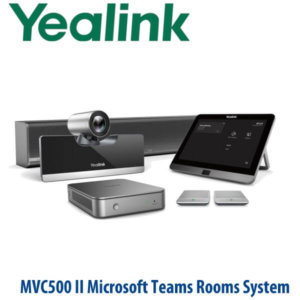
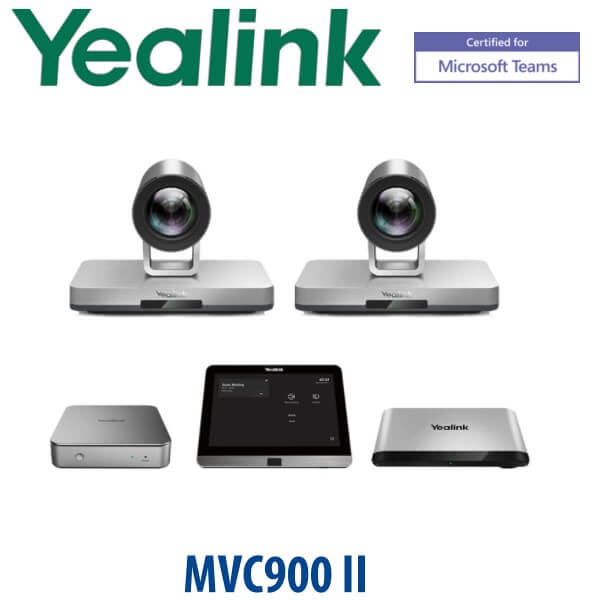
The Yealink MVC900 II Microsoft Teams Room System is built for extra-large meeting rooms, executive boardrooms, training halls and enterprise collaboration spaces where a laptop webcam or small-room video bar is not enough. It combines the Yealink MCore mini-PC, MTouch II touch console, Camera-Hub and dual UVC80 USB PTZ cameras into a dedicated Microsoft Teams Rooms setup for Dubai offices that need professional room video, touch-panel control and a proper front-of-room experience.
For organisations in DIFC, DMCC, Business Bay, Dubai Internet City and enterprise headquarters across the UAE, the MVC900 II suits rooms where remote participants must clearly see the board table, presenter area and active speakers. Vector Digital Systems LLC supplies and stages Yealink Teams Rooms systems in Dubai, with pre-sales room checks, project pricing, VAT breakdown, delivery planning and local warranty support handled by the Yealink team since 2009.
Platform Check — Microsoft Teams Room, Not a SIP Conference Phone
The MVC900 II is a Microsoft Teams Room System, not a SIP conference phone and not a standard Zoom Room kit. This is the most important buying distinction before ordering. A Teams Room system needs a Microsoft 365 tenant, a Teams Rooms account, the correct Teams Rooms licence, network access and display planning. If your requirement is only SIP audio conferencing, choose a Yealink CP-series conference phone instead. If your requirement is Zoom Rooms, ask David to verify the correct Zoom-certified Yealink system before quoting.
| Your Platform | Right Yealink Device | What You Need |
|---|---|---|
| Microsoft Teams Rooms | Yealink MVC900 II — this page | Microsoft Teams Rooms account, Teams Rooms licence, Microsoft 365 tenant and room network access |
| SIP PBX audio conferencing | Yealink CP-series conference phone — ask David for the correct model | SIP credentials from 3CX, Yeastar, Grandstream UCM, hosted PBX or licensed operator platform |
| Zoom Rooms | Zoom-certified Yealink room system — verify before quoting | Zoom Rooms licence, Zoom admin setup and compatible certified hardware |
Teams certification note: Yealink MVC900 II certification status should be checked against Microsoft’s certified Teams Rooms hardware list before every project quote. This page is written for the MVC900 II model as requested, with certification verification treated as a mandatory pre-sales step for Dubai and export buyers.
Power, Cabling and Room Planning — No Surprises on Installation Day
Unlike a desk phone or simple USB camera, the MVC900 II is a room system. The MCore mini-PC, MTouch II, Camera-Hub, dual UVC80 cameras, displays, network points and table cabling all need to be planned together. Before dispatch, Vector Digital Systems checks the room layout, display count, camera positions, touch-console placement, LAN availability, HDMI routing and power access so the installation does not stall because a cable path, wall point or display input was missed.
For extra-large rooms, this planning matters more than the box contents. A boardroom with a long table, a training room with a presenter zone, or a divisible meeting room may need different camera angles, different mounting positions and different cable routes. Tell David the room size, table shape, display plan and whether the room is new-build, retrofit or MVC900 II replacement stock before requesting a quote.
MVC900 II Range Position and Lifecycle Context
The Yealink MVC900 II sits in the extra-large Microsoft Teams Rooms category. Its role is to cover large boardrooms and training spaces using dual UVC80 PTZ cameras rather than a single small-room camera. The kit is suitable where the room needs dedicated Teams Room control, professional camera coverage and a permanent meeting-room appliance instead of a user’s laptop.
Because MVC900 II is a lifecycle-sensitive model, Vector Digital Systems treats it as a project-availability product: confirm stock, warranty position and customer requirement before quoting. For customers standardising on the exact MVC900 II model, we can support like-for-like room requirements where available. For new enterprise refresh projects, David can also advise whether the newer Yealink MVC S-series room systems are a better fit.
MVC900 II in the Yealink Meeting Room Range
The easiest way to choose the correct Yealink room system is by room size and platform. MVC900 II is the extra-large Microsoft Teams Rooms option from its generation. Smaller rooms need fewer cameras and less complex AV planning; larger or newer Pro-AV projects may need the current MVC S-series architecture. The comparison below keeps the buyer on the correct path without forcing them to understand every Yealink room SKU before calling.
| Feature | MVC840 | MVC900 II ★ | MVC S90-C5U |
|---|---|---|---|
| Room category | Large Teams Room | Extra-large Teams Room | Current large / extra-large Teams Room |
| Main use case | Boardroom or large meeting room | Executive boardroom, training hall, extra-large room | New-generation large room or upgrade project |
| Platform | Microsoft Teams Rooms | Microsoft Teams Rooms | Microsoft Teams Rooms for Windows |
| Core controller | MCore + MTouch generation | MCore mini-PC + MTouch II | MCore 4 + MTouch Plus |
| Camera setup | Large-room camera setup | Dual UVC80 USB PTZ cameras | Dual UVC86 4K PTZ cameras |
| Camera hub / AV routing | Room dependent | Camera-Hub included | AVHub for flexible multi-camera design |
| Availability position | Confirm before quoting | Project availability / lifecycle-sensitive | Newer migration option |
| Price tier | High | Higher — extra-large room kit | Higher / current-generation project tier |
| Choose if… | You need a large Teams Room and do not require the MVC900 II dual-camera extra-large setup | You specifically need MVC900 II for an extra-large Teams Room, matching deployment or project replacement | You are planning a new room refresh and want the newer Yealink Teams Rooms architecture |
Where the Yealink MVC900 II Works in Dubai
Extra-large executive boardrooms. The MVC900 II is built for rooms where a single camera cannot frame the full table properly. In DIFC, Business Bay, DMCC and Sheikh Zayed Road headquarters, it gives directors, remote teams and regional stakeholders a dedicated Microsoft Teams Rooms experience instead of relying on a laptop at the end of the table.
Training rooms and presentation halls. The dual UVC80 PTZ camera setup helps cover longer rooms where one camera angle cannot capture both the presenter and the audience. This makes the MVC900 II suitable for training centres, internal academies, enterprise briefing rooms and hybrid learning spaces.
Replacement and matching-room projects. Some enterprise customers need the same MVC900 II model to match an existing room standard, spare-parts plan or approved bill of materials. Vector Digital Systems treats MVC900 II as a project-availability model: David confirms stock, warranty position and whether a newer MVC S-series system is a better fit before quoting.
Hotel and conference facilities. Large meeting rooms in Dubai hotels, serviced offices and event spaces often need stable Teams Rooms hardware for visiting corporate clients. The MVC900 II gives the room a fixed Teams meeting identity, touch-panel control and professional camera coverage instead of ad-hoc USB equipment.
Full Technical Specifications
| Specification | Yealink MVC900 II Microsoft Teams Room System |
|---|---|
| Platform | Microsoft Teams Rooms for Windows |
| Room category | Extra-large meeting rooms, boardrooms, training halls and enterprise conference spaces |
| Main components | MCore mini-PC, MTouch II touch console, Camera-Hub and 2× UVC80 USB PTZ cameras |
| Meeting control | MTouch II touch panel for one-touch join, call control, camera control and content sharing |
| Room PC | Yealink MCore mini-PC for Microsoft Teams Rooms operation |
| Camera setup | 2× Yealink UVC80 USB PTZ cameras for extra-large room coverage |
| Camera zoom | 12x optical zoom for boardroom framing and presenter close-up views |
| Camera control | PTZ control for pan, tilt and zoom positioning across large room layouts |
| Camera-Hub | Included to support the MVC900 II dual-camera room architecture |
| Content sharing | Wired content sharing through the Teams Rooms system and MTouch II workflow |
| Displays | Designed for front-of-room display integration; final display count and cabling confirmed during project planning |
| Network requirement | LAN access for the Microsoft Teams Rooms account and room PC |
| Microsoft requirement | Microsoft 365 tenant, Teams Rooms account and correct Teams Rooms licence |
| Certification status | Teams Rooms hardware status must be verified against Microsoft’s certified devices list before quotation |
| Lifecycle position | Project-availability / lifecycle-sensitive model; confirm availability and newer migration option before quoting |
Compatible Room Components and Accessories
| Component | Purpose | Project Note |
|---|---|---|
| UVC80 PTZ cameras | Dual-camera coverage for extra-large rooms | Camera placement must be planned around table length, presenter position and display wall |
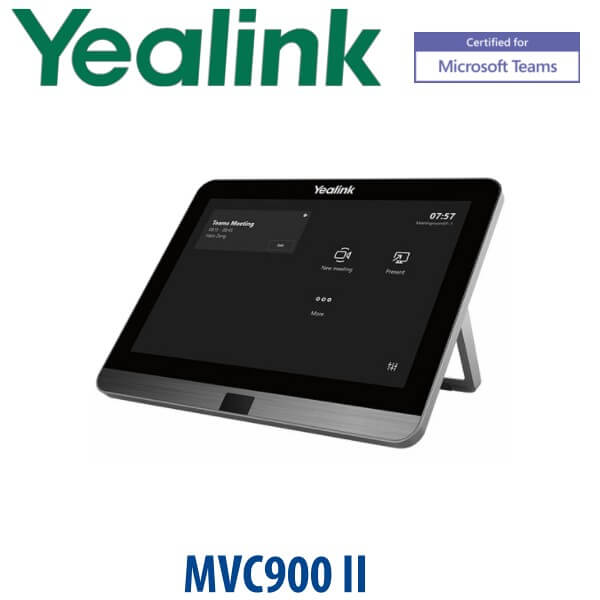
| MTouch II touch console | Room control, meeting join, content sharing and call control | Usually placed on the meeting table with cable access planned before installation |
| MCore mini-PC | Runs the Microsoft Teams Rooms environment | Mounting, power, LAN and display cabling must be confirmed during room survey |
| Camera-Hub | Supports the MVC900 II multi-camera room setup | Important for the dual-camera architecture that separates MVC900 II from smaller room kits |
| Displays and room cabling | Front-of-room video output and meeting display experience | Display size, quantity, HDMI routes and wall power should be finalised before order approval |
Staging Before Dispatch — What Vector Digital Systems Checks
Vector Digital Systems stages Yealink MVC900 II systems before Dubai delivery where project access allows. The pre-dispatch checklist can include MCore startup check, MTouch II connection check, UVC80 camera detection, Camera-Hub connection review, Teams Rooms readiness check, content-sharing workflow check, camera positioning notes and handover guidance for the installer or customer IT team.
For Microsoft Teams Rooms projects, we also ask the customer to confirm the Teams Rooms account, licence assignment, Microsoft 365 tenant readiness, LAN access, display plan and installation date. This prevents the most common project delay: the room hardware arrives, but the room account, licence, cable path or display input is not ready.
Export from Dubai
Vector Digital Systems exports Yealink Microsoft Teams Rooms systems from Dubai to enterprise buyers, AV installers, system integrators, hotel groups and government IT teams across the region. Common export destinations include Oman, Saudi Arabia, Kuwait, Bahrain and Qatar in the GCC; Jordan and Egypt for wider Middle East projects; Kenya and Tanzania for East Africa; and Pakistan and Sri Lanka for South Asian deployments.
Export quotations are prepared FOB Dubai with commercial invoice, packing list and certificate of origin on request. For lifecycle-sensitive models such as MVC900 II, David confirms model availability, warranty position and whether the customer needs the exact MVC900 II kit or should migrate to a newer Yealink MVC S-series room system.
Get a same-day quote in AED for Yealink MVC900 II
Tell David your room size, table layout, display count, Teams Rooms licence status, installation location and whether you need the exact MVC900 II model or a newer migration option. VAT breakdown and Dubai delivery charges are included in the quote.
Frequently Asked Questions — Yealink MVC900 II
Is the Yealink MVC900 II still available in Dubai?
The MVC900 II is treated as a project-availability and lifecycle-sensitive model. Vector Digital Systems can check current stock, warranty position and whether the exact MVC900 II kit is available for your project. For new room refreshes, David can also advise whether a newer Yealink MVC S-series system is the better option.
Is the Yealink MVC900 II a Microsoft Teams Room System?
Yes — the Yealink MVC900 II is a Microsoft Teams Room System for extra-large rooms. It is designed for dedicated Teams Rooms deployments with MCore mini-PC, MTouch II touch console, Camera-Hub and dual UVC80 PTZ cameras. Certification status should be checked against Microsoft’s certified device list before every project quote.
What room size is the Yealink MVC900 II designed for?
The MVC900 II is designed for extra-large meeting rooms, executive boardrooms, training halls and enterprise collaboration spaces. It is the correct class of product when one small-room camera cannot capture the full table, presenter area and meeting participants clearly.
What is included in the Yealink MVC900 II kit?
The MVC900 II kit includes the Yealink MCore mini-PC, MTouch II touch console, Camera-Hub and two UVC80 USB PTZ cameras. Room displays, mounting, cabling and any installation services should be confirmed separately during the quotation stage.
MVC900 II vs MVC S90-C5U — which one should I buy?
Choose MVC900 II if you specifically need that model for a matching-room deployment, approved bill of materials or replacement project. Choose MVC S90-C5U if you are planning a new extra-large Teams Room and want the newer Yealink room architecture with MCore 4, MTouch Plus, AVHub and dual UVC86 cameras.
Does the Yealink MVC900 II need a Teams Rooms licence?
Yes — the MVC900 II requires the correct Microsoft Teams Rooms licence, a room account and Microsoft 365 tenant readiness. Vector Digital Systems asks for licence and account confirmation before dispatch or installation so the room can be activated without delays.
Can the Yealink MVC900 II be used as a SIP conference phone?
No — the MVC900 II is a Microsoft Teams Rooms system, not a SIP conference phone. If you need a device for 3CX, Yeastar, Grandstream UCM or another SIP PBX, ask David for a Yealink CP-series conference phone instead.
Does Vector Digital Systems configure the MVC900 II before delivery?
Yes — where project access allows, Vector Digital Systems checks the MCore, MTouch II, UVC80 cameras, Camera-Hub, Teams Rooms readiness, content-sharing workflow and basic handover notes before Dubai delivery. We also confirm room account, licence, display and network readiness with the customer.
Who is the Yealink authorised supplier in Dubai?
Vector Digital Systems LLC has supplied Yealink and VoIP solutions in Dubai since 2009. David handles Yealink pre-sales, Teams Rooms specification, project pricing, staging and local warranty support for Dubai and export customers.
Does Vector Digital Systems export Yealink MVC systems from Dubai?
Yes — Vector Digital Systems exports Yealink MVC systems from Dubai to AV installers, system integrators and enterprise buyers in Oman, Saudi Arabia, Kuwait, Bahrain, Qatar, Jordan, Egypt, Kenya, Tanzania, Pakistan and Sri Lanka. Export shipments are quoted FOB Dubai with commercial invoice, packing list and certificate of origin on request.