Description
Yealink SmartVision 40 AI All-in-One Camera for Microsoft Teams Rooms Dubai
Yealink SmartVision 40 for Small-to-Medium Microsoft Teams Rooms in Dubai
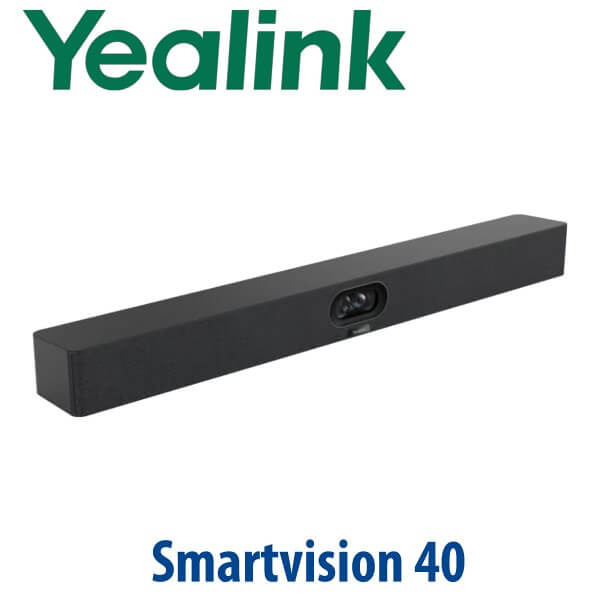
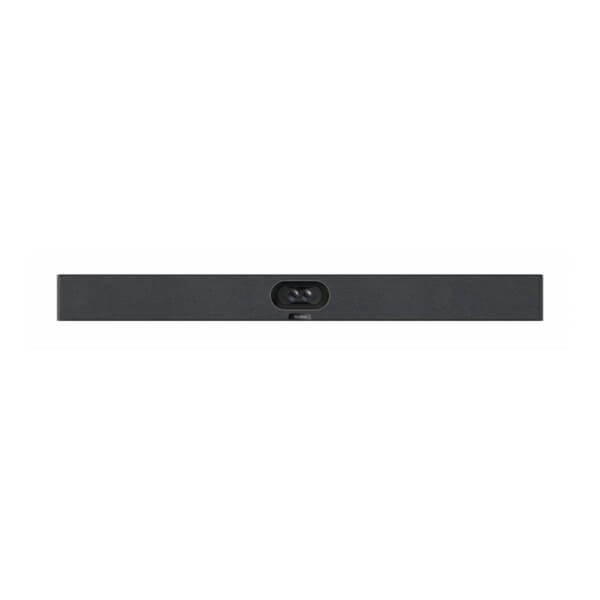
The Yealink SmartVision 40 is built for the Dubai meeting room that has outgrown a laptop webcam but does not need a complex AV rack. It combines dual 48MP cameras, AI framing, speaker tracking, an 8 MEMS microphone array, and 2×10W stereo speakers in one front-of-room device. For a small-to-medium Microsoft Teams Room in Business Bay, DIFC, DMCC, JLT, Dubai Internet City, or a branch office boardroom, SmartVision 40 gives the room a cleaner table, better framing, and a more consistent meeting experience.
Vector Digital Systems LLC supplies Yealink collaboration devices in Dubai with pre-sales room sizing, firmware check, Teams Rooms readiness advice, staging, VAT breakdown, and delivery included in the quote. For meeting room projects, contact David, our Yealink specialist in Dubai, before ordering so the camera, compute, controller, display, cabling, and licence plan match the room.
Platform Check — Teams Rooms, Zoom Rooms, or BYOD?
SmartVision 40 is often requested as “a Yealink Teams camera”, but the exact deployment matters. The device can be used as a certified Microsoft Teams Rooms peripheral, and it also appears in the certified Yealink MVC S40-C5U Teams Rooms system. For Zoom Rooms, do not assume certification from the camera name alone — David will verify the latest Zoom certification status before quoting. For simple laptop-based BYOD meetings, the room design may be different from a fixed Teams Rooms installation.
| Your Platform | Right Yealink Route | What You Need |
|---|---|---|
| Microsoft Teams Rooms | SmartVision 40 as a Teams-certified peripheral, or the Yealink MVC S40 room system | Teams Rooms compute, MTouch controller, Microsoft Teams Rooms licence, display, network, and room cabling |
| Zoom Rooms | Verify certification status before quoting | Zoom Rooms licence, compatible room computer or appliance, display, and confirmed supported hardware list |
| BYOD laptop meetings | Ask David whether SmartVision 40 or a Yealink UVC-series bar is the better fit | USB connectivity, room display, cable path, and a simple user handover process |
Power and Cabling Truth — Plan the Room Before Dispatch
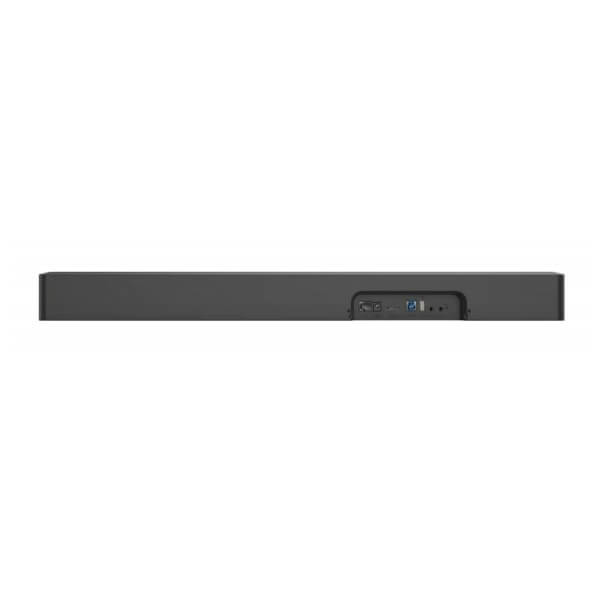
SmartVision 40 is not a desk phone and is not powered by PoE like a Yealink SIP handset. Meeting room cameras need planned power, USB/network cabling, display routing, and controller placement. For a Teams Rooms installation, the camera is only one part of the room: the compute, controller, display, Microsoft Teams Rooms licence, network point, and cable run all need to be confirmed before installation day.
Vector Digital Systems checks the room plan before dispatch: camera position below or above the display, table distance, microphone coverage, display inputs, network availability, and whether expansion microphones are needed. That planning step is what prevents the common Dubai meeting-room problem: hardware arrives, but the cable path, controller position, or licence is missing.
Where SmartVision 40 Sits in the Yealink Video Range
SmartVision 40 is the compact AI front-of-room option for small-to-medium rooms. It is a step up from simpler USB video bars because it uses dual 48MP lenses and intelligent framing features rather than a single basic camera view. For larger or more complex rooms, David may recommend a Yealink MVC S-series bundle, SmartVision 60, SmartVision 80, ceiling audio, or a full AVHub design depending on room size and table shape.
Sibling Comparison — UVC40 E2 vs SmartVision 40 vs SmartVision 60
| Feature | Yealink UVC40 E2 | SmartVision 40 ★ | SmartVision 60 |
|---|---|---|---|
| Best room fit | Small and huddle rooms | Small-to-medium Teams Rooms | Medium rooms needing centre-table intelligence |
| Camera system | Single 4K camera class | Dual 48MP lenses | 360° intelligent camera design |
| Field of view | Wide room view | 120° diagonal field of view | Centre-of-table participant capture |
| AI features | Auto framing and speaker tracking class | IntelliFocus, Video Fence, Auto Framing, Speaker Tracking | Advanced multi-person intelligent view |
| Built-in microphones | 8 MEMS microphone array class | 8 MEMS microphone array | Intelligent room audio capture design |
| Speakers | Built-in speaker class | 2×10W stereo speakers | Room-system audio design varies by bundle |
| Expansion microphones | Model-dependent | Supports up to 2 expansion microphones | Project-dependent |
| Platform fit | BYOD and small room projects | Microsoft Teams Rooms certified peripheral | Teams Rooms intelligent room projects |
| Price tier | Entry video bar tier | Mid AI Teams room tier | Higher intelligent room tier |
| Choose if… | You need a simpler USB video bar for a huddle room | You want a clean AI front-of-room camera for a small-to-medium Microsoft Teams Room | You need a more advanced intelligent room design with centre-table capture |
Where SmartVision 40 Works in Dubai
Small-to-medium Teams Rooms in free zone offices. DIFC, DMCC, Dubai Internet City, Media City, and Business Bay offices often need a professional Teams Room without turning a six-to-ten-person meeting space into an AV construction project. SmartVision 40 keeps the room clean: one intelligent camera bar at the front, AI framing for the table, and built-in audio for everyday meetings.
Boardrooms upgrading from laptop calls. Many UAE SMEs still run boardroom meetings from a laptop placed at the end of the table. That creates poor framing, weak audio, and cable confusion. SmartVision 40 moves the meeting experience to the room itself: the display becomes the meeting focal point, the camera frames participants, and the microphone array captures the table more naturally.
Hybrid work rooms after return-to-office. Teams meetings now include Dubai staff, Abu Dhabi management, Saudi regional teams, and export partners in the same call. SmartVision 40 helps the room feel more natural by tracking speakers and keeping participants visible instead of showing one static wide shot.
Client-facing rooms for consultants, law firms, and finance teams. A clean room setup matters when the meeting is with a client, investor, auditor, or regional board. SmartVision 40 gives the room a professional Microsoft Teams Rooms experience without overbuilding the space.
Full Technical Specifications
| Specification | Yealink SmartVision 40 |
|---|---|
| Product Type | AI all-in-one intelligent conference camera for small-to-medium rooms |
| Primary Platform | Microsoft Teams Rooms peripheral; also used in Yealink MVC S40 room-system deployments |
| Camera | Dual 48MP camera system |
| Field of View | 120° diagonal field of view |
| Digital Zoom | 6× digital zoom |
| AI Video Features | IntelliFocus, Video Fence, Auto Framing, Speaker Tracking |
| Microphone Array | Built-in 8 MEMS microphone array |
| Voice Pickup Range | Up to 6 metres voice pickup range; 4 metres quality voice pickup range |
| Speakers | 2×10W stereo speakers |
| Expansion Microphones | Supports up to 2 additional expansion microphones |
| Noise Handling | Intelligent noise reduction for meeting-room audio clarity |
| Room Size | Small-to-medium meeting rooms; final sizing depends on table length, seating layout, ceiling height, glass walls, and microphone expansion needs |
| Certification Status | Microsoft Teams certified peripheral; Zoom certification status to be verified before Zoom Rooms quotation |
Compatible Accessories and Room Components
| Component | What to Confirm | Why It Matters |
|---|---|---|
| Expansion microphones | Up to 2 supported; confirm exact microphone model at quote stage | Needed when the table is longer or participants sit beyond the best built-in pickup zone |
| Teams Rooms compute | MCore/MVC bundle or compatible room computer | SmartVision 40 is the camera/audio bar; the Teams Rooms system still needs compute and controller |
| Touch controller | MTouch controller or approved Teams Rooms controller | Users need one-touch join, meeting controls, mute, volume, and room calendar access |
| Display and cabling | Single or dual display, HDMI path, USB path, cable length, wall routing | Most meeting-room failures are cabling and display planning problems, not camera problems |
| Microsoft Teams Rooms licence | Confirm licence availability with your Microsoft 365 administrator | Certified hardware still needs the correct room account and Teams Rooms licence to operate properly |
Staging Before Dispatch — What Vector Digital Systems Checks
Before dispatch, Vector Digital Systems checks the SmartVision 40 project against your room plan: platform choice, Teams Rooms licence readiness, firmware level, camera location, display connection, cable path, microphone coverage, expansion microphone requirement, and basic user handover. For Yealink MVC S40-style deployments, we coordinate the camera, compute, controller, display path, and room account so the system is ready for installation instead of arriving as disconnected boxes.
For Dubai customers, we quote in AED with VAT breakdown and delivery charges included. For larger office refreshes, multi-room project pricing is available — share room photos, table dimensions, platform, display count, and whether the room is for Teams Rooms, Zoom Rooms, or BYOD laptop calls.
Export from Dubai
Vector Digital Systems exports Yealink meeting-room hardware from Dubai to system integrators, corporate IT teams, hotel groups, telecom installers, and regional procurement teams. SmartVision 40 and Yealink MVC room systems can be quoted for projects in Oman, Saudi Arabia, Kuwait, Bahrain, Qatar, Jordan, Egypt, Kenya, Nigeria, Pakistan, Sri Lanka, and Bangladesh. Export shipments move FOB Dubai with commercial invoice, packing list, and certificate of origin on request. For export buyers, David can help confirm region-specific power, platform, documentation, and packing requirements before shipment.
Get a same-day quote in AED — Yealink SmartVision 40 Dubai
Tell David your room size, table length, platform, display count, and whether you need Teams Rooms compute, controller, installation, or expansion microphones. VAT breakdown and delivery charges are included in the quote.
Frequently Asked Questions — Yealink SmartVision 40
Is the Yealink SmartVision 40 Microsoft Teams certified?
Yes. SmartVision 40 is listed by Microsoft as a certified Teams Rooms peripheral, and Yealink MVC S40-C5U is listed as a certified Teams Rooms system using SmartVision 40. Vector Digital Systems verifies the certification status before quoting, because Microsoft certification lists and firmware requirements can change.
Does the Yealink SmartVision 40 work with Zoom Rooms?
For Zoom Rooms, certification status should be verified before ordering. SmartVision 40 is primarily positioned for Microsoft Teams Rooms, and Vector Digital Systems will check Zoom’s current certified hardware list before making a Zoom Rooms claim in your quote.
Is SmartVision 40 a complete Teams Room system by itself?
No. SmartVision 40 is the intelligent camera, microphone, and speaker bar. A complete Microsoft Teams Room normally also needs a Teams Rooms compute unit, touch controller, room account, Teams Rooms licence, display, cabling, and network. David can quote the SmartVision 40 alone or the correct Yealink MVC room-system bundle.
What room size is the Yealink SmartVision 40 designed for?
SmartVision 40 is designed for small-to-medium meeting rooms. Its built-in microphone array supports up to 6 metres voice pickup, with 4 metres as the quality pickup range. For longer tables, glass rooms, or noisy open office areas, David may recommend expansion microphones or a different Yealink room design.
What camera features does SmartVision 40 offer?
SmartVision 40 uses dual 48MP lenses with a 120° diagonal field of view and 6× digital zoom. It includes IntelliFocus, Video Fence, Auto Framing, and Speaker Tracking so meeting participants are framed more naturally than with a static laptop camera.
SmartVision 40 vs UVC40 E2 — which one should I buy?
Choose UVC40 E2 for a simpler small-room or BYOD-style USB video bar requirement. Choose SmartVision 40 when the room is being built around Microsoft Teams Rooms and you want a certified AI front-of-room camera with dual 48MP lenses, stronger intelligent framing, built-in 8 MEMS microphones, and 2×10W stereo speakers.
Does SmartVision 40 need PoE?
SmartVision 40 is a meeting-room camera system, not a PoE SIP desk phone. The room needs planned power, USB or system cabling, display routing, and network connectivity for the Teams Rooms setup. Vector Digital Systems confirms the cable path and power plan before dispatch so the installation team is not missing anything on site.
Does Vector Digital Systems configure SmartVision 40 before delivery?
Yes. Vector Digital Systems checks firmware, room design, platform choice, controller and compute requirements, display routing, microphone coverage, and Teams Rooms readiness before dispatch. For complete room systems, we coordinate the camera, compute, controller, licence readiness, and installation handover.
Who is the Yealink authorised supplier in Dubai?
Vector Digital Systems LLC has supplied and integrated Yealink solutions in Dubai since 2009. David leads the Yealink product team for meeting-room specification, project pricing, staging, delivery coordination, and local warranty handling.
What is the best Yealink camera for a small Microsoft Teams Room in Dubai?
For a small-to-medium Microsoft Teams Room, SmartVision 40 is the strongest recommendation when you want an AI front-of-room camera with built-in microphones and speakers. For a simpler huddle room, UVC40 E2 may be enough. For a larger or more intelligent room layout, David may recommend SmartVision 60, SmartVision 80, or a complete Yealink MVC room-system bundle.
Does Vector Digital Systems export Yealink SmartVision 40 from Dubai?
Yes. Vector Digital Systems exports Yealink meeting-room hardware from Dubai to integrators and enterprise buyers in Oman, Saudi Arabia, Kuwait, Bahrain, Qatar, Jordan, Egypt, Kenya, Nigeria, Pakistan, Sri Lanka, and Bangladesh. Shipments are quoted FOB Dubai with commercial invoice, packing list, and certificate of origin on request.