Description
Yealink RCH40 Room Cable Hub 4-Port Gigabit PoE+ Meeting Room Switch Dubai
Clean Up the Meeting Room Cabinet with the Yealink RCH40
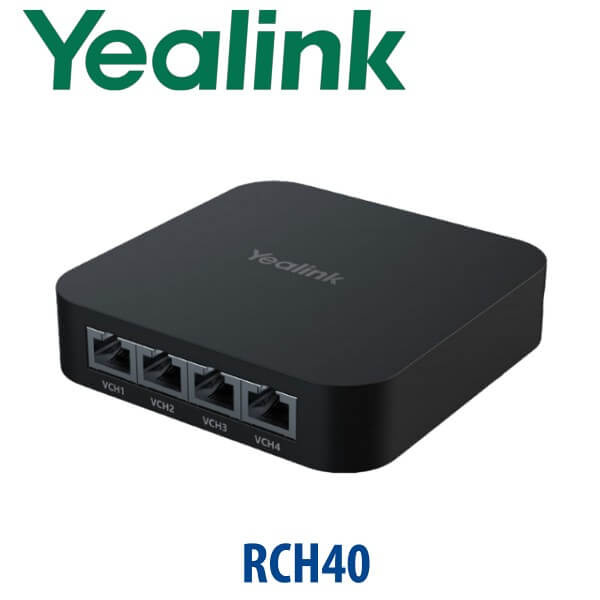
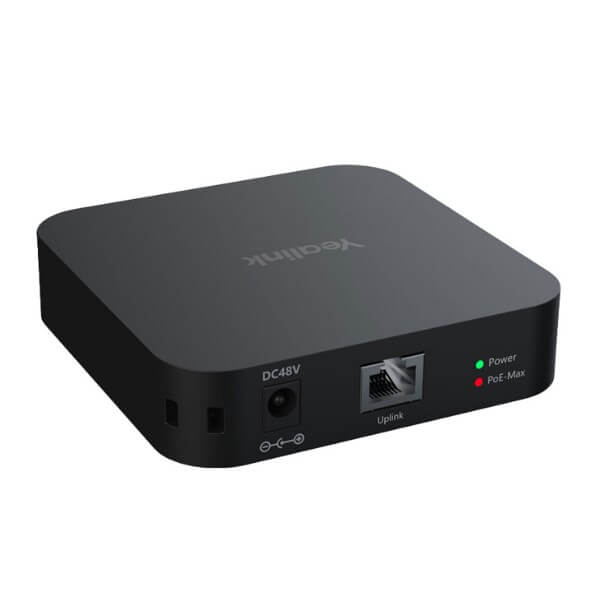
The Yealink RCH40 is the small accessory that fixes a big meeting-room problem: too many AV devices, too many power injectors, and too many cables hidden under the table. Built as a Gigabit PoE+ room cable hub for Yealink audio and video systems, the RCH40 gives a Dubai meeting room four Gigabit PoE ports, a dedicated uplink, and a 90W total PoE budget in one compact device. It is the right fit when your Yealink room kit needs clean networking for touch panels, microphones, cameras, and room-system accessories without turning the AV cabinet into a troubleshooting job.
Room Platform Check — SIP, Teams Room, or Zoom Room?
The RCH40 is a room-networking accessory, not a standalone phone or meeting bar. It does not decide whether your meeting room is SIP, Microsoft Teams, or Zoom — the room system does. Use the RCH40 to connect and power supported Yealink AV devices inside the room, then confirm the correct Yealink room kit for your platform before ordering.
| Your Meeting Platform | What the RCH40 Does | What You Still Need |
|---|---|---|
| SIP / Yealink VC room system | Connects and powers compatible Yealink room audio/video peripherals | Correct Yealink VC room unit, network, display, and SIP/meeting configuration |
| Microsoft Teams Rooms | Keeps Yealink room peripherals on a clean PoE network layout | Teams Rooms-certified Yealink room system, Microsoft 365 tenant, and Teams Rooms licence |
| Zoom Rooms | Provides compact PoE connectivity for Yealink room accessories | Zoom Rooms-compatible Yealink room system and Zoom Rooms licence |
Tell David which room platform you are building when requesting a quote. The RCH40 is often the right cabling hub, but the room system itself must match Teams, Zoom, or SIP requirements.
PoE Truth — The RCH40 Supplies PoE to Room Devices, but the Room Design Still Matters
The RCH40 is built for PoE room-device power, not random office switching. It supports 802.3af/at and can deliver up to 30W per PoE port, with a total PoE budget up to 90W. That is enough for many Yealink room-device layouts, but the final power calculation depends on the microphones, touch panels, cameras, and room accessories connected. Vector Digital Systems checks the device list before quoting, so the room does not fail because the PoE budget was guessed.
Why Gigabit Matters in a Modern Dubai Meeting Room
Dubai boardrooms now carry camera video, microphone audio, content sharing, touch-panel control, and cloud meeting traffic through the same cabinet. The RCH40 uses Gigabit Ethernet ports instead of old 100Mbps switching, so the room system has the bandwidth headroom expected in DIFC, DMCC, Business Bay, JLT, Dubai Internet City, and modern hotel meeting spaces. It is a small part, but it protects the whole room from the classic “everything works until the meeting starts” cabling failure.
RCH40 in the Yealink Room Networking Range
Choose the RCH40 when you need a compact Yealink room cable hub for a standard meeting room. For simple one-device setups, a direct room-system connection may be enough. For larger AV-over-IP environments, Yealink’s newer RCH80 and RCH240 managed ProAV switches move into L2+ switching, Dante/AES67, and Yealink AV-over-IP territory. The RCH40 sits in the middle: clean, compact, and purpose-built for common room-device cabling.
| Feature | Direct Room-System Port | RCH40 ★ | RCH80 / RCH240 |
|---|---|---|---|
| Best for | Very simple room with minimal peripherals | Standard Yealink meeting room with multiple PoE peripherals | Professional AV-over-IP rooms and larger AV networks |
| Ports | Depends on room system | 4× Gigabit PoE downlink + 1× Gigabit uplink | 8-port / larger managed AV switch options |
| PoE Budget | Limited by host device | Up to 90W total, up to 30W per port | Designed for heavier ProAV PoE loads |
| Network Role | Basic connection only | Room cable hub for Yealink AV peripherals | Managed ProAV switching for AV-over-IP |
| Ease of deployment | Simple, but limited | Compact, clean, room-friendly | Requires AV network planning |
| Price tier | Lowest | Accessory / room-cabling tier | Professional AV tier |
| Choose if… | Your room has almost no external Yealink peripherals | You want a clean Yealink meeting-room cable hub with 4 PoE ports and 90W budget | You are designing a full ProAV / AV-over-IP room network |
Where the Yealink RCH40 Works in Dubai
Teams Rooms and Zoom Rooms in free-zone offices. DIFC, DMCC, JLT, and Dubai Internet City offices often want a neat meeting room that behaves like an appliance: walk in, tap join, and start the meeting. The RCH40 helps keep the room devices connected through one compact PoE hub instead of a cabinet full of injectors and small switches.
Hotel boardrooms and training rooms. Business hotels in Deira, Sheikh Zayed Road, Business Bay, and Dubai Marina need rooms that can be reset quickly between clients. A clean RCH40-based layout reduces cable mistakes after room reconfiguration and helps AV teams trace devices faster when a microphone or controller is moved.
SME boardroom refresh projects. Many Dubai companies are upgrading from laptop-and-speakerphone meetings to permanent Yealink room systems. The RCH40 is useful when the room has multiple PoE-connected components and the installer wants one predictable hub for the AV side of the network.
Integrator-standard deployments. For system integrators and PABX/AV installers, the RCH40 gives a repeatable room-cabling pattern: same PoE budget check, same port layout, same cabinet position, and easier handover documentation for the client.
Full Technical Specifications
| Specification | Yealink RCH40 |
|---|---|
| Product Type | Room cable hub / Gigabit PoE+ switch for Yealink meeting room audio and video networking |
| Downlink Ports | 4× 10/100/1000 Mbps Gigabit Ethernet PoE ports |
| Uplink Port | 1× 10/100/1000 Mbps Gigabit Ethernet uplink |
| PoE Standard | 802.3af/at compliant |
| PoE Output Per Port | Up to 30W per PoE port |
| Total PoE Budget | Up to 90W total |
| Yealink EasyConnect | Designed to simplify Yealink room-system cabling and connection through supported Yealink room ports |
| Yealink SafeConnect / PoE Priority | When connected device demand exceeds the PoE budget, lower-priority loads are managed before higher-priority devices |
| Room Compatibility | Yealink VC room systems, Microsoft Teams Rooms, Zoom Rooms, and supported Yealink meeting room peripherals — final compatibility checked at quote stage |
| Typical Connected Devices | Yealink room microphones, touch controllers, cameras, and AV peripherals depending on the room-system design |
| Deployment Type | Meeting room table, AV cabinet, credenza, or integrator-managed room rack |
| Best Room Size | Medium to large Yealink meeting rooms with multiple room peripherals |
Compatible Yealink Room Accessories
| Accessory / System | How It Relates to RCH40 | Order Note |
|---|---|---|
| Yealink MVC / Teams Rooms kits | RCH40 may be used as part of the room-device cabling layout | Certification belongs to the Teams Rooms kit, not the cable hub alone |
| Yealink Zoom Rooms systems | Supports clean PoE connectivity for compatible room peripherals | Verify the complete Zoom Rooms system before quoting |
| Yealink VCM microphones | Common room peripherals that may be planned into an RCH40 cabling layout | Confirm model compatibility and power draw with David |
| Yealink touch controllers | Can sit in the room network design depending on the kit generation | Share the exact room-system model before ordering |
| RCH80 / RCH240 | Step-up managed ProAV switching for larger AV-over-IP deployments | Use when the project needs managed L2+ AV networking, Dante/AES67, or Yealink AV-over-IP planning |
Staging Before Dispatch — What Vector Digital Systems Checks
Vector Digital Systems does not ship the RCH40 as a blind accessory. For Dubai meeting-room orders, David’s Yealink team checks the room-system model, connected devices, PoE demand, cable route, network handoff, Teams/Zoom/SIP platform, and installation location before dispatch. For project orders, we can label ports, prepare the room-device connection plan, verify the PoE budget, and coordinate the RCH40 with the Yealink meeting bar, MVC kit, microphones, controllers, and display-side equipment. The goal is simple: when the installer opens the box, the room layout already makes sense.
Export from Dubai
Vector Digital Systems exports Yealink RCH40 room cable hubs and Yealink room-system accessories from Dubai to telecom operators, system integrators, AV installers, hotel groups, and enterprise IT teams. Common export destinations include Oman, Saudi Arabia, Kuwait, Bahrain, Qatar, Jordan, Egypt, Kenya, Nigeria, Pakistan, Sri Lanka, and Bangladesh. Shipments move FOB Dubai with commercial invoice, packing list, and certificate of origin on request. For project quantities, David can quote the RCH40 together with the required Yealink room kits and accessories so the integrator receives one matched bill of materials.
Get a same-day quote in AED for the Yealink RCH40
Tell David your room system model, meeting platform, connected devices, and quantity. Vector Digital Systems quotes with VAT breakdown, delivery charges, staging notes, and export documentation where required.
Frequently Asked Questions — Yealink RCH40
What is the Yealink RCH40 used for?
The Yealink RCH40 is a room cable hub for meeting room audio and video networking. It gives Yealink room deployments four Gigabit PoE ports, one Gigabit uplink, and a total PoE budget up to 90W, helping connect and power compatible room devices such as microphones, controllers, cameras, and room-system peripherals.
Does the Yealink RCH40 work with Microsoft Teams Rooms?
The RCH40 can be used in Yealink Microsoft Teams Rooms deployments as a room-device cable hub, but certification applies to the complete Teams Rooms system, not the RCH40 alone. Vector Digital Systems verifies the current Teams-certified Yealink room kit before quoting any Teams Rooms project in Dubai.
Does the Yealink RCH40 work with Zoom Rooms?
Yes, the RCH40 can be part of a Yealink Zoom Rooms cabling layout when the connected Yealink room system and peripherals support that design. David checks the exact room kit, connected devices, and Zoom Rooms requirements before quoting so the accessory is matched to the platform.
How many PoE ports does the Yealink RCH40 have?
The Yealink RCH40 has four 10/100/1000 Mbps Gigabit PoE downlink ports and one Gigabit uplink port. Each PoE port can deliver up to 30W, with a total PoE budget up to 90W for the connected room devices.
Is the RCH40 a normal network switch?
The RCH40 behaves like a compact Gigabit PoE room hub, but it is designed for Yealink meeting room audio and video networking rather than as a general office switch. Use it for supported Yealink room devices and ask David to verify the room design before using it in a non-standard network layout.
RCH40 vs RCH80 — which one should I buy?
Choose the RCH40 for a standard Yealink meeting room that needs a compact 4-port Gigabit PoE hub with a 90W PoE budget. Choose the RCH80 or RCH240 for larger professional AV-over-IP deployments that need managed L2+ switching, Yealink AV protocols, Dante/AES67, and more advanced AV network planning.
Can Vector Digital Systems supply the RCH40 with a complete Yealink room kit?
Yes. Vector Digital Systems can quote the RCH40 together with Yealink meeting bars, MVC Teams Rooms kits, Zoom Rooms systems, microphones, touch controllers, cameras, and room accessories. This is the safer way to buy because the PoE budget and compatibility are checked as one bill of materials.
Who is the Yealink authorised supplier in Dubai?
Vector Digital Systems LLC has supplied and integrated Yealink solutions in Dubai since 2009. David handles Yealink product selection, project pricing, staging, local warranty support, and export coordination, so Dubai buyers do not need to manage overseas warranty claims or mismatched accessories.
Does Vector Digital Systems configure Yealink meeting room accessories before delivery?
Yes. For RCH40 projects, Vector Digital Systems checks the room system, PoE device list, platform, port plan, and cable layout before dispatch. For larger room deployments, we can prepare the accessory map and staging notes so the installer knows which device connects to each room port.
Does Vector Digital Systems export Yealink RCH40 units from Dubai?
Yes. Vector Digital Systems exports Yealink RCH40 units and room-system accessories from Dubai to system integrators, AV installers, telecom operators, hotel groups, and enterprise buyers in Oman, Saudi Arabia, Kuwait, Bahrain, Qatar, Jordan, Egypt, Kenya, Nigeria, Pakistan, Sri Lanka, and Bangladesh. Exports ship FOB Dubai with commercial invoice, packing list, and certificate of origin on request.