Description
Yealink MVC840 Microsoft Teams Room Large Room Video Conferencing System Dubai
Yealink MVC840 Microsoft Teams Room for Dubai Boardrooms
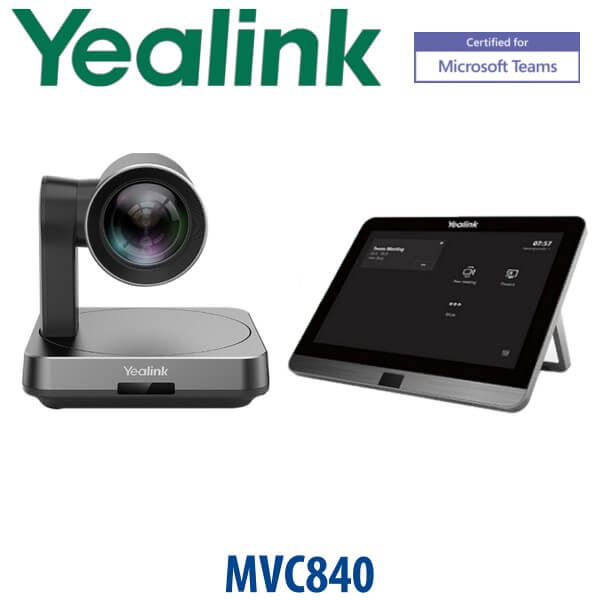
The Yealink MVC840 is a Microsoft Teams Rooms system built for medium and large meeting rooms that need a permanent, room-ready Teams experience instead of a laptop, loose webcam and speakerphone on the table. It combines the Yealink UVC84 4K PTZ camera, MTouch Plus touch console and MCore Pro room PC into a dedicated Teams Rooms on Windows setup for boardrooms, training rooms and hybrid meeting spaces in Dubai.
Vector Digital Systems LLC supplies Yealink Teams Rooms systems with Dubai-based pre-sales guidance, staging, room-readiness checks and local warranty handling. For new MVC840 enquiries, David will confirm stock and lifecycle status before quoting, because MVC840 is now a discontinued Yealink model. If MVC840 stock is not suitable for a new project, we will recommend the current Yealink MVC successor system for the same room size.
Platform Check — MVC840 Is for Microsoft Teams Rooms
The MVC840 is not a SIP conference phone and it is not a Yealink desk phone. It is a Microsoft Teams Rooms system for a dedicated meeting room. This distinction is important in UAE projects because buyers often mix up Yealink SIP conference phones, Teams desk phones and full Teams Rooms systems.
| Your Platform | Right Yealink Category | What You Need |
|---|---|---|
| Microsoft Teams Rooms | Yealink MVC840 — this page, subject to stock and lifecycle status | Microsoft Teams Rooms licence, room account, display plan and room installation |
| Microsoft Teams Phone for users | Yealink MP-series Teams desk phones | Teams Phone licence per user — not a room system |
| SIP PBX — 3CX, Yeastar, Grandstream UCM, hosted PBX | Yealink SIP conference phone or SIP desk phone range | SIP credentials from your PBX — MVC840 will not register as a SIP phone |
| Zoom Rooms | Zoom-certified Yealink room system — verify current certification | Zoom Rooms licence and Zoom-certified hardware |
Power, Displays and Cabling — What Buyers Must Know
MVC840 is a room system, not a plug-and-play desk device. It requires power for the MCore Pro room PC, display screens, camera, touch panel and any room audio devices. It also needs a stable network connection, Microsoft Teams Rooms licence, room account, display layout and cabling plan. Before quoting, David confirms the room size, table shape, display count, network point, wall/ceiling route and whether installation is included.
This prevents the most common Teams Rooms mistake: ordering hardware without checking whether the room has the correct power points, network port, HDMI route, USB route, display position and Microsoft tenant readiness. For offices in DIFC, DMCC, Business Bay and JAFZA, this room-readiness check is often the difference between a clean handover and a delayed boardroom launch.
MVC840 in the Yealink Room System Range
The MVC840 sits in the medium-large to large-room class of Yealink Microsoft Teams Rooms systems. It is above small-room MVC kits and below newer current-generation large-room systems that may be recommended when MVC840 stock is unavailable or when a new project needs longer lifecycle support.
| Feature | MVC640 | MVC840 ★ | Current Large-Room MVC Successor |
|---|---|---|---|
| Room Fit | Medium meeting rooms | Medium and large rooms | Large rooms and new lifecycle projects |
| Camera | Room camera package | UVC84 4K PTZ camera | Current Yealink intelligent large-room camera package |
| Room PC | MCore family | MCore Pro | Current MCore generation |
| Touch Control | MTouch family | MTouch Plus 11.6″ touch console | Current MTouch Plus / latest console bundle |
| Platform | Microsoft Teams Rooms | Microsoft Teams Rooms on Windows | Microsoft Teams Rooms on Windows |
| Lifecycle | Verify before quoting | Discontinued — quote subject to stock | Recommended for new projects |
| Price Tier | Lower | Medium-large room tier | Higher / current lifecycle tier |
| Choose if… | Your room is smaller and does not need large-room camera reach | You need MVC840 specifically for an existing standard, tender, replacement or matching deployment | You are starting a new large-room project and want the current Yealink lifecycle path |
Where MVC840 Works in Dubai
Corporate boardrooms in DIFC and Downtown Dubai. MVC840 gives a dedicated Teams Rooms experience for leadership meetings, investor calls, partner reviews and regional board sessions where a laptop-based setup looks unprofessional and wastes time at the start of every meeting.
Training rooms and hybrid project rooms in Business Bay and DMCC. The UVC84 PTZ camera and room-control console make the MVC840 suitable for rooms where staff, consultants and remote participants need structured Teams meetings, content sharing and camera control without moving a webcam around the table.
Government, banking and enterprise refresh projects. Many UAE organisations standardised on Yealink MVC room systems during the first hybrid-work wave. MVC840 may still be requested for matching existing rooms, tender continuity or spare-room replacement. For new rollouts, David will confirm whether MVC840 stock or the current successor is the better procurement choice.
Full Technical Specifications
| Specification | Yealink MVC840 |
|---|---|
| System Type | Microsoft Teams Rooms on Windows system |
| Room Size | Medium and large meeting rooms, boardrooms and training rooms |
| Camera | Yealink UVC84 4K PTZ camera |
| Camera Zoom | 12× optical zoom class, suitable for larger tables and boardroom coverage |
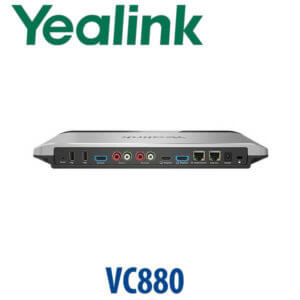
| Room PC | Yealink MCore Pro mini-PC for Teams Rooms |
| Touch Console | Yealink MTouch Plus 11.6″ touch console for meeting join, control and sharing |
| Meeting Experience | Native Microsoft Teams Rooms interface with one-touch join, calendar access, camera control and content sharing |
| Displays | Single or dual display room design — confirm display count before quotation |
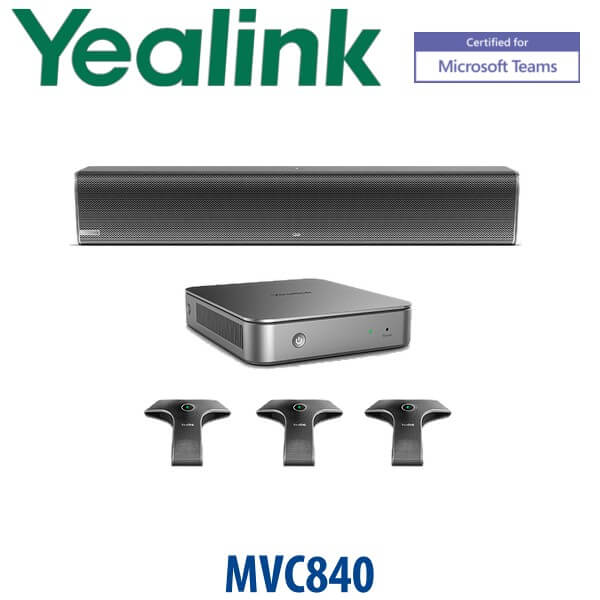
| Audio Package | Room audio package depends on bundle and room layout; confirm microphone and speaker scope with David |
| Licence Required | Microsoft Teams Rooms licence and configured room resource account |
| Network Required | Stable room network connection with access to Microsoft Teams services |
| Power Required | Power points required for room PC, display screens, touch console, camera and audio peripherals |
| Lifecycle Status | Discontinued by Yealink — quote subject to availability; successor available for new projects |
Room Accessories and Quote Scope
| Item | Purpose | Quote Note |
|---|---|---|
| Display Screens | Front-of-room video output for Teams meetings | Single or dual display design confirmed before quote |
| Microphones | Voice pickup for table participants | Bundle and quantity depend on seating layout and room size |
| Speakers | Far-end meeting audio for the room | Specified based on room acoustics and seating count |
| Mounting and Cabling | Camera position, display connection, touch console route and network path | Quoted after room photos, drawing or site survey |
| Microsoft Teams Rooms Licence | Required for Teams Rooms operation | Prepared by the customer’s Microsoft 365 admin or IT team |
Staging Before Delivery
Vector Digital Systems stages Yealink MVC840 systems before dispatch wherever the project scope allows. We confirm the room account, Teams Rooms licence readiness, firmware/application status, display layout, camera path, touch console operation and basic Teams join workflow. For installation projects, we also review camera placement, microphone position, cable route and user handover requirements.
This is especially important for Dubai enterprise rooms where IT, facilities and procurement are often handled by separate teams. David coordinates the Yealink hardware quote so the system, room design and Microsoft tenant requirements match before delivery.
Export from Dubai
Vector Digital Systems exports Yealink Teams Rooms systems from Dubai to system integrators, AV installers and enterprise IT teams across the region. Common export routes include Oman, Saudi Arabia, Kuwait, Bahrain and Qatar in the Gulf; Jordan and Egypt in the wider Middle East; Kenya and Tanzania in East Africa; and Pakistan and Sri Lanka in South Asia. Shipments are quoted FOB Dubai with commercial invoice, packing list and certificate of origin on request.
For export orders, confirm whether you need MVC840 specifically for a matching project or whether a current Yealink successor is acceptable. For discontinued models, availability changes quickly, and the best answer may be a successor bundle with longer support life.
Get a same-day quote in AED for Yealink MVC840
Tell David your room size, seating count, display count, whether you need MVC840 specifically, and whether your Microsoft Teams Rooms licence and room account are ready. We quote with VAT breakdown, delivery and installation scope clearly listed.
Frequently Asked Questions — Yealink MVC840
Is the Yealink MVC840 still available in Dubai?
The Yealink MVC840 is now a discontinued model, so availability depends on remaining stock and project suitability. Vector Digital Systems can quote MVC840 when stock is available or recommend the current Yealink successor for new Microsoft Teams Rooms projects.
Is the Yealink MVC840 a Microsoft Teams Room system?
Yes — the Yealink MVC840 is a Microsoft Teams Rooms system for medium and large meeting rooms. It is designed for a dedicated Teams room experience with room PC, touch console, camera and meeting control, not as a generic SIP conference phone.
Does the Yealink MVC840 work with 3CX, Grandstream UCM or Yeastar?
No — MVC840 is not a SIP conference phone. It is a Microsoft Teams Rooms system. If your meeting room needs to connect to 3CX, Grandstream UCM, Yeastar or another SIP PBX, ask David for a Yealink SIP conference phone instead.
What room size is the Yealink MVC840 designed for?
The Yealink MVC840 is designed for medium and large meeting rooms, including boardrooms, training rooms and hybrid project spaces. Send David the room dimensions, seating count, table shape and display plan so we can confirm whether MVC840 or a current successor is the best fit.
What comes in the Yealink MVC840 system?
The MVC840 system is built around the Yealink UVC84 4K PTZ camera, MCore Pro room PC and MTouch Plus 11.6-inch touch console. The final quote should confirm the exact bundle, audio package, display requirements, mounting and installation scope.
What Microsoft licence do I need for the MVC840?
You need a Microsoft Teams Rooms licence and a configured room resource account in your Microsoft 365 tenant. The hardware alone does not activate the Teams Rooms experience. Your IT admin normally prepares the room account, calendar and policy settings before installation.
Can the Yealink MVC840 be used for Zoom meetings?
The MVC840 is sold as a Microsoft Teams Rooms system. If your room primarily runs Zoom Rooms, ask David to verify a Zoom-certified Yealink room system instead. For occasional Zoom meeting join from Teams Rooms, your IT admin should confirm the supported cross-platform join workflow in Microsoft Teams Rooms settings.
MVC840 vs current Yealink MVC successor — which should I buy?
Choose MVC840 only if you need the same model for an existing standard, tender, replacement or matching room deployment and stock is available. For a new large-room Teams Rooms project, a current Yealink successor is usually the better long-term choice because it gives a newer lifecycle and current bundle support.
Does Vector Digital Systems configure the MVC840 before delivery?
Yes — Vector Digital Systems checks the Teams Rooms hardware, touch console, camera path, display plan and room account requirements before delivery or installation. For Dubai projects, we coordinate with your IT admin so the Teams Rooms licence, room account and network readiness are aligned before handover.
Who is the Yealink authorised supplier in Dubai?
Vector Digital Systems LLC has supplied and integrated Yealink solutions in Dubai since 2009. David leads the Yealink product team and handles pre-sales specification, room-system quoting, staging coordination, project pricing and local warranty handling.
Does Vector Digital Systems export Yealink MVC840 from Dubai?
Yes — Vector Digital Systems can export Yealink Teams Rooms systems from Dubai where stock and project scope allow. Common routes include Oman, Saudi Arabia, Kuwait, Bahrain, Qatar, Jordan, Egypt, Kenya, Tanzania, Pakistan and Sri Lanka. Shipments are quoted FOB Dubai with commercial invoice, packing list and certificate of origin on request.