Description
Yealink MVC940 Microsoft Teams Extra-Large Room System Dubai
Yealink MVC940 Microsoft Teams Room for Extra-Large Meeting Spaces
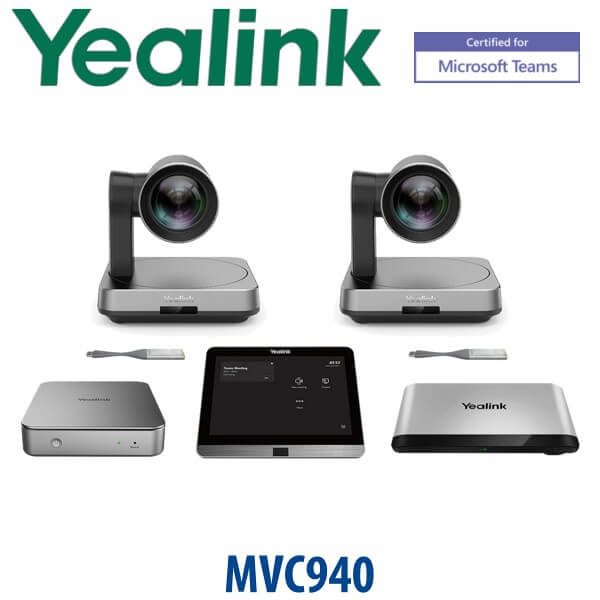
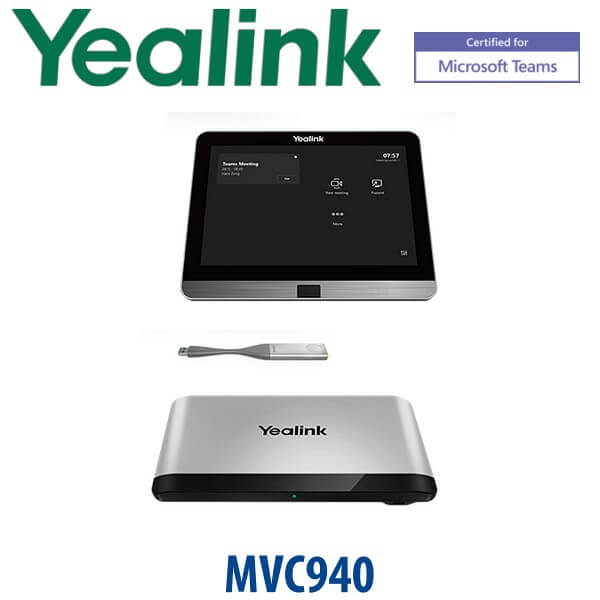
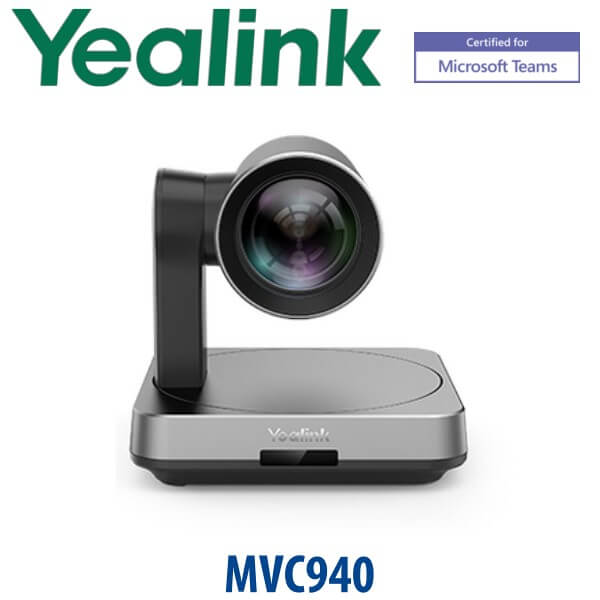
The Yealink MVC940 is a Microsoft Teams Rooms system built for extra-large conference rooms, boardrooms and training spaces where one small camera and a table speakerphone are not enough. It combines Yealink’s MCore / MCore Pro mini-PC, MTouch / MTouch Plus control panel, UVC84 intelligent 4K PTZ multi-camera system, AVHub audio/video processor and flexible audio options into one room solution for native Teams meetings.
For Dubai offices upgrading high-value meeting rooms, MVC940 is the right model when the brief says: large table, multiple seating zones, Teams calendar integration, one-touch join, professional camera coverage and audio planned around the room. Vector Digital Systems LLC supplies, stages and supports Yealink Teams Room systems in Dubai, with quote in AED, VAT breakdown and delivery included.
Platform Check — Microsoft Teams Room, SIP Conference Phone or Zoom Room?
The MVC940 is a dedicated Microsoft Teams Rooms system. It is not a SIP conference phone and it is not a desk phone. A Teams Room needs the right Microsoft tenant, Teams Rooms licence, room account and network access before the hardware is installed. This is the most important platform check before ordering.
| Your Platform | Right Yealink Device | What You Need |
|---|---|---|
| Microsoft Teams Rooms | Yealink MVC940 — this page | Teams Rooms licence, room account, displays, network and room AV plan |
| SIP audio conference room | Yealink CP-series SIP conference phone | SIP credentials from 3CX, Yeastar, UCM, Asterisk or hosted PBX |
| Zoom Rooms | Zoom-certified Yealink room system — verify current model before quote | Zoom Rooms licence and Zoom room account |
Teams Rooms Licence Truth — Hardware Alone Is Not the Room
The MVC940 is the Yealink hardware system; it does not include your Microsoft Teams Rooms licence. Your organisation needs the correct Microsoft Teams Rooms licence, room mailbox, sign-in credentials, Teams admin policy, display layout and network access. Vector Digital Systems confirms these before dispatch so the installation team does not lose time at first login.
Power, Cabling and AV Planning Truth
The MVC940 is an installed room system, not a plug-and-play desk device. Camera position, display cabling, table or ceiling microphone placement, speaker coverage, AVHub location, PoE/network points and mains power must be planned before delivery. For extra-large rooms, this planning is the difference between a Teams Room that feels executive and a room that looks expensive but performs poorly.
MVC940 in the Yealink Room System Range
The MVC940 sits in Yealink’s extra-large Microsoft Teams Room category. It is above smaller MVC systems designed for huddle and medium rooms, because it uses multi-camera and AVHub architecture for wider coverage and flexible audio integration.
| Feature | MVC840 | MVC940 ★ | MVC S90 / S98 |
|---|---|---|---|
| Room Size | Large room | Extra-large room / training room | Current extra-large / ProAV designs |
| Camera | UVC84 class camera setup | UVC84 multi-camera system | UVC86 / SmartVision family depending on model |
| Control | MTouch panel | MTouch / MTouch Plus | MTouch Plus |
| AV Processing | Standard MVC room workflow | AVHub for multi-camera and AV processing | AVHub / newer ProAV architecture |
| Best Fit | Large boardrooms | Extra-large boardrooms, training rooms, council rooms | Newer replacement and premium ProAV projects |
| Price Tier | High | Premium | Premium / project-priced |
| Choose if… | Your room is large but not complex enough for multi-camera training-room coverage | You specifically need the MVC940 extra-large Teams Room bundle | You want the newest Yealink replacement path for a fresh ProAV project |
Where the MVC940 Works in Dubai
Executive boardrooms in DIFC and Downtown Dubai. MVC940 gives regional leadership teams a dedicated Teams Room instead of a laptop on the table. The room joins from the calendar, the camera covers the boardroom, and the audio plan is designed for people sitting far apart.
Training rooms in Business Bay, JLT and Dubai Internet City. Extra-large spaces need camera coverage for presenters, trainees and display content. MVC940’s UVC84 multi-camera and AVHub workflow is built for rooms where people speak from more than one position.
Government, banking and enterprise meeting rooms. Organisations standardising on Microsoft Teams need managed, predictable room hardware. MVC940 gives IT a Teams Rooms on Windows system with touch control instead of unmanaged laptops and random USB peripherals.
Divisible and multi-zone rooms. The MVC940 series can be planned around flexible room layouts, using AVHub and multiple devices where the room may operate as one large space or as divided meeting areas. David can review the room drawing before quote.
Full Technical Specifications
| Specification | Yealink MVC940 |
|---|---|
| Product Type | Microsoft Teams Rooms system for extra-large spaces |
| Platform | Microsoft Teams Rooms on Windows |
| Room Size | Extra-large meeting rooms, boardrooms and training rooms |
| Camera | UVC84 intelligent 4K PTZ multi-camera system |
| Compute | MCore / MCore Pro mini-PC depending on bundle generation |
| Touch Panel | MTouch / MTouch Plus touch panel depending on bundle generation |
| AV Processor | AVHub for audio/video processing, multi-camera control and room layout workflow |
| Room Sensor | RoomSensor supported / included on selected MVC940 bundle variants |
| BYOD | Compatible with MVC-BYOD-Extender for laptop-based meetings using room AV hardware |
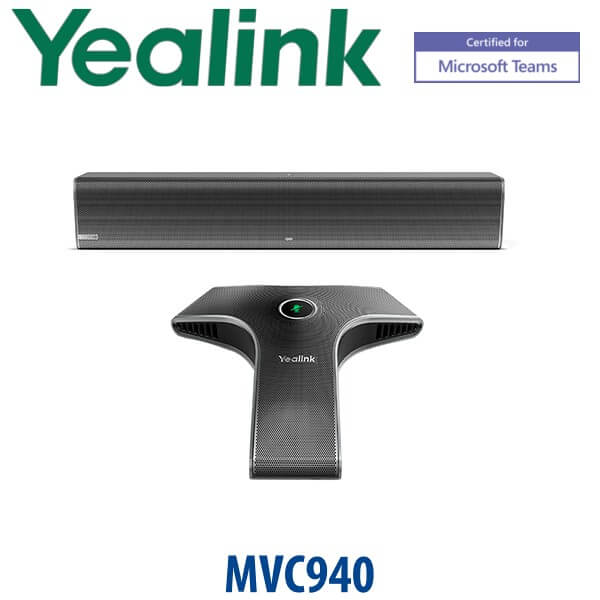
| Audio Options | Flexible Yealink room audio options including microphones and speakers; third-party audio integration may be supported per design |
| Displays | Single or dual front-of-room display layouts planned per room |
| Microsoft Requirements | Teams Rooms licence, Microsoft 365 tenant, room account, network access and Teams admin policy |
| Dubai Use Case | Executive boardrooms, enterprise training rooms, government meeting halls and large hybrid collaboration rooms |
Compatible Accessories and Room Options
| Room Component | Model / Option | Purpose |
|---|---|---|
| Camera | UVC84 | Intelligent 4K PTZ room camera for large room coverage |
| Touch Panel | MTouch / MTouch Plus | One-touch join, meeting control and Teams Room operation |
| AV Processor | AVHub | Audio/video processing, camera control and room layout integration |
| BYOD | MVC-BYOD-Extender | Lets a laptop use the room camera, audio and display workflow for non-room meetings |
| Wireless Presentation | WPP30 where supported by bundle | Wireless content sharing for meeting presenters |
| Audio | Yealink microphones, speakers and project audio options | Selected after checking ceiling type, table shape, participant count and acoustic conditions |
Staging Before Dispatch — What Vector Digital Systems Configures
Every Yealink MVC940 supplied by Vector Digital Systems is checked before dispatch: bundle contents verified, MCore / MCore Pro prepared, MTouch / MTouch Plus checked, UVC84 camera tested, AVHub workflow reviewed, display output confirmed, Teams Rooms readiness checked with your IT team, BYOD requirements noted, cables labelled for the installer and a deployment note prepared. For multi-room projects, we standardise room naming and handover details across the site.
Export from Dubai
Vector Digital Systems exports Yealink MVC940 room systems from Dubai to system integrators, AV contractors and enterprise procurement teams across the region. Common export destinations include Oman, Saudi Arabia, Qatar, Kuwait and Bahrain in the GCC; Jordan and Egypt for regional enterprise projects; Kenya and Tanzania for East Africa; and Pakistan and Sri Lanka for South Asian rollouts. Shipments are quoted FOB Dubai with commercial invoice, packing list and certificate of origin on request.
Get a same-day MVC940 quote in AED — Dubai supply and staging
Tell David: room size, seating layout, number of displays, Microsoft Teams Rooms licence status, ceiling/table audio preference and whether you need BYOD support. We quote with VAT breakdown and delivery included.
Frequently Asked Questions — Yealink MVC940
Is the Yealink MVC940 a Microsoft Teams Room system?
Yes. The Yealink MVC940 is a Microsoft Teams Rooms system for extra-large rooms. It is built around Teams Rooms on Windows with MCore / MCore Pro compute, MTouch / MTouch Plus control, UVC84 camera coverage and AVHub processing.
Is the Yealink MVC940 Microsoft Teams certified?
Microsoft has a Teams enabled device listing for Yealink MVC940. Vector Digital Systems checked the Microsoft listing on 23 July 2026 and re-checks certification before every Teams Room quote.
What room size is the Yealink MVC940 designed for?
MVC940 is designed for extra-large meeting rooms, boardrooms and training rooms. It is suitable where the room needs multi-camera coverage, planned audio and a dedicated Teams Rooms experience instead of a laptop-based meeting setup.
MVC840 vs MVC940 — which one should I buy?
Choose MVC840 for large rooms where a simpler camera and room design is enough. Choose MVC940 for extra-large rooms, training rooms and boardrooms that need UVC84 multi-camera coverage, AVHub processing and more flexible audio planning.
Does the MVC940 include the Microsoft Teams Rooms licence?
No. MVC940 is the Yealink room hardware system. Your organisation still needs the correct Microsoft Teams Rooms licence, room account, Microsoft 365 tenant access and Teams admin policy. Vector Digital Systems can stage the hardware and coordinate readiness with your IT team.
Can the MVC940 be used for Zoom or BYOD meetings?
MVC940 is built for Microsoft Teams Rooms. BYOD use is possible when the room is paired with the MVC-BYOD-Extender, allowing a laptop to use the room AV hardware for non-room meetings. For native Zoom Rooms, ask David for the current Zoom-certified Yealink option.
What is included in the Yealink MVC940 system?
The MVC940 family is built around MCore / MCore Pro mini-PC, MTouch / MTouch Plus touch panel, UVC84 intelligent 4K PTZ multi-camera system, AVHub and flexible audio options. Bundle contents can vary by generation and SKU, so David confirms the exact package before quote.
Does Vector Digital Systems configure the MVC940 before delivery?
Yes. Vector Digital Systems checks the bundle, prepares the MCore / MCore Pro, tests the MTouch panel, verifies UVC84 camera operation, reviews AVHub workflow, checks display output, confirms Teams Rooms readiness and labels cables for the installer before dispatch.
Who is the Yealink authorised supplier in Dubai?
Vector Digital Systems LLC has supplied and integrated Yealink solutions in Dubai since 2009. David handles Yealink Teams Room selection, project pricing, staging and local warranty support for UAE and export customers.
What is the best Yealink Teams Room system for an extra-large boardroom in Dubai?
If the requested model is MVC940, it is the correct Yealink choice for extra-large Microsoft Teams Rooms that need UVC84 multi-camera coverage and AVHub processing. For a fresh project where the newest generation is acceptable, ask David to compare MVC940 with MVC S90 or MVC S98 before final order.
Does Vector Digital Systems export Yealink MVC940 from Dubai?
Yes. Vector Digital Systems exports Yealink MVC940 systems from Dubai to integrators and enterprise buyers in Oman, Saudi Arabia, Qatar, Kuwait, Bahrain, Jordan, Egypt, Kenya, Tanzania, Pakistan and Sri Lanka. Shipments are quoted FOB Dubai with commercial invoice, packing list and certificate of origin on request.