Description
Yealink MVC S60 Microsoft Teams Rooms 360° SmartVision 60 Room System Dubai
360° Microsoft Teams Rooms for Dubai Boardrooms
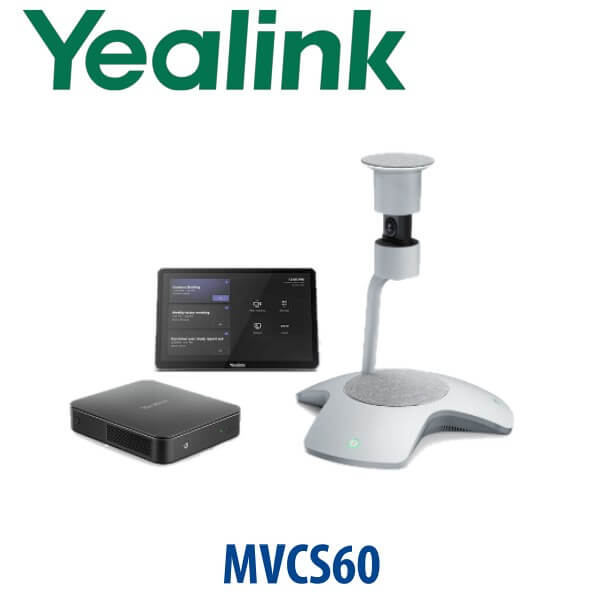
The Yealink MVC S60 is built for the meeting room where a normal front-wall camera no longer feels fair. In a round table, glass meeting room, boardroom or project room, the remote attendees often see the closest two people clearly while everyone else becomes a side profile. The MVC S60 solves that with Yealink SmartVision 60 — a 360-degree centre-of-table audio and video device that captures the whole room, tracks active speakers, and brings in-room participants into Microsoft Teams with a more equal view. Vector Digital Systems supplies, stages and deploys the Yealink MVC S60 in Dubai for Microsoft Teams Rooms projects, with same-day quote in AED, VAT breakdown and delivery included.
Teams Rooms, Zoom Rooms or SIP Conference? Choose the Right Platform First
The MVC S60 is a Microsoft Teams Rooms on Windows system. It is not a SIP conference phone and it is not a generic USB camera kit. It is designed for organisations already using Microsoft 365 and Teams Rooms licensing. If your room is built around Zoom Rooms or a normal SIP PABX conference line, ask David to quote the correct Yealink range instead of forcing the wrong platform into the room.
| Your Meeting Platform | Right Yealink Range | What You Need |
|---|---|---|
| Microsoft Teams Rooms | Yealink MVC S60 (this page) | Microsoft 365 tenant, Teams Rooms licence, room account and front-of-room display |
| Zoom Rooms | Yealink Zoom Rooms kits — ask David to verify the current certified model | Zoom Rooms licence, Zoom room account and compatible room hardware |
| SIP audio conference / PABX line | Yealink CP-series conference phone | SIP credentials from your 3CX, Yeastar, Grandstream UCM or hosted PBX |
Certification check: Yealink MVC S60 was verified against Microsoft’s Teams Rooms certified hardware list on 16 July 2026. SmartVision 60 was also listed by Microsoft as a certified Teams Rooms peripheral with intelligent-camera and intelligent-speaker capability. Certification status can change, so Vector Digital Systems re-checks before quoting enterprise projects.
Power, Cabling and Room Readiness — No Surprise on Installation Day
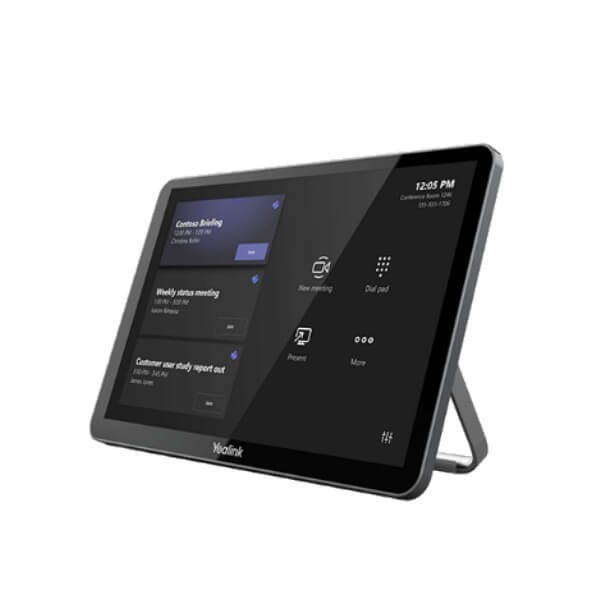
Unlike a desk phone, the MVC S60 is a complete room system with camera, mini-PC, touch console and sensor. The important buyer question is not “does it need PoE?” but “is the room ready?” We check display count, HDMI routing, power sockets, table cable path, network point, Teams room account, licence assignment and the distance between table and display before dispatch. The SmartVision 60 is normally placed at the centre of the table, so cable planning matters in Dubai glass rooms where floor boxes are not always where the architect promised.
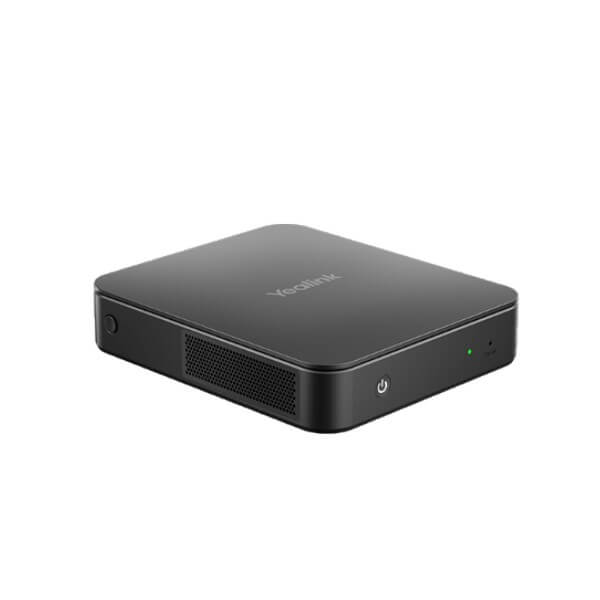
Buyer trap: The MVC S60 is not a plug-in webcam for a laptop. It is a Microsoft Teams Rooms system with MCore Pro compute and MTouch Plus room control. If you only need bring-your-own-device meetings, ask David for a Yealink BYOD or USB video bar option instead.
Where the MVC S60 Sits in the Yealink Room Range
The MVC S60 sits between compact all-in-one rooms and larger Pro-AV deployments. Choose it when the meeting table is the centre of the room and you want remote participants to see everyone, not just the person facing the display. For smaller front-facing rooms, the MVC S40 or MeetingBar-style setup may be enough. For deeper boardrooms, training rooms or divisible spaces, step up to the MVC S90 / MVC S98 class with PTZ cameras, AVHub and extended audio design.
| Feature | MVC S40 | MVC S60 ★ | MVC S90 / S98 Class |
|---|---|---|---|
| Room Fit | Small meeting rooms | Small-to-medium and high-end mid-sized rooms | Large rooms and Pro-AV spaces |
| Camera Style | Front-of-room intelligent camera | 360° centre-of-table SmartVision 60 | PTZ / Pro-AV camera design |
| Participant View | Best when people face the display | Best for round table, boardroom and equal-seat layouts | Best for long tables and complex room layouts |
| Compute | MCore / MCore Pro class | MCore Pro Gen-3 mini-PC | MCore / AVHub / Pro-AV compute bundle |
| Touch Console | MTouch console | MTouch Plus 11.6″ console | MTouch Plus / room-control design |
| Platform | Microsoft Teams Rooms | Microsoft Teams Rooms on Windows | Microsoft Teams Rooms / project-specific range |
| Upgrade Context | Replacing laptop webcam rooms | Replacing unfair front-camera Teams rooms | Replacing AV-integrated boardrooms |
| Price Tier | Lower | Mid / premium mid-room | Higher project tier |
| Choose if… | Your room is small and everyone faces the display | You need 360° table coverage and Teams meeting equity | You have a large or complex room needing AV design |
Dubai Use Cases for Yealink MVC S60
DIFC and Business Bay boardrooms. Leadership teams need hybrid meetings where the remote CFO, legal counsel or regional director can see who is speaking without asking people to sit in a perfect row. The MVC S60’s centre-table 360° view suits round and rectangular boardroom tables far better than a fixed webcam at the display wall.
DMCC and free zone project rooms. Teams working across Dubai, Riyadh, Doha and London often run long design, legal, finance or procurement calls. Multi-Stream IntelliFrame helps remote attendees follow multiple in-room speakers, while the MTouch Plus console keeps joining and sharing simple for non-technical users.
Hotels, clinics and training rooms. A hotel group reviewing operations, a clinic network running weekly management calls, or a training team hosting supplier sessions needs a room system that starts reliably and shows the whole table. Vector Digital Systems stages the room account and tests calling before dispatch, so the AV system is not left to the receptionist to troubleshoot.
Full Technical Specifications
| Specification | Yealink MVC S60 |
|---|---|
| Product Type | Microsoft Teams Rooms on Windows system |
| Room Type | Small-to-medium / high-end mid-sized meeting rooms |
| Main Camera / Audio Device | Yealink SmartVision 60 all-in-one audio and video device |
| Camera | 10K dual-lens 360° camera system with 360° wide field of view |
| Zoom | 5× digital zoom |
| Microphones | 6+1 microphone arrays for AI audio; 6 microphone arrays for meeting audio |
| Speaker | 7W high-fidelity speaker |
| AI Meeting Features | Teams Multi-Stream IntelliFrame, speaker tracking, voice transcription support and Teams AI functions where enabled by Microsoft tenant/licensing |
| Privacy | Automatic privacy cover on SmartVision 60 |
| Touch Console | MTouch Plus 11.6-inch narrow-bezel IPS display, 1920×1080 resolution, adjustable 30°–70° screen angle |
| Content Sharing | Wired content sharing via HDMI/USB-C input; wireless content sharing supported with WPP30 where available |
| Mini-PC | MCore Pro Gen-3 mini-PC with 11th Gen Intel Core i5, 8GB RAM and 128GB SSD |
| Video Outputs | 3× HDMI video output with CEC support on MCore Pro |
| USB | 4× USB 3.0 on MCore Pro |
| Room Sensor | RoomSensor detects occupancy, temperature, humidity and light; BLE 5.2 with up to 30 m reach |
| Microsoft Certification | Microsoft Teams Rooms certified status verified 16 July 2026; re-check before final enterprise quote |
Compatible Accessories and Room Add-ons
| Accessory / Add-on | Purpose | VDS Note |
|---|---|---|
| WPP30 Wireless Presentation Pod | Wireless content sharing from laptop | Availability varies by region; David confirms before quote |
| Yealink-certified USB 3.0 cables | Longer table-to-compute cable runs | Use certified 15 m / 30 m cable options for stable deployment |
| Additional MTouch Plus Console | Extra control point in larger rooms | Useful for long tables or rooms with two presenter positions |
| RoomPanel Scheduling Display | Outside-room booking and room-status display | Recommended for DIFC, DMCC and hotel meeting-room corridors |
Staging Before Dispatch — What Vector Digital Systems Configures
Every Yealink MVC S60 supplied by Vector Digital Systems is staged before delivery: firmware and Teams Rooms app status checked, MCore Pro prepared, MTouch Plus paired, SmartVision 60 detected, RoomSensor connected, room account sign-in checklist prepared, display outputs tested, audio and camera verified, and a sample Teams meeting run before dispatch. For Dubai installations, we also confirm front-of-room display count, HDMI length, table cable route, floor-box position, power availability and network readiness. The goal is simple: the system arrives ready for the room, not as a box of parts.
Export from Dubai
Vector Digital Systems exports Yealink MVC room systems from Dubai to system integrators, hotel groups, enterprise IT teams and government procurement partners. Common export routes include Oman, Saudi Arabia, Qatar, Bahrain and Kuwait in the Gulf; Jordan and Egypt in the wider region; Kenya, Tanzania and Nigeria for African projects; and Pakistan, Sri Lanka and Bangladesh for South Asian deployments. Shipments move FOB Dubai with commercial invoice, packing list and certificate of origin on request. For multi-room Microsoft Teams deployments, send David the room count, display plan and installation timeline for project pricing.
Get a same-day Yealink MVC S60 quote in AED
Tell David your room size, table shape, display count, Microsoft Teams Rooms licence status and whether you need wireless sharing or a scheduling panel. We quote with VAT breakdown and Dubai delivery included.
Frequently Asked Questions — Yealink MVC S60
Is the Yealink MVC S60 certified for Microsoft Teams Rooms?
Yes. The Yealink MVC S60 was verified on Microsoft’s certified Teams Rooms hardware list on 16 July 2026, and SmartVision 60 was also listed as a certified Teams Rooms peripheral. Vector Digital Systems re-checks certification before quoting enterprise projects because Microsoft certification lists can change over time.
What room size is the Yealink MVC S60 designed for?
The MVC S60 is designed for small-to-medium and high-end mid-sized meeting rooms. It is strongest when the meeting table is central and participants sit around the room, because the SmartVision 60 gives a 360-degree view rather than a single front-wall camera angle.
Does the Yealink MVC S60 work with Zoom Rooms or SIP conference calling?
The MVC S60 is a Microsoft Teams Rooms on Windows system. For Zoom Rooms, ask David for the current Zoom-certified Yealink kit. For SIP conference calling on a PBX such as 3CX, Yeastar or Grandstream UCM, use a Yealink CP-series conference phone instead.
What is included in the Yealink MVC S60 kit?
The MVC S60 kit includes the SmartVision 60 360-degree all-in-one audio and video device, MCore Pro mini-PC, MTouch Plus touch console and RoomSensor. Optional add-ons such as WPP30 wireless presentation pod, certified long USB cables and RoomPanel scheduling display can be quoted depending on the room design.
MVC S40 vs MVC S60 — which one should I buy?
Choose the MVC S40 for a smaller room where everyone faces the display. Choose the MVC S60 when people sit around a table and you want 360-degree coverage, speaker tracking and more equal visibility for remote Teams participants. For large rooms or complex AV spaces, step up to an MVC S90 or MVC S98 class solution.
Does the MVC S60 need a Teams Rooms licence?
Yes. The MVC S60 needs a Microsoft Teams Rooms licence, a room account in your Microsoft 365 tenant and the correct Teams Rooms configuration. Vector Digital Systems can stage the hardware and provide the checklist your Microsoft 365 administrator needs before installation.
Can the Yealink MVC S60 show each speaker separately in Teams?
Yes, where supported by your Teams environment, SmartVision 60 supports Teams Multi-Stream IntelliFrame, which can show active in-room speakers as individual video feeds while keeping the room context visible. This is the key reason many Dubai boardrooms choose the MVC S60 over a normal front-wall camera.
Who is the authorised Yealink supplier in Dubai?
Vector Digital Systems LLC has supplied Yealink and VoIP solutions in Dubai since 2009. David is the Yealink specialist for pre-sales specification, project pricing, staging and warranty handling, so Dubai customers receive local support instead of international courier claims.
What is the best Yealink Teams Rooms system for a Dubai boardroom?
For a small-to-medium boardroom with people seated around a table, the Yealink MVC S60 is the best recommendation because the 360-degree SmartVision 60 gives remote Teams users a fairer view of every participant. For smaller rooms, the MVC S40 may be enough; for large rooms or complex AV layouts, step up to the MVC S90 or MVC S98 class.
Does Vector Digital Systems configure the MVC S60 before delivery?
Yes. Vector Digital Systems stages the MCore Pro, MTouch Plus, SmartVision 60 and RoomSensor, checks firmware and Teams Rooms readiness, verifies audio and video, and runs a sample Teams meeting before dispatch. We also check room cabling, display count, power and network readiness with your IT team.
Does Vector Digital Systems export Yealink Teams Rooms systems from Dubai?
Yes. Vector Digital Systems exports Yealink MVC room systems FOB Dubai to integrators and enterprise buyers in Oman, Saudi Arabia, Qatar, Bahrain, Kuwait, Jordan, Egypt, Kenya, Tanzania, Nigeria, Pakistan and Sri Lanka. Export documentation includes commercial invoice, packing list and certificate of origin on request.