
Description
Yealink UVC86 4K Dual-Eye AI PTZ Camera for Teams, Zoom & BYOD Rooms Dubai
Yealink UVC86 — Intelligent 4K Camera for Dubai Boardrooms
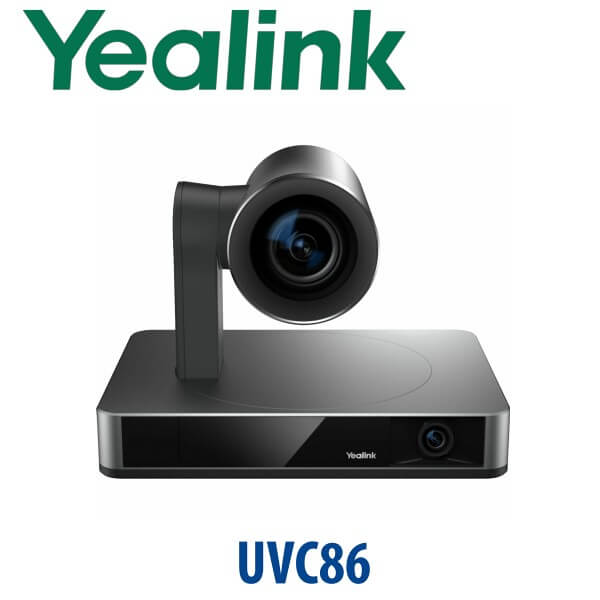
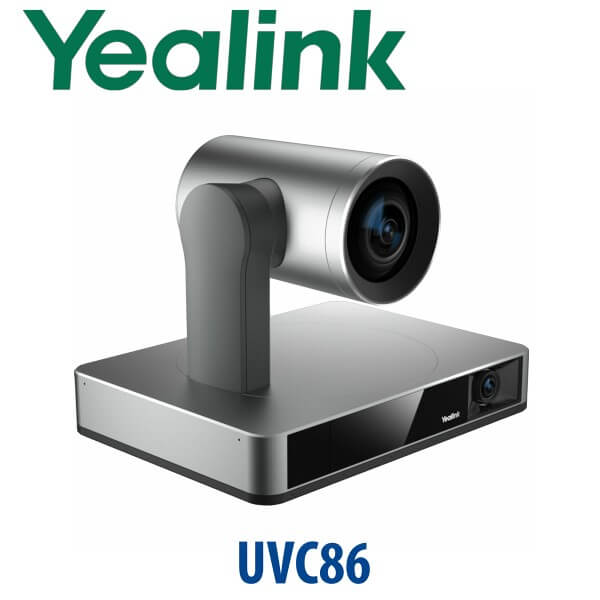
The Yealink UVC86 is the camera to choose when a normal webcam no longer fits the room. Designed for medium and large meeting spaces, it combines a 4K PTZ camera with a 4K panoramic camera so the room can be detected, framed and followed intelligently. The PTZ lens delivers close-up detail with 12× optical zoom, while the panoramic lens helps the system understand where people are sitting. For Dubai boardrooms, training rooms, executive meeting rooms and hybrid collaboration spaces, the UVC86 gives remote participants a far more natural view of the room than a fixed USB camera.
Teams, Zoom or BYOD? Choose the Right Room Architecture
The UVC86 can be used in different ways: as a USB camera for laptop-based BYOD meetings, as part of a Microsoft Teams Rooms setup, or inside a Zoom Rooms deployment. The important buyer mistake is assuming the camera alone creates a full room system. The UVC86 is the camera; the room still needs the right compute, touch panel, audio, display and platform licence.
| Your Meeting Platform | Right UVC86 Setup | What You Need |
|---|---|---|
| BYOD laptop meetings — Teams, Zoom, Google Meet, Webex | UVC86 as a USB camera with Yealink audio devices | Room PC or user laptop, USB connection, display and suitable microphones/speakers |
| Microsoft Teams Rooms | UVC86 camera inside a Teams Rooms bundle or certified room design | Teams Rooms compute, touch console, M365/Teams Rooms licence and certified audio path |
| Zoom Rooms | UVC86 in a Zoom Rooms-certified deployment | Zoom Rooms licence, room controller, compute and compatible Yealink audio devices |
Certification status checked 21 July 2026: the Yealink UVC86 is listed by Microsoft as a Teams-enabled camera device and appears on Zoom’s hardware page as a Certified Product. Ask David to confirm the full room bill of materials before ordering, because certification depends on the complete room design, not only the camera body.
Power Truth — This Is Not a PoE Camera
The Yealink UVC86 uses its own power adapter. It is not a simple PoE IP camera and it is not powered by the display. The standard camera package includes the power adapter, remote control, wall bracket accessories and USB cable. For neat Dubai boardroom installs, Vector Digital Systems checks power location, USB cable path, wall bracket height, display position and meeting-table audio layout before dispatch, so the camera does not arrive without the accessories required to mount and test it.
Why Dual-Eye Matters in Real Meeting Rooms
A single PTZ camera can zoom in beautifully, but it may lose room context while tracking. The UVC86 solves that with a dual-eye design: a panoramic lens watches the full room and helps detect participants, while the PTZ camera provides the close-up image. Auto Framing keeps everyone visible, Speaker Tracking follows the active talker, Presenter Tracking works for training and board presentations, and Picture-in-Picture can preserve context while showing a focused view.
Where the UVC86 Sits in the Yealink Camera Range
The UVC86 sits above the UVC84-style single-camera PTZ option because it adds the second panoramic camera and richer AI tracking behaviour. For teams that want a complete BYOD kit rather than only a camera, Yealink’s newer UVC85-BYOD direction packages camera and audio around a single-cable room experience. For most medium and large Dubai rooms that already have, or will be designed around, a Yealink Teams Rooms or Zoom Rooms architecture, the UVC86 remains the premium camera choice.
| Feature | UVC84 | UVC86 ★ | UVC85-BYOD Kit |
|---|---|---|---|
| Camera Type | Single 4K PTZ camera | Dual-eye 4K PTZ + panoramic camera | 4K intelligent camera inside BYOD kit |
| Room Size | Medium to large rooms | Medium and large rooms needing smarter tracking | Medium to large BYOD rooms |
| Zoom | 12× optical zoom | 12× optical zoom + 1.7× digital zoom | Designed as part of bundled kit |
| Field of View | 80° camera view | 90° PTZ camera + 120° panoramic camera | Kit-dependent room coverage |
| AI Features | Auto Framing | Auto Framing, Speaker Tracking, Presenter Tracking, PIP, Multi Focus | BYOD-focused intelligent meeting experience |
| Best Use | Cost-effective PTZ upgrade | Executive boardrooms, training rooms, smarter Teams/Zoom rooms | Laptop-first rooms needing camera + audio package |
| Price Tier | Lower | Premium camera | Kit price tier |
| Choose if… | You need 4K PTZ on a tighter budget | You want smarter AI framing and better speaker/presenter tracking | You want a bundled BYOD room kit rather than camera-only design |
Where the UVC86 Works in Dubai
DIFC and DMCC boardrooms. Senior teams need remote participants to see the whole table, not just the person closest to a laptop. The UVC86 gives Teams and Zoom rooms a professional front-of-room camera with AI framing, speaker tracking and presenter tracking, making it suitable for board meetings, investor calls, legal reviews and regional leadership sessions.
Business Bay training rooms. Presenter Tracking makes the UVC86 useful for training rooms where the speaker moves between a screen, whiteboard and table. The 12× optical zoom keeps the trainer sharp from across the room, while the panoramic lens helps the system maintain context when participants ask questions.
Hybrid project rooms in Jebel Ali and Dubai South. Engineering, logistics and operations teams often mix in-room staff with remote sites. The UVC86 is strong for rooms where the discussion moves around the table, because Auto Framing and Speaker Tracking reduce the need for someone to manually steer the camera during a live call.
Government, education and healthcare meeting rooms. Larger rooms need predictable staging, labelled cables, correct camera height and tested audio paths. Vector Digital Systems designs the UVC86 with Yealink microphones, speakers and room controllers where required, then checks the meeting workflow before delivery.
Full Technical Specifications
| Specification | Yealink UVC86 |
|---|---|
| Product Type | 4K dual-eye intelligent PTZ camera for medium and large meeting rooms |
| Camera Design | PTZ camera + panoramic camera |
| Video Resolution | 4K video stream, up to 30fps |
| PTZ Camera Sensor | 8MP Sony sensor with autofocus |
| PTZ Field of View | 90° diagonal, 81° horizontal, 50° vertical |
| Panoramic Camera | 8MP Sony sensor, 120° diagonal, 110° horizontal, 78° vertical field of view |
| Zoom | 20.4× HD zoom: 12× optical zoom + 1.7× digital zoom |
| Movement | Mechanical pan ±100°, tilt +40° to -90°; panoramic camera manual tilt ±9° |
| AI Video Features | Auto Framing, Speaker Tracking, Presenter Tracking, Picture-in-Picture and Multi Focus |
| Camera Presets | 9 presets |
| Connections | USB 3.0 Type-B, USB 2.0 Type-A, Yealink VCH RJ45, 3.5mm line-in, HDMI out, power port, security lock slot and reset slot |
| Platform Use | BYOD USB rooms, Microsoft Teams Rooms designs, Zoom Rooms designs and Yealink room bundles |
| Package Contents | UVC86 camera, VCR20 remote control, power adapter, wall bracket and accessories, USB cable |
| Dimensions | Sleeping: 210 × 156 × 183mm; working: 210 × 156 × 156mm; working height 156–192mm |
| Net Weight | 3.27kg |
Compatible Accessories and Room Components
| Accessory / Component | Use With UVC86 | Buyer Note |
|---|---|---|
| VCR20 Remote Control | Camera control and presets | Included in standard UVC86 package |
| Wall Bracket | Mounts camera above or near the room display | Included; installation height should be checked before dispatch |
| Yealink Audio Devices | Microphones and speakers for full-room coverage | Confirm table size, seating count and ceiling/table microphone preference with David |
| Yealink VCH Connection | Audio devices, BYOD extender or Yealink codec connection | Useful in professional room designs where USB distance and cable routing matter |
| Teams Rooms / Zoom Rooms Compute | Turns the camera into a complete room system | Do not buy camera-only if the requirement is a fully managed room appliance |
Staging Before Dispatch — What We Configure
Vector Digital Systems stages Yealink meeting-room equipment before dispatch from Dubai. For a UVC86 order, we confirm the platform, camera mounting position, USB or VCH cable path, display location, room size, microphone plan, speaker plan and controller requirement. For Teams Rooms and Zoom Rooms projects, we verify the camera inside the full room design, test the video path, label the cables and document what the installer should connect on site. For BYOD rooms, we test laptop connection behaviour so the user can walk in, plug in and start the meeting.
Export from Dubai
Vector Digital Systems exports Yealink UVC86 cameras and room kits from Dubai to system integrators, AV installers, telecom operators, hotel groups, education buyers and corporate IT teams. Common routes include Oman, Saudi Arabia, Kuwait, Qatar, Bahrain, Jordan, Egypt, Kenya, Pakistan and Sri Lanka. Shipments move FOB Dubai with commercial invoice, packing list and certificate of origin on request. For multi-room projects, ask David for a same-day quote in AED with VAT breakdown, delivery options and export documentation.
Get a same-day quote in AED — Yealink UVC86 Dubai
Tell David your room size, platform, seating count, display size, microphone preference and whether you need camera-only, BYOD kit, Teams Rooms or Zoom Rooms design. VAT breakdown and delivery charges are included in the quote.
Frequently Asked Questions — Yealink UVC86
Is the Yealink UVC86 certified for Microsoft Teams?
Yes — certification/listing was checked on 21 July 2026. Microsoft lists the Yealink UVC86 Camera as a Teams-enabled device for medium and large rooms, with Teams streaming at 1080p. For a complete Microsoft Teams Rooms project, the camera must still be paired with the correct room compute, touch console, audio devices and Teams Rooms licence.
Is the Yealink UVC86 certified for Zoom Rooms?
Yes — Zoom lists the Yealink UVC86 as a Certified Product, verified 21 July 2026. For best results, Vector Digital Systems designs the full Zoom Rooms setup around the room size, display, table shape, microphone coverage and controller requirement rather than treating the camera as a standalone webcam.
Can I use the UVC86 as a USB BYOD camera with a laptop?
Yes — the UVC86 can be used as a USB camera in BYOD rooms where users bring a laptop and run Teams, Zoom, Google Meet, Webex or another meeting app. The room still needs proper microphones and speakers; for larger tables, camera-only is not enough for a professional meeting experience.
What room size is the Yealink UVC86 designed for?
The UVC86 is designed for medium and large meeting rooms. It suits Dubai boardrooms, training rooms, executive meeting rooms and larger hybrid project rooms where a fixed webcam cannot capture the full table or follow speakers clearly.
What is the difference between UVC84 and UVC86?
The UVC84 is a 4K PTZ camera with 12× optical zoom and Auto Framing. The UVC86 is the smarter step-up model: it adds a dual-eye design with a panoramic camera, wider room detection, Speaker Tracking, Presenter Tracking, Picture-in-Picture and Multi Focus. Choose UVC86 when tracking quality matters more than the lowest camera cost.
Does the UVC86 come with a power adapter?
Yes — the standard UVC86 package includes the power adapter, VCR20 remote control, wall bracket accessories and USB cable. It is not a PoE camera. Vector Digital Systems checks the power point and cable route during staging so the room installer has the correct plan before mounting.
Does the UVC86 include microphones and speakers?
The UVC86 is the camera. Microphones, speakers, room compute and controller are selected according to the room design. David can quote camera-only, BYOD camera-and-audio kits, Microsoft Teams Rooms bundles or Zoom Rooms designs depending on your platform and seating count.
Does Vector Digital Systems configure the UVC86 before delivery?
Yes — Vector Digital Systems stages Yealink meeting-room equipment before dispatch. For UVC86 projects, we verify camera connection, platform requirement, cable path, audio pairing, mounting position and room workflow, then label and test the equipment before delivery.
Who is the authorised Yealink supplier in Dubai?
Vector Digital Systems LLC has supplied and integrated Yealink solutions in Dubai since 2009. David handles Yealink pre-sales, room design checks, project pricing, staging and local warranty support, so buyers do not need to manage international courier claims.
Does Vector Digital Systems export Yealink UVC86 cameras from Dubai?
Yes — Vector Digital Systems exports Yealink UVC86 cameras and room kits from Dubai to integrators and enterprise buyers in Oman, Saudi Arabia, Kuwait, Qatar, Bahrain, Jordan, Egypt, Kenya, Pakistan and Sri Lanka. Shipments are FOB Dubai with commercial invoice, packing list and certificate of origin on request.