Description
Yealink MVC860 Microsoft Teams Rooms Medium & Large Room Video System Dubai
Yealink MVC860 for Microsoft Teams Rooms in Dubai
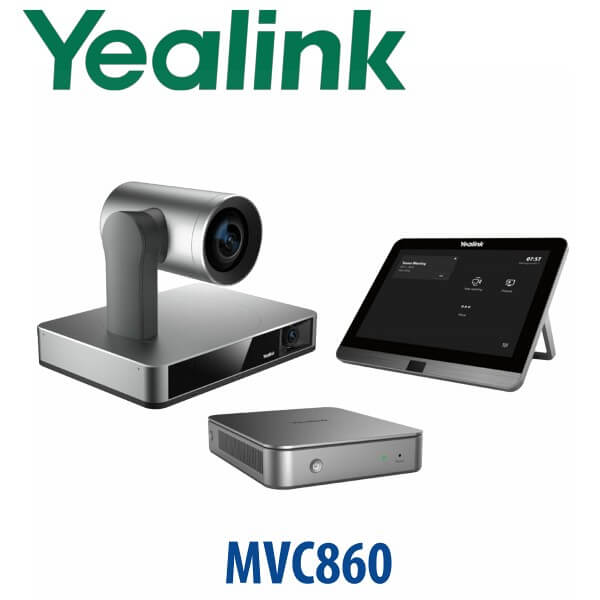
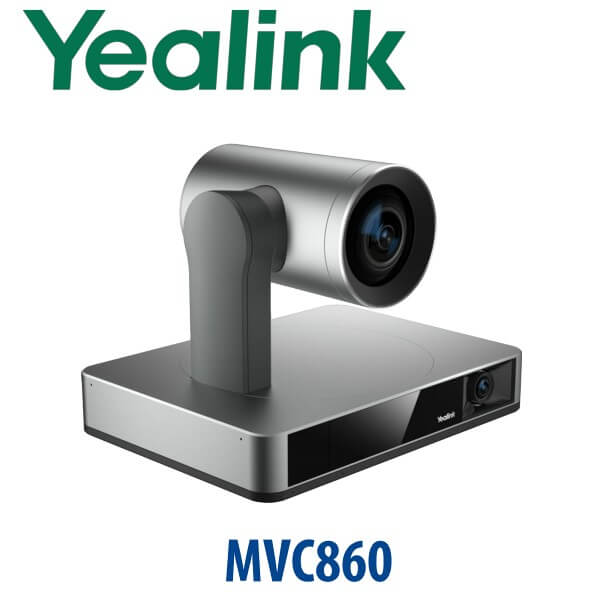
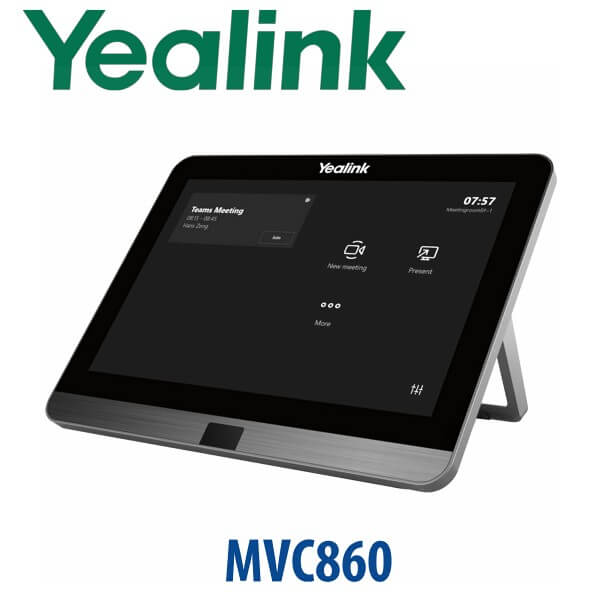
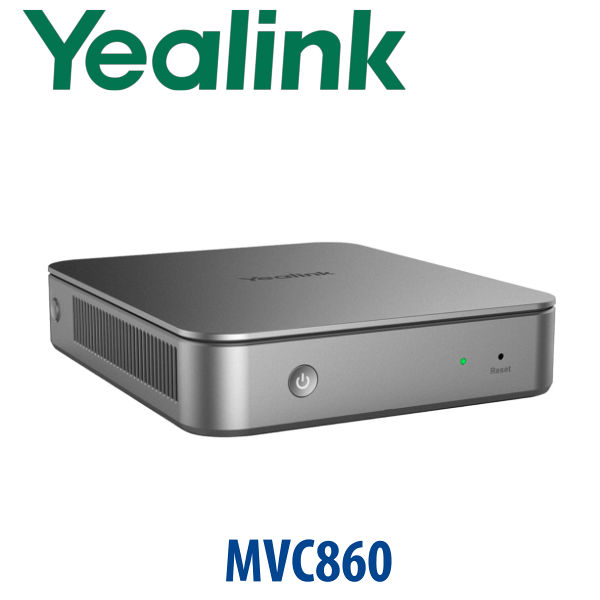
The Yealink MVC860 is built for the Dubai meeting room that has outgrown laptop-based Teams calls. Instead of balancing a webcam on a TV and hoping the far end can hear the boardroom table, the MVC860 gives you a dedicated Microsoft Teams Rooms system with the UVC86 intelligent 4K tracking camera, MCore Pro mini-PC, MTouch Plus touch controller and modular Yealink audio options. It is the right fit for medium and large rooms in DIFC, DMCC, Business Bay, JAFZA and enterprise head offices where Teams is already the daily meeting platform.
Vector Digital Systems LLC supplies the Yealink MVC860 in Dubai with project scoping, room layout advice, staging, Teams Rooms setup support and same-day quote in AED. We do not display fixed pricing because each room depends on display count, microphone layout, mounting, cabling, installation access, delivery location and whether your bundle includes wireless presentation and expanded audio.
Platform Check — Teams Room, Zoom Room or SIP Conference?
The MVC860 is not a SIP conference phone and it is not a generic USB webcam kit. It is a dedicated Microsoft Teams Rooms system for shared meeting spaces. This matters because many buyers ask for “Yealink video conference” without separating Teams Rooms, Zoom Rooms and traditional SIP conference phones. Ordering the wrong platform creates licensing, control and room-join problems.
| Your Meeting Platform | Right Yealink Range | What You Need |
|---|---|---|
| Microsoft Teams Rooms | Yealink MVC860 (this page) | Microsoft Teams Rooms licence, Microsoft 365 tenant, network access and room account |
| Zoom Rooms | Yealink Zoom Rooms range — ask David to verify the current certified kit | Zoom Rooms licence and Zoom admin setup |
| SIP / PBX audio conference | Yealink CP-series conference phones | SIP account from 3CX, Yeastar, Grandstream UCM, Asterisk or hosted PBX |
For Teams Rooms deployments, David verifies the current Microsoft certification status before quoting. The MVC860 certification was checked against Microsoft’s Teams devices list on 21 July 2026.
Certification Truth — Do Not Assume from the Model Name Alone
Teams Rooms hardware must be matched to the Microsoft certified-device list, the Teams Rooms app generation, the Windows room image and the correct room licence. The MVC860 is a Microsoft Teams Rooms system, but bundle generation matters: older MVC860 references may show MTouch II and MCore, while current MVC860-C5 bundles use MTouch Plus and MCore Pro. Vector Digital Systems checks the exact SKU, accessory bundle and certification status before quoting so the unit you receive matches your tenant and meeting room design.
Room Power & Cabling Truth
The MVC860 is a room system, not a single PoE desk phone. A successful installation needs power at the display wall or credenza, network for the MCore Pro, USB/video connections, display HDMI, camera mounting and microphone cable planning. Do not treat it like a plug-in speakerphone. For Dubai boardrooms, we confirm display locations, cable routes, table boxes, wall brackets, ceiling access and LAN availability before dispatch so installation day does not become a civil-work surprise.
Where MVC860 Sits in the Yealink MVC Range
Think of the Yealink MVC range as a room-size ladder. The MVC640 is usually the step-down choice for smaller Teams Rooms where the table is shorter and audio coverage is simpler. The MVC860 is the main medium-to-large room recommendation because the UVC86 camera suits longer tables and presenter-led meetings. The MVC900 II sits above it for larger rooms that need expanded camera and audio coverage.
| Feature | MVC640 | MVC860 ★ | MVC900 II |
|---|---|---|---|
| Room fit | Small to medium Teams Rooms | Medium and large Teams Rooms | Large and complex rooms |
| Camera | Yealink Teams Rooms camera bundle | UVC86 intelligent dual-eye 4K PTZ camera | Expanded large-room camera solution |
| Audio approach | Standard room audio | VCM35 microphones + MSpeaker II options | Expanded audio for larger room layouts |
| Touch control | MTouch controller family | MTouch Plus touch panel | MTouch controller family |
| Compute | MCore / MCore Pro generation by SKU | MCore Pro mini-PC | MCore / MCore Pro generation by SKU |
| Wireless presentation | Bundle dependent | WPP30 available in selected bundles | Bundle dependent |
| Best Dubai use case | Huddle room, manager room, small meeting room | Boardroom, training room, 8–18 person meeting space | Large boardroom, council room, enterprise conference space |
| Price tier | Lower | Mid-large room tier | Higher |
| Choose if… | Your Teams room is smaller and does not need long-table camera tracking | You need a serious Teams Rooms system for a medium or large Dubai boardroom | Your room is larger, more complex or needs higher-end coverage |
Where the MVC860 Works in Dubai
DIFC and DMCC boardrooms. Teams has become the default meeting layer for finance, legal, consulting and free-zone companies. The MVC860 gives these rooms a native join experience, proper front-of-room camera coverage and a touch controller that visitors can use without asking IT to start every call.
Business Bay and Downtown training rooms. Longer tables need better framing than a laptop camera can deliver. The UVC86 camera is designed for intelligent room capture, while the modular microphone and speaker options allow the audio design to match the seating layout instead of forcing everyone to crowd around one device.
Enterprise and government meeting spaces. When a room is used by senior management, procurement teams or visiting regional partners, the experience must be repeatable. One-touch Teams join, room-account scheduling, dual-display support and remote device management make the MVC860 a cleaner choice than ad-hoc USB devices.
JAFZA, DIP and multi-site operations. Regional operations teams often run review meetings between warehouses, branch offices and overseas suppliers. The MVC860 helps standardise the room experience across locations, while Vector Digital Systems can stage the system in Dubai before dispatch and coordinate export documentation for regional rollouts.
Full Technical Specification
| Specification | Yealink MVC860 |
|---|---|
| Product type | Microsoft Teams Rooms system for medium and large rooms |
| Certification | Microsoft Teams certified-device status checked 21 July 2026 |
| Camera | Yealink UVC86 intelligent dual-eye 4K PTZ camera |
| Camera intelligence | Auto framing, speaker tracking and presenter tracking support |
| Compute unit | MCore Pro mini-PC for Microsoft Teams Rooms on Windows |
| Touch controller | MTouch Plus touch panel for one-touch join and room control |
| Audio options | VCM35 microphones, MSpeaker II soundbar and supported Yealink room audio accessories, depending on bundle |
| Wireless presentation | WPP30 wireless presentation pod available in selected MVC860 bundles |
| Display support | Single and dual display meeting room layouts supported |
| Room sensor | RoomSensor included in selected MVC860 bundles |
| Room size | Medium and large meeting rooms, boardrooms and training rooms |
| Platform requirement | Microsoft Teams Rooms licence, Microsoft 365 tenant and room account |
| Management | Microsoft Teams Admin Center and Yealink device management tools, depending on tenant policy |
| Typical deployment | Front-of-room display wall, camera mounting, touch panel at table, microphones positioned to suit seating layout |
| Dubai quote includes | VAT breakdown, delivery charge, bundle confirmation, staging scope and installation planning notes |
Compatible Accessories and Bundle Options
| Accessory / Component | Model | Purpose |
|---|---|---|
| Camera | UVC86 | Dual-eye 4K PTZ camera for intelligent tracking in longer rooms |
| Mini-PC | MCore Pro | Microsoft Teams Rooms compute unit for Windows-based room deployment |
| Touch controller | MTouch Plus | Table controller for one-touch join, calendar meetings and room controls |
| Microphones | VCM35 | Table microphone coverage for medium and large rooms; quantity depends on room layout |
| Speaker | MSpeaker II | Front-of-room soundbar for clearer meeting audio playback |
| Wireless presentation | WPP30 | Wireless content sharing for users who present from laptops; availability depends on bundle and region |
| Room sensor | RoomSensor | Room occupancy and environmental accessory in selected bundles |
Staging and Deployment Support Before Delivery
Every Yealink MVC860 order from Vector Digital Systems is scoped before dispatch. We confirm your Teams Rooms licence plan, room account readiness, single or dual display requirement, camera mounting position, microphone count, LAN point, power availability, cable path, table controller location and wireless presentation requirement. For Dubai projects, we can stage the kit with the correct bundle components, label cables, prepare deployment notes and coordinate with your Microsoft 365 administrator so the room is ready for a clean handover.
For larger projects, Vector Digital Systems can also standardise multiple Teams Rooms across branches: boardroom, training room, CEO room and multi-purpose meeting room. That means the same naming logic, room-account checklist, display layout and user experience across the organisation instead of every room becoming a different IT experiment.
Export from Dubai
Vector Digital Systems exports Yealink MVC860 room systems from Dubai to system integrators, corporate IT teams, hotel groups, telecom operators, banking branch networks and government project contractors. Common export routes include Oman, Saudi Arabia, Kuwait, Bahrain and Qatar in the Gulf; Jordan and Egypt in the wider region; Kenya, Tanzania and Nigeria for African deployments; and Pakistan, Sri Lanka and Bangladesh for South Asian projects. Shipments move FOB Dubai with commercial invoice, packing list and certificate of origin on request. Ask David for project pricing, lead time, bundle confirmation and export packing details.
Get a same-day MVC860 quote in AED
Send David your room size, table shape, number of seats, display count, Microsoft Teams Rooms licence status and whether you need installation. We quote the correct MVC860 bundle with VAT breakdown, delivery and staging scope included.
Frequently Asked Questions — Yealink MVC860
Does the Yealink MVC860 work with Microsoft Teams?
Yes — the Yealink MVC860 is a Microsoft Teams Rooms system for medium and large meeting rooms. Vector Digital Systems checks the exact SKU and certification status before quoting; MVC860 certification was checked against Microsoft’s Teams devices list on 21 July 2026.
Do I need a Microsoft Teams Rooms licence for the MVC860?
Yes. The MVC860 is designed for Microsoft Teams Rooms, so your organisation needs a Microsoft Teams Rooms licence, a room account in Microsoft 365 and the correct Teams admin configuration. Vector Digital Systems can help your IT team confirm the readiness checklist before delivery.
What room size is the Yealink MVC860 designed for?
The MVC860 is designed for medium and large meeting rooms, including Dubai boardrooms, training rooms and long-table conference rooms. For smaller huddle rooms, ask David about a lower-tier Yealink MVC or A-series room system. For very large or complex rooms, the MVC900 II tier may be a better fit.
MVC640 vs MVC860 — which one should I buy?
Choose the MVC640 for smaller Teams Rooms where the table is shorter and audio coverage is simpler. Choose the MVC860 when you need UVC86 intelligent 4K camera coverage, stronger room audio options and a more serious medium-to-large room deployment. For larger rooms with more complex coverage requirements, ask David about the MVC900 II tier.
Can the Yealink MVC860 be used for Zoom meetings?
The MVC860 is sold as a Microsoft Teams Rooms system. If your organisation is standardised on Zoom Rooms, do not assume the same kit is the right purchase. Ask David to verify the current Zoom-certified Yealink room system and match the hardware to your Zoom Rooms licence.
What is included in the Yealink MVC860 bundle?
The current MVC860 bundle typically centres on the UVC86 4K intelligent tracking camera, MCore Pro mini-PC and MTouch Plus touch panel. Depending on the SKU, it can also include VCM35 microphones, MSpeaker II, RoomSensor and WPP30 wireless presentation. Vector Digital Systems confirms the exact package contents before quoting.
Does Vector Digital Systems install or stage the MVC860 before delivery?
Yes. Vector Digital Systems scopes the room before dispatch, confirms licence readiness, checks display count, plans camera and microphone placement, prepares cable notes and coordinates the deployment checklist with your IT administrator. For Dubai projects, delivery, VAT and staging scope are included in the quote.
Who is the authorised Yealink supplier in Dubai?
Vector Digital Systems LLC has supplied Yealink solutions in Dubai since 2009. David is the Yealink specialist for room systems, desk phones, headsets and project quotes. Warranty handling, staging and local support are managed in Dubai, so customers do not need to manage overseas courier claims.
What is the best Yealink Teams Rooms system for a Dubai boardroom?
For most medium and large Dubai boardrooms, the MVC860 is the practical recommendation because it combines UVC86 intelligent camera tracking with Microsoft Teams Rooms control and modular audio options. For a smaller room, use a lower-tier MVC or A-series system. For a larger executive boardroom or council-style room, step up to the MVC900 II tier.
Does Vector Digital Systems export Yealink MVC860 systems from Dubai?
Yes. Vector Digital Systems exports Yealink MVC860 systems from Dubai to Oman, Saudi Arabia, Kuwait, Bahrain, Qatar, Jordan, Egypt, Kenya, Tanzania, Nigeria, Pakistan and Sri Lanka. Export shipments are quoted FOB Dubai with commercial invoice, packing list and certificate of origin on request.