Description
Yealink MVC S40 Microsoft Teams Rooms SmartVision 40 AI Room System Dubai
Turn a Dubai Meeting Room into a Native Microsoft Teams Room
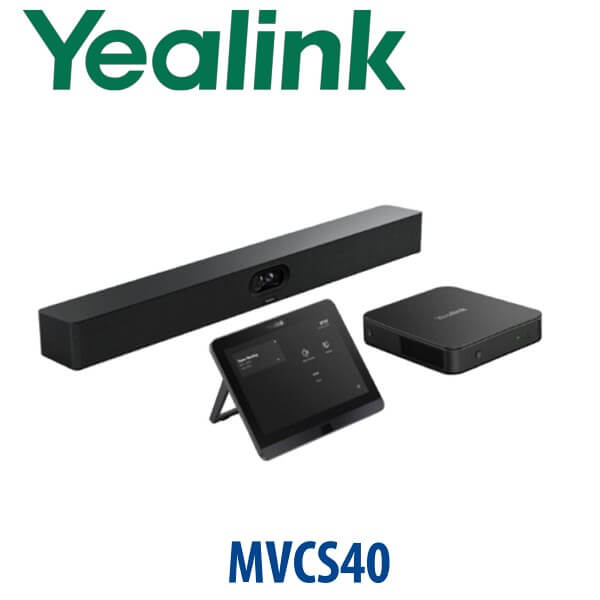
The Yealink MVC S40 is a Microsoft Teams Rooms on Windows system built for small to medium meeting rooms that need more than a webcam on a laptop. It combines the SmartVision 40 all-in-one audio/video bar, MCore 4 mini-PC, MTouch Plus touch console and RoomSensor into a clean Teams Rooms package for boardrooms, huddle rooms, director cabins, project rooms and hybrid meeting spaces across Dubai. Vector Digital Systems supplies the MVC S40 in Dubai with staging included: Teams Rooms account setup guidance, device pairing, firmware check, camera/audio test, room handover and same-day quote in AED.
Microsoft Teams Rooms Certification — Verified Before Writing
This is not a generic USB video bar. The Yealink MVC S40 is a dedicated Microsoft Teams Rooms system. Microsoft certification was checked on 15 July 2026 against Microsoft’s official Teams Rooms certified hardware list, where Yealink MVC S40 and Yealink MVC S40-C5U are listed under Teams Rooms on Windows systems. For Dubai IT teams, this matters: certified Teams Rooms hardware gives the meeting room a native Teams interface, one-touch join, Teams Admin Center management and a supported room-device path.
| Your Meeting Platform | Right Yealink Device | What You Need |
|---|---|---|
| Microsoft Teams Rooms | Yealink MVC S40 / MVC S40-C5U (this page) | Microsoft Teams Rooms licence, Microsoft 365 tenant, wired network and room display |
| Zoom Rooms | Zoom-certified Yealink room system — verify current model before ordering | Zoom Rooms licence, room display and supported Zoom device package |
| SIP / PBX audio room | Yealink CP-series conference phone or SIP room device — not MVC S40 | SIP credentials from 3CX, Yeastar, Grandstream UCM or hosted PBX |
The buyer trap is platform confusion. MVC S40 is for Microsoft Teams Rooms, not SIP PBX registration and not a standard Zoom Rooms SKU unless a specific Zoom-certified package is verified. Tell David your platform before quoting and Vector Digital Systems will route you to the correct Yealink room solution.
Power and Network Truth — Plan the Room Before Delivery
The MVC S40 is a room system, not a single desk phone. The kit requires a wired network environment, a room display with HDMI input, power for the room components and a Teams Rooms account. The room display, HDMI cabling beyond the standard kit, Ethernet cabling and any extra PoE infrastructure are normally part of the room installation scope, not assumptions inside the product box. Vector Digital Systems confirms the room layout, display position, table position, network point and power sockets before dispatch so the system can be installed without last-minute cable surprises.
What Makes the SmartVision 40 Different?
The SmartVision 40 is the heart of the MVC S40 package. It uses a dual-camera design with 2× 48MP cameras and a wide 120° field of view to capture everyone at the table. The same bar includes an 8 MEMS beamforming microphone array, 6m pickup range, 2× stereo speakers, AI-enhanced noise cancellation, reverberation suppression and an automatic lens privacy cover. In real meeting rooms, that means fewer tabletop devices, cleaner cable paths and a much better experience for remote Teams participants.
Current C5U Package Context
Earlier MVC S40 packages used MCore Pro and MTouch E2. The current MVC S40-C5U package moves the room forward with MCore 4, MTouch Plus and RoomSensor. For new Dubai projects, Vector Digital Systems quotes the current package unless you are matching an older installed fleet. If you already have an MVC S40-C4 room and want to standardise new rooms, ask David to confirm whether you need same-generation matching or the newer C5U package.
Yealink Room System Comparison — Where MVC S40 Fits
| Feature | MeetingBar A40 | MVC S40 ★ | MVC640 |
|---|---|---|---|
| Best room fit | Small rooms that need a compact all-in-one bar | Small to medium Teams Rooms needing Windows-based MTR | Medium meeting rooms needing separate camera/audio flexibility |
| Camera | Integrated room camera | SmartVision 40 dual 48MP camera system | Separate UVC-series room camera package |
| Audio | Built-in bar audio | 8 MEMS mic array, 6m pickup, 2× stereo speakers | Separate speakerphone / room audio options |
| Compute | Appliance-style room solution | MCore 4 Windows Teams Rooms mini-PC | Windows Teams Rooms mini-PC package |
| Touch control | Touch panel depending on bundle | MTouch Plus 11.6″ touch console | MTouch room console package |
| Platform | Teams or Zoom variant must be verified | Microsoft Teams Rooms on Windows | Microsoft Teams Rooms on Windows |
| Expansion | Limited to smaller room layouts | Supports additional audio devices for larger spaces | Better for multi-device medium-room layouts |
| Replaces / upgrades | Laptop webcam huddle setup | Older MVC400-style small Teams Rooms or DIY meeting rooms | Older medium-room MVC deployments |
| Price tier | Lower | Mid | Higher |
| Choose if… | You want the simplest compact video bar room | You want a native Windows Teams Room with AI camera, touch control and room sensor | You need a larger medium-room system with more separated room hardware |
Where the MVC S40 Works in Dubai
DIFC and Business Bay meeting rooms. Hybrid meetings are now the default for finance, legal, consulting and regional HQ teams. The MVC S40 gives a small to medium room a native Teams Rooms interface instead of relying on whoever brought the laptop. Users walk in, tap join on MTouch Plus and start the meeting with consistent camera, microphone and speaker quality.
DMCC, JLT and free-zone director cabins. Many Dubai offices have glass meeting rooms where a traditional PTZ camera is too much hardware and a USB webcam is not enough. SmartVision 40 keeps the installation clean: one main front-of-room bar with dual cameras, microphone array, speakers and privacy shutter built in.
SME boardrooms after return-to-office. Companies in Al Barsha, Deira, Garhoud and Dubai Silicon Oasis are upgrading from laptop-on-table meetings to permanent Teams Rooms. The MVC S40 is a strong fit when the room seats 4–10 people, has one front display and needs a professional Microsoft Teams experience without designing a full AV rack.
Training, project and vendor rooms. Construction firms, logistics companies and system integrators use Teams for consultant calls, supplier meetings and project updates. The 120° camera view and 6m pickup range help include everyone in the room, while noise cancellation and reverberation suppression help when the room has glass walls, hard flooring or open-plan office noise outside.
Full Technical Specifications
| Specification | Yealink MVC S40 / MVC S40-C5U |
|---|---|
| Room Type | Small to medium Microsoft Teams Rooms |
| Platform | Microsoft Teams Rooms on Windows |
| Certification | Microsoft Teams Rooms certification verified on 15 July 2026 against Microsoft’s official list |
| Main A/V Device | Yealink SmartVision 40 all-in-one audio/video bar |
| Camera | Dual-camera system, 2× 48MP |
| Field of View | 120° diagonal field of view |
| AI Video Features | IntelliFocus, Multi-stream IntelliFrame support, Video Fence, virtual background and meeting equity features |
| Privacy | Automatic electric lens privacy cover |
| Microphones | Built-in 8 MEMS beamforming microphone array |
| Voice Pickup | Up to 6m voice pickup range |
| Speakers | 2× built-in stereo speakers |
| Audio Processing | AI-enhanced noise cancellation and reverberation suppression |
| Room PC | MCore 4 mini-PC with Intel Core Ultra 5 and built-in NPU |
| AI Compute | Up to 34 TOPS AI processing power |
| Memory / Storage | 16GB DDR5 RAM, 256GB SSD |
| Video Outputs | 3× HDMI video output with CEC support |
| Content Input | HDMI-in for 4K content sharing; MTouch Plus supports HDMI/USB-C video input and wireless content sharing with WPP30 |
| USB Ports | 4× USB 3.0 on MCore 4 |
| Touch Console | MTouch Plus 11.6″ IPS touch panel, 1920×1080 resolution |
| Room Sensor | Yealink RoomSensor included in MVC S40-C5U package |
| Additional Audio | Supports compatible expansion microphones and selected Yealink audio accessories; confirm exact room design before order |
| Required But Not Included | Room display, Teams Rooms licence, Microsoft tenant, wired network, room cabling and installation accessories as required |
Compatible Accessories and Room Add-ons
| Accessory / Add-on | Use | VDS Note |
|---|---|---|
| WPP30 Wireless Presentation Pod | Wireless content sharing from a laptop | Add when users frequently present from guest laptops |
| Expansion Microphones | Extend pickup in longer meeting rooms | Confirm compatible microphone model and room layout before quoting |
| MVC-BYOD Extender | Lets users connect their laptop to use room camera/audio in BYOD meetings | Useful where Teams Rooms is primary but Zoom, Webex or Google Meet calls still happen |
| Second Touch Console | Additional room control point for larger tables or room layouts | Recommended only after layout review |
| Wall / TV / Table Mounting | Mounts SmartVision 40, MCore 4 and room console cleanly | Vector Digital Systems checks display height, table distance and cable route before dispatch |
Staging Before Dispatch — What Vector Digital Systems Configures
Vector Digital Systems stages the Yealink MVC S40 before delivery wherever tenant access and project scope allow. The staging process includes firmware and device package check, MCore 4 preparation, MTouch Plus pairing, SmartVision 40 camera/audio verification, RoomSensor check, Teams Rooms sign-in guidance, display output test, content-sharing test and a live room call test where possible. For Dubai installations, we also label room cabling, confirm Teams Rooms licence readiness with your IT team and document what must be available on site: display, network, power, Teams account and meeting-room calendar.
Export from Dubai
Vector Digital Systems exports Yealink Microsoft Teams Rooms systems from Dubai to system integrators, AV installers, enterprise IT teams and hotel groups across the region. Common export routes include Oman, Saudi Arabia, Kuwait, Bahrain and Qatar in the Gulf; Jordan and Egypt for regional office projects; Kenya, Tanzania and Nigeria for enterprise rollouts; and Pakistan, Sri Lanka and Bangladesh for integrator deployments. Shipments are quoted FOB Dubai with commercial invoice, packing list and certificate of origin on request. For export buyers, David can quote the MVC S40 with optional accessories, staging notes and room-design assumptions so the receiving installer knows exactly what must be prepared on site.
Get a same-day quote in AED for Yealink MVC S40
Tell David your room size, number of seats, display count, Microsoft Teams Rooms licence status, network point location and whether you need wireless presentation or BYOD support. Vector Digital Systems quotes with VAT breakdown, delivery and staging scope included.
Frequently Asked Questions — Yealink MVC S40
Is the Yealink MVC S40 Microsoft Teams certified?
Yes. Microsoft Teams Rooms certification was verified on 15 July 2026 against Microsoft’s official certified hardware list, where Yealink MVC S40 and Yealink MVC S40-C5U are listed under Teams Rooms on Windows systems. Vector Digital Systems still checks the current certification status before quoting large projects, because Microsoft certification lists can change over time.
What is included in the Yealink MVC S40-C5U package?
The current MVC S40-C5U package includes the Yealink MCore 4 mini-PC, MTouch Plus 11.6-inch touch console, SmartVision 40 all-in-one audio/video bar and RoomSensor. The room display, Teams Rooms licence, Microsoft tenant, wired network, room cabling and installation accessories are project requirements and should be confirmed before delivery.
What room size is the Yealink MVC S40 designed for?
The MVC S40 is designed for small to medium meeting rooms. It is a strong fit for 4–10 seat rooms, director cabins, huddle rooms and compact boardrooms where the 120° camera view and 6m microphone pickup range can cover the table clearly. For larger rooms, David may recommend MVC640, MVC860 or a custom Yealink AVHub-based room design.
Does the MVC S40 work with Zoom or SIP PBX systems?
The MVC S40 is a Microsoft Teams Rooms on Windows system. Do not buy it as a SIP conference phone for 3CX, Yeastar or Grandstream UCM. For Zoom Rooms, ask David to verify the current Zoom-certified Yealink room package before ordering. For SIP audio rooms, Vector Digital Systems can quote Yealink CP-series conference phones instead.
Yealink MVC S40 vs MVC640 — which one should I buy?
Choose MVC S40 for a small to medium Teams Room where you want one clean front-of-room SmartVision 40 bar with built-in camera, microphones and speakers. Choose MVC640 when the room is larger, the camera/audio devices need to be separated, or the layout requires more flexible medium-room hardware. David can size the room from a photo, seat count and display-wall distance.
Does the MVC S40 need a Microsoft Teams Rooms licence?
Yes. The MVC S40 is a room system and requires a Microsoft Teams Rooms licence assigned to the room account, plus a Microsoft 365 tenant and room calendar. Vector Digital Systems can stage the hardware and guide your IT team, but the tenant, licence and admin permissions must be ready from your Microsoft environment.
Can the MVC S40 support extra microphones or larger room audio?
Yes, the MVC S40 supports compatible additional audio devices for larger meeting spaces, including selected Yealink expansion microphones and room audio accessories. Because audio coverage depends on table length, ceiling height, glass walls and room acoustics, Vector Digital Systems verifies the exact accessory model and layout before quoting.
Does Vector Digital Systems configure the MVC S40 before delivery?
Yes. Vector Digital Systems stages the MVC S40 before dispatch where project access allows: firmware check, device pairing, MTouch Plus setup, SmartVision 40 camera and audio test, RoomSensor check, content-sharing test and Teams Rooms sign-in guidance. For Dubai installations, we also confirm display, network and power requirements before delivery.
Who is the Yealink authorised supplier in Dubai?
Vector Digital Systems LLC has supplied and integrated Yealink solutions in Dubai since 2009. David handles Yealink product specification, room-system sizing, project pricing, staging and local warranty coordination. Buying through Vector Digital Systems means your Teams Room is specified for the room, not just sold as a box.
What is the best Yealink Teams Rooms system for a small boardroom in Dubai?
For a small to medium Teams boardroom, the Yealink MVC S40 is the standard recommendation because SmartVision 40 combines dual 48MP cameras, microphones, speakers and AI framing in one clean front-of-room device. For very small rooms, MeetingBar A40 may be enough. For larger medium rooms, MVC640 or MVC860 may be the better fit.
Does Vector Digital Systems export Yealink MVC S40 systems from Dubai?
Yes. Vector Digital Systems exports Yealink Teams Rooms systems from Dubai to AV installers, system integrators and enterprise IT teams in Oman, Saudi Arabia, Kuwait, Bahrain, Qatar, Jordan, Egypt, Kenya, Nigeria and Pakistan. Shipments are quoted FOB Dubai with commercial invoice, packing list and certificate of origin on request.