Description
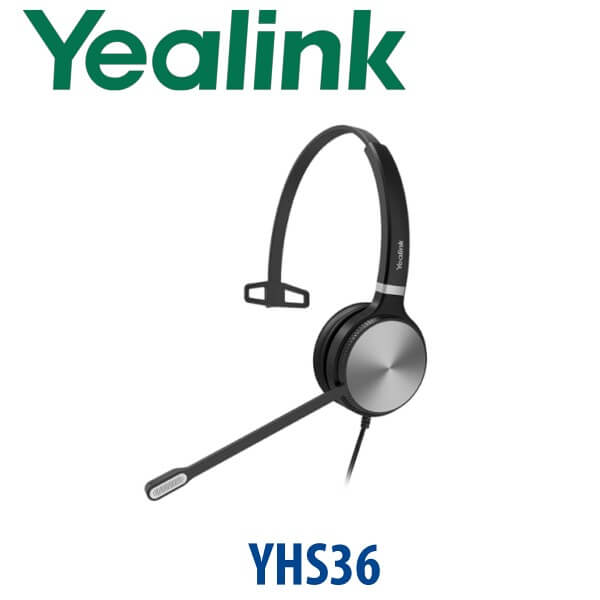
Yealink YHS36 Mono Headset RJ9 Wired Headset for Yealink IP Phones Dubai
Yealink YHS36 Mono — The Simple Wired Headset for Yealink Desk Phones
The Yealink YHS36 Mono is the headset to order when the desk already has a Yealink IP phone and the user needs a reliable, low-maintenance way to take calls hands-free. It connects by QD-to-RJ9 cable, so there is no Bluetooth pairing, no USB driver, no charging routine, and no battery to manage across a call-centre floor. For Dubai reception desks, sales teams, support agents, clinic counters, warehouse offices, and branch staff who spend the day answering calls on Yealink desk phones, the YHS36 Mono keeps the setup simple: plug it into the phone’s headset port, set the headset volume, and start calling.
Vector Digital Systems supplies the YHS36 Mono in Dubai with same-day quote in AED, VAT breakdown and delivery charges included in the quote, and compatibility checked against your existing Yealink phone model before dispatch.
Headset Compatibility — Desk Phone, Teams or Laptop?
The YHS36 Mono is an RJ9 wired headset made primarily for Yealink desk phones. It is not a USB headset for direct laptop use, and it is not the right product if the user wants Bluetooth mobility or a Teams-certified headset for PC softphone calls. This is the buyer trap: the YHS36 looks like a call-centre headset, but its cable is designed for the headset port on compatible Yealink phones.
| Your Calling Setup | Right Headset Choice | What to Check Before Ordering |
|---|---|---|
| Yealink desk phone with RJ9 headset port | YHS36 Mono (this page) | Confirm the phone model and headset-port support |
| Microsoft Teams on laptop or PC | Yealink USB, Bluetooth or DECT Teams headset — ask David to verify certification status | Teams client, PC connection type, and certified-device requirement |
| Hybrid desk phone + laptop user | Yealink BH or WH range may be a better fit | Whether the user needs one headset across phone, laptop and mobile |
Tell David the phone model printed on the front of the Yealink device — for example T31P, T33G, T43U, T46U, T53W, T74U or T77U — and we confirm the right headset before quoting.
No Charger, No Pairing, No Battery Management
The YHS36 Mono is a wired headset, so it does not need a power adapter or charging dock. It receives audio through the Yealink phone’s headset port using the included QD-to-RJ9 cable. For call centres and reception desks, that matters: there are no dead batteries at shift change, no Bluetooth interference, and no device-pairing mistakes. The user can disconnect at the Quick Disconnect point, step away from the desk, and reconnect without removing the headset from the phone.
Mono vs Dual — Keep One Ear Open or Block More Noise?
The YHS36 family is available in Mono and Dual versions. Choose the YHS36 Mono when the user still needs to hear colleagues, visitors, room announcements, delivery drivers, or a manager nearby. That makes it a practical fit for Dubai reception counters, clinic registration desks, retail back offices, warehouse dispatch desks, and small support teams. Choose the Dual version when the user needs more isolation in a louder call-centre environment.
YHS36 Mono in the Yealink Headset Range — Where It Sits
The YHS36 Mono sits in the wired RJ9 headset family: above the older/basic RJ-style headset choice, below USB and wireless models, and focused on Yealink desk phone users rather than laptop-first Teams users. It is the practical volume headset for offices that want dependable voice quality and simple deployment at many desks.
| Feature | YHS34 Mono | YHS36 Mono ★ | YHS36 Dual |
|---|---|---|---|
| Wearing Style | Mono | Mono | Dual ear |
| Connection | RJ9 / QD-style wired | QD to RJ9 wired | QD to RJ9 wired |
| Best Use | Basic desk-phone calling | Reception, support, sales and branch users | Louder call-centre rows |
| Desk Awareness | Keeps one ear open | Keeps one ear open | More isolated |
| Microphone | Call-focused boom mic | Noise-cancelling boom mic | Noise-cancelling boom mic |
| Phone Compatibility | Yealink desk phones | Yealink desk phones, broad T/MP support | Yealink desk phones, broad T/MP support |
| Laptop / USB Use | No | No — RJ9 desk-phone headset | No — RJ9 desk-phone headset |
| Price Tier | Entry | Best-value volume headset | Step-up for noisy floors |
| Choose if… | You need the lowest-cost wired Yealink headset | You want a reliable one-ear RJ9 headset for Yealink desk-phone users | The agent needs both ears covered in a louder call-centre area |
Where the YHS36 Mono Works in Dubai
Reception and front desk counters. Hotels in Deira and Business Bay, clinics in Jumeirah and Al Barsha, and office receptions in DIFC often need staff to speak to visitors while still answering calls. The mono design keeps one ear open, while the noise-cancelling microphone helps the caller hear the receptionist clearly.
Sales and customer support teams. For teams using Yealink T31, T33, T43, T46, T53, T74 or T77 desk phones, the YHS36 Mono gives hands-free calling without moving to a wireless headset budget. It is a sensible volume purchase for branch offices, telesales teams and service desks where users sit at assigned phones.
Warehouse and dispatch offices. In Jebel Ali, DIP and Al Quoz, dispatch staff often need to hear supervisors, drivers and radio calls around them. A mono wired headset is safer and more practical than a dual-ear headset when the phone user must stay aware of the room.
Training desks and temporary seats. Wired RJ9 headsets are easy to label, issue, collect and redeploy. There is no charging base to track and no Bluetooth pairing history to clear when a desk changes user.
Full Technical Specifications
| Specification | Yealink YHS36 Mono |
|---|---|
| Product Type | Professional analog wired headset for Yealink desk phones |
| Wearing Style | Over-the-head, monaural / mono, one-ear design |
| Connection | QD headset cable to RJ9 phone connector |
| Plug and Play | Yes — designed to connect directly to compatible Yealink desk phones |
| Speaker Performance | HD Voice / wideband speaker performance |
| Speaker Frequency Response | 20 Hz – 20 kHz |
| Speaker Impedance | 32Ω ± 4.8Ω at 1.0 kHz |
| Microphone | Noise-cancelling microphone with wideband microphone performance |
| Microphone Frequency Response | 100 Hz – 14 kHz |
| Boom Arm | 300° bendable boom arm for left or right positioning |
| Hearing Protection | ActiveProtection technology helps protect users from acoustic injury |
| Passive Noise Reduction | Yes — ear cushion and headset design reduce surrounding noise at the ear |
| Headset Cable Length | Approx. 0.9 m headset cable |
| QD to RJ9 Cable Length | Approx. 1.2 m QD-to-RJ9 cable |
| Weight | Approx. 81 g for Mono version |
| Colour | Black |
| Operating Temperature | -10°C to 50°C |
| Package Contents | YHS36 Mono headset, QD-to-RJ9 cable, quick start guide |
| Compatible Phone Families | Compatible with many Yealink enterprise IP phones including T7, T5, T4, T3, VP and MP families — exact model checked before quote |
Compatible Yealink Phones and Accessories
| Item | Model / Family | Purpose |
|---|---|---|
| Current T7 Desk Phones | T73U, T73W, T74U, T74W, T77U | RJ9 headset connection for current Yealink SIP desk-phone deployments |
| Common T3 Entry Phones | T31, T31P, T31G, T33P, T33G and related models | Branch desks, reception counters and cost-sensitive volume deployments |
| Legacy T4 / T5 Phones | T43U, T46U, T48U, T53, T53W, T54W, T57W and selected earlier models | Useful when adding headsets to existing Yealink fleets before a T7 refresh |
| Teams / Zoom Desk Phones | Selected MP-series phones | RJ9 phone-headset use where the MP phone model supports it; certification status is verified separately when needed |
| Replacement / Spare Cable | QD-to-RJ9 cable | For support floors that keep spare cables for fast swap-outs |
Related Yealink pages to publish or link when live: Yealink YHS34 Mono, Yealink YHS36 Dual, Yealink T74U, Yealink T73U, Yealink T77U, Yealink BH72, Yealink WH62, Yealink WH66 and the Yealink headset range overview. Links should be added only when the registry marks those pages live.
Staging Before Dispatch — What We Check
For headset orders, Vector Digital Systems checks the Yealink desk phone model, confirms RJ9 headset compatibility, verifies whether the user needs Mono or Dual, and labels bulk orders by department or branch when requested. For phone-plus-headset bundles, we can stage the phone before dispatch with SIP registration, provisioning template, BLF and speed-dial keys, dial-plan test, and headset audio test. The desk receives a working Yealink phone and headset setup instead of a box of parts.
Export from Dubai
Vector Digital Systems exports Yealink YHS36 Mono headsets from Dubai to system integrators, telecom installers, call-centre operators and enterprise procurement teams. Common export routes include Oman, Saudi Arabia, Kuwait, Bahrain and Qatar in the Gulf; Jordan and Lebanon where permitted in the Levant; Kenya, Tanzania and Uganda in East Africa; and Pakistan, Sri Lanka and Bangladesh in South Asia. Shipments are quoted FOB Dubai with commercial invoice, packing list and certificate of origin on request. Multi-unit project pricing is available for headset rollouts of 5+ units, especially when bundled with Yealink desk phones.
Get a same-day quote in AED — Yealink YHS36 Mono in Dubai
Tell David the Yealink phone model, quantity, Mono or Dual preference, and delivery location. We quote with VAT breakdown and delivery included, and we confirm compatibility before dispatch.
Frequently Asked Questions — Yealink YHS36 Mono
Does the Yealink YHS36 Mono work with Microsoft Teams?
The YHS36 Mono is an RJ9 wired headset for compatible Yealink desk phones. It is not a USB headset for direct laptop Teams calls, and it should not be treated as a Teams-certified PC headset unless certification is separately verified. If your users work mainly in Microsoft Teams on a laptop, ask David for a current Yealink Teams headset option with certification status checked before quote.
Will the YHS36 Mono work with my Yealink T74U, T73U, T77U or older T46U phone?
Yes, the YHS36 Mono is designed for Yealink desk phones with RJ9 headset support, including current T7 models and many legacy T4 and T5 phones. Vector Digital Systems checks the exact phone model before dispatch so the headset matches your desk-phone fleet.
Does the YHS36 Mono need a power adapter, charging dock or battery?
No. The YHS36 Mono is a wired RJ9 headset, so it does not need a charger, charging dock or battery. It connects to the Yealink phone using the included QD-to-RJ9 cable and is ready for use once the phone’s headset mode is enabled.
YHS36 Mono vs YHS36 Dual — which one should I buy?
Choose the YHS36 Mono when the user needs one ear open to hear colleagues, visitors or supervisors nearby. Choose the YHS36 Dual when the user works in a louder call-centre area and needs both ears covered for more focus. For most reception, sales and branch desks in Dubai, the Mono version is the practical first choice.
Can I use the YHS36 Mono directly with my laptop or mobile phone?
No. The YHS36 Mono is not a USB or Bluetooth headset. It uses a QD-to-RJ9 cable for compatible Yealink desk phones. For laptop, mobile or hybrid desk-phone use, ask David about Yealink USB, Bluetooth or DECT headset options such as the UH, BH or WH ranges.
Does the YHS36 Mono have a noise-cancelling microphone?
Yes. The YHS36 Mono uses a noise-cancelling boom microphone to reduce surrounding office noise so the caller hears the agent more clearly. It also uses passive noise reduction at the ear and ActiveProtection technology to help protect users from acoustic injury.
What is the best Yealink headset for a reception desk in Dubai?
For a Yealink desk-phone reception user, the YHS36 Mono is the best-value wired choice because it keeps one ear open, has a noise-cancelling microphone, and avoids charging or pairing issues. If the reception area is very noisy, step up to the YHS36 Dual. If the user needs to walk around, choose a Yealink wireless WH headset instead.
Who is the authorised Yealink supplier in Dubai?
Vector Digital Systems LLC has supplied and integrated Yealink solutions in Dubai since 2009. David handles Yealink headset and phone selection, compatibility checks, project pricing, staging and local warranty support before dispatch.
Does Vector Digital Systems configure Yealink phones before delivering headsets?
Yes. When the YHS36 Mono is supplied with Yealink phones, Vector Digital Systems can stage the phone before dispatch with SIP registration, provisioning template, BLF and speed-dial setup, dial-plan test and headset audio test. The user receives a ready-to-use phone and headset setup.
Does Vector Digital Systems export Yealink YHS36 Mono headsets from Dubai?
Yes. Vector Digital Systems exports Yealink headsets and phone bundles from Dubai to integrators and enterprise buyers in Oman, Saudi Arabia, Kuwait, Bahrain, Qatar, Jordan, Kenya, Tanzania, Uganda, Pakistan, Sri Lanka and Bangladesh. Exports are quoted FOB Dubai with commercial invoice, packing list and certificate of origin on request.