Description
Yealink WH66 Dual Teams Microsoft Teams Certified DECT Wireless Headset Workstation Dubai
One Headset Workstation for Microsoft Teams, Desk Phone and Mobile
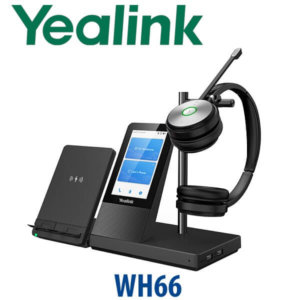
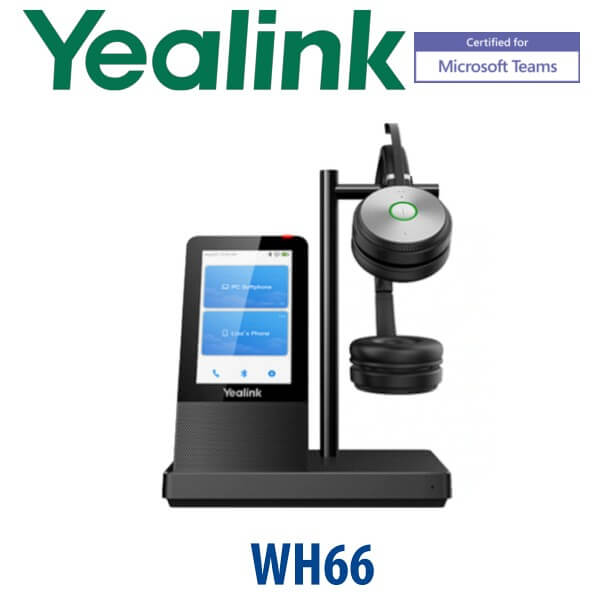
The Yealink WH66 Dual Teams is built for the Dubai user who spends the whole day moving between Microsoft Teams calls, desk phone calls and mobile conversations. Instead of a basic USB headset, the WH66 gives you a dual-ear DECT wireless headset, a 4-inch touch-screen workstation base, Bluetooth mobile pairing, speakerphone mode, USB hub functionality and Teams call control from one desk device. It is a strong fit for managers, reception supervisors, hybrid workers, call-centre leads and anyone who needs focused audio without being tied to the laptop.
Vector Digital Systems supplies the Yealink WH66 Dual Teams in Dubai with same-day quote in AED, VAT and delivery clearly noted, and compatibility checked before dispatch. For Microsoft Teams offices in DIFC, DMCC, Business Bay, JLT, Dubai Internet City and Abu Dhabi branch offices, this is the premium headset option when a simple USB headset is not enough.
Platform Table — Teams Headset, UC Variant or SIP Desk Phone?
The WH66 family is sold in Teams and UC variants. This page is for the Yealink WH66 Dual Teams, the Microsoft Teams-certified version with Teams button behaviour. If your users do not run Teams, ask David to quote the UC variant instead. If the requirement is a complete desk phone, not a headset, choose the Yealink SIP or MP-series phone range.
| Your Platform | Right Device | What You Need |
|---|---|---|
| Microsoft Teams | WH66 Dual Teams — this page | Teams desktop client, Microsoft 365 account and USB connection to the PC |
| General UC softphones | WH66 Dual UC variant — ask David before ordering | Softphone compatibility check and Yealink USB Connect configuration |
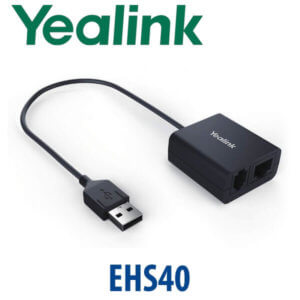
| SIP desk phone calling | WH66 with compatible Yealink IP phone, or a Yealink SIP desk phone | Compatible Yealink phone and correct USB/EHS setup confirmed before dispatch |
| Zoom Phone / Zoom meetings | Verify certification status before quoting | Zoom client and compatibility confirmation for your user workflow |
Teams Certification Check — Verified Before Writing
The Yealink WH66 Dual appears on Microsoft’s official Teams enabled devices listing as a Teams headset/workstation. Certification was checked on 17 July 2026 before this page was written. This matters because “Teams compatible” and “Teams certified” are not the same thing. For enterprise Dubai rollouts, especially where IT procurement asks for approved Teams devices, Vector Digital Systems verifies certification status before quoting instead of relying on old reseller descriptions.
Power Truth — This Is Not a PoE Desk Phone
The WH66 Dual Teams is a powered headset workstation, not a PoE desk phone. Unlike Yealink desk phones, it uses its workstation base and power adapter rather than drawing PoE from a network switch. The practical buyer check is different: confirm the user has a PC USB connection, desk space for the touch-screen base, and the correct cable path to any Yealink desk phone. Vector Digital Systems checks this before delivery so the headset is ready for the actual desk layout.
Why WH66 Dual Teams Instead of a Basic USB Headset?
A basic USB headset is fine for a light user. The WH66 Dual Teams is for people whose desk is their communication hub. The DECT wireless link gives freedom to move away from the laptop, the dual-ear wearing style helps block office distraction, the base screen keeps call control visible, and the speakerphone mode handles quick hands-free conversations. The workstation also reduces desktop clutter by combining Teams call control, headset charging, mobile Bluetooth connection and USB hub features into one device.
WH66 Dual Teams in the Yealink Headset Range
The WH66 Dual Teams sits above the simpler WH64-style headset experience and below larger premium headset/workstation choices such as WH68 for users who need the highest headset tier. Choose it when the user wants a dual-ear Teams-certified DECT headset with a proper desk workstation base, not just a dongle headset.
| Feature | WH64 Dual | WH66 Dual Teams ★ | WH68 Dual |
|---|---|---|---|
| Wearing Style | Dual-ear | Dual-ear | Dual-ear |
| Microsoft Teams | Verify variant | Teams-certified variant | Verify variant |
| Base Screen | Simpler base | 4.0″ touch screen | Premium base |
| Wireless Type | DECT | DECT + Bluetooth on base | DECT + advanced workstation use |
| Best For | Standard wireless headset users | Teams power users, managers and hybrid desks | Heavier premium headset deployments |
| Device Connections | Check per desk setup | PC, mobile and compatible Yealink phone workflow | Check per desk setup |
| Price Tier | Lower | Premium workstation | Higher premium |
| Choose if… | You need wireless headset basics at a lower cost | You want a Teams-certified dual headset with a touch-screen desk workstation | You are standardising on the top headset tier for heavier users |
Where the WH66 Dual Teams Works in Dubai
Teams-heavy executive desks. In DIFC, DMCC and Business Bay offices, managers often run Teams meetings, mobile calls and internal desk phone calls from the same desk. The WH66 Dual Teams gives them a single audio workstation instead of three separate devices.
Hybrid workers and return-to-office teams. Staff who split time between home and office need reliable audio that feels the same every day. The WH66 Dual Teams pairs well with Teams on the laptop while keeping mobile calling and speakerphone use close at hand.
Reception supervisors and call-centre leads. The dual-ear headset helps the user stay focused during long call blocks, while the DECT wireless range lets them leave the desk without missing the conversation. For Jebel Ali, DIP, Al Quoz and logistics offices, that freedom matters during operational calls.
IT-standardised Teams rollouts. Enterprise buyers do not want random consumer headsets in Teams offices. They need certified devices, predictable USB behaviour, central configuration using Yealink USB Connect, and local warranty support in Dubai. Vector Digital Systems handles the pre-sales check, supply and staging flow.
Full Technical Specifications
| Specification | Yealink WH66 Dual Teams |
|---|---|
| Product Type | DECT wireless headset with workstation base |
| Variant | WH66 Dual Teams — dual-ear Microsoft Teams-certified version |
| Teams Certification | Verified on Microsoft Teams enabled devices listing on 17 July 2026 |
| Base Display | 4.0 inch 480×800 capacitive touch screen |
| Wireless Technology | DECT wireless headset link, with Bluetooth on the base for mobile pairing |
| Wireless Range | Up to 160m / 525ft in open conditions; real office range depends on walls and interference |
| Talk Time | Up to 14 hours on WH66 Dual |
| Audio | HD voice, dual-ear headset, full-duplex speakerphone on base |
| Microphones | Dual-microphone noise reduction with Yealink Acoustic Shield technology |
| Hearing Protection | Peak Block Protection and Australia G616 protection support |
| Connectivity | USB connection to PC, Bluetooth mobile pairing and compatible Yealink IP phone integration |
| USB Hub | 2-port USB 3.0 hub on workstation base |
| Busylight | Integrated busylight; optional BLT60 external busylight available |
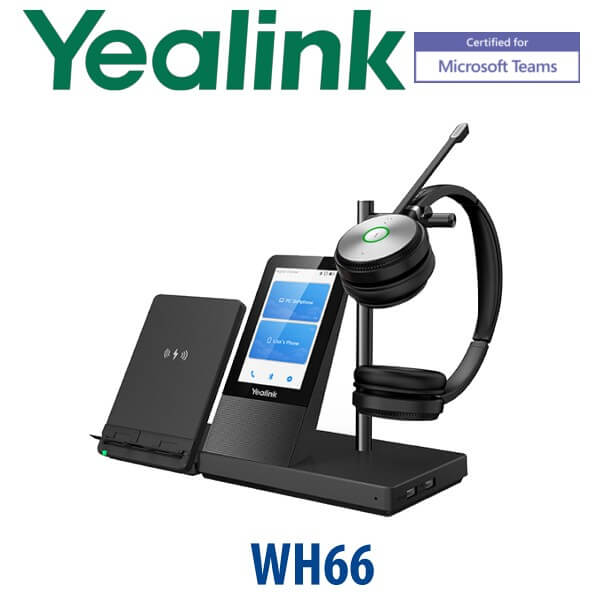
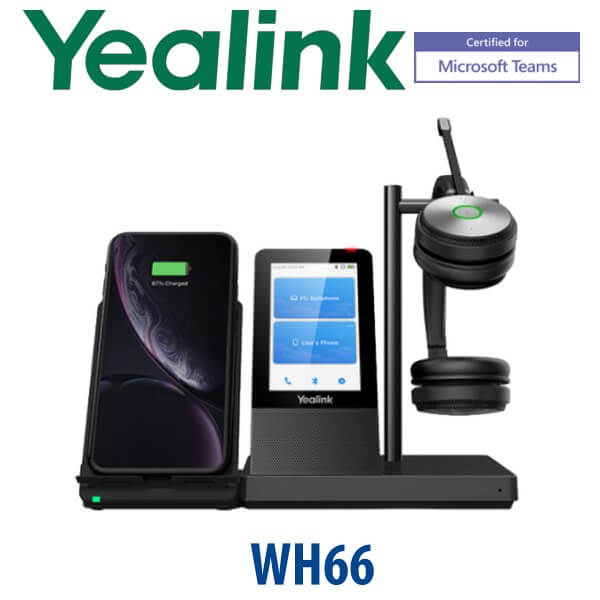
| Optional Accessories | WHC60 wireless charging pad, BLT60 external busylight, replacement headset accessories as available |
| Configuration Tool | Yealink USB Connect for settings, firmware and headset configuration |
| Best Fit | Teams power users, executives, supervisors, hybrid workers and high-call-volume desks |
Compatible Accessories
| Accessory | Model | Purpose |
|---|---|---|
| Wireless Charging Pad | WHC60 | Adds wireless smartphone charging to the WH66 workstation base where supported |
| External Busylight | BLT60 | Gives a stronger visual “on a call” signal for open-plan offices and shared desks |
| Yealink IP Phone Setup | Compatibility checked per phone model | For users who need both Teams on PC and SIP calls on a Yealink desk phone |
| USB Configuration | Yealink USB Connect | Firmware, audio settings, Teams behaviour and headset preferences before dispatch |
Staging Before Dispatch — What Vector Digital Systems Checks
Every Yealink WH66 Dual Teams order is checked before dispatch by Vector Digital Systems. We confirm the user workflow, Teams requirement, PC USB connection, mobile Bluetooth requirement, Yealink IP phone compatibility if used, and accessory needs such as WHC60 or BLT60. For project orders, we help standardise the headset variant so the IT team does not accidentally mix Teams and UC versions across the same deployment.
For bulk headset rollouts, Vector Digital Systems can prepare the units for desk delivery with device labelling, Teams variant confirmation, USB Connect guidance, and user assignment notes. This reduces first-day support tickets and keeps the deployment clean for Dubai IT teams.
Export from Dubai
Vector Digital Systems exports Yealink WH66 Dual Teams headsets from Dubai to telecom operators, system integrators, PABX installers, corporate procurement teams and hotel groups across the region. Common destinations include Oman, Saudi Arabia, Kuwait, Bahrain and Qatar in the GCC; Jordan and Egypt in the wider Middle East; Kenya and Tanzania in East Africa; and Pakistan, Sri Lanka and Bangladesh in South Asia. Shipments move FOB Dubai with commercial invoice, packing list and certificate of origin on request. Project pricing is available for multi-unit Teams headset deployments.
Get a same-day quote in AED — Yealink WH66 Dual Teams Dubai
Tell David your quantity, Teams or UC requirement, whether users also need Yealink desk phone integration, and whether you need WHC60 wireless charging or BLT60 external busylights. We quote with VAT breakdown and delivery included.
Frequently Asked Questions — Yealink WH66 Dual Teams
Is the Yealink WH66 Dual Teams certified for Microsoft Teams?
Yes. The Yealink WH66 Dual is listed on Microsoft’s official Teams enabled devices page, and Vector Digital Systems verified the certification status on 17 July 2026 before writing this page. For procurement teams in Dubai, that means it is the correct Teams-certified WH66 variant, not just a generic UC headset.
What is the difference between WH66 Dual Teams and WH66 Dual UC?
The WH66 Dual Teams is the Microsoft Teams-certified version with Teams-focused call control and Teams button behaviour. The WH66 Dual UC variant is intended for general UC softphone environments. If your company uses Microsoft Teams as the main collaboration platform, order the Teams variant. If you use another softphone, ask David to confirm whether the UC version is the better fit.
Does the Yealink WH66 Dual Teams work with a desk phone and laptop?
Yes, the WH66 workstation is designed for multi-device desk use, including PC connection for Teams, mobile pairing via Bluetooth and compatible Yealink IP phone workflows. Before dispatch, Vector Digital Systems checks the exact Yealink phone model and user setup so the headset is supplied for the right desk arrangement.
How far can I walk from the desk with the WH66 Dual Teams?
The WH66 Dual Teams supports up to 160 metres or 525 feet of DECT wireless range in open conditions. In real Dubai offices, the practical range depends on walls, glass partitions, server rooms and interference, but it gives far more desk freedom than a standard Bluetooth-only headset.
How long is the talk time on the Yealink WH66 Dual Teams?
The WH66 Dual headset provides up to 14 hours of talk time, making it suitable for full working days, call-centre supervisors, Teams-heavy managers and hybrid workers who spend many hours in meetings.
WH66 Dual Teams vs WH64 Dual — which one should I buy?
Choose WH66 Dual Teams when the user needs a premium Teams-certified workstation base with a 4-inch touch screen, speakerphone, Bluetooth mobile pairing and stronger desk control. Choose WH64 Dual where the requirement is a simpler DECT wireless headset at a lower price tier. For executives and Teams power users, WH66 Dual Teams is the stronger choice.
Can the WH66 Dual Teams reduce background noise in open offices?
Yes. Yealink Acoustic Shield uses dual microphones to reduce background noise so the caller’s voice is clearer. It is useful for open-plan offices in DIFC, DMCC, Business Bay, JLT and call-centre environments where people nearby may also be speaking.
What accessories should I order with the WH66 Dual Teams?
The common accessories are the WHC60 wireless charging pad for supported smartphone charging on the base and the BLT60 external busylight for stronger call-status visibility. If the user also has a Yealink desk phone, ask David to confirm the correct compatibility and cable setup before dispatch.
Who is the authorised Yealink supplier in Dubai?
Vector Digital Systems LLC has supplied Yealink products in Dubai since 2009. David handles Yealink headset specification, Teams/UC variant selection, project pricing, staging guidance and local warranty support. This avoids international courier claims and reduces deployment risk for Dubai buyers.
What is the best Yealink headset for Microsoft Teams users in Dubai?
For a premium desk user who needs Microsoft Teams certification, dual-ear focus, wireless DECT freedom, mobile pairing and a touch-screen base, the Yealink WH66 Dual Teams is the best recommendation. For simpler users, WH64 may be enough. For heavier premium headset standardisation, ask David to compare WH66 Dual Teams with the WH68 tier.
Does Vector Digital Systems export Yealink WH66 Dual Teams from Dubai?
Yes. Vector Digital Systems exports Yealink WH66 Dual Teams headsets from Dubai to integrators and corporate buyers in Oman, Saudi Arabia, Kuwait, Bahrain, Qatar, Jordan, Egypt, Kenya, Tanzania, Pakistan, Sri Lanka and Bangladesh. Shipments are FOB Dubai with commercial invoice, packing list and certificate of origin on request.