Description
Yealink WH67 DECT Wireless Headset Convertible UC Workstation Dubai
Premium Convertible DECT Headset for Dubai’s Hybrid Desks
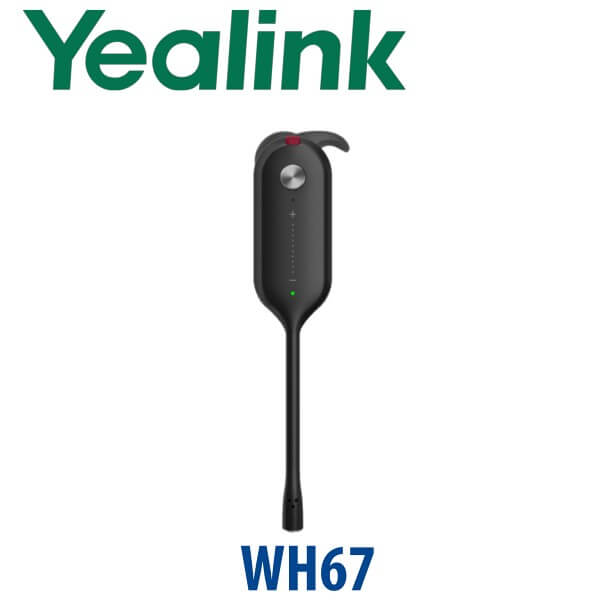
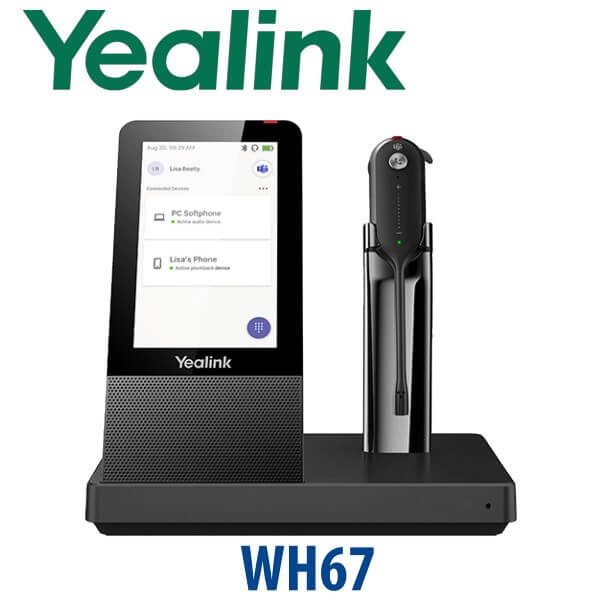
The Yealink WH67 is built for the user who does not sit still: reception staff walking between counters, managers switching between desk phone and laptop calls, and hybrid workers who need one headset for Teams, Zoom, softphone and mobile calls. It combines a lightweight 19g convertible headset with a 4.0-inch touch-screen UC workstation base, giving the user call control, device switching, speakerphone capability, Bluetooth connection and DECT wireless freedom from one desk hub.
For Dubai offices standardising on Yealink phones and headsets, the WH67 is the premium mono/conversible choice above the WH63 class. It is ideal where users need all-day comfort, visible busy status, and the freedom to move around an office floor without relying on Bluetooth range alone. Vector Digital Systems LLC supplies Yealink headsets in Dubai, stages compatible Yealink phone and headset deployments, and provides same-day quote support in AED with VAT and delivery noted.
Platform Check: Teams, UC, SIP Phone, Zoom or Mobile?
Headset platform selection is different from IP phone platform selection. A Yealink headset may work with multiple call apps, but the exact SKU matters when the buyer wants the Microsoft Teams button and Teams certification. The WH67 is available as Teams and UC variants; Microsoft lists the Yealink WH67 as a Teams enabled device, verified on 24 July 2026. For SIP desk phones, softphones, Zoom, 3CX, Yeastar, Grandstream UCM, hosted PBX and mobile use, David confirms the correct WH67 version and cable/accessory requirement before quoting.
| Your Calling Setup | Right WH67 Choice | What to Confirm Before Order |
|---|---|---|
| Microsoft Teams | Yealink WH67 Teams variant | Teams certification verified 24 July 2026; confirm Teams desktop app and user workflow |
| 3CX, Yeastar, Grandstream UCM, hosted PBX or softphone | Yealink WH67 UC variant | Confirm PC softphone, Yealink desk phone model, and whether EHS/USB control is needed |
| Zoom, Google Meet, Webex or browser meetings | WH67 UC or Teams variant depending on primary platform | Confirm the main meeting app and whether the Teams button is required |
| Mobile phone + laptop + desk phone workflow | WH67 workstation setup | Confirm Bluetooth pairing, USB connection and desk phone compatibility before dispatch |
Tell David your main platform when requesting a quote. Teams users should not assume that any headset SKU is automatically Teams-certified, and UC users should not pay for Teams functionality they do not need.
Power Truth: This Is a Workstation Headset, Not a Passive Cable Headset
The Yealink WH67 includes its own power adapter in the package. Unlike PoE desk phones, this headset base is powered from its supplied adapter and connects to your PC, phone or mobile workflow through USB and Bluetooth. The WH67 is therefore best treated as a desk workstation: reserve a power socket, place the touch-screen base where the user can reach it, and confirm the correct USB path to the laptop, mini-PC, thin client or Yealink desk phone before delivery.
DECT vs Bluetooth: Why WH67 Works Better on Busy Office Floors
Bluetooth headsets are excellent for laptop-and-mobile users, but DECT is the better fit for office-floor mobility. The WH67 gives up to 120m / 394ft wireless range, so a receptionist can step away from the counter, a supervisor can walk between agents, and a manager can take calls away from the desk without depending on short-range Bluetooth alone. Bluetooth remains useful for mobile pairing, while DECT carries the office call path with better range discipline.
WH67 in the Yealink Headset Range — Where It Sits
The WH67 sits in Yealink’s premium DECT headset tier. The WH63 E2 below it is the simpler convertible DECT option for users who need wireless calls without the full workstation base. The WH67 adds the 4-inch touch-screen base, speakerphone-style desk hub experience, Bluetooth device pairing and premium workstation control. The WH68 above it is the newer step-up for users who want hybrid DECT/Bluetooth technology, ANC and longer talk-time capability.
| Feature | WH63 E2 | WH67 ★ | WH68 |
|---|---|---|---|
| Type | Convertible DECT headset | Convertible DECT workstation headset | ANC DECT / Bluetooth hybrid headset |
| Base / Workstation | Compact base | 4.0″ 480×800 touch-screen base | Workstation / ANC class depending on SKU |
| Wearing Style | 4 wearing styles | 4 wearing styles | Headband ANC style |
| Wireless Range | Up to 185m / 606ft | Up to 120m / 394ft | Up to 185m / 606ft |
| Noise Control | 2-mic noise cancellation | 2-mic AI noise cancellation + Acoustic Shield | 4-mic noise cancellation + ANC |
| Talk Time | Up to 8 hours | Up to 7 hours | Up to 16h DECT / 32h Bluetooth |
| Teams / UC | Teams and UC variants | Teams and UC variants | Confirm current variant at quote stage |
| Best Fit | Standard wireless office users | Premium mono headset users who want a touch workstation | Focus users needing ANC and longer battery life |
| Choose if… | You want a lighter-cost DECT headset for regular calls | You want a premium convertible headset with touch-screen desk control | You need ANC, hybrid wireless and longer talk-time performance |
Where the WH67 Works in Dubai
Reception and front-desk teams. A clinic receptionist in Jumeirah, a hotel front desk in Deira or a service counter in Business Bay often needs to answer calls while checking visitors, documents or room status. The WH67 gives the user wireless freedom, a visible base, a busy indicator and easy call handling without holding a handset all day.
DIFC and DMCC hybrid offices. Finance, legal and consulting teams switch between Teams meetings, softphone calls, mobile calls and desk-phone conversations. The WH67 workstation base helps keep those channels under control, while the Teams variant gives Microsoft Teams users the certified headset path verified against Microsoft’s device list.
Call-centre supervisors and small support teams. Agents may prefer stereo headsets for full-day call queues, but supervisors often need one-ear awareness of the room while staying reachable on calls. The WH67 is a strong fit for team leads who move between desks, answer escalations and still need to hear what is happening around them.
Executive and manager desks. For managers who dislike bulky over-ear headsets, the WH67’s convertible wearing options make it easier to find a comfortable fit. It keeps the desk tidy, works with the laptop and mobile workflow, and gives a more professional audio path than built-in laptop microphones during client calls.
Full Technical Specifications
| Specification | Yealink WH67 |
|---|---|
| Product Type | Premium convertible DECT wireless headset with UC workstation base |
| Variants | WH67 Teams and WH67 UC variants available |
| Part Numbers | 1308040 WH67 Teams · 1308041 WH67 UC |
| Base Display | 4.0 inch 480×800 capacitive touch screen |
| Wearing Style | Convertible in-ear design with earhook, eartips, headband and neckband accessories |
| Headset Weight | 19g |
| Base Weight | 344g |
| Microphone | Dual headset microphones with AI noise cancellation and Yealink Acoustic Shield technology |
| Headset Mic Frequency Range | 100 Hz–10 kHz |
| Base Microphone | ECM omnidirectional microphone, 70 Hz–20 kHz frequency range |
| Headset Speaker | 13.6mm speaker, 20 Hz–14 kHz speaker frequency range |
| Base Speaker | 40mm × 20.8mm speaker, 160 Hz–20 kHz frequency range |
| Wireless Range | Up to 120m / 394ft DECT range |
| Talk Time | Up to 7 hours |
| Standby Time | 54 hours |
| Charging Time | 2.5 hours with 12V / 2A power adapter |
| Connectivity | USB 3.0 and two Bluetooth devices |
| USB Port | 1× Type-A USB 3.0 port |
| Bluetooth | Built-in Bluetooth 4.2 |
| Management | Yealink USB Connect for PC and Yealink Management Cloud Service |
| Busylight | Built-in busylight; optional external busylight support |
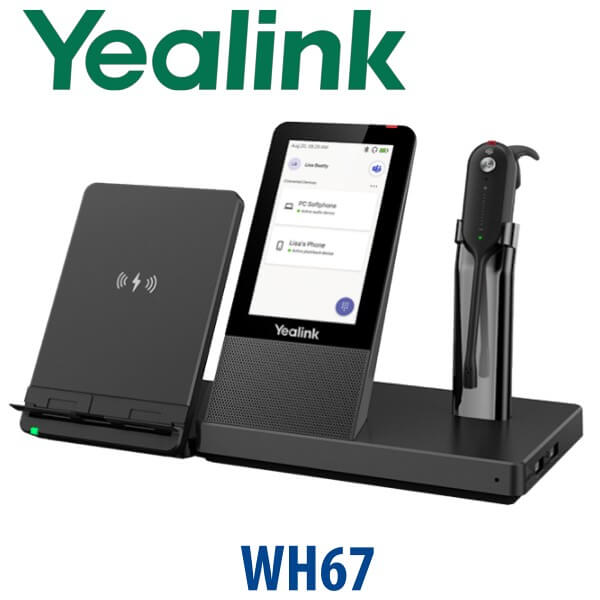
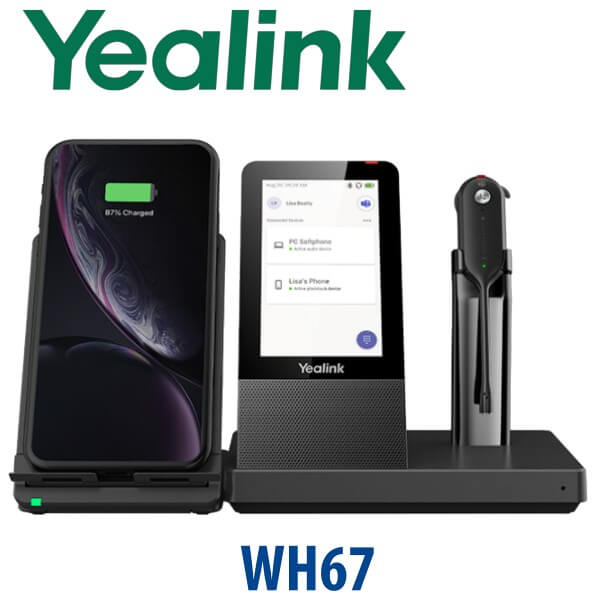
| Wireless Charging | Optional wireless charger accessory available for WH66 / WH67 setups |
| Package Contents | Base, headset, earhook and eartips, headband, neckband, power adapter, 2× 1m USB 3.0 cables, quick start guide |
| Best For | Reception users, hybrid managers, Teams/UC users, supervisors and mobile desk workers |
Compatible Accessories and Deployment Notes
| Accessory / Item | Model / Type | Purpose |
|---|---|---|
| External Busylight | Yealink BLT60 | Gives colleagues a clear visual “on a call” signal for open-plan offices and reception counters |
| Wireless Charger | Yealink WHC60 | Optional wireless mobile charging accessory for WH66 / WH67 workstation desks |
| Portable Accessory Kit | Portable Accessory Kit for WH63 / WH67 | Useful for users who need spare wearing accessories or shared deployment support |
| Desk Phone Integration | Yealink phone / compatible third-party phone path | David confirms whether USB, Bluetooth or an adapter path is required for call control |
For mixed offices using Yealink desk phones, Microsoft Teams and softphones, Vector Digital Systems checks the headset path before dispatch. That avoids the common problem where the headset audio works but remote answer, call control or Teams button behaviour is not what the user expected.
Staging Before Dispatch — What We Check
Every Yealink WH67 supplied by Vector Digital Systems is checked before dispatch: Teams or UC variant confirmed, USB connection path checked, Bluetooth pairing guidance prepared, Yealink USB Connect noted for PC-side management, and the user’s Yealink desk phone or softphone workflow reviewed. For larger headset rollouts, we label units by user or department, align the correct variant to each user group, and can supply matching Yealink desk phones, DECT systems or speakerphones in the same project quote.
Export from Dubai
Vector Digital Systems exports Yealink WH67 headsets from Dubai to system integrators, telecom operators, PABX installers, hotel groups, call-centre operators and corporate IT procurement teams. Common export destinations include Oman, Saudi Arabia, Kuwait, Bahrain and Qatar in the Gulf; Jordan and Egypt for regional integrators; Kenya, Tanzania and Nigeria for African projects; and Pakistan, Sri Lanka and Bangladesh for South Asian deployments. Shipments move FOB Dubai with commercial invoice, packing list and certificate of origin on request. Multi-unit project pricing is available for 5+ units, with VAT and delivery shown clearly where applicable.
Get a same-day quote in AED — Yealink WH67 in Dubai
Tell David: quantity, Teams or UC requirement, desk phone model, laptop/softphone platform, and whether users need external busylights or wireless charging. We quote with VAT breakdown and delivery included.
Frequently Asked Questions — Yealink WH67
Is the Yealink WH67 Microsoft Teams certified?
Yes — Microsoft lists the Yealink WH67 as a Teams enabled device, and this certification was verified on 24 July 2026 before writing this page. Order the WH67 Teams variant if the user needs Microsoft Teams button behaviour and Teams-certified headset deployment. For non-Teams softphones, choose the WH67 UC variant unless David recommends otherwise.
What is the difference between Yealink WH67 Teams and WH67 UC?
The hardware class is the same premium WH67 workstation headset, but the Teams variant is intended for Microsoft Teams users and Teams-certified behaviour, while the UC variant is the usual choice for softphones, Zoom, 3CX, Yeastar, Grandstream UCM, hosted PBX and mixed UC workflows. Tell David your main calling platform before quoting so the correct SKU is supplied.
Does the Yealink WH67 work with a Yealink desk phone and laptop?
Yes — the WH67 is designed as a UC workstation for users who handle calls across desk phone, computer and mobile workflows. It connects through USB 3.0 and supports two Bluetooth devices. Before dispatch, Vector Digital Systems checks your desk phone model, laptop softphone and required call-control path so the headset is matched to the actual desk setup.
How far can I walk from the desk with the Yealink WH67?
The WH67 gives up to 120m / 394ft DECT wireless range in ideal conditions. Real office range depends on walls, partitions, glass, lifts, server rooms and other radio conditions, but DECT is still a better fit than Bluetooth for users who need to move around a Dubai office floor while staying on a call.
How long does the Yealink WH67 battery last?
The WH67 supports up to 7 hours of talk time, 54 hours of standby time and around 2.5 hours charging time with its 12V / 2A power adapter. For users who spend the entire day in continuous call queues, David may also compare WH67 against WH68 or other Yealink headset models with longer talk-time requirements.
WH63 E2 vs WH67 — which one should I buy?
Choose WH63 E2 for a simpler convertible DECT headset at a lower tier. Choose WH67 when the user wants a premium 4-inch touch-screen workstation base, easier device control, Bluetooth pairing, built-in busy status and a more complete desk hub. For reception, management and hybrid desk users in Dubai, WH67 is the stronger everyday recommendation.
Can the Yealink WH67 charge a mobile phone wirelessly?
The WH67 workstation supports the wireless charging desk concept, and Yealink lists the WHC60 wireless charger as an accessory for WH66 / WH67. Ask David to include the wireless charger if mobile charging is required, because accessories should be confirmed and quoted with the headset rather than assumed to be in every package.
Who is the Yealink authorised supplier in Dubai?
Vector Digital Systems LLC has supplied and integrated Yealink solutions in Dubai since 2009. David handles Yealink headset selection, Teams/UC variant checks, project pricing, staging guidance and local warranty support, so Dubai buyers do not need to manage international courier claims for standard warranty handling.
What is the best Yealink headset for a reception desk in Dubai?
For a reception user who wants one-ear awareness, wireless freedom and easy desk control, the WH67 is an excellent choice. It gives a convertible wearing style, DECT range, touch-screen base and visible busy status. For full-day agents who need stereo focus or ANC, David may recommend WH68 or another Yealink headset depending on call volume and office noise.
Does Vector Digital Systems export Yealink WH67 headsets from Dubai?
Yes — Vector Digital Systems exports Yealink WH67 headsets from Dubai to integrators, telecom operators and enterprise buyers in Oman, Saudi Arabia, Kuwait, Bahrain, Qatar, Jordan, Egypt, Kenya, Tanzania, Nigeria, Pakistan, Sri Lanka and Bangladesh. Shipments are quoted FOB Dubai with commercial invoice, packing list and certificate of origin on request.
Does Vector Digital Systems configure the WH67 before delivery?
Yes — Vector Digital Systems checks the Teams or UC variant, USB connection path, Bluetooth pairing requirement, desk phone compatibility and user workflow before dispatch. For bulk deployments, units can be labelled by user or department and supplied with matching Yealink phones, accessories and staging notes.