Description
Yealink UH34 Mono USB Wired Microsoft Teams Headset Dubai
Yealink UH34 Mono Teams Headset for Dubai Offices
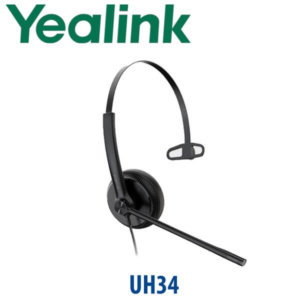
The Yealink UH34 Mono Teams is the practical wired headset for staff who spend the day in Microsoft Teams calls, softphone conversations and customer support queues. It gives one-ear awareness, plug-and-play USB connection, a noise-cancelling boom microphone and a light 82.5g frame that is comfortable through long call shifts. For Dubai teams moving from laptop audio to proper business headsets, the UH34 Mono Teams is the simple, dependable starting point: no battery charging, no Bluetooth pairing, no wireless interference — just clear USB audio and Teams call control.
Teams, UC or Desk Phone? Choose the Right UH34 Version
The UH34 family is sold in Teams and UC versions, and in Mono and Dual wearing styles. The model on this page is the Yealink UH34 Mono Teams. Microsoft Teams certification was checked against Microsoft’s official Teams device listing on 18 July 2026. If your staff live inside Microsoft Teams, choose the Teams version. If they mainly use 3CX, Zoom, RingCentral, browser diallers or mixed softphones, ask David whether the UC version is the better fit for your fleet.
| Your Calling Setup | Right Headset Choice | What to Confirm |
|---|---|---|
| Microsoft Teams on PC or laptop | UH34 Mono Teams — this page | Teams app, USB-A or USB-C port requirement, user count |
| Mixed softphones — 3CX, Zoom, browser dialler, UC app | UH34 Mono UC or UH34 Dual UC — ask David | Softphone name and call-control requirement |
| Compatible Yealink Teams desk phone | UH34 Teams headset via USB | Phone model and USB port type before dispatch |
Power Truth — No Charger, No PoE, No Batteries
The UH34 Mono Teams is USB powered. Unlike wireless headsets, it does not need a charging base or battery routine. Unlike IP phones, it does not need PoE or a separate power adapter. The only thing to confirm before order is the user’s USB port type: standard USB-A for the common UH34 Mono Teams SKU, or USB-C if your laptops are newer ultrabooks and you want the USB-C edition where available.
Why Mono Matters in a Real Office
A dual-ear headset blocks more of the room. A mono headset keeps one ear open. That matters for reception staff, coordinators, dispatch desks, clinic counters and supervisors who need to hear a colleague, a visitor or a printer while still handling calls. The UH34 Mono Teams gives the agent a proper boom microphone and Teams controls without isolating them from the office floor.
UH34 Range Position — Lite, Mono or Dual?
The UH34 Mono Teams sits in the sweet spot between budget foam-cushion models and full dual-ear concentration headsets. It is better suited than the UH34 Lite Mono for users who wear a headset for several hours a day, because the UH34 version uses a leatherette ear cushion. Step up to the UH34 Dual Teams when the user needs stronger focus in a noisy call centre or open-plan office.
| Feature | UH34 Lite Mono Teams | UH34 Mono Teams ★ | UH34 Dual Teams |
|---|---|---|---|
| Wearing style | Single ear | Single ear | Dual ear |
| Best for | Occasional calls | Daily Teams calling | Focused call work |
| Ear cushion | Foam | Leatherette | Leatherette |
| Teams certification | Teams version available | Teams certified — verified 18 July 2026 | Teams version available |
| Connection | USB wired | USB wired | USB wired |
| Office awareness | High | High | Lower — better isolation |
| Noise handling | Noise-cancelling mic | Noise-cancelling mic | Noise-cancelling mic + dual-ear focus |
| Price tier | Entry | Best daily-value tier | Step-up |
| Choose if… | You need a budget Teams headset for light users | You want a comfortable one-ear Teams headset for daily calling | You need both ears covered for louder office floors |
Where the UH34 Mono Teams Works in Dubai
Reception and front desk teams. Hotels in Deira, clinics in Jumeirah and corporate reception desks in Business Bay often need one ear free while answering Teams calls or softphone calls. The UH34 Mono Teams keeps the user aware of walk-in visitors while giving callers a proper microphone instead of laptop audio.
Microsoft Teams rollouts in DIFC and DMCC offices. When a company standardises on Teams calling, the headset fleet matters as much as the laptop. The UH34 Mono Teams is easy to deploy in batches because it is USB wired, Teams certified and simple for users to understand on day one.
Call centres and support desks. For agents who handle a steady call queue but still need to hear floor supervisors, the mono format is ideal. The inline controller keeps mute and volume under the user’s hand, while the noise-cancelling boom mic helps reduce open-office background noise.
Hybrid workers and training rooms. A wired headset is still the easiest choice for training labs, hot desks and shared workstations: no pairing history, no lost charging base, no battery health problem. Plug it in, select Yealink UH34 as the audio device, and the user is ready.
Full Technical Specifications
| Specification | Yealink UH34 Mono Teams |
|---|---|
| Product type | USB wired business headset |
| Wearing style | Monaural — single ear |
| Teams status | Microsoft Teams certified / Teams-enabled UH34 Series — verified 18 July 2026 |
| Connection | USB plug-and-play. Confirm USB-A or USB-C SKU before order. |
| Weight | UH34 Mono: 82.5g |
| Ear cushion | Replaceable leatherette cushion on UH34; UH34 Lite uses foam cushion |
| Microphone | Noise-cancelling boom microphone for business voice calls |
| Speaker | 28mm speaker, wideband audio, 32Ω impedance |
| Frequency response | Speaker range: 20Hz–20kHz; wideband voice performance up to 15kHz stereo where supported |
| Inline controls | Answer, end, reject, hold, volume up/down, microphone mute, redial support where platform allows |
| Hearing protection | Peak Block Protection, AU G616 protection and daily noise exposure protection |
| Software management | Yealink USB Connect and Yealink Device Management Platform / Cloud Service |
| Typical applications | Microsoft Teams, Teams Phone, Teams meetings, softphone calling and daily office communication |
| Package contents | UH34 Mono headset and quick start guide |
Compatible Devices and Accessories
| Item | Compatibility Note | Buyer Decision |
|---|---|---|
| Microsoft Teams PC / laptop | Designed for Teams calling and meetings | Confirm USB-A or USB-C port before dispatch |
| Yealink Teams phones | USB headset use depends on phone model and firmware | Send David the phone model before bulk order |
| Replacement ear cushion | UH34 cushions are replaceable | Recommended for call-centre fleets and hygiene rotation |
| UH34 Dual Teams | Same family, dual-ear wearing style | Choose for noisy open-plan desks or focused agents |
Staging and Bulk Deployment Support
Vector Digital Systems checks the UH34 Mono Teams before dispatch, confirms the correct USB connector type, labels bulk orders by user or department where required, and can support Teams headset rollouts for call centres, reception teams, IT help desks and hybrid workers. For larger Microsoft Teams projects, David can coordinate headset quantities alongside Yealink Teams phones, meeting-room systems and user deployment batches.
Export from Dubai
Vector Digital Systems exports Yealink UH34 Mono Teams headsets from Dubai to system integrators, telecom resellers, corporate IT teams and call-centre operators across the region. Common export routes include Oman, Saudi Arabia, Kuwait, Bahrain and Qatar in the Gulf; Jordan and Egypt in the wider Arab market; Kenya, Tanzania and Nigeria for African deployments; and Pakistan, Sri Lanka and Bangladesh for South Asian projects. Export quotes are prepared FOB Dubai with commercial invoice, packing list and certificate of origin on request. Multi-unit project pricing is available for Teams headset fleets.
Get a same-day quote in AED — Yealink UH34 Mono Teams Dubai
Tell David the quantity, whether your users need USB-A or USB-C, and whether you want Mono, Dual or Lite versions. We quote with VAT breakdown, delivery charges and export documentation where required.
Frequently Asked Questions — Yealink UH34 Mono Teams
Is the Yealink UH34 Mono Teams Microsoft Teams certified?
Yes. The Yealink UH34 Series is listed by Microsoft as a Teams-enabled device, and the Teams status for this headset family was verified on 18 July 2026 before writing this page. For large Teams rollouts, Vector Digital Systems can confirm the exact Teams SKU again before quotation.
What is the difference between UH34 Mono Teams and UH34 Mono UC?
UH34 Mono Teams is the Microsoft Teams version, intended for Teams calling and meetings with Teams call-control behaviour. UH34 Mono UC is the general unified communications version for mixed softphones. If your Dubai office mainly uses Teams, choose the Teams version. If you use 3CX, Zoom, RingCentral or browser calling, ask David to confirm whether the UC version is more suitable.
Is the UH34 Mono better than the UH34 Lite Mono?
For daily headset users, yes. The UH34 Mono uses a leatherette ear cushion, while the UH34 Lite Mono uses a foam cushion. The Lite version is fine for light or occasional use, but the UH34 Mono is the better choice for reception desks, support agents and Teams users who wear a headset for several hours a day.
Should I buy UH34 Mono Teams or UH34 Dual Teams?
Choose UH34 Mono Teams when the user needs one ear open for colleagues, visitors or floor awareness. Choose UH34 Dual Teams when the user needs more focus in a noisy open-plan office or call centre. Many Dubai teams buy Mono for reception and supervisors, then Dual for agents handling continuous queues.
Does the UH34 Mono Teams work with Yealink Teams desk phones?
It can work with compatible Yealink Teams phones over USB, but compatibility depends on the exact phone model, firmware and USB port. Send David your Yealink phone model before ordering, especially for MP-series deployments, so the headset and phone are matched correctly before dispatch.
Does the UH34 Mono Teams need charging or a power adapter?
No. The UH34 Mono Teams is a wired USB headset, so it is powered directly from the connected PC, laptop or compatible phone. There is no charging base, battery, PoE switch or separate power adapter required. Just confirm whether your users need USB-A or USB-C before ordering.
Can Vector Digital Systems supply UH34 Mono Teams headsets in bulk?
Yes. Vector Digital Systems supplies Yealink headset fleets for Teams rollouts, call centres, reception teams, IT help desks and hybrid workers in Dubai. Project pricing is available for multi-unit orders, with VAT breakdown, delivery charges and user or department labelling where required.
Who is the authorised Yealink supplier in Dubai?
Vector Digital Systems LLC has supplied Yealink solutions in Dubai since 2009. David handles Yealink product selection, pre-sales compatibility checks, project pricing, local warranty support and headset rollout guidance for Microsoft Teams and VoIP deployments.
What is the best Yealink headset for Microsoft Teams reception staff in Dubai?
The Yealink UH34 Mono Teams is the best starting point for Teams reception users because it keeps one ear open, has a proper boom microphone, supports Teams calling and avoids battery charging. For louder call-centre floors, step up to the UH34 Dual Teams or a Yealink wireless DECT headset depending on mobility needs.
Does Vector Digital Systems export Yealink UH34 Mono Teams from Dubai?
Yes. Vector Digital Systems exports Yealink headsets from Dubai to Oman, Saudi Arabia, Kuwait, Bahrain, Qatar, Egypt, Kenya, Nigeria, Pakistan and Sri Lanka. Export quotes are prepared FOB Dubai with commercial invoice, packing list and certificate of origin on request.