Description
Yealink UH37 Mono Teams USB-A/USB-C Wired Headset Dubai
Yealink UH37 Mono Teams Headset for Dubai Offices
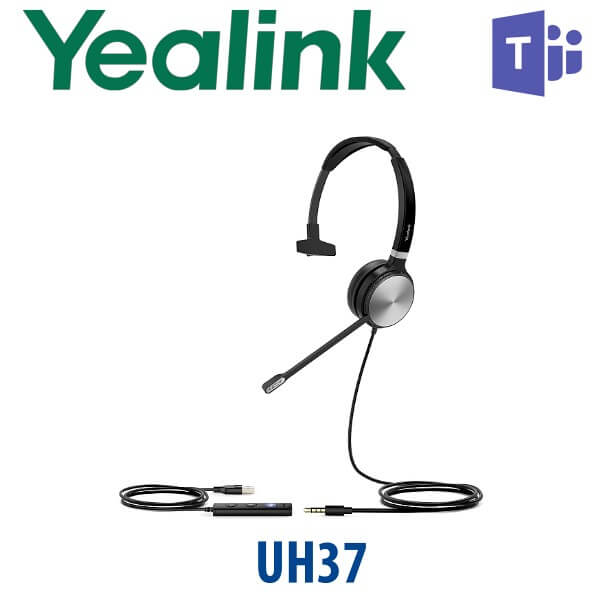
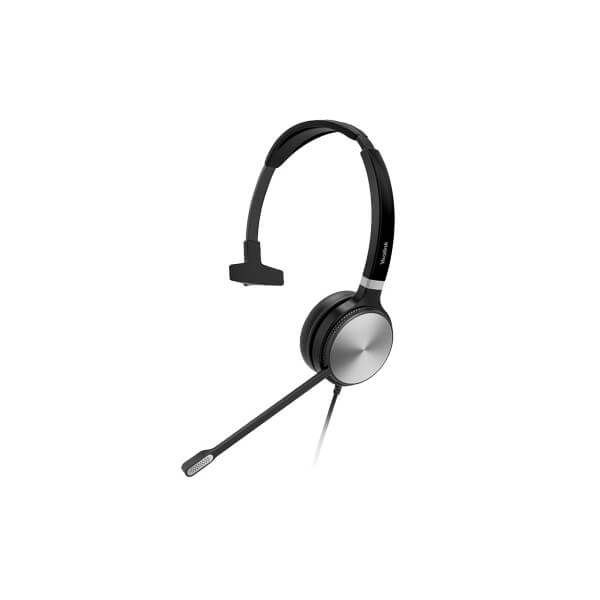
The Yealink UH37 Mono Teams is a wired USB headset for staff who spend the day on Microsoft Teams calls, softphone calls, helpdesk tickets, sales follow-ups, and customer support queues. It gives one-ear awareness for office environments while keeping the caller’s voice clear through dual noise-cancelling microphones and Yealink Acoustic Shield technology. For Dubai call centres, reception teams, hybrid workers, and Microsoft Teams users who want a simple plug-and-play headset without battery charging or Bluetooth pairing issues, the UH37 Mono Teams is the practical choice.
Vector Digital Systems LLC supplies Yealink headsets in Dubai with same-day quote in AED, VAT breakdown, delivery options, and staging advice for Teams, Yealink IP phone, 3CX, Yeastar, Grandstream UCM, and laptop-based UC users. Contact David, our Yealink specialist in Dubai, for quantity pricing and compatibility checks before dispatch.
Platform Fit — Teams, UC Softphone or Yealink Desk Phone?
The UH37 Mono Teams is a headset, not a desk phone. It connects by USB to your laptop, PC, or compatible Yealink IP phone. The Teams version is designed for Microsoft Teams users, while still remaining useful for wider UC calling workflows. The key buying question is not SIP vs Teams firmware — it is where the headset will plug in.
| Your Calling Setup | Right Use | What You Need |
|---|---|---|
| Microsoft Teams on laptop or PC | UH37 Mono Teams — this page | Teams desktop app and USB-A or USB-C port |
| 3CX, Zoom, Webex, softphone or browser calling | UH37 Mono works as a USB audio headset | Select UH37 as speaker and microphone in the app |
| Yealink IP phone with USB headset support | Compatible with selected Yealink desk phones | Confirm exact phone model and firmware with David before ordering |
Teams Certification Verified
Microsoft Teams certification verified: 16 July 2026. The Yealink UH37 Monaural USB-C appears on Microsoft’s Teams enabled devices list. That matters for IT teams standardising headsets across Dubai offices because Teams-certified devices are tested for Teams call control, audio experience, and user workflow. For mixed offices using Teams plus other softphone apps, David can confirm whether the Teams version or standard UC version is the better fit for your users.
No Battery, No Pairing, No Desk Downtime
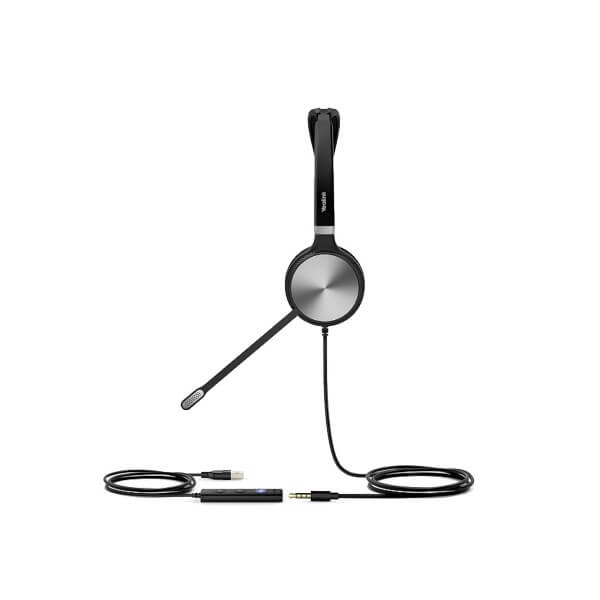
The UH37 Mono Teams is wired. That is the advantage for call-centre and support desks: no charging cycle, no Bluetooth pairing queue, no low-battery surprise halfway through a customer escalation. The headset plugs into USB-A or USB-C, making it suitable for older desktop PCs as well as newer laptops used in DIFC, DMCC, Business Bay, JLT and remote-work setups across Dubai.
One Ear Open for Busy Teams
Mono headsets are still the right choice where the user must hear the room: reception counters, IT support desks, sales admin teams, dispatch counters and open offices. The UH37 Mono keeps one ear free while the dual microphones focus on the speaker’s voice. The integrated red busylight also helps reduce shoulder taps when the user is already on a call or Teams meeting.
UH37 Mono Teams in the Yealink Headset Range
The UH37 Mono Teams sits between lower-cost wired USB headsets and dual-ear concentration headsets. Choose mono when the user needs call clarity but must remain aware of nearby colleagues or walk-in customers. Step up to a dual-ear headset where concentration and noise isolation are more important than room awareness.
| Feature | UH35 Mono | UH37 Mono Teams ★ | UH37 Dual Teams |
|---|---|---|---|
| Wearing style | Mono | Mono | Dual-ear |
| Best for | Budget desks | Teams users who need room awareness | Focused calling and noisy offices |
| Microsoft Teams | Verify version | Teams certified | Teams certified |
| Speaker | 35 mm class | 35 mm | 35 mm |
| Microphone | Noise cancelling | Dual noise-cancelling microphones | Dual noise-cancelling microphones |
| Busylight | Verify version | Yes | Yes |
| Connectivity | USB | USB-A / USB-C | USB-A / USB-C |
| Desk phone use | Selected Yealink USB phones | Selected Yealink USB phones | Selected Yealink USB phones |
| Price tier | Entry | Mid | Mid-plus |
| Choose if… | You need a simple wired USB headset for light calling | You use Teams and need one-ear awareness for office work | You want both ears covered for concentration and higher noise isolation |
Where the UH37 Mono Teams Works in Dubai
Call centres and helpdesks. The UH37 Mono Teams is ideal for agents who take calls all day but still need to hear supervisors, walk-up requests, or floor announcements. Dubai support teams in Business Bay, Al Quoz, Jebel Ali and DIP can standardise on a wired headset that avoids battery management and gives consistent audio across shifts.
Microsoft Teams users in DIFC and DMCC. Finance, consulting, legal, real estate and trading teams often live inside Microsoft Teams for calls and meetings. The UH37 Mono Teams gives them a Teams-certified headset with inline controls, a visible busylight, and USB-A/USB-C connection for mixed laptop fleets.
Reception, dispatch and admin counters. One-ear audio is useful when the user must talk to visitors, coordinate with colleagues and answer calls. The bendable boom arm, mute controls and red call indicator make the headset practical for front desks, logistics counters, clinic receptions and sales admin teams.
Hybrid workers and home-office staff. A wired USB headset is simple to support remotely. Users plug it into the laptop, select it in Teams, Zoom, 3CX or the softphone app, and start work. No charging dock, no pairing reset, no separate Bluetooth driver support ticket.
Full Technical Specifications
| Specification | Yealink UH37 Mono Teams |
|---|---|
| Product type | Professional USB wired mono headset |
| Teams certification | Microsoft Teams enabled device — verified 16 July 2026 |
| Wearing style | Mono, over-the-head, left-ear or right-ear use |
| Connection | USB-A / USB-C |
| Cable length | 1.2 m headset cable |
| Speaker size | 35 mm |
| Speaker frequency response | 20 Hz – 20 kHz |
| Speaker impedance | 32 ± 4.8 Ω at 1.0 kHz |
| Microphones | 2× noise-cancelling microphones |
| Microphone technology | Yealink Acoustic Shield technology, wideband microphone bandwidth |
| Microphone frequency response | 100 Hz – 10 kHz |
| Boom arm | 300° bendable boom arm |
| Busylight | Integrated LED indicator, automatic red light during calls and meetings, manual busy status support |
| Call controls | Answer, end, reject, hold, volume up/down, microphone mute, redial last outgoing call |
| Hearing protection | ActiveProtection technology helps safeguard users from acoustic injury |
| Operating systems | Microsoft Windows and Apple Mac OS |
| Compatible platforms | Microsoft Teams, major UC platforms, softphones and selected Yealink IP phones with USB headset support |
| Weight | UH37 Mono: 96.5 g |
| Colour | Black |
| Operating temperature | -10°C to +50°C |
| Package contents | UH37 Mono headset, carrying case, quick start guide |
Accessories and Compatibility Notes
| Item | Compatibility Note | Why It Matters |
|---|---|---|
| USB-A / USB-C connection | Works with modern USB-C laptops and older USB-A desktops | One headset standard can cover mixed office devices |
| Yealink IP phones | Supported on selected Yealink phones with USB headset support; firmware may matter | David checks your exact phone model before quoting |
| Teams desktop app | Teams-certified headset for Microsoft Teams calling and meetings | Better fit for companies standardising Microsoft Teams devices |
| Carrying case | Included in the package | Useful for hybrid users moving between office, home and client sites |
Staging and Deployment Support Before Dispatch
Headsets do not need SIP registration, but Vector Digital Systems still helps reduce rollout friction. For bulk UH37 Mono Teams orders, David can confirm Teams certification status, laptop connector type, Yealink IP phone compatibility, USB headset policy, and recommended user groups before dispatch. For mixed Yealink deployments, we can also stage the desk phones separately with SIP registration, provisioning templates, BLF/speed-dial keys and dial-plan test before delivery.
Export from Dubai
Vector Digital Systems supplies Yealink UH37 Mono Teams headsets from Dubai to corporate IT teams, system integrators, telecom operators, helpdesk outsourcers and call-centre projects across the region. Common export routes include Oman, Saudi Arabia, Kuwait, Qatar, Bahrain, Jordan, Egypt, Kenya, Tanzania, Nigeria, Pakistan and Sri Lanka. Shipments are quoted FOB Dubai with commercial invoice, packing list and certificate of origin on request. Project pricing is available for 5+ units and larger headset rollouts.
Get a same-day quote in AED — Yealink UH37 Mono Teams Dubai
Tell David your quantity, whether users are on Microsoft Teams, softphone or Yealink desk phones, and whether you need USB-A or USB-C connection. We quote with VAT breakdown and delivery included.
Frequently Asked Questions — Yealink UH37 Mono Teams
Is the Yealink UH37 Mono Teams Microsoft Teams certified?
Yes — the Yealink UH37 Monaural USB-C is listed on Microsoft’s Teams enabled devices list, and certification was verified on 16 July 2026 before writing this page. It is a good fit for Dubai companies standardising Microsoft Teams headsets for office, hybrid and call-centre users.
Does the Yealink UH37 Mono Teams work with both my laptop and Yealink desk phone?
Yes, it connects by USB-A or USB-C to laptops and PCs, and it also works with selected Yealink IP phones that support USB headsets. Because phone model and firmware can affect headset behaviour, David checks your exact Yealink phone model before quoting.
Should I buy UH37 Mono or UH37 Dual for a call centre?
Choose UH37 Mono when agents need one ear open to hear supervisors, walk-up requests or floor announcements. Choose UH37 Dual when users need both ears covered for stronger concentration and passive noise isolation in a louder office. For mixed call-centre floors in Dubai, many teams use Mono for supervisors and Dual for focused agents.
Does the UH37 Mono Teams need charging or Bluetooth pairing?
No. The UH37 Mono Teams is a wired USB headset, so there is no battery to charge and no Bluetooth pairing to manage. Users plug it into a USB-A or USB-C port, select it in Microsoft Teams or their softphone app, and start working.
What does the red busylight on the UH37 do?
The busylight glows red during calls or meetings to show colleagues that the user should not be interrupted. It is useful for reception desks, open offices, Teams meeting users and support agents who need fewer interruptions during live calls.
Will the UH37 Mono Teams work with 3CX, Zoom, Webex or a browser softphone?
Yes. Although this version is Teams certified, the UH37 is still a USB audio headset and can be selected as the microphone and speaker in 3CX, Zoom, Webex, browser diallers and other UC platforms. App-specific button behaviour can vary, so David can confirm your workflow before bulk orders.
Who is the Yealink authorised supplier in Dubai?
Vector Digital Systems LLC has supplied Yealink products in Dubai since 2009. David handles Yealink pre-sales advice, compatibility checks, project pricing, staging coordination and local warranty support, so Dubai buyers do not need to manage international courier claims.
What is the best Yealink headset for Microsoft Teams users in Dubai?
For Teams users who need a reliable wired headset and one-ear awareness, the UH37 Mono Teams is the best practical choice. For users who need stronger concentration, choose the UH37 Dual Teams. For wireless Teams users, ask David to compare Yealink Bluetooth and DECT headset options based on desk layout and mobility needs.
Does Vector Digital Systems configure Yealink devices before delivery?
For headsets, Vector Digital Systems confirms Teams certification, connector type, user workflow and Yealink phone compatibility before dispatch. For Yealink desk phones in the same project, we can stage SIP registration, provisioning templates, BLF/speed-dial keys and dial-plan testing before delivery.
Does Vector Digital Systems export Yealink UH37 Mono Teams headsets from Dubai?
Yes — Vector Digital Systems exports Yealink headsets from Dubai to system integrators, telecom operators and corporate IT buyers in Oman, Saudi Arabia, Kuwait, Qatar, Bahrain, Jordan, Egypt, Kenya, Nigeria, Pakistan and Sri Lanka. Shipments are quoted FOB Dubai with commercial invoice, packing list and certificate of origin on request.