Description
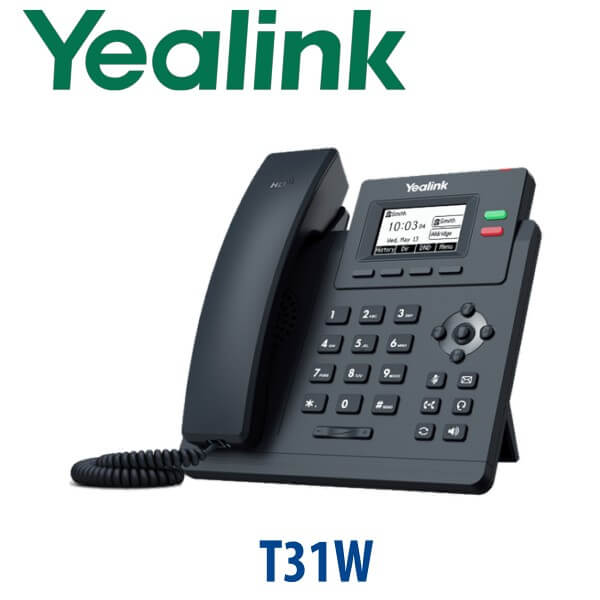
Yealink SIP-T31W IP Phone 2-Line Wi-Fi SIP Desk Phone Dubai
Yealink T31W — Entry-Level Wi-Fi SIP Phone for Dubai Offices
The Yealink SIP-T31W is the practical choice when you need a reliable desk phone but do not want to pull Ethernet cable to every counter, reception point, clinic desk or branch office workstation. It gives you 2 SIP accounts, built-in dual-band Wi-Fi, HD voice, Smart Noise Filtering and PoE support in a compact Yealink body. For Dubai SMEs, retail stores, clinics, warehouses and temporary project offices, the T31W solves the everyday problem: a proper business SIP phone that can sit where cabling is limited.
SIP or Microsoft Teams? Get the Platform Right Before You Order
The Yealink SIP-T31W is a SIP phone. It registers to SIP platforms such as 3CX, Yeastar, Grandstream UCM, Asterisk, FreePBX and hosted PBX services. It is not a Microsoft Teams phone, and it cannot be converted into a Teams desk phone by firmware flashing. If your office uses Teams Phone, ask David for the current Yealink MP-series Teams model instead.
| Your Platform | Right Phone | What You Need |
|---|---|---|
| SIP PBX — 3CX, Yeastar, UCM, Asterisk, hosted PBX | SIP-T31W (this page) | SIP credentials from your phone system |
| Microsoft Teams | Yealink MP-series Teams phone — ask David for the current certified model | Microsoft 365 tenant + Teams Phone licence per user |
| Zoom Phone | Zoom-certified Yealink range — ask David | Zoom Phone licence per user |
Tell David your platform when requesting a quote. It is the fastest way to avoid ordering a SIP phone for a Teams-only office.
PoE Truth — No Power Adapter in the Standard Box
The SIP-T31W does not include a power adapter as standard. It can run from a PoE-capable network switch, or from the optional Yealink 5V / 0.6A power adapter if your switch does not provide PoE. Even though the phone has built-in Wi-Fi, it still needs power at the desk. Wi-Fi replaces the network cable, not the power source. Vector Digital Systems checks this before dispatch so your Dubai installation does not stop because a PSU was missed.
Fast Ethernet vs Gigabit — Know the Desk Network Limit
The T31W has two 10/100 Mbps Ethernet ports. That is fine for a standalone phone, reception point, retail counter, warehouse desk or Wi-Fi deployment where the phone is not feeding a laptop. If a user’s laptop sits behind the phone and your Dubai office runs 1Gbps to the desk, choose a Gigabit model such as the T31G, T33G or a T7-series phone instead. This is the small detail many UAE product pages miss — the T31W is a value Wi-Fi SIP phone, not a Gigabit passthrough phone.
Where the T31W Sits in the Yealink Entry Range
The SIP-T31W is the Wi-Fi member of Yealink’s T31 entry family. Choose it when you need two SIP lines and flexible placement without relying on a wired network point. Choose the T31P for a low-cost wired PoE desk. Choose the T31G when the phone will sit in front of a computer and you need Gigabit passthrough.
| Feature | T31P | SIP-T31W ★ | T31G |
|---|---|---|---|
| Display | 2.3″ 132×64 backlit LCD | 2.3″ 132×64 backlit LCD | 2.3″ 132×64 backlit LCD |
| SIP Accounts | 2 | 2 | 2 |
| Programmable Keys | 2 line keys + DSS functions | 2 line keys + DSS functions | 2 line keys + DSS functions |
| GigE | No — 10/100 | No — 10/100 | Yes — Gigabit |
| Wi-Fi / Bluetooth | No Wi-Fi / no Bluetooth | Built-in dual-band Wi-Fi / no Bluetooth | No Wi-Fi / no Bluetooth |
| Conference | 5-way local | 5-way local | 5-way local |
| Expansion | No EXP module support | No EXP module support | No EXP module support |
| Replaces | Older basic wired SIP handsets | Basic desk phones where cable access is limited | Older 100Mbps entry phones behind PCs |
| Price Tier | Lowest wired PoE tier | Entry Wi-Fi tier | Entry Gigabit tier |
| Choose if… | You have Ethernet and PoE at every desk | You need a clean Wi-Fi desk phone for 2 SIP lines without pulling cable | A laptop sits behind the phone and needs Gigabit passthrough |
Where the T31W Works Best in Dubai
Retail counters and reception points. The T31W is ideal for a shop counter in Deira, a clinic reception in Jumeirah, a small office in Business Bay or a service desk where a wired network point is not available. Two SIP accounts are enough for a main line and a backup/department line, while the backlit display keeps caller ID readable during busy hours.
Temporary and branch offices. Project teams, fit-out contractors and branch offices often need phones before structured cabling is complete. The T31W can connect over dual-band Wi-Fi while still behaving like a normal SIP desk phone on your 3CX, Yeastar, Grandstream UCM or hosted PBX platform.
Warehouses and back-office desks. In Jebel Ali, Al Quoz and DIP industrial zones, not every workstation has a clean Ethernet run. The T31W gives supervisors, dispatch desks and admin counters a fixed business handset without relying on a mobile phone for every call.
Cost-conscious rollouts. For 5+ unit projects, Vector Digital Systems can stage T31W handsets in batches: SIP accounts, extensions, dial plan and basic speed dials loaded before dispatch. That makes it useful for multi-branch SMEs, small call teams, retail chains and export buyers who need predictable deployment instead of on-site setup work.
Full Technical Specifications
| Specification | Yealink SIP-T31W |
|---|---|
| Product Type | Entry-level Wi-Fi SIP desk phone |
| Display | 2.3 inch 132×64 graphical LCD with backlight |
| SIP Accounts | 2 VoIP accounts |
| Line Keys | 2 line keys with dual-colour LED status indication |
| Local Conferencing | 5-way local conference |
| Wi-Fi | Built-in dual-band 2.4GHz / 5GHz Wi-Fi, IEEE 802.11a/b/g/n/ac, up to 433Mbps dynamic rate |
| Bluetooth | Not built in |
| Ethernet Ports | 2× RJ45 10/100 Mbps Ethernet ports — Fast Ethernet, not Gigabit |
| PoE | IEEE 802.3af PoE, Class 2 |
| Power Adapter | Optional Yealink AC adapter, 100–240V input, DC 5V / 0.6A output. Not included as standard. |
| Audio | HD handset, HD speaker, full-duplex speakerphone with AEC, Smart Noise Filtering |
| Codecs | G.722 wideband; G.711, G.723.1, G.729, G.726, iLBC and related narrowband codecs |
| Headset | 1× RJ9 headset port |
| USB | No USB port |
| Phonebook | Local phonebook up to 1000 entries; XML/LDAP remote phonebook support |
| Security | TLS 1.3, SRTP, HTTPS, AES256 configuration encryption, OpenVPN, 802.1X, WPA2/WPA3, secure boot |
| Provisioning | Auto-provision via FTP/TFTP/HTTP/HTTPS, PnP, TR-069, zero-touch deployment |
| Mounting | Desktop stand included; wall mountable |
| Dimensions | 188 × 189 × 162 × 50 mm |
| In Box | SIP-T31W phone, handset, handset cord, Ethernet cable, stand, quick start guide. Power adapter optional. |
| Compatible with | 3CX, Yeastar P-Series, Grandstream UCM, Asterisk, FreePBX, hosted PBX and RFC-compliant SIP servers |
Compatible Accessories
| Accessory | Model | Purpose |
|---|---|---|
| Power Supply | Yealink 5V / 0.6A PSU | Required if the desk has no PoE power source. Wi-Fi removes the network cable, not the need for power. |
| Wired Headset | Yealink YHS series / RJ9 headset | For reception users, call handlers and counter staff who need hands-free calling. |
| Wall Mount | Compatible Yealink wall-mount option | Useful for clinics, retail back offices, security cabins and warehouse counters. |
Accessory note: The T31W does not support EXP expansion modules and does not have USB. For operator consoles, choose a T7-series phone with EXP55 support. For Bluetooth headset use, ask David for the correct Yealink desk phone or headset combination before quoting.
Staging Before Dispatch — What We Configure
Every Yealink SIP-T31W supplied by Vector Digital Systems can be staged before it leaves Dubai. We register the SIP account on your 3CX, Yeastar, Grandstream UCM, Asterisk or hosted PBX platform, load the provisioning template, apply the dial plan, program essential speed dials, confirm Wi-Fi settings if supplied, and complete a live test call. For multi-unit orders, each handset is labelled by extension or desk location before dispatch so your team can plug in and start calling.
Related Yealink Pages to Build / Link When Live
Related models for comparison: Yealink T31P for wired PoE desks, Yealink T31G for Gigabit passthrough, Yealink T33G for a higher entry-tier Gigabit desk phone, Yealink T73U for a larger colour-screen SIP desk, Yealink T73W for Wi-Fi 6 entry-mid deployments, and Yealink T7 Series Dubai for the full upgrade matrix. Link only when each page is marked live in the Vector Digital Systems registry.
Export from Dubai
Vector Digital Systems exports Yealink SIP-T31W phones from Dubai to telecom operators, PABX installers, system integrators, hotel groups, branch-office procurement teams and IT resellers. Common routes include Oman, Saudi Arabia, Kuwait, Qatar and Bahrain across the GCC; Jordan and Egypt for regional integrators; Kenya, Tanzania and Uganda for East Africa projects; and Pakistan, Sri Lanka and Bangladesh for South Asian deployments. Shipments move FOB Dubai with commercial invoice, packing list and certificate of origin on request. Project pricing is available for 5+ units.
Get a same-day quote in AED — in stock in Dubai
Tell David: quantity, phone system, Wi-Fi or wired deployment, PoE availability, and whether you need power adapters or RJ9 headsets. We quote with VAT breakdown, delivery charges and staging included.
Frequently Asked Questions — Yealink SIP-T31W
Does the Yealink T31W work with Microsoft Teams?
The Yealink T31W is a SIP phone for 3CX, Yeastar, Grandstream UCM, Asterisk, FreePBX and hosted SIP PBX platforms. It is not a Microsoft Teams phone, and it cannot be converted into a Teams model by firmware flashing. For Teams Phone deployments, ask David for the current Yealink MP-series Teams device and certification status.
Does the Yealink T31W come with a power adapter, or do I need PoE?
The T31W does not include a power adapter as standard. It can run from an IEEE 802.3af PoE switch, or from the optional Yealink 5V / 0.6A power supply if PoE is not available. Built-in Wi-Fi handles network connectivity, but the phone still needs power at the desk.
Will the T31W work with our 3CX, Grandstream UCM, Yeastar P-Series or existing SIP PABX?
Yes — the SIP-T31W works with RFC-compliant SIP systems including 3CX, Yeastar P-Series, Grandstream UCM, Asterisk, FreePBX and hosted PBX providers. Vector Digital Systems can load your SIP account, provisioning template and dial plan before delivery.
Yealink T31W vs T31G — which one should I buy?
Choose the T31W if you need built-in Wi-Fi and the phone will not be used as a Gigabit passthrough point for a laptop. Choose the T31G if the phone sits between the wall port and a computer, because the T31G gives Gigabit Ethernet while the T31W uses 10/100 Mbps Fast Ethernet ports.
Does the T31W support Gigabit passthrough for my laptop?
No — the T31W has dual 10/100 Mbps Ethernet ports. It is suitable for standalone phone positions and Wi-Fi deployments. If a laptop sits behind the phone in a 1Gbps Dubai office network, choose the T31G, T33G or a T7-series Gigabit model instead.
Can I add a headset to the Yealink T31W?
Yes — the T31W has an RJ9 headset port for compatible wired headsets such as Yealink YHS-series models. It does not have built-in Bluetooth and does not have USB, so confirm the headset model with David before ordering for reception or call-handling users.
Can I add an EXP expansion module to the Yealink T31W?
No — the T31W is an entry-level 2-line desk phone and does not support EXP expansion modules. If you need BLF keys for many extensions, choose a T7-series phone such as T73U, T74U or T74W with EXP55 support instead.
Who is the Yealink authorised supplier in Dubai?
Vector Digital Systems LLC has supplied and integrated Yealink solutions in Dubai since 2009. David handles Yealink product selection, project pricing, staging, warranty support and export coordination, with local support instead of international courier claims.
What is the best Yealink IP phone for a small branch office in Dubai?
For a small branch office with one or two lines per user and limited cabling, the Yealink T31W is the best value because it combines SIP calling with built-in dual-band Wi-Fi. For desks with laptops behind the phone, step up to the T31G for Gigabit passthrough; for larger colour-screen desks, choose the T73U or T73W.
Does Vector Digital Systems configure the T31W before delivery?
Yes — Vector Digital Systems can stage every T31W before dispatch: SIP registration, provisioning template, Wi-Fi settings if supplied, speed dials, dial plan and test call. For multi-unit orders, phones can be labelled by extension or desk location before delivery.
Does Vector Digital Systems export Yealink T31W phones from Dubai?
Yes — Vector Digital Systems exports Yealink T31W phones FOB Dubai to integrators, PABX installers and business buyers in Oman, Saudi Arabia, Kuwait, Qatar, Bahrain, Jordan, Egypt, Kenya, Tanzania, Pakistan, Sri Lanka and Bangladesh. Export documents include commercial invoice, packing list and certificate of origin on request.