Description
Yealink SIP-T31P 4-Line PoE Entry Desk Phone Dubai
Yealink SIP-T31P — The Practical PoE Desk Phone for Dubai Branches
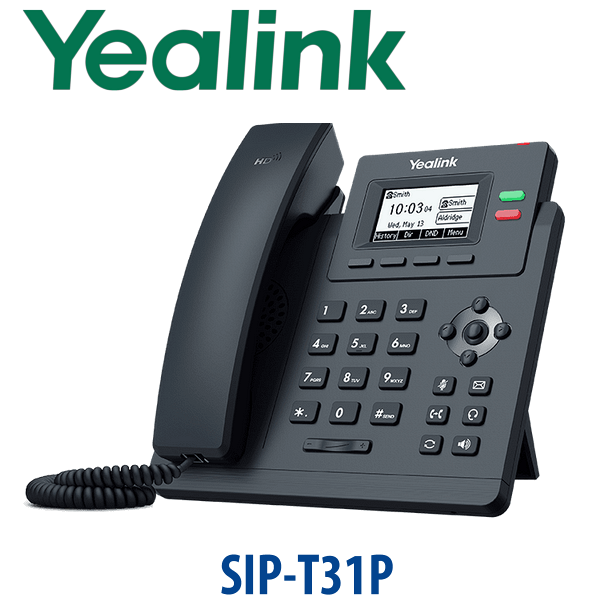
The Yealink SIP-T31P is the entry-level IP phone Dubai teams buy when they need reliable SIP calling without paying for a colour screen or executive desk features. It is the right fit for branch counters, warehouse admin desks, clinic back offices, reception support desks, retail tills, security rooms, hotel service desks and staff extensions that need clean PoE installation, HD voice and easy provisioning. Vector Digital Systems supplies the SIP-T31P in Dubai with same-day quote in AED, VAT and delivery noted, and staging before dispatch by our Yealink team since 2009.
SIP, Microsoft Teams or Zoom? Get the Platform Right Before You Order
The SIP-T31P is a SIP desk phone. It registers to SIP-based platforms such as 3CX, Yeastar P-Series, Grandstream UCM, Asterisk, FreePBX and hosted PBX services. It is not a Microsoft Teams phone and it is not a Zoom Phone-native model. If your office runs Teams Phone or Zoom Phone, order the correct Yealink certified range instead of trying to force a SIP phone into a cloud platform it was not built for.
| Your Platform | Right Phone | What You Need |
|---|---|---|
| SIP PBX — 3CX, Yeastar, UCM, Asterisk, hosted PBX | Yealink SIP-T31P — this page | SIP credentials from your PBX or hosted provider |
| Microsoft Teams | Yealink MP-series Teams phone — ask David for the current certified model | Microsoft 365 tenant + Teams Phone licence per user |
| Zoom Phone | Zoom-certified Yealink range — verify certification status before ordering | Zoom Phone licence per user |
Tell David which phone system you use when requesting a quote. This avoids the most common Yealink buying mistake: ordering a SIP desk phone for a Teams-only office.
PoE Truth — Clean Desk Installation, But Check Your Switch
The Yealink SIP-T31P supports Power over Ethernet, but the power adapter is optional. In most Dubai offices, the phone is powered from a PoE-capable network switch through the same Ethernet cable used for data. If your switch is not PoE-capable, ask David to add the matching Yealink 5V power supply to the quote. We confirm this before dispatch so your installer does not discover a missing PSU at the desk.
Fast Ethernet, Not Gigabit — Choose the Right Entry Model
The SIP-T31P has two 10/100 Mbps Ethernet ports. That is fine for a simple phone-only desk, counter position, reception back desk, warehouse admin point or staff extension where the phone does not sit in front of a laptop. If a computer connects through the phone and your office uses 1Gbps desk networking, step up to the Yealink T31G or T33G so the phone does not reduce the laptop passthrough speed.
Where the SIP-T31P Sits in the Yealink Entry Range
The T31P is the PoE version of Yealink’s entry T31 family. Choose it when you want a cost-effective desk phone powered from your network switch. Step down to the T31 only if PoE is not required. Step up to the T31G when the PC passthrough port must support Gigabit speeds.
| Feature | T31 | SIP-T31P ★ | T31G |
|---|---|---|---|
| Display | 2.3″ 132×64 backlit LCD | 2.3″ 132×64 backlit LCD | 2.3″ 132×64 backlit LCD |
| SIP Accounts | Up to 4 | Up to 4 | Up to 4 |
| Programmable / Line Keys | 2 line keys + feature keys | 2 line keys + feature keys | 2 line keys + feature keys |
| GigE | No — 10/100 Mbps | No — 10/100 Mbps | Yes — Gigabit ports |
| Wi-Fi / Bluetooth | No built-in wireless | No built-in wireless | No built-in wireless |
| Conference | 5-way local conference | 5-way local conference | 5-way local conference |
| Expansion | No EXP module support | No EXP module support | No EXP module support |
| Common Upgrade From | Basic non-PoE entry phones | Older entry PoE SIP phones such as T21P/T23P estates | Entry phones where a laptop needs Gigabit passthrough |
| Price Tier | Lowest entry tier | Entry PoE value tier | Entry Gigabit tier |
| Choose if… | You do not need PoE and have a PSU plan | You want the best-value PoE phone for staff desks and branch extensions | A laptop or PC will connect through the phone and needs Gigabit speed |
Where the Yealink SIP-T31P Works in Dubai
Branch offices and staff extensions. The T31P is built for high-volume desk rollouts where the user needs dependable calling, voicemail, transfer, mute, speakerphone and headset support — not a colour screen. For multi-branch companies in Business Bay, Deira, Al Quoz, Sharjah and Abu Dhabi, Vector Digital Systems can stage the same provisioning template across all units before dispatch.
Retail counters, clinics and service desks. A POS counter, nurse station, clinic admin room or service reception does not always need an executive phone. The SIP-T31P gives PoE installation, clear LCD visibility, HD voice and 5-way conferencing in a compact, practical body that staff can learn quickly.
Warehouses and industrial offices. In Jebel Ali, DIP and Al Quoz warehouses, the SIP-T31P works well for dispatch desks, guard rooms, loading bay admin points and inventory counters. PoE keeps the cabling simple: one network cable to the phone, one optional PC passthrough if required.
Hotel and apartment back-office phones. For housekeeping desks, engineering offices, security rooms and admin extensions, the T31P is a strong SIP replacement for older entry phones. It is not a room phone or operator console — it is the dependable back-office desk handset that keeps costs controlled across a larger deployment.
Full Technical Specifications
| Specification | Yealink SIP-T31P |
|---|---|
| Phone Type | Entry-level SIP IP phone with PoE |
| Display | 2.3 inch 132×64-pixel graphical LCD with backlight |
| SIP Accounts | Up to 4 VoIP accounts |
| Line Keys | 2 line keys with LED |
| Feature Keys | Transfer, message, headset, redial, mute, hands-free speakerphone, navigation and volume keys |
| Local Conferencing | 5-way local conference |
| Audio | Yealink HD Voice, HD handset, HD speaker, Smart Noise Filtering and full-duplex speakerphone with AEC |
| Network Ports | 2× RJ45 10/100 Mbps Ethernet ports |
| PoE | Power over Ethernet IEEE 802.3af, Class 1 |
| Power Adapter | Optional Yealink 5V / 0.6A power supply for non-PoE switch ports |
| Headset | 1× RJ9 headset port; EHS wireless headset support |
| Handset Port | 1× RJ9 handset port |
| Phonebook | Local phonebook up to 2000 entries, XML/LDAP remote phonebook, call history and smart dialling |
| PBX Features | BLF, BLA, voicemail, hot-desking, call park, call pickup, call transfer, call forward and call waiting |
| Security | TLS 1.3, SRTP, HTTPS, AES256 configuration encryption, OpenVPN, 802.1X, IPv6 and secure boot |
| Provisioning | Browser, phone and auto-provisioning via FTP, TFTP, HTTP, HTTPS, PnP, TR-069 and device management platforms |
| Mounting | 2-angle adjustable desk stand; wall mountable |
| Dimensions | 188 × 189 × 162 × 50 mm |
| In Box | SIP-T31P phone, handset with cord, 1.5m CAT5E Ethernet cable, stand and quick start guide. Power adapter optional. |
| Compatible Platforms | 3CX, Yeastar P-Series, Grandstream UCM, Asterisk, FreePBX, hosted PBX and SIP-compatible operator platforms |
Compatible Accessories
| Accessory | Model / Type | Purpose |
|---|---|---|
| Power Supply | Yealink 5V / 0.6A PSU | Required only when the desk network port does not provide PoE |
| Wired Headset | RJ9 Yealink YHS-series headset | For call-centre style users who need hands-free calling at an entry desk |
| EHS Wireless Headset Setup | EHS adapter + compatible Yealink WH DECT headset | Remote answer and hang-up from a wireless headset; David confirms adapter compatibility at order |
| Wall Mount | Wall-mount installation option | Useful for security rooms, counters, narrow back-office desks and warehouse admin points |
Staging Before Dispatch — What Vector Digital Systems Configures
Every Yealink SIP-T31P supplied by Vector Digital Systems can be staged before it leaves Dubai. We register the SIP account on your PBX, apply the provisioning template, set the dial plan, program speed-dial or BLF keys where required, confirm codec priority, label the handset if part of a branch rollout, and complete a live test call before dispatch. For larger projects, we build the same template across all units so the phones arrive ready for desk delivery instead of becoming an on-site configuration job.
Export Yealink SIP-T31P from Dubai
Vector Digital Systems exports Yealink SIP-T31P phones from Dubai to telecom operators, system integrators, PABX installers, hotel groups, clinic networks, corporate procurement teams and government IT departments. Common export routes include Oman, Saudi Arabia, Kuwait, Bahrain and Qatar in the Gulf; Jordan and Egypt across the wider Arab market; Kenya, Tanzania and Nigeria in Africa; and Pakistan, Sri Lanka and Bangladesh in South Asia. Shipments move FOB Dubai with commercial invoice, packing list and certificate of origin on request. For 5+ units, ask David for project pricing and staging options before shipment.
Get a same-day quote in AED — in stock in Dubai
Tell David: quantity, your PBX platform, whether your switch has PoE, and whether you need headset or PSU accessories. We quote with VAT breakdown and delivery charges included.
Frequently Asked Questions — Yealink SIP-T31P
Does the Yealink SIP-T31P work with Microsoft Teams?
The Yealink SIP-T31P is a SIP phone for 3CX, Yeastar, Grandstream UCM, Asterisk, FreePBX and hosted SIP PBX platforms. It is not a Microsoft Teams phone. If your office runs Teams Phone, ask David for the current Yealink MP-series Teams model and verify certification status before ordering.
Does the Yealink SIP-T31P come with a power adapter, or do I need PoE?
The SIP-T31P supports PoE, so most Dubai offices power it directly from a PoE network switch. The power adapter is optional, not a standard item to assume in the box. If your switch does not provide PoE, ask David to add the matching Yealink 5V power supply to the quote.
Will the SIP-T31P work with our 3CX, Grandstream UCM, Yeastar or existing SIP PABX?
Yes. The Yealink SIP-T31P is built for SIP platforms and works with 3CX, Yeastar P-Series, Grandstream UCM, Asterisk, FreePBX, hosted PBX providers and RFC-compliant SIP servers. Vector Digital Systems can load your provisioning template and test registration before delivery.
Yealink T31P vs T31G — which one should I buy?
Choose the T31P when you want the best-value PoE entry phone and do not need Gigabit passthrough to a computer. Choose the T31G when a laptop or PC will connect through the phone and the desk network should remain Gigabit. Both are entry SIP phones, but the T31G is the better choice for 1Gbps office networks.
Does the SIP-T31P support Gigabit passthrough for my laptop?
No. The SIP-T31P has two 10/100 Mbps Ethernet ports. That is fine for phone-only desks and basic PC passthrough, but it can limit a laptop on a 1Gbps office network. If Gigabit passthrough matters, ask David for the Yealink T31G or T33G instead.
How many SIP accounts does the Yealink SIP-T31P support?
The current Yealink SIP-T31P datasheet lists up to 4 VoIP accounts. Older seller pages may still describe it as a 2-account phone, so Vector Digital Systems verifies the current datasheet and firmware expectations before quoting project quantities.
Can I add a headset to the Yealink SIP-T31P?
Yes. The SIP-T31P includes an RJ9 headset port and supports EHS wireless headset use with the correct adapter and compatible Yealink WH-series headset. For counter staff, clinic reception or call-heavy admin desks, ask David to bundle the phone with the right headset option.
Who is the Yealink authorised supplier in Dubai?
Vector Digital Systems LLC supplies Yealink phones in Dubai and has been a Yealink reseller and system integrator since 2009. David handles Yealink product selection, project pricing, staging and local warranty support, so buyers do not need to manage international courier claims.
What is the best Yealink IP phone for branch office staff in Dubai?
For cost-controlled branch staff, retail counters and basic office extensions, the SIP-T31P is the best-value PoE choice. It gives 4 SIP accounts, HD voice, 5-way conferencing and simple provisioning. For desks with laptops behind the phone, step up to the T31G or T33G for Gigabit passthrough.
Does Vector Digital Systems configure the SIP-T31P before delivery?
Yes. Vector Digital Systems can stage the SIP-T31P before dispatch with SIP registration, provisioning template, dial plan, speed-dial or BLF setup, codec priority and a live test call. For multi-branch rollouts, we label and prepare units so they arrive ready for desk delivery.
Does Vector Digital Systems export Yealink SIP-T31P phones from Dubai?
Yes. Vector Digital Systems exports Yealink SIP-T31P phones from Dubai to integrators, telecom operators and enterprise buyers in Oman, Saudi Arabia, Kuwait, Bahrain, Qatar, Jordan, Egypt, Kenya, Tanzania, Nigeria, Pakistan, Sri Lanka and Bangladesh. Shipments move FOB Dubai with commercial invoice, packing list and certificate of origin on request.