Description
Yealink SIP-T58W IP Video Phone 7-Inch Android SIP Desk Phone Dubai
Executive SIP Video Phone for Dubai Desks That Need More Than Voice
The Yealink SIP-T58W is the smart desk phone for managers, reception supervisors, executives and branch heads who still need a proper handset, but also want touchscreen control, video calling, Wi-Fi, Bluetooth and expansion-module capacity from one SIP endpoint. It runs Android 9.0, carries a 7-inch adjustable colour touchscreen, registers up to 16 SIP accounts, and supports HD video with the optional CAM50 camera. For Dubai offices using 3CX, Yeastar P-Series, Grandstream UCM, Asterisk, FreePBX or a hosted SIP PBX, the T58W gives the senior desk a cleaner, more visual way to manage calls without moving the user into a Teams-only device by mistake.
SIP, Microsoft Teams or Zoom? Get the Platform Right Before You Order
The SIP-T58W is a SIP smart business phone. It is not a Microsoft Teams phone, and it should not be ordered for a Teams-only office unless your phone system provides SIP registration through a supported PBX or hosted SIP service. Teams phones are a separate Yealink MP-series range. Zoom-certified devices are also separate SKUs. This platform split is the most common Yealink buying mistake in UAE offices, especially where an IT team asks for “a Yealink touchscreen phone” without naming the calling platform.
| Your Platform | Right Phone | What You Need |
|---|---|---|
| SIP PBX — 3CX, Yeastar, UCM, Asterisk, hosted PBX | SIP-T58W or SIP-T58W Pro (this page) | SIP credentials from your PBX or provider |
| Microsoft Teams Phone | Yealink MP-series Teams phone — ask David for the current certified model | Microsoft 365 tenant + Teams Phone licence per user |
| Zoom Phone | Zoom-certified Yealink range — ask David to verify certification status | Zoom Phone licence per user |
Tell David which calling platform you use before quoting. A SIP phone cannot be converted into a native Teams phone in the field, and a Teams desk phone is not the right choice for a standard SIP PBX.
PoE Truth — No Power Adapter Surprise at Delivery
The Yealink SIP-T58W is normally powered by PoE from your network switch and does not include a power adapter in the standard desk-phone box. If your switch port is not PoE-capable, ask David to add the correct Yealink PSU to the quote. For desks using multiple EXP50 expansion modules, external power may be required depending on the final accessory configuration. Vector Digital Systems checks your PoE situation before dispatch so the phone arrives ready to install, not waiting for a missing adapter.
T58W vs T58W Pro — The Bluetooth Handset Difference
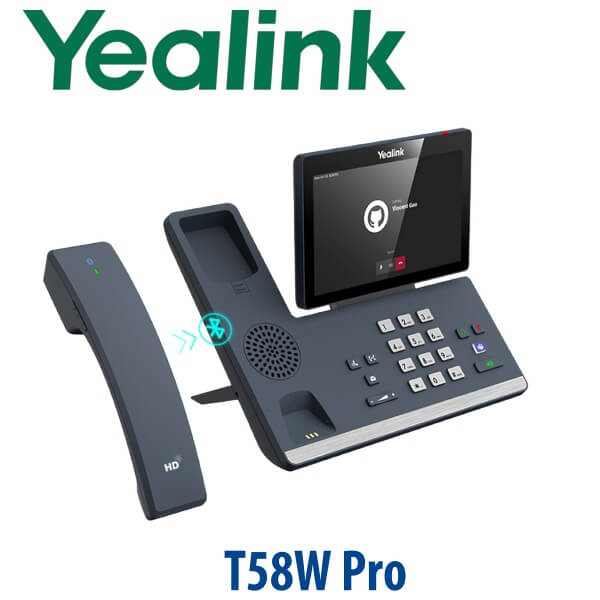
The SIP-T58W and SIP-T58W Pro share the same smart-phone platform: 7-inch touchscreen, Android 9.0, 16 SIP accounts, built-in Wi-Fi and Bluetooth, dual Gigabit Ethernet, dual USB 2.0 ports, CAM50 camera support and EXP50 expansion-module support. The key difference is the handset bundle. The standard T58W supports the Bluetooth handset BTH58 as an optional accessory, while the T58W Pro is supplied with the BTH58 by default. Choose the Pro if the user regularly walks around the desk during calls and wants cordless handset freedom from day one.
Gigabit Passthrough for Modern Dubai Offices
The SIP-T58W has dual Gigabit Ethernet ports, so a laptop can sit behind the phone without being trapped behind an older 100Mbps desk-phone bottleneck. This matters in Dubai offices where cloud storage, video calls and shared drives already assume 1Gbps cabling to the desk. Connect the LAN port to the switch and the PC port to the user’s computer; the phone remains the voice endpoint while the laptop keeps full Gigabit network access.
Where the T58W Sits in the Yealink Desk Phone Range
Think of the T58W as the SIP touchscreen and video desk phone above the standard executive colour-screen models. It is not part of the T7 ladder, and it uses EXP50 expansion modules rather than EXP55. Compared with a T57W-style executive touchscreen desk phone, the T58W moves into richer desktop video, optional camera use and Bluetooth-handset workflow. Compared with the T58W Pro, the standard T58W is the lower-cost choice when a wired handset is acceptable and the BTH58 can remain optional.
| Feature | T57W Tier | SIP-T58W ★ | SIP-T58W Pro |
|---|---|---|---|
| Display | 7″ touchscreen tier | 7″ 1024×600 adjustable touchscreen | 7″ 1024×600 adjustable touchscreen |
| SIP Accounts | Verify per stock model | Up to 16 | Up to 16 |
| Programmable Keys | Touchscreen DSS keys | 27 one-touch DSS keys | 27 one-touch DSS keys |
| GigE | Dual GigE tier | Dual Gigabit Ethernet | Dual Gigabit Ethernet |
| Wi-Fi / Bluetooth | Wireless executive tier | Built-in Wi-Fi + Bluetooth 4.2 | Built-in Wi-Fi + Bluetooth 4.2 |
| Conference | Executive audio conference tier | Up to 10-party audio conference | Up to 10-party audio conference |
| Expansion | EXP50 tier | Up to 3× EXP50 | Up to 3× EXP50 |
| Replaces | Older T5 touchscreen desks | T58V / older video-phone workflows | T58W where BTH58 is required by default |
| Price Tier | Executive touchscreen | Video smart desk phone | Video smart desk phone with Bluetooth handset bundle |
| Choose if… | You want a lower-cost executive touchscreen SIP desk | You want SIP video, Wi-Fi, Bluetooth, touchscreen control and optional camera/BTH58 | You want the same phone with the BTH58 Bluetooth handset included from day one |
Dubai Use Cases for the Yealink SIP-T58W
Executive offices in DIFC, Business Bay and DMCC. Senior users want a large screen, fast directory access, call history, speakerphone quality, headset options and a handset that still feels like a desk phone. The T58W gives those desks a modern Android-based SIP endpoint without forcing the whole office into a Teams-only hardware path.
Reception supervisors and branch managers. With 16 SIP accounts, touchscreen DSS keys and EXP50 expansion support, the T58W works well where one user monitors multiple extensions, shared lines, service queues or branch call routes. Vector Digital Systems can stage BLF keys, speed dials and dial-plan rules before dispatch so the phone lands ready for the user’s actual workflow.
Video intercom and controlled-access desks. The T58W supports door-phone workflows such as preview, monitoring and one-button open when matched with a compatible SIP video intercom system. This makes it useful for clinics, serviced offices, logistics reception desks and executive floors where the same desk answers calls and handles entry requests.
Hybrid offices that still run SIP. Not every Dubai office has moved voice to Microsoft Teams Phone. Many still run 3CX, Yeastar, Grandstream UCM, hosted SIP or operator SIP trunks, while using Teams or Zoom only for meetings. The T58W fits that environment: a premium SIP desk endpoint for telephony, with optional camera support for video workflows where the PBX or application supports it.
Full Technical Specifications
| Specification | Yealink SIP-T58W / SIP-T58W Pro |
|---|---|
| Product Type | Smart business SIP desk phone with optional desktop video |
| Operating System | Android 9.0 |
| Display | 7-inch 1024×600 capacitive adjustable touchscreen |
| SIP Accounts | Up to 16 |
| Video | 720p30 HD video with optional CAM50 camera |
| Audio | Optimal HD audio, Yealink Noise Proof Technology, full-duplex speakerphone with AEC |
| Local Audio Conference | Up to 10-party audio conference |
| DSS / Feature Keys | 27 one-touch DSS keys plus standard call-control keys |
| Network | Dual-port Gigabit Ethernet with PoE support |
| Wi-Fi | Built-in dual-band 2.4GHz / 5GHz Wi-Fi |
| Bluetooth | Built-in Bluetooth 4.2 for Bluetooth handset, Bluetooth headset and mobile device pairing |
| USB | 2× USB 2.0 ports for CAM50 camera, USB headset, storage, media and accessories |
| Expansion Modules | Supports up to 3× EXP50 colour-screen expansion modules |
| Handset Options | Wired handset included on T58W; BTH58 Bluetooth handset optional on T58W and included by default with T58W Pro |
| DoorPhone Features | Preview, one-button open and monitoring with compatible SIP door-phone systems |
| Management | Yealink Device Management Platform and Unify Square Device Management Platform support |
| Security | Hardened Android OS, secure boot, encryption, sandboxing, process isolation and anti-exploitation controls |
| Power | PoE from network switch; optional Yealink PSU required where PoE is unavailable |
| Wall Mount | Wall mountable with optional accessory |
| Compatible Platforms | 3CX, Yeastar P-Series, Grandstream UCM, Asterisk, FreePBX, hosted PBX and RFC-compliant SIP servers |
Compatible Accessories
| Accessory | Model | Purpose |
|---|---|---|
| Bluetooth Handset | BTH58 | Cordless handset movement around the desk; optional on T58W and included with T58W Pro |
| USB Camera | CAM50 | Adds 720p30 HD desktop video for video calling workflows |
| Expansion Module | EXP50 | Colour-screen DSS/BLF expansion; up to 3 modules supported on the T58W family |
| USB Headset | Yealink UH range | USB headset connection for executive, support and hybrid-work users |
| Wireless Headset Adapter | EHS40 | Remote answer/hang-up with compatible Yealink DECT wireless headsets |
| Power Supply | Yealink PSU — confirm at quote | Required for non-PoE switch ports and some expanded desk configurations |
Staging Before Dispatch — What Vector Digital Systems Configures
Every Yealink SIP-T58W supplied by Vector Digital Systems is staged before dispatch from Dubai. We register the SIP account to your phone system, load the provisioning template, configure BLF and speed-dial keys, apply dial-plan settings, test audio, verify the network path and confirm the user’s headset, camera or expansion-module accessories where included. For multi-phone rollouts, we label each device by desk or branch before delivery so installation is a plug-in-and-test job, not a configuration project on the customer’s floor.
Export Yealink T58W from Dubai
Vector Digital Systems LLC supplies Yealink phones to Dubai offices and exports to system integrators, telecom operators, PABX installers and enterprise procurement teams across the region. Common export routes include Oman, Saudi Arabia, Kuwait, Bahrain and Qatar in the Gulf; Jordan and Egypt in the wider Middle East; Kenya and Tanzania in East Africa; and Pakistan and Sri Lanka for South Asian deployments. Export shipments are quoted FOB Dubai with commercial invoice, packing list and certificate of origin on request. VAT, local delivery and export documentation are clearly separated in the quote.
Get a same-day quote in AED for Yealink SIP-T58W
Tell David your quantity, phone system, PoE availability, camera requirement, Bluetooth handset requirement and whether you need EXP50 expansion modules. We quote with VAT breakdown, delivery and staging included.
Frequently Asked Questions — Yealink SIP-T58W
Does the Yealink T58W work with Microsoft Teams?
The SIP-T58W is a SIP smart business phone for platforms such as 3CX, Yeastar, Grandstream UCM, Asterisk and hosted SIP PBX services. It is not a native Microsoft Teams phone. Yealink Teams phones are a separate MP-series range, and Vector Digital Systems verifies the current Microsoft certification status before quoting any Teams device.
What is the difference between the Yealink T58W and T58W Pro?
Both models share the same 7-inch touchscreen, Android 9.0 platform, 16 SIP accounts, Wi-Fi, Bluetooth, dual Gigabit Ethernet, dual USB ports, CAM50 camera support and EXP50 expansion support. The difference is the handset bundle: the T58W supports the BTH58 Bluetooth handset as an option, while the T58W Pro includes the BTH58 by default.
Does the Yealink T58W come with a power adapter, or do I need PoE?
The T58W is normally powered by PoE from your network switch, and the standard desk-phone package does not include a power adapter. If your switch port is not PoE-capable, ask David to add the correct Yealink PSU to the quote. Expanded desks using accessories should be checked before dispatch so the correct power arrangement is supplied.
Will the Yealink T58W work with our 3CX, Grandstream UCM, Yeastar or SIP PABX?
Yes. The SIP-T58W is designed for SIP platforms and works with 3CX, Yeastar P-Series, Grandstream UCM, Asterisk, FreePBX and hosted SIP providers. Vector Digital Systems stages the phone before delivery by loading your SIP registration, provisioning template, BLF keys, speed dials and dial plan, then completing a test call.
Can I use video calling on the Yealink T58W?
Yes, the T58W supports 720p30 HD video when fitted with the optional Yealink CAM50 camera and used with a compatible SIP video calling workflow. It is a strong fit for executive desks, controlled-access desks and SIP video intercom use cases where preview, monitoring or one-button open features are required.
Can I add EXP50 expansion modules to the Yealink T58W?
Yes. The SIP-T58W supports up to three Yealink EXP50 colour-screen expansion modules. This is useful for reception supervisors, branch managers and executive assistants who need many BLF, speed-dial or shared-line keys visible from one desk. Vector Digital Systems can program the full key map before dispatch.
Does the Yealink T58W support Gigabit passthrough for my laptop?
Yes. The T58W has dual Gigabit Ethernet ports. Connect the LAN port to your switch and the PC port to the user’s laptop or desktop, and the computer keeps Gigabit network access while the phone handles SIP voice and video. This is important in Dubai offices with 1Gbps desk cabling.
Who is the authorised Yealink supplier in Dubai?
Vector Digital Systems LLC has supplied Yealink phones, VoIP systems and staging services in Dubai since 2009. David handles Yealink product selection, compatibility checks, project pricing, pre-delivery configuration and local warranty support, so buyers avoid international courier claims and unsupported grey-market stock.
What is the best Yealink phone for an executive SIP video desk in Dubai?
For an executive SIP desk that needs a large touchscreen, Wi-Fi, Bluetooth, optional camera, 16 SIP accounts and expansion-module support, the SIP-T58W is the right recommendation. Choose the T58W Pro if the user wants the BTH58 Bluetooth handset included from day one. For a standard non-video executive desk, David may recommend a lower-cost Yealink executive model instead.
Does Vector Digital Systems export Yealink T58W phones from Dubai?
Yes. Vector Digital Systems exports Yealink phones from Dubai to system integrators, telecom operators and enterprise buyers in Oman, Saudi Arabia, Kuwait, Bahrain, Qatar, Jordan, Egypt, Kenya, Tanzania, Pakistan and Sri Lanka. Export quotes are prepared FOB Dubai with commercial invoice, packing list and certificate of origin on request.