
Description
Yealink MeetingBoard 55C EDLA MBC55 Interactive Whiteboard Dubai
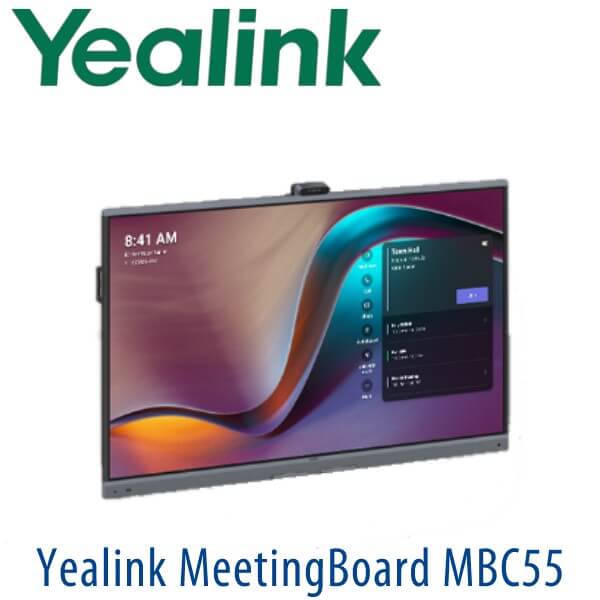
Yealink MeetingBoard 55C EDLA MBC55 for Dubai Huddle Rooms
The Yealink MeetingBoard 55C EDLA MBC55 is positioned as a compact Google EDLA-based BYOM interactive board for Dubai huddle rooms, manager cabins, training corners and small collaboration spaces where a normal TV plus webcam setup is no longer enough. Instead of buying a separate display, camera, microphone, speaker, whiteboard and sharing device, the MeetingBoard C EDLA family combines interactive whiteboarding, video conferencing, wireless presentation and Google ecosystem access in one meeting-room display. Public Yealink sources verify the MeetingBoard C EDLA family as an all-in-one BYOM interactive whiteboard with Google EDLA integration; the 55C / MBC55 size must be confirmed from supplier documentation before publishing as an exact SKU.
Platform Fit: Google EDLA BYOM Board, Not a SIP Desk Phone
The MeetingBoard 55C EDLA MBC55 is not a Yealink SIP phone and it is not part of the T7 desk-phone range. It belongs to Yealink’s video collaboration and interactive display category. The correct buying question is not “How many SIP accounts does it support?” but “Which meeting workflow do we want in the room — Google ecosystem apps, BYOM laptop meetings, Microsoft Teams Rooms, Zoom Rooms or a standard SIP phone system?”
| Your Meeting Platform | Right Yealink Category | What You Need |
|---|---|---|
| Google ecosystem / BYOM meetings | Yealink MeetingBoard C EDLA family — this page | Google account access, room network, BYOM workflow and required apps from Google Play |
| Microsoft Teams Rooms | Yealink MVC or Teams Rooms-certified MeetingBoard range — verify current certification before quoting | Teams Rooms licence, Microsoft 365 tenant and certified room hardware |
| Zoom Rooms | Zoom-certified Yealink room device — ask David for the current certified option | Zoom Rooms licence and certified device selection |
| SIP voice calling / PBX extension | Yealink SIP desk phone or conference phone, not MeetingBoard | 3CX, Yeastar, Grandstream UCM, Asterisk or hosted SIP credentials |
Tell David whether the room is for Google EDLA apps, BYOM laptop meetings, Teams Rooms or Zoom Rooms before ordering. This avoids the common mistake of buying a collaboration display when the project actually needs a certified Teams Rooms or Zoom Rooms appliance.
Power, Mounting and Installation Truth
The MeetingBoard is a room display, not a PoE phone. It requires normal AC power and proper wall, trolley or lift-stand planning. For Dubai offices, the real installation questions are wall strength, cable route, meeting-table distance, Wi-Fi versus wired LAN, camera height and whether the board will be fixed to a wall or moved between rooms. Vector Digital Systems quotes the MeetingBoard with VAT, delivery and installation options in AED, and can include mounting accessories such as a wall mount, floor stand or lift stand where required.
Why EDLA Matters
EDLA means the MeetingBoard C is designed around the Google ecosystem instead of being a locked display with limited built-in tools. Users can access supported Google services and workplace apps through Google Play, while still using the board for BYOM video calls, digital whiteboarding and screen sharing. For Dubai teams already working in Google Workspace, this makes the board easier to adopt because the meeting room feels closer to the tools staff already use on laptops and tablets.
Room Position: 55C vs 65C vs 75C
Because Yealink’s public MeetingBoard C EDLA material currently verifies 65-inch and 75-inch models, the 55C / MBC55 should be treated as a compact supplier-confirmed SKU until the official datasheet is provided. The safest positioning is a small huddle-room board: ideal where a 65-inch or 75-inch panel is too large, but the customer still wants an all-in-one interactive meeting screen with camera, microphone array, speakers, whiteboard and wireless sharing.
| Feature | MeetingBoard 55C EDLA | MeetingBoard 65C EDLA ★ | MeetingBoard 75C EDLA |
|---|---|---|---|
| Display size | 55″ — supplier confirmation required | 65″ — publicly verified family size | 75″ — publicly verified family size |
| Best room fit | Huddle room, cabin, small meeting corner | Small meeting room and standard collaboration room | Medium meeting room, training room, larger wall space |
| Platform | Google EDLA / BYOM | Google EDLA / BYOM | Google EDLA / BYOM |
| Camera and audio | MeetingBoard C EDLA family AV features — verify exact 55C datasheet | 50MP camera and integrated microphone array | 50MP camera and integrated microphone array |
| Whiteboard use | Compact brainstorming board | Daily meeting-room board | Training and workshop board |
| Wireless sharing | AirPlay, Miracast and sharing options — verify exact 55C bundle | AirPlay, Miracast and sharing options | AirPlay, Miracast and sharing options |
| Mounting | Wall / stand option to be confirmed | Wall, floor stand or lift stand options | Wall, floor stand or lift stand options |
| Price tier | Compact room tier | Standard room tier | Larger room tier |
| Choose if… | You have a small huddle room and supplier has confirmed the 55C SKU | You want the safest publicly verified MeetingBoard C EDLA size for small rooms | You need a larger board for medium rooms, training and wider seating |
Where the MeetingBoard 55C EDLA Fits in Dubai Offices
Huddle rooms and manager cabins. The Yealink MeetingBoard 55C EDLA MBC55 is best positioned for compact collaboration spaces where a 65-inch or 75-inch board may feel oversized. It gives the room a professional meeting screen, camera, microphone array, speakers, whiteboard and wireless sharing workflow without building a full boardroom AV system.
Google Workspace teams in Business Bay, DIFC and DMCC. For companies already working around Google apps, the MeetingBoard C EDLA family is a cleaner fit than a basic Android display because it is built around Google EDLA access, Google Play ecosystem support and BYOM collaboration. Staff can walk into the room, share content, annotate ideas and run meetings without turning the room into a cable hunt.
Training corners and quick project spaces. Dubai SMEs often need one flexible room for sales reviews, HR training, project stand-ups and supplier calls. The MeetingBoard 55C EDLA MBC55 works well as a compact interactive board where teams need digital whiteboarding, screen sharing and video calls in the same place.
BYOM meeting rooms. Bring Your Own Meeting means users can connect their laptop and run the meeting from the app they already use. That makes the board practical for mixed-platform offices where some calls are on Google Meet, some on browser-based apps and some from guest laptops.
Technical Specifications
| Specification | Yealink MeetingBoard 55C EDLA MBC55 |
|---|---|
| Product Category | Interactive whiteboard / BYOM collaboration display |
| Model | MeetingBoard 55C EDLA / MBC55 — supplier confirmation required before publishing as exact SKU |
| Display | 55-inch class 4K interactive touch display — verify final panel size from supplier datasheet |
| Platform | Google EDLA-based MeetingBoard C platform |
| Operating System | Android 15 platform on MeetingBoard C EDLA family |
| Google Services | Google Play ecosystem support, Google apps access and browser-based collaboration workflow |
| Camera | MeetingBoard C EDLA family camera system with AI framing features — verify exact 55C datasheet before locking final camera spec |
| Microphones | Integrated microphone array with full-duplex pickup and AI audio processing on MeetingBoard C EDLA family |
| Audio Processing | AI noise cancellation and room audio enhancement for clearer speech in small meeting spaces |
| Touch and Whiteboard | Interactive whiteboard, annotation and multi-touch collaboration workflow |
| Wireless Sharing | Wireless presentation workflow including AirPlay and Miracast support on MeetingBoard C EDLA family; confirm final bundle options at order |
| BYOM Support | Designed for Bring Your Own Meeting rooms where users run meetings from their preferred laptop app |
| Connectivity | HDMI, USB and network connectivity options — confirm exact port count from supplier datasheet before final publication |
| Wireless Network | Wi-Fi and Bluetooth support on MeetingBoard C EDLA family; wired LAN recommended for fixed meeting rooms |
| Power | AC-powered meeting-room display — not PoE powered |
| Mounting | Wall mount, floor stand or lift stand options subject to final SKU and site survey |
| Best Fit | Huddle room, executive cabin, small meeting room, project room or training corner |
Accessories and Room Add-ons
| Accessory | Use | Order Note |
|---|---|---|
| Wall Mount | Fixed boardroom or huddle-room installation | Confirm wall strength, height and cable route before delivery |
| Floor Stand | Movable board for shared meeting areas or training rooms | Useful where drilling or permanent wall mounting is not approved |
| Lift Stand | Height-adjustable training and workshop setup | Recommended where seated and standing whiteboard use both matter |
| Presentation Pod | Quick wireless content sharing from laptops | Add when guest users present often and IT wants fewer cables |
| Expansion Microphone | Better pickup for deeper rooms or longer tables | David will recommend only after room size and table layout are known |
| OPS / Room Compute Option | Dedicated room compute workflow where required | Confirm meeting platform first — Google EDLA, Teams Rooms and Zoom Rooms have different requirements |
Staging and Installation Before Handover
Vector Digital Systems prepares the MeetingBoard 55C EDLA MBC55 before delivery wherever project access allows: firmware and startup checks, basic network readiness review, Google EDLA workflow guidance, wireless sharing test, HDMI input test, camera and microphone test, and room-placement advice before dispatch. For Dubai installations, we can quote delivery, wall mounting or stand assembly, cable routing guidance and user handover so the room is ready for meetings instead of becoming another unused screen on the wall.
Export from Dubai
Vector Digital Systems supplies Yealink collaboration displays and meeting-room devices from Dubai to system integrators, AV contractors, telecom partners and corporate IT buyers. Common export destinations include Oman, Saudi Arabia, Qatar, Kuwait, Bahrain, Kenya, Tanzania, Nigeria, Pakistan and Sri Lanka. Shipments are quoted FOB Dubai with commercial invoice, packing list and certificate of origin on request. For MeetingBoard orders, David will confirm packing dimensions, mounting accessories and destination documentation before final quote.
Get a same-day quote in AED — Dubai supply and installation options available
Tell David the room size, wall or stand preference, meeting platform, quantity and delivery location. We quote with VAT breakdown, delivery, installation options and export documentation where required.
Frequently Asked Questions — Yealink MeetingBoard 55C EDLA MBC55
Is Yealink MeetingBoard 55C EDLA MBC55 an official Yealink model?
The MBC55 / 55C name should be confirmed from supplier documentation before publishing. Yealink public MeetingBoard C EDLA material commonly shows the 65C and 75C sizes. If your project specifically requests 55C, David will verify the supplier SKU, datasheet and UAE availability before quoting.
What is the Yealink MeetingBoard 55C EDLA used for?
It is positioned as a compact interactive whiteboard and BYOM collaboration display for huddle rooms, executive cabins, training corners and small meeting spaces. It combines a touch display, camera, microphone array, speakers, whiteboard and screen sharing workflow in one room device.
Does the MeetingBoard 55C EDLA work with Microsoft Teams?
The MeetingBoard C EDLA page should be treated as a Google EDLA / BYOM collaboration board unless a specific Teams Rooms-certified SKU is verified. If your office needs Microsoft Teams Rooms, ask David for the current Yealink Teams Rooms-certified option and licence requirements before ordering.
Does the MeetingBoard 55C EDLA work with Zoom Rooms?
For Zoom Rooms, certification must be checked against the current Zoom hardware list before quoting. The MeetingBoard C EDLA family is best positioned for Google EDLA and BYOM workflows. David will confirm the correct Zoom-certified Yealink device if your room is a dedicated Zoom Rooms space.
Is this a SIP phone or PBX device?
No. The MeetingBoard 55C EDLA MBC55 is not a SIP desk phone and does not replace a Yealink T7 phone or conference phone for PBX extensions. If you need SIP calling with 3CX, Yeastar, Grandstream UCM or hosted PBX, ask David for the correct Yealink SIP desk phone or conference phone instead.
Should I buy MeetingBoard 55C, 65C or 75C?
Choose 55C only when the supplier SKU is confirmed and the room is compact. Choose 65C for the safest standard small-room MeetingBoard C EDLA size. Choose 75C for medium rooms, training spaces or wider seating layouts where a larger display improves readability.
Does it need PoE?
No. MeetingBoard is a room display and uses normal AC power, not PoE. The installation plan should confirm power socket location, wall or stand mounting, network access, cable route and room camera height before delivery.
Can Vector Digital Systems install the MeetingBoard in Dubai?
Yes. Vector Digital Systems can quote Dubai delivery, wall mounting or stand assembly options, basic setup, camera and microphone checks, wireless sharing test and user handover. Room readiness is confirmed before installation to avoid delays.
Who is the Yealink supplier in Dubai for MeetingBoard products?
Vector Digital Systems LLC has supplied Yealink products and VoIP solutions in Dubai since 2009. David handles Yealink product selection, meeting-room sizing, project pricing, staging coordination and local warranty support.
Does Vector Digital Systems export Yealink MeetingBoard devices from Dubai?
Yes. Vector Digital Systems exports Yealink meeting-room devices from Dubai to integrators and enterprise buyers in Oman, Saudi Arabia, Qatar, Kuwait, Bahrain, Kenya, Tanzania, Nigeria, Pakistan and Sri Lanka. Export quotes include FOB Dubai terms, commercial invoice, packing list and certificate of origin on request.
